Tag: email security

  • How to Prevent Email Spoofing with SPF, DKIM, and DMARC

    How to Prevent Email Spoofing with SPF, DKIM, and DMARC

    Only 12.8% of domains in a 2026 scan enforced a DMARC policy that blocks spoofed messages, even though 30.4% had published a DMARC record. SPF appeared on 56.0% of domains, which means many organizations have started authentication but still haven't finished the job of stopping forged mail. (2026 email authentication research)

    That gap defines how to prevent email spoofing in practice. Publishing SPF, DKIM, and DMARC records is configuration. Moving DMARC from monitoring to quarantine and reject is enforcement. For sales and marketing teams sending cold outreach at scale, the distinction matters because an unauthenticated sequence can damage domain trust, confuse prospects, and give attackers room to impersonate your brand.

    Why Most Domains Still Get Spoofed in 2026

    Publishing authentication records does not stop spoofing. Enforcement does. A p=none DMARC policy provides visibility into authentication failures, but it does not tell receiving servers to quarantine or reject those messages.

    The 2026 scan of 5.5 million domains found that only 12.8% enforced an anti-spoofing policy, while 57.9% of published DMARC records remained at p=none, according to the DMARC adoption and email authentication analysis. A separate benchmark reported that 77.6% of analyzed domains weren't fully protected, including 25.8% lacking DMARC and 55.5% either missing DMARC or using p=none, as described in the UK government email security guidance.
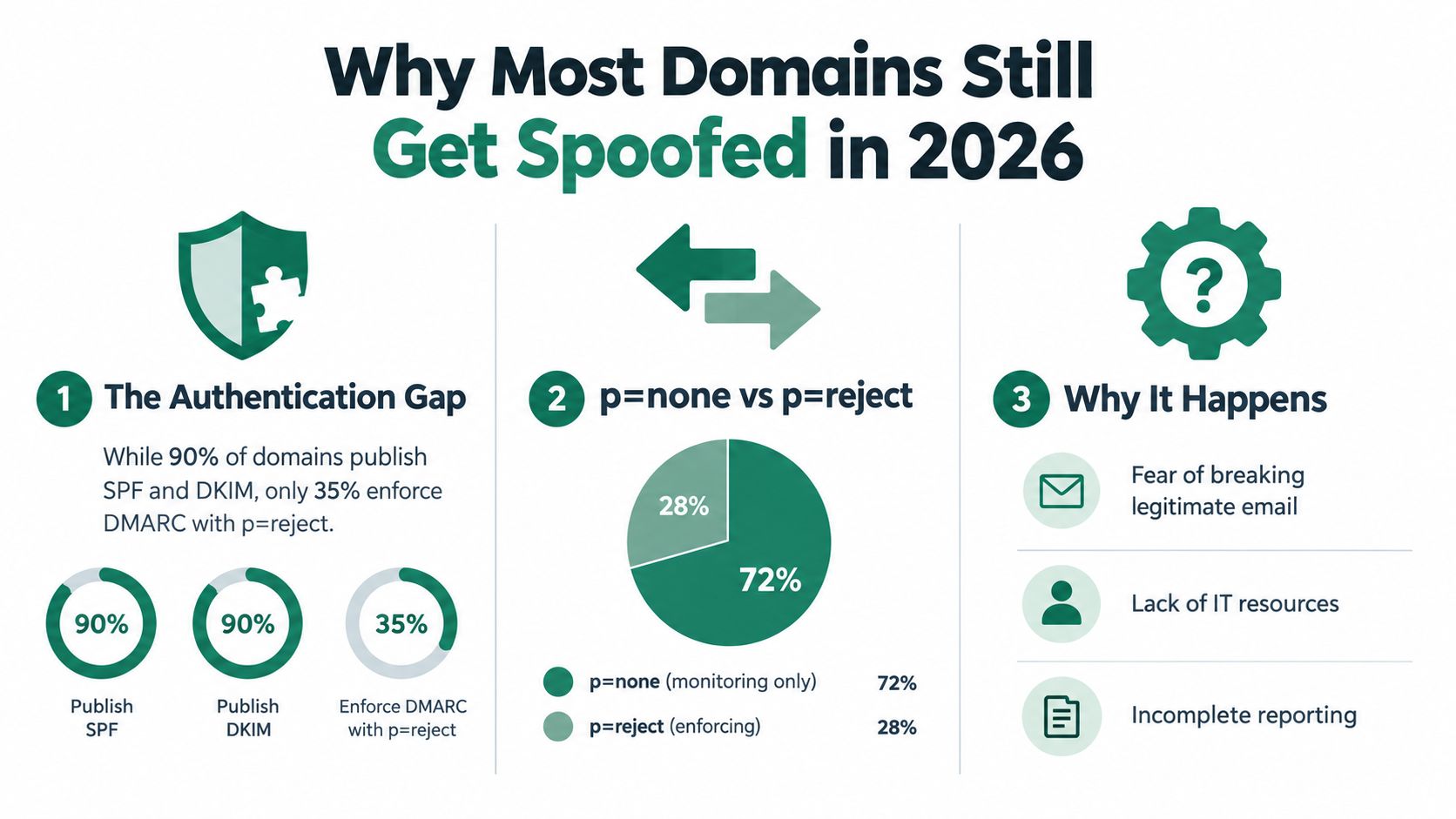
    An infographic titled Why Most Domains Still Get Spoofed in 2026, showing statistics on email authentication practices.

    Publication isn't protection

    SPF and DKIM can authenticate legitimate messages while forged mail continues to pass through. Without DMARC alignment and an enforcement policy, attackers can place your visible domain in the From address while sending through infrastructure your records do not authorize.

    Mailbox providers also use authentication when assessing sender trust. In 2024, Google and Yahoo announced requirements for bulk senders that included SPF or DKIM and DMARC alignment for domain protection. A 2025 security summary linked those requirements to a 65% reduction in unauthenticated email, according to the Email phishing and DMARC security trends.

    Weak enforcement creates two problems. Spoofers get a clearer path to impersonation, while legitimate campaigns can receive weaker trust signals from mailbox providers.

    The operational causes

    Marketing and sales teams often delay enforcement because they fear blocking legitimate mail. That concern should trigger an inventory, not permanent monitoring. Document every marketing automation platform, CRM, transactional service, sales engagement tool, and internal application. Then align each sender before changing the policy.

    Practical rule: Treat p=none as an investigation phase, not a finished security posture.

    For outreach programs, ownership must be explicit. Each tool needs a documented sending domain, DKIM configuration, and accountable owner before a sequence launches. Monitor alignment, test enforcement in stages, and make rejection the destination. A published record without that operating discipline leaves your domain available for abuse.

    How Email Authentication Actually Works

    Email authentication uses three complementary controls. SPF answers whether the sending infrastructure is authorized. DKIM proves that an authorized system signed the message and that signed content wasn't altered. DMARC connects those results to the visible From domain and tells the receiving server what to do when authentication fails.
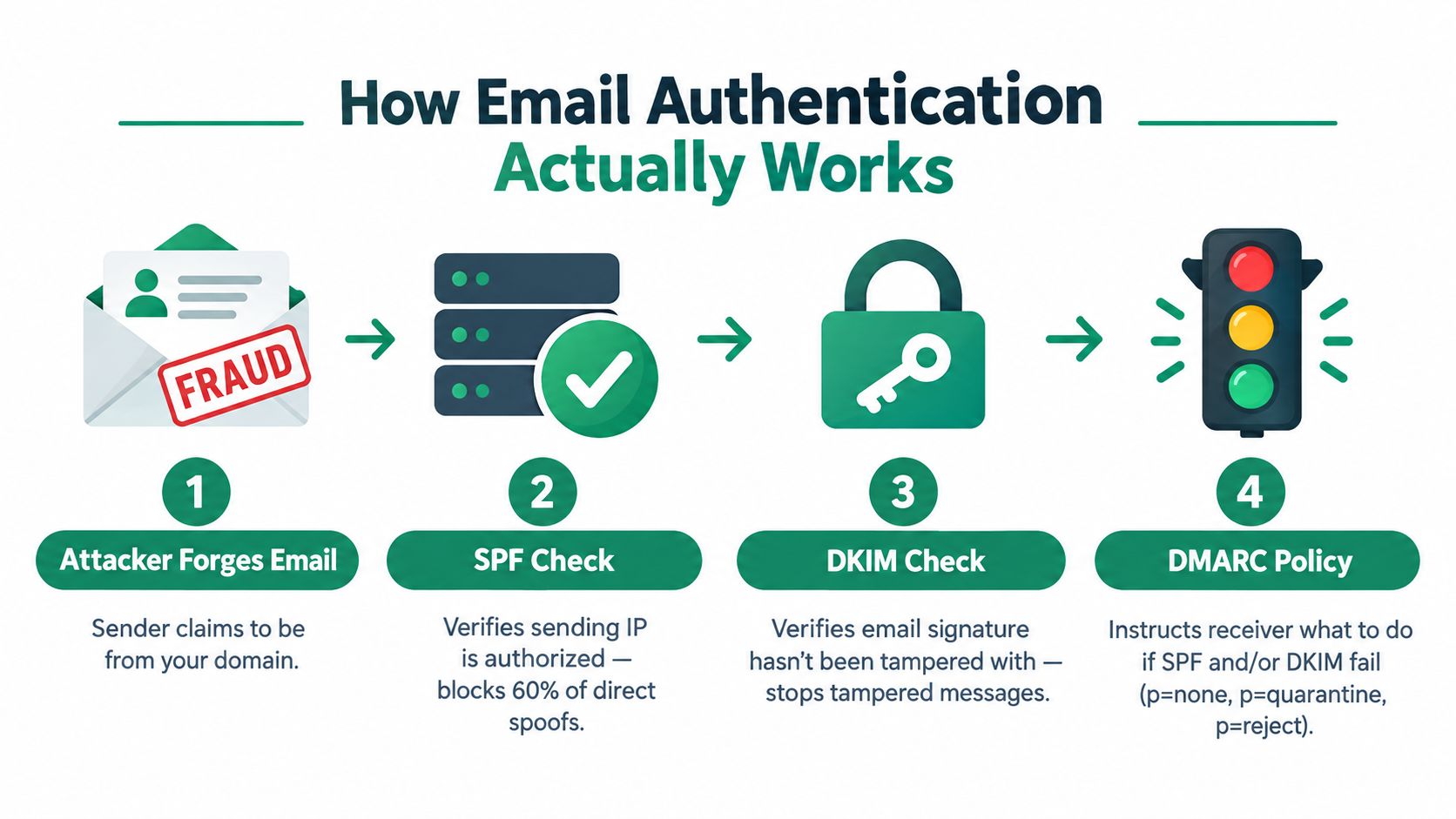
    A diagram illustrating the four steps of email authentication including SPF, DKIM, and DMARC verification processes.

    The four-part decision

    An attacker can send a message that claims to come from your domain. The receiving server then evaluates the message through several checks:

    1. SPF check. The server examines the envelope sender domain and looks up its SPF record. That record lists authorized sending services or infrastructure. If the source isn't authorized, SPF fails.
    2. DKIM check. The receiving server finds the DKIM selector in the message, retrieves the matching public key from DNS, and verifies the cryptographic signature. A valid signature helps show that the message came through a configured sender and wasn't modified after signing.
    3. DMARC alignment. DMARC compares the authenticated SPF or DKIM domain with the domain visible to the recipient in the From address. Authentication that belongs to an unrelated vendor domain may pass SPF or DKIM but still fail DMARC alignment.
    4. Policy decision. The domain owner's DMARC policy determines whether the receiving server should monitor, quarantine, or reject the message. With p=none, the receiver reports the event without blocking it. With p=quarantine, the receiver is asked to treat the message as suspicious. With p=reject, unauthenticated mail is blocked at the mail server, which government guidance identifies as the strongest protection. (Cybersecurity and Infrastructure Security Agency phishing guidance)

    SPF and DKIM aren't interchangeable. SPF is tied to the sending path and can be affected by forwarding. DKIM travels with the message, but it doesn't by itself tell the receiving server what to do with a failure. DMARC supplies the enforcement instruction and alignment requirement.

    For a practical primer that complements the technical flow, review this email security guidance from Blowfish Technology. Teams responsible for outbound campaigns should also audit how to improve email deliverability before increasing send volume or adding another platform.

    The key is the chain. SPF authorizes infrastructure, DKIM authenticates message integrity, and DMARC turns those signals into a receiver-side action.

    Setting Up SPF and DKIM the Right Way

    Treat SPF and DKIM as enforcement controls, not DNS housekeeping. Start by listing every system allowed to send as your domain, including Google Workspace, Microsoft 365, marketing automation, transactional email, CRM notifications, Outreach, Salesloft, Instantly, and applications that send password resets or invoices. Your outreach tools belong in this inventory because an untracked sender can undermine DMARC later.
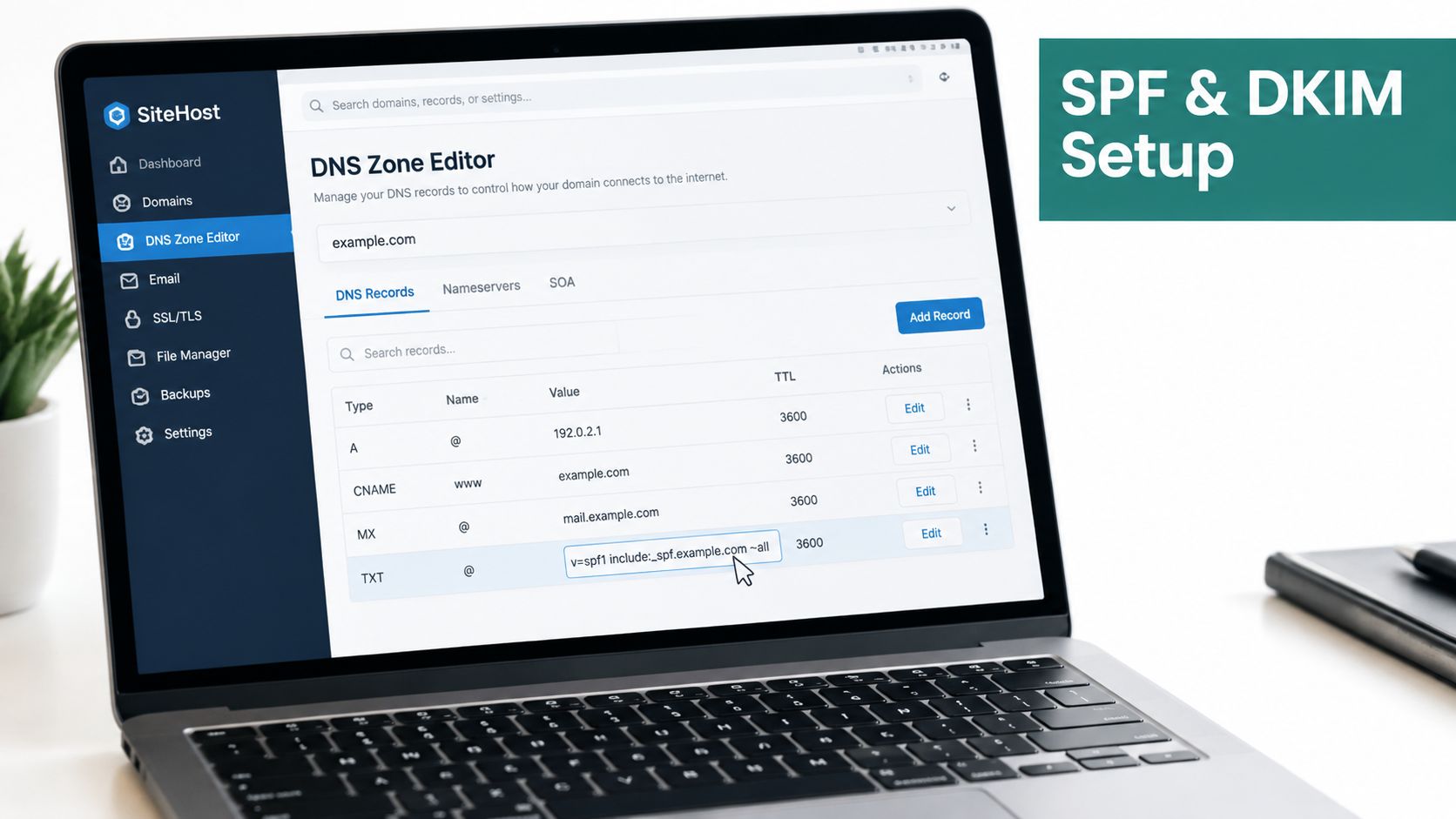
    Screenshot from https://example.com/screenshots/spf-dkim-dns-records.png

    Build the sender inventory first

    For each platform, request the current SPF include, DKIM selector, envelope-from domain, and alignment instructions from its documentation page. Do this instead of using a spreadsheet last updated before the vendor migrated to new infrastructure. Record the responsible owner and the campaigns or transactional streams that depend on the connection.

    SPF has a 10-DNS-lookup limit, so adding every vendor casually creates a failure point. (Email spoofing prevention guidance) Publish only verified senders, and finish with a hard fail:

    v=spf1 include:verified-mail-provider.example include:verified-outreach-provider.example -all

    This is a template, not a record to publish unchanged. Replace each placeholder with the vendor's documented mechanism. Do not use +all, which authorizes every sender, or ?all, which provides no useful authorization signal. Remove discontinued vendors promptly. Consolidate overlapping services where possible, and check the final record for lookup limits before saving it.

    Configure DKIM per sending platform

    Each platform should generate its own DKIM key pair or provide managed signing. Publish the public key at the specified selector, usually under selector._domainkey.yourdomain.com, then enable signing in that platform.

    For Google Workspace and Microsoft 365, generate or retrieve the configuration in the administrator console. For Outreach, Salesloft, Instantly, and similar tools, use the custom-domain authentication area. Copy the selector and record value from the service. Never reuse a selector from another account or one key across unrelated sending systems.

    Send test messages through every important stream. Inspect the receiving headers and confirm SPF passes, DKIM passes, and the authenticated domains align with the visible From address. One successful platform proves nothing about the others.

    Outbound rule: Do not move to DMARC enforcement while a legitimate sender remains unidentified or unaligned.

    Rolling Out DMARC from Monitoring to Reject

    DMARC rollout is an enforcement program, not a DNS checklist. Start by exposing every sender, fix legitimate traffic, then tighten the policy only when reports show that authorized mail will pass.

    Phase one: establish visibility

    Publish a monitoring policy with an aggregate-report mailbox:

    v=DMARC1; p=none; pct=100; rua=mailto:dmarc-reports@yourdomain.com

    Use a parser that converts aggregate XML into records your team can review. For each source, track the sending IP, SPF result, DKIM result, alignment status, and reported disposition. Compare those findings with the sender inventory. An unfamiliar source may be a forgotten CRM integration, forwarding path, vendor, or spoofing attempt.

    Assign an owner to the report stream. That person should review findings, document decisions, and contact platform administrators when a legitimate stream fails alignment. A mailbox full of reports does not protect the domain.

    Phase two: apply controlled pressure

    After legitimate sources are authenticated and aligned, move to quarantine with limited coverage:

    v=DMARC1; p=quarantine; pct=10; rua=mailto:dmarc-reports@yourdomain.com

    Increase the percentage only after validating campaign traffic, transactional messages, replies, and forwarding behavior. Use a staged rollout rather than switching the entire domain at once.

    Review these signals daily:

    • Alignment rates: Separate SPF alignment from DKIM alignment. Fix any legitimate stream that depends on only one.
    • New sources: Investigate newly reported IPs, vendors, and infrastructure before they become permanent exceptions.
    • Quarantine effects: Check spam placement and user reports for messages that should reach the inbox.
    • Subdomains: Define a policy for outreach subdomains instead of assuming the organizational domain policy is safe for every use.
    • Vendor rewriting: Confirm that each outreach platform preserves the envelope sender and signing domain required for alignment.

    Sales and marketing teams should test every sending tool under the same policy they will use in production. A sequence that passes in a staging setup can fail once the platform changes its return path or DKIM selector.

    Phase three: enforce rejection

    Move to:

    v=DMARC1; p=reject; pct=100; rua=mailto:dmarc-reports@yourdomain.com; ruf=mailto:dmarc-forensics@yourdomain.com; adkim=s; aspf=s

    Use strict alignment only for systems that support it reliably. The trigger for rejection is evidence, not a calendar date. Every legitimate sender must be identified, authenticated, aligned, tested, and monitored.

    The CISA phishing guidance identifies p=reject as the strongest DMARC protection because receiving servers can block unauthenticated messages. Keep reports flowing after enforcement. Without monitoring, a newly adopted sales tool or acquisition platform can fail.
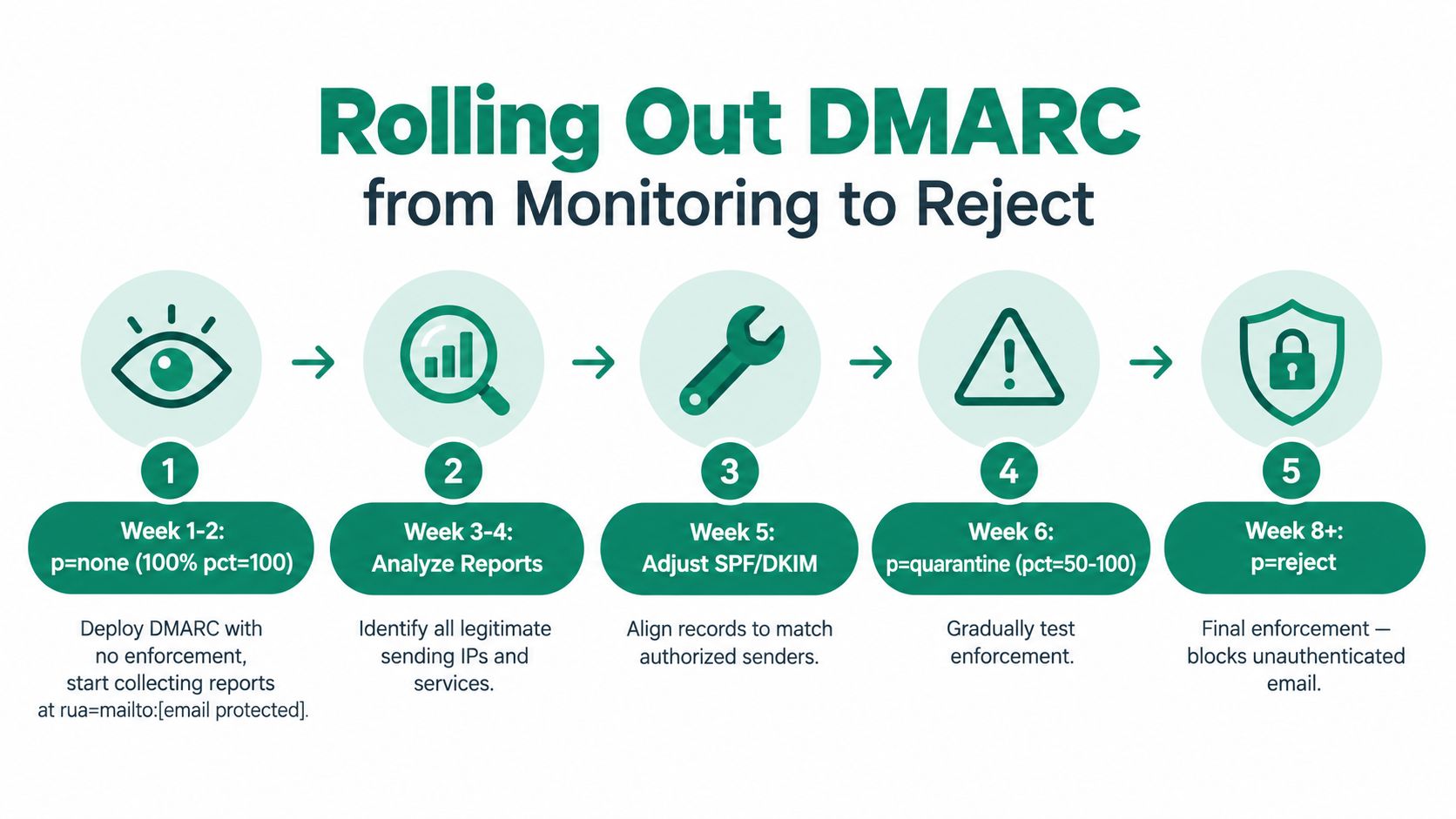
    A five-step infographic guide illustrating the process of rolling out DMARC, from monitoring to reject.

    Hardening Beyond DMARC for Outreach Teams

    DMARC protects the authenticated domain, not the brand around it. Criminals can register lookalike domains, compromise legitimate mailboxes, or abuse trusted services. Barracuda's 2026 analysis reported spoof rates rising from 12.08% in Q2 2025 to 24.30% in Q2 2026, while ARC absence remained above 72%. It recommends layered controls, including MFA, conditional access, risky sign-in monitoring, time-of-click URL analysis, and automated response. (Barracuda 2026 email threats report)

    For cold outreach, separate sending from corporate communications. Sales sequences should not send from your primary corporate domain. Use dedicated, authenticated sending domains or subdomains, assign each platform its own DKIM identity, and document ownership. If an outreach stream develops a reputation problem, executive, support, and transactional mail should remain isolated.

    Control What it blocks Outreach-team action
    BIMI with a VMC Prevents unauthenticated messages from receiving the authenticated brand-logo treatment Meet the enforced DMARC prerequisite, prepare a compliant logo, and obtain the required certificate
    MTA-STS Helps prevent downgrade or insecure SMTP transport paths Publish a policy and move to enforcement only after testing receiving infrastructure
    TLS-RPT Reports TLS delivery and negotiation failures Send reports to a monitored security mailbox
    Null MX and restrictive SPF Prevents parked domains from becoming usable mail sources Set domains that never send or receive mail to reject inbound assumptions and authorize no senders
    PTR and abuse mailbox hygiene Reduces ambiguity around outbound ownership and incident contact Keep reverse-DNS identity and abuse reporting details current
    Lookalike-domain monitoring Detects registrations that imitate your brand Track typo patterns, register strategically, and route abuse reports quickly

    Treat MTA-STS and TLS-RPT as operating controls, not records you publish and forget. Add them to the same register as SPF, DKIM, and DMARC, with an owner, test date, report destination, and escalation path. Keep PTR records and abuse contacts current so receiving providers can identify and report problems.

    Give each outreach provider its own SPF authorization and DKIM key. Do not reuse one DKIM key across every platform. Rotate sending subdomains according to governance and reputation policy, never to evade provider controls. Before approving a tool, confirm that it supports aligned authentication, monitored reporting, and a documented shutdown process. If you are assessing managed services, use this guide to choose the right email provider.

    EmailScout can help sales and marketing teams discover contact addresses for prospecting. That workflow still requires permission, list hygiene, and authenticated sending infrastructure. Use documented email security best practices to govern access, authentication, campaign approval, and vendor use. A contact-discovery tool does not enforce domain security.

    Monitoring, Reporting, and Incident Response

    A CFO's name appears on an invoice reminder from a lookalike domain, asking a supplier to change payment details. At the same time, DMARC aggregate reports show a new source that does not align with the company's domain. The security lead has one hour to decide whether the message reflects spoofing, a compromised account, or an undocumented legitimate service.

    The first-hour response

    Begin by pulling DMARC source IPs, timestamps, and authentication results before reviewing the sender's display name.

    • Correlate reports: Compare the DMARC source IP and timestamps with outbound sending logs.
    • Classify the path: Establish whether the message came from an unauthorized server, a forwarded route, a lookalike domain, or a compromised approved account.
    • Preserve samples: Save the forensic report and complete headers where available.
    • Alert providers: Use postmaster and abuse channels for Gmail, Microsoft, and Yahoo, then report malicious infrastructure.
    • Protect recipients: Notify affected customers, suppliers, finance staff, and executives through a trusted channel.
    • Request takedowns: Submit abuse reports for the impersonating domain, hosting provider, links, and attachments.

    Read a DMARC aggregate record in sequence. The source IP identifies the reporting sender. SPF and DKIM show authentication outcomes, alignment indicates whether those results match the visible From domain, and disposition records how the receiving provider handled the message.

    Use this SMB email safety guide to support response procedures and access controls. Before sales or marketing staff engage with suspicious contacts, use a workflow for checking whether an email address is associated with spam. EmailScout can support that address-checking workflow, but it does not decide whether a message is authorized or enforce domain policy.

    Make review recurring

    Review alignment and new sending sources weekly. Triage forensic samples monthly under your privacy and retention rules. Re-audit the authentication posture quarterly, covering parked domains, outreach vendors, subdomains, DKIM selectors, MTA-STS, TLS reporting, and account access.

    After a confirmed incident, document the event and notify affected parties. Tighten the domain policy to p=reject when the sender inventory supports enforcement. Add the impersonating domain or infrastructure to your organization's blocklist and threat-intelligence feeds, then assign an owner to verify that the controls remain active.

    Your 30/60/90 Anti-Spoofing Plan

    The distance between a published DMARC record and enforced spoofing protection is operational, not technical. A team needs ownership, reporting, change control, and a clear point at which monitoring ends.

    First 30 days

    Complete the sender inventory. Publish SPF and DKIM for every legitimate system, set DMARC to p=none with an aggregate-report address, and confirm that reports reach a parser that someone reviews. Assign one owner in security or infrastructure and one partner in marketing operations.

    Days 31 through 60

    Tighten SPF with -all after validating every authorized sender. Review BIMI prerequisites, enable MTA-STS and TLS-RPT, and secure parked and typo domains with appropriate DNS and registration controls.

    Deliver a short sales-team training session covering display-name impersonation, reply-to manipulation, lookalike domains, and outreach-tool authentication. Salespeople should know that a familiar name isn't proof of a legitimate address and that payment or credential requests require separate verification.

    Days 61 through 90

    Graduate DMARC to p=quarantine for a controlled period. Escalate to p=reject; pct=100 only when aligned legitimate volume exceeds 95%, as specified in the rollout plan, and the remaining failures have documented owners and decisions. Finalize BIMI with a VMC where it fits your brand and mailbox-provider requirements, then run a tabletop spoofing drill with security, finance, marketing, sales, and customer support.

    Keep the operating rule visible in every campaign approval checklist:

    If it sends as your domain, it must authenticate, align, and be auditable.


    EmailScout helps sales and marketing teams find decision-maker email addresses and build prospecting lists, while your team remains responsible for authenticated, compliant outreach infrastructure. Visit EmailScout to support contact discovery alongside the SPF, DKIM, DMARC, and monitoring controls that protect your sending identity.
  • 10 Email Security Best Practices for Sales Teams in 2026

    10 Email Security Best Practices for Sales Teams in 2026

    Your outreach engine might already be your biggest security gap.

    Sales reps live in the inbox. Marketers launch campaigns from it. Founders use it to open doors, revive cold leads, share decks, and move deals forward. That same inbox often stores prospect lists, account notes, email finder exports, reply threads, contracts, and access to half the SaaS stack. When one mailbox gets hijacked, the damage isn't limited to one user. Attackers can read live conversations, impersonate your team, export lead data, and turn your sending domain into a trust problem overnight.

    That risk is easy to underestimate because outreach teams optimize for speed. They add browser extensions, connect sequencing tools, authorize CRMs, and spin up extra sending accounts fast. Security usually gets treated like an IT issue that can wait until after the next campaign. That's a mistake. In 2022, about 4.7 million phishing attacks were recorded globally, reinforcing that email remains a primary entry point for attackers, according to Siteimprove's email security overview.

    If you use email-finding tools, manage large prospect lists, or send cold outreach at volume, generic advice isn't enough. You need controls that protect data without killing deliverability or slowing reps to a crawl.

    Here are 10 email security best practices that fit the way sales and marketing teams work.

    1. Implement Strong Email Authentication Protocols

    If your domain isn't properly authenticated, you're making two problems worse at once. You become easier to spoof, and your legitimate outreach becomes harder to trust.

    SPF, DKIM, and DMARC are the baseline. Siteimprove notes that organizations that skip these protocols leave their domains exposed to impersonation because they help validate that messages are sent from authorized infrastructure, not malicious intermediaries. For teams sending outbound campaigns, that's both a security control and a deliverability control.

    Start with your sending inventory. List every platform that sends mail as your domain. That usually includes Google Workspace or Microsoft 365, your CRM, marketing automation platform, sequencing tool, support desk, invoicing system, and calendar software.

    Set the records in the right order

    A clean rollout usually looks like this:

    • Publish SPF first: Authorize the mail servers allowed to send on your behalf.
    • Enable DKIM next: Turn on cryptographic signing in each sending platform.
    • Add DMARC after that: Begin in monitoring mode so you can see failures before enforcing stricter action.
    • Tighten policy gradually: Move toward stronger enforcement after you confirm all legitimate senders are aligned.

    For outreach teams, this matters even more when multiple tools send from the same domain. One forgotten integration can break alignment and create confusing failures.

    A quick deliverability review helps before you push volume. EmailScout has a useful guide on how to improve email deliverability, and if you're running Microsoft 365, this architect's guide to Microsoft 365 security is a practical setup reference.

    Use a test inbox before a full campaign. Send from your CRM, from your cold email platform, and from your regular mailbox. Check headers, confirm DKIM is signing, and make sure DMARC reports don't reveal an old tool still sending unauthenticated mail.

    Here's a useful walkthrough for teams that want a visual setup explanation:

    Practical rule: If you can't name every service that sends email from your domain, don't enforce DMARC yet. Inventory first, then lock it down.

    2. Enable Two-Factor Authentication on Every Email Account

    The fastest way to lose a prospect database is to let a stolen password open the door.

    Multi-Factor Authentication is one of the strongest single controls you can put on email, and Rippling explicitly recommends implementing it across all email accounts with no exceptions in its email security best practices guide. For sales teams, that means primary mailboxes, shared outreach accounts, aliases used for campaigns, and admin accounts for the email platform.

    A person using a smartphone to authenticate a login with two-factor authentication codes while working on a laptop.

    The common mistake is enabling 2FA only on leadership accounts or only on Google Workspace admins. Attackers don't need the CEO first. They'll gladly take a junior SDR's inbox if it contains active threads and CRM notifications.

    Choose the strongest option your team will actually use

    Not all second factors are equal.

    • Use authenticator apps by default: They avoid many of the weaknesses tied to SMS codes.
    • Prefer security keys for sensitive accounts: Admin users, finance-related accounts, and domain owners should use hardware-backed methods where possible.
    • Store backup codes safely: Keep them in a secure internal system, not in a browser note or shared spreadsheet.
    • Review sign-in activity: Strange devices, unfamiliar locations, or repeated prompts usually deserve investigation.

    Proofpoint reports that 99% of organizations were targeted for account takeovers and 62% experienced at least one successful compromise in recent years, according to its email security threat reference. That's why basic 2FA isn't just a box to check. For high-risk roles, phishing-resistant methods matter.

    A simple policy works best for outreach teams: no mailbox used for prospecting, account management, or campaign sending gets exempted. If a tool or legacy workflow can't support that policy, replace the workflow.

    3. Use Secure, Unique Passwords With a Password Manager

    Weak passwords rarely fail in isolation. They fail because teams reuse them across tools, store them in the wrong places, or share them through Slack and spreadsheets.

    That pattern is common in sales environments. One mailbox gets connected to a sequencing platform, a warm-up tool, a CRM, a browser extension, and a data provider. Then a rep leaves, another rep inherits the setup, and nobody rotates anything. Now one leaked password opens five systems.

    A person typing on a laptop next to a security checklist and a security key.

    A password manager fixes the operational mess. Tools like 1Password, Bitwarden, and LastPass give teams a controlled place to generate long, unique passwords and share access without exposing the secret itself in plain text.

    What good password hygiene looks like in a revenue team

    Use this standard across your stack:

    • Create a long master password: Make it unique and memorable enough that users won't write it on a sticky note.
    • Generate unique credentials per account: Email, CRM, prospecting tools, and domain registrars should never share passwords.
    • Turn on breach monitoring: Most modern password managers can flag exposed or reused credentials.
    • Secure the password manager itself: Put strong MFA on the vault before anything else.
    • Share access through the vault: Don't send login details by email, chat, or onboarding docs.

    Sales managers also need to clean up inherited access. If a shared mailbox or old outreach account is still active, rotate the password and update the connected tools immediately.

    For teams that pass credentials between contractors, agencies, and internal users, this guide to secure password sharing for teams and families is worth reviewing.

    The password problem usually isn't complexity. It's sprawl. The more apps your team connects to the inbox, the more important centralized credential management becomes.

    4. Implement Email Encryption for Sensitive Communications

    Not every outbound message needs heavy protection. But some absolutely do.

    If you're sending prospect exports, customer lists, pricing approvals, contracts, legal documents, or anything that could create a privacy issue if forwarded or intercepted, you need stronger controls than ordinary email flow. That's where encryption earns its place.

    SNS Insider reports that the End-to-End Email Encryption segment held 25.27% of the global email security market by type in 2024, according to its email security market report. The same report says the U.S. market reached USD 1.16 billion in 2024 and is projected to reach USD 2.72 billion by 2032 at a CAGR of 11.31%, which points to how mainstream advanced email protection has become.

    Use encryption selectively and automatically

    The best setup is policy-driven, not manual guesswork.

    • Encrypt by data type: Trigger protection for files and messages containing sensitive account data, financial details, or private strategy notes.
    • Use built-in platform features first: Microsoft 365 Message Encryption and secure mail options in major providers are easier to manage than custom systems.
    • Separate routine outreach from sensitive sharing: Cold emails don't need friction. Lead exports and internal handoffs might.
    • Verify recipient workflow: If a recipient can't open your protected message easily, people will work around the control.

    A metallic padlock sitting on a laptop keyboard with an email compose window open on screen.

    For outreach teams, the practical line is simple. Don't attach raw prospect spreadsheets to casual email threads. Use a protected sharing method, restrict forwarding where your platform allows it, and reserve standard email for ordinary communication.

    Encryption shouldn't be everywhere. It should be automatic where exposure would hurt you.

    5. Enable Advanced Spam and Phishing Filtering

    Your team probably thinks of spam filtering as an inbox cleanliness feature. It isn't. It's a frontline security layer that decides which messages your reps ever see.

    That matters more in sales than in many other departments. Outreach users get a messy mix of replies, autoresponders, calendar notifications, vendor mail, prospect responses, unsubscribe requests, and lookalike phishing attempts. A weak filter lets obvious threats through. An overaggressive one buries real leads.

    Tune filters for both safety and response handling

    The right setup balances protection with visibility.

    • Max out built-in protections first: Gmail, Microsoft Defender for Office 365, Proofpoint, Mimecast, and Barracuda all provide stronger controls than default legacy settings.
    • Review quarantine routinely: Sales ops or an assigned admin should check whether legitimate replies are getting trapped.
    • Whitelist carefully, not broadly: Approve trusted senders and systems, but don't create giant exceptions that gut protection.
    • Teach reps to report suspicious mail: Filtering improves when users flag what got through.

    If your team sends cold campaigns, you also need to understand the other side of the filtering equation. Your own messages must avoid looking malicious. EmailScout's guide on how to avoid spam filters is helpful for aligning deliverability habits with safer sending behavior.

    Marconet notes that 83% of organizations experienced at least one Business Email Compromise attack in 2024, with average losses of $489,000 per incident, in its email security best practices article. That's the exact tension outreach teams face. Sending patterns that look unnatural can trigger security scrutiny externally, while weak internal controls leave your own users exposed.

    Keep one rule in mind: filtering isn't "set and forget" for outbound teams. Review false positives, false negatives, and sender reputation together.

    6. Practice Email Account Hygiene and Regular Security Audits

    Compromised inboxes often stay compromised because nobody checks the boring settings.

    Attackers love silent persistence. They add a forwarding rule, authorize a shady app, create a filter that hides security alerts, or leave a session active on a device nobody recognizes. The mailbox still works, so the team keeps sending.

    For outreach-heavy environments, audits matter because the inbox is connected to so many external tools. Sequencers, CRMs, AI assistants, browser extensions, lead databases, meeting schedulers, and support tools all add surface area.

    Audit the mailbox like an operator, not a theorist

    Look at the account the way an attacker would use it.

    • Connected apps: Remove anything the team no longer uses or can't clearly identify.
    • Forwarding rules: Block or investigate any external auto-forwarding, especially to personal addresses.
    • Active sessions and devices: Revoke old sessions after role changes, laptop replacements, or suspicious login events.
    • Delegation and shared access: Confirm exactly who can read or send from the account.
    • Recovery options: Make sure password reset methods still point to trusted owners.

    EmailScout users should also review how prospect data is stored and shared after discovery. A large list is valuable, but unmanaged list sprawl becomes a quiet liability. This guide on email list management is useful for tightening operational control around the data itself.

    If you're cleaning up older hardware or retired devices that held mailbox exports, PST files, or downloaded lead lists, this overview of how to protect your business data is a practical reminder that deletion and disposal matter too.

    A quarterly audit cadence is realistic for many teams. After any suspected compromise, do it immediately.

    7. Establish Clear Email Security Policies and Team Training

    A security stack won't save a team that improvises every risky decision.

    Rippling's guidance emphasizes that email security works best as a layered mix of technical controls, administrative measures, and continuous awareness training rather than annual one-off sessions. For sales and marketing teams, that means people need rules they can follow during a live campaign, not a dense policy PDF nobody reads.

    Write policies for the situations reps actually face

    A strong policy is short, specific, and tied to common workflows.

    • Prospect data handling: Define where exports can be stored, who can access them, and when they must be deleted.
    • Third-party tool approvals: Require review before installing browser extensions or connecting new inbox tools.
    • Attachment and link handling: Spell out how users should verify unexpected invoices, shared docs, and login prompts.
    • Incident reporting: Tell users exactly how to report suspicious email, account lockouts, or strange sending behavior.

    Training should mirror real work. Use examples that look like calendar invites, CRM alerts, login resets, and prospect replies, because that's what your team sees all day. Include simulations and short refreshers instead of relying on a single yearly session.

    Hornetsecurity highlights an important blind spot in its email security best practices article: many organizations overlook extension-based email harvesting and related governance gaps. Its cited angle notes that a 2025 study found 67% of employees use unauthorized browser extensions that scrape contact data, while only 12% of security policies explicitly regulate extension-based email harvesting. For teams using finder tools, this isn't edge-case governance. It's core policy territory.

    Manager's test: If a new SDR can't answer "Can I install this extension?" or "Can I export this contact list to my laptop?" your policy is too vague.

    8. Monitor and Control Email Forwarding and Delegation

    Forwarding rules are one of the easiest ways for attackers to siphon data without breaking your workflow. They're also one of the easiest things for teams to ignore.

    A rep leaves. Their inbox gets forwarded to a manager. A founder forwards certain replies to a personal address. A virtual assistant gets delegated access for scheduling. None of that is automatically wrong. It becomes risky when nobody tracks who approved it, where the mail goes, or whether the rule still needs to exist.

    Lock down the quiet exfiltration paths

    For most companies, the safest default is restrictive.

    • Disable external forwarding by default: Only allow exceptions where there's a documented business reason.
    • Require approval for new rules: Especially for shared inboxes, executive mailboxes, and campaign accounts.
    • Log delegation changes: If someone gains send-as or full-access rights, that should be visible.
    • Review exceptions regularly: Temporary access has a habit of becoming permanent.

    This control matters more for outreach teams because email often carries contact research, sequence performance discussions, account notes, and exported lead data. One hidden forwarding rule can leak all of it to an external address for months.

    Proofpoint also notes the value of frictionless reporting inside the inbox. One-click reporting helps users flag suspicious messages quickly, which supports faster containment when something odd appears in a mailbox. Combined with forwarding restrictions, that gives you both prevention and faster detection without forcing users into a complicated process.

    In practice, shared inboxes deserve the strictest governance. If multiple people need access, use formal delegation inside Google Workspace or Microsoft 365 instead of ad hoc forwarding chains.

    9. Use Data Loss Prevention and Content Filtering

    The biggest email risk for many revenue teams isn't only inbound phishing. It's outbound leakage.

    A rep exports a prospect list and emails it to the wrong person. A marketer sends a campaign file that includes internal notes. An account manager forwards a thread containing confidential pricing to an outside contact by mistake. These aren't dramatic breaches. They're ordinary mistakes with real consequences.

    Put guardrails around sensitive outbound mail

    Data Loss Prevention works best when you start narrow and tune it.

    • Begin in audit mode: Watch what the system flags before you start blocking messages.
    • Protect your highest-risk content first: Prospect databases, client lists, contract attachments, finance details, and internal planning docs.
    • Apply different rules for internal and external recipients: Internal collaboration usually needs more flexibility than outbound mail.
    • Pair DLP with attachment controls: Restrict risky file types and add warnings for unusual sends.

    For sales and marketing teams, custom rules are often more useful than generic templates. You may not handle regulated medical or payment data, but you probably do handle valuable contact data, pricing logic, and account plans. Build policies around what would hurt if it left the company.

    One practical pattern works well. Warn first, block second. If users constantly hit hard blocks without understanding why, they'll find side channels. If they see a clear warning tied to specific content, organizations adapt quickly.

    DLP isn't about distrusting your reps. It's about catching the normal errors that happen when people move fast.

    10. Maintain Backups and a Recovery Plan for Email Data

    Sooner or later, something breaks. A user deletes the wrong folder. A mailbox gets locked. A sync issue wipes messages. An attacker trashes threads after gaining access. If you can't recover business-critical email, you don't have a complete security posture.

    This matters more than many sales leaders realize. Email history often contains the only record of deal context, pricing approvals, past objections, partner commitments, and prospect conversations that never made it into the CRM cleanly.

    Back up what your team can't afford to lose

    A solid recovery setup has a few essential elements:

    • Automate backups: Manual exports won't happen consistently.
    • Keep copies separate from production: If the main environment is compromised, recovery data must still be available.
    • Encrypt backup data: Backups contain the same sensitive content as the live mailbox.
    • Test restore procedures: A backup that nobody can restore under pressure isn't a backup.

    Focus on the accounts that run revenue operations first. Shared sales inboxes, founder mailboxes, customer-facing campaign accounts, and admin accounts deserve priority. If your team uses EmailScout data inside outreach workflows, preserve the communications and exports that support active pipeline work.

    Recovery planning should also define ownership. Who disables a compromised account, who checks forwarding rules, who reissues access, and who restores deleted email? If those decisions wait until an incident, your team loses time when it matters most.

    Email Security: 10 Best Practices Comparison

    Security Measure Implementation complexity Resource requirements Expected outcomes Ideal use cases Key advantages
    Implement Strong Email Authentication Protocols (SPF, DKIM, DMARC) Moderate–High (DNS & mail server configuration) DNS access, admin expertise, monitoring tools Higher deliverability; reduced spoofing/phishing Bulk/outreach senders and brand protection Improves inbox placement; provides authentication reports; protects brand
    Enable Two-Factor Authentication (2FA) on All Email Accounts Low–Medium (user setup and policy rollout) Auth apps / security keys, user devices, admin enforcement Strong reduction in account takeover risk All business email accounts, especially high‑value inboxes Prevents compromise with leaked passwords; low operational cost
    Use Secure, Unique Passwords with Password Managers Low–Medium (deployment and team onboarding) Password manager service, master password policy, training Fewer reused/weak credentials; breach alerts Teams managing many accounts and shared credentials Eliminates reuse; secure sharing; saves time
    Implement Email Encryption for Sensitive Communications Medium–High (PKI/key management, recipient capability) Encryption tools/providers, key management, recipient support Confidential messaging; compliance support Sending PII, contracts, or regulated communications End‑to‑end confidentiality; non‑repudiation; compliance aid
    Enable Advanced Spam and Phishing Filtering Medium (ML tuning and integration) Filtering service/vendor, threat intelligence, admin tuning Reduced phishing/spam; improved inbox quality High‑volume inboxes and outreach response handling Automates threat detection; blocks malicious links/attachments
    Practice Email Account Hygiene and Regular Security Audits Medium (ongoing audits and remediation) Time, audit checklists/tools, IT support Early compromise detection; cleaner permissions Teams with many third‑party integrations or delegated access Identifies issues early; improves overall security posture
    Establish Clear Email Security Policies and Team Training Medium (policy creation and recurring training) Time, training platform/materials, management buy‑in Reduced human error; clearer incident response Organizations scaling sales/marketing outreach teams Builds awareness; enforces consistent practices; aids compliance
    Monitor and Control Email Forwarding and Delegation Medium (policy enforcement and logging) Admin controls, logging/alerts, approval workflows Prevents data exfiltration via forwarding; detects misuse Protecting prospect lists, shared mailboxes, delegated accounts Stops stealth data leaks; provides audit trails and visibility
    Use Email Data Loss Prevention (DLP) and Content Filtering High (policy design, tuning, false‑positive handling) DLP platform, integration, monitoring, licensing Blocks/flags sensitive data; enforces data policies Regulated data environments and sensitive prospect info Automated enforcement; compliance support; reduces insider risk
    Maintain Regular Backups and Disaster Recovery for Email Data Medium (backup design, testing, RTO/RPO planning) Backup solution, storage, testing processes, ongoing costs Recovery from ransomware, deletion, or outages Preserving campaign history, legal records, and critical communications Enables data recovery and continuity; reduces ransomware impact

    Turn Security into a Competitive Advantage

    Email security best practices aren't just about reducing downside. For sales and marketing teams, they directly affect whether outreach works at all.

    A secure inbox is more stable. A properly authenticated domain is easier to trust. A team that uses MFA, controlled access, and clean account hygiene is less likely to lose weeks of work to a takeover, spoofing event, or quiet data leak. That operational reliability shows up in the metrics your team cares about. Replies stay visible. Sending reputation stays healthier. Fewer fire drills interrupt pipeline generation.

    The same is true for prospect data. If you use a finder tool, you're collecting an asset. That asset deserves handling rules. Browser extensions, exports, shared sheets, and synced inbox tools make lead generation faster, but they also create exposure points that many companies never document. The gap usually isn't malicious behavior. It's casual sprawl. Contacts get copied into the wrong tool, downloaded to unmanaged devices, or left accessible long after the campaign ends.

    The good news is that most of the highest-impact fixes are straightforward. Authenticate every sending domain. Turn on MFA for every mailbox. Use a password manager. Restrict forwarding. Audit connected apps. Train reps with scenarios that look like the emails they really receive. Add DLP and encryption where the data justifies it. Back up critical mailboxes and make sure recovery isn't theoretical.

    There's also a real trust advantage here. Buyers notice when emails arrive consistently, look legitimate, and come from domains that behave like professional senders. Internal teams notice too. When sales, marketing, and operations trust the inbox, they move faster because they aren't constantly second-guessing what's safe.

    If you're unsure where to start, don't start with the longest policy document. Start with one working mailbox and inspect it end to end. Check authentication. Review apps. remove stale access. verify MFA. inspect forwarding rules. Then repeat that process across every account tied to outreach. You'll usually find the biggest risks in the first pass.

    Security doesn't need to slow down growth. Done properly, it protects your domain, your data, and your ability to keep conversations moving. For teams that depend on outreach, that's not overhead. It's infrastructure.


    If you're using EmailScout to build prospect lists and speed up outreach, protect that advantage with the same discipline you apply to pipeline. Use EmailScout to find the right contacts faster, then pair it with strong inbox security, controlled data handling, and cleaner outreach operations so your growth engine stays trusted and resilient.