Tag: email list building

  • How to Send Mass Email Individually the Right Way

    How to Send Mass Email Individually the Right Way

    If you want to cut through the inbox noise, you have to make every mass email feel like a one-on-one conversation. The secret isn't some complex, expensive technology. It’s simply a combination of a verified email list, personalized data fields, and a smart sending tool like a mail merge or an Email Service Provider (ESP).

    This approach takes your message from a generic broadcast to a powerful, direct communication channel that actually gets results.

    Why Generic Email Blasts No Longer Work

    Rear view of a man working on a laptop, displaying personalized content, with text "Personalize at Scale".

    Let's be honest: the days of blasting one identical message to a list of a thousand contacts are long gone. Today’s customers are savvy, and they expect relevance. A generic email blast is the digital equivalent of junk mail—impersonal, instantly forgettable, and a fast way to get your domain flagged as spam.

    Think about your own inbox. How quickly do you delete an email that opens with "Dear Valued Customer"? Now, compare that to an email that uses your name, references your company, or mentions a recent conversation. That one gets your attention, right? This is the entire principle behind sending mass emails that feel individual. You're shifting your strategy from broadcasting to connecting.

    The Power of a Personal Connection

    Real personalization goes way beyond just slotting a {{first_name}} tag into your template. It’s about using the data you have to make the recipient feel seen and understood.

    When you tailor your message to their specific industry, pain points, or past interactions with your brand, you’re sending a clear signal: "I did my homework." This simple act builds immediate trust and separates your email from the hundreds of other generic messages flooding their inbox.

    The results speak for themselves. Marketers who personalize their email campaigns see up to 760% higher revenue by properly segmenting their lists. On top of that, consumers who buy something from an email offer spend 138% more than those who don't get those offers. In a market like the US where 9.7 billion emails fly around every single day, this individual approach is your biggest competitive advantage. You can dive deeper into these powerful email marketing statistics and what they mean for your strategy.

    The goal is simple: make every person on your list of 1,000 feel like they are the only person you emailed that day. This mindset is what drives engagement and conversions.

    Generic Blasts vs. Individual Mass Emails

    The performance gap between a generic blast and a personalized outreach campaign is massive. Just a quick look at the metrics shows exactly why taking the time to customize is a non-negotiable part of any modern email strategy.

    Metric Generic Email Blast Personalized Mass Email
    Recipient Perception "Spam" or "Junk Mail" "Relevant" or "Helpful"
    Open Rate Low (typically <15%) High (often >30%)
    Click-Through Rate Minimal Significantly Higher
    Conversion Impact Negligible Drives qualified leads & sales
    Brand Impact Negative (damages sender reputation) Positive (builds trust and loyalty)

    As you can see, the data is pretty clear. Sending mass emails that feel individual isn't just a "nice-to-have" feature; it's a fundamental requirement for effective sales and marketing today. It shows respect for your audience's time, dramatically improves your campaign performance, and builds a foundation for real, long-term customer relationships.

    The following sections will walk you through the exact steps to get this done right.

    Building a High-Quality Verified Email List

    Before you write a single word of your email, let's talk about the one thing that will make or break your entire campaign: your email list. It doesn't matter how personalized your message is if you're sending it to the wrong people or, even worse, to dead-end addresses. A clean, targeted, and verified list isn't just a good idea—it's the entire foundation.

    A smartphone showing verified contacts with green checkmarks on a laptop, on a wooden desk.

    The old-school approach of buying massive, generic lists is a recipe for disaster. Today, the goal is quality over quantity. You want a curated list of high-intent prospects who are actual decision-makers. This is where modern tools completely change the game. With something like the EmailScout Chrome extension, you can pull the right contact information just by visiting a company’s website or a professional’s social profile.

    This approach flips the script. Instead of spraying your message and hoping something sticks, you're hand-picking the exact people who need to see it.

    Why Email Verification Is Non-Negotiable

    Just finding an email isn't enough. You have to know it's valid. Every time you send to a nonexistent address, it counts as a hard bounce. Rack up too many of those, and you’ll trigger a massive red flag for email providers like Gmail and Outlook.

    A high bounce rate kills your sender reputation, signaling to these providers that you might be a spammer. Suddenly, even your legitimate emails start getting routed to spam folders instead of the primary inbox. Email verification is your first and best line of defense.

    By integrating verification directly into your prospecting workflow, you ensure every single contact you add to your list is deliverable from day one.

    Practical List-Building Strategies

    Building a strong list doesn't have to be a slow, manual grind. With the right tools and a smart approach, you can automate a huge chunk of the work without sacrificing quality.

    Here are a few tactics I use all the time:

    • Automate While You Browse: Let tools do the heavy lifting. Features like AutoSave can capture and verify emails for you in the background as you browse company sites or online directories.
    • Extract from Multiple Sources: Got a list of target companies? Paste their website URLs or LinkedIn profiles into a URL Explorer and let it pull all the relevant contacts in one shot.
    • Focus on Decision-Makers: Don't just grab the first email you see. Keep an eye out for titles like "Director," "Manager," or "Head of" to make sure your message lands in front of someone with actual authority.

    This strategic approach to list building pays off. Seriously. Email is still 40 times more effective at acquiring new customers than social media, and business development teams report a median ROI of 122% from their email outreach.

    A clean, verified list is the single most important asset for sending mass emails that feel individual. It protects your reputation, guarantees deliverability, and dramatically increases the chances your message will actually be read by the right person.

    At the end of the day, a verified list is about building trust—both with email providers and with your prospects. For a deeper dive, our guide on email address verification breaks down exactly how this process fuels campaign success. Remember, your personalization efforts are only as good as the list you’re sending them to.

    Preparing Your Data for Powerful Personalization

    Now that your list is clean and verified, it’s time to focus on the data that makes your outreach feel like it was written just for them. This is where you graduate from a basic {{first_name}} merge tag and start showing you’ve actually done your homework.

    The truth is, the quality of your personalization is a direct result of the prep work you do upfront. Generic data will always lead to generic emails that get ignored. You need to think more like a researcher than a marketer.

    Building Your Personalization Framework

    Before you write a single word of your email, you need to set up your spreadsheet or CRM. Think of each column as a unique piece of information you can use to build a connection with your prospect.

    Start with the basics, but don't stop there. Get specific with custom fields.

    • Company Name: Lets you reference their organization directly.
    • Job Title: Helps you frame your pitch around their specific responsibilities.
    • Industry: Allows you to talk about trends and challenges you know they're facing.
    • Recent Achievement: This is a seriously powerful and underused field. Think company funding announcements, a recent promotion, or a major project they just launched.

    For example, I love using a Pain Point column. It lets you drop in a specific challenge like "managing remote sales teams" or "reducing customer churn." That one detail immediately makes your email resonate more than a generic pitch ever could. Finding this kind of information is exactly what the best data enrichment tools are designed for, and they can automate a huge chunk of this research.

    The best personalized emails don't feel like a mail merge at all—they feel like a one-to-one message. Your data structure is what makes this happen at scale.

    From Spreadsheet Columns to Dynamic Content

    Let's see how this works in practice. Imagine your spreadsheet has columns for First Name, Company Name, and Recent Achievement.

    First Name Company Name Recent Achievement
    Sarah Innovatech launching their new AI platform
    David Quantum Solutions securing Series B funding

    Now, you can build a sentence in your email template like this: "Hi {{First Name}}, I was really impressed to read about {{Company Name}} {{Recent Achievement}} last week."

    For Sarah, this becomes: "Hi Sarah, I was really impressed to read about Innovatech launching their new AI platform last week."

    For David, the same template produces something completely different but just as relevant. This is how you send mass email individually without manually writing hundreds of messages. All the heavy lifting happens in your spreadsheet, turning a single template into hundreds of unique-feeling emails.

    Alright, you've got a clean list packed with personalized data. Now comes the fun part—actually sending the emails. How you choose to do this is a big deal. The right tool can make your life easier and your campaigns more effective, while the wrong one can be a frustrating dead end.

    Your choice really boils down to your specific goals. Are you sending a handful of hyper-personal notes, or are you scaling up a massive automated sequence? Let's walk through the three main ways to send mass emails that still feel one-to-one.

    The Simple Mail Merge

    You’ve probably heard of mail merge, and it's the most basic way to get started. All you need are tools you already have, like a spreadsheet (Google Sheets or Excel) and your regular email account (Gmail or Outlook). It works by pulling data from your spreadsheet into an email template, sending out each one individually from your inbox.

    This method is perfect if you’re:

    • Sending Small Batches: Think freelancers or small teams sending under 100 very custom emails a day.
    • On a Tight Budget: It’s practically free since you’re using existing software.
    • Looking for Simplicity: If you know your way around a spreadsheet, the learning curve is almost zero.

    But its simplicity is also its biggest weakness. Your standard Gmail account has a daily sending limit of around 500 emails, and trying to send that many at once is a surefire way to get flagged for spam. Plus, you get zero built-in tracking. No open rates, no click tracking—you're basically flying blind.

    Dedicated Email Service Providers (ESPs)

    Next up are Email Service Providers (ESPs). These are platforms like Mailchimp or ConvertKit built specifically for sending email at scale. They're the go-to for marketing newsletters, big announcements, and promotional blasts to people who have opted-in to your list.

    ESPs are your best friend when you need beautiful, professional-looking templates and solid analytics. They handle all the complicated deliverability stuff behind the scenes and give you deep insights into who’s opening, clicking, and engaging with your content.

    ESPs make managing huge lists a breeze and come with drag-and-drop builders for creating stunning emails. They also automatically handle unsubscribes, which is crucial for staying compliant. The main downside for a sales-focused "send individually" strategy? They can feel a bit impersonal. The emails often come from a shared server and might have the ESP’s branding, which can kill the one-to-one vibe you're trying so hard to create.

    Advanced SMTP and Outreach Tools

    For sales teams doing serious cold outreach, this is where the magic happens. Dedicated outreach platforms that use SMTP (Simple Mail Transfer Protocol) services are by far the most powerful option. Tools like Mailshake or Woodpecker connect to your own email account but layer on powerful automation, sequencing, and tracking.

    This approach gives you the best of both worlds: the personal touch of sending from your own inbox combined with the power of automation. You can build out multi-step sequences that send automatic follow-ups if someone doesn't reply, A/B test your subject lines to see what works, and track every single interaction.

    Yes, they come with a monthly subscription fee, but the ROI from landing just one or two new clients almost always covers the cost. This is the way to go for any serious, scalable outreach campaign.

    Comparing Email Sending Methods

    Choosing the right sending tool can feel overwhelming, but it's really about matching the tool to the job. The table below breaks down the key differences to help you decide which path makes the most sense for your goals.

    Method Best For Pros Cons
    Mail Merge Small, highly-personalized batches (under 100/day) and testing ideas. – Essentially free
    – Simple to set up
    – Sends from your real inbox
    – No tracking or analytics
    – Very low sending limits
    – Manual and time-consuming
    ESPs Marketing newsletters, announcements, and opt-in audiences. – Handles large lists
    – Great analytics
    – Easy-to-use email builders
    – Can feel impersonal
    – May include ESP branding
    – Not ideal for cold outreach
    SMTP/Outreach Tools Scalable sales outreach, automated sequences, and cold emailing. – High level of personalization
    – Advanced automation & sequencing
    – Deep tracking and analytics
    – Requires a monthly subscription
    – Steeper learning curve

    Ultimately, there's no single "best" method—only the best method for you. If you're just starting, a simple mail merge might be enough. But if you're serious about scaling your outreach and maximizing replies, investing in a dedicated outreach tool is a no-brainer.

    Ensuring Deliverability and Avoiding the Spam Folder

    You’ve done all the hard work—you’ve built a great list, verified it, and crafted the perfect personalized message. But none of that matters if your email lands in the spam folder.

    Getting your emails into the primary inbox, known as deliverability, is the final, make-or-break step. It’s not about flipping a switch; it's about continuously proving to email providers that you’re a legitimate sender.

    This process kicks off with what’s called domain authentication. Think of it as your email’s official passport. By setting up SPF (Sender Policy Framework) and DKIM (DomainKeys Identified Mail) records, you're telling receiving servers that you are who you claim to be. It’s a non-negotiable step for anyone who’s serious about outreach.

    Warming Up Your Account

    You can't just jump from sending a dozen emails a day to a thousand overnight. A sudden, massive spike in sending volume is one of the biggest red flags for spam filters. That’s precisely why you need to "warm up" your email account.

    Start small. Begin by sending just 20-30 emails per day to your most engaged contacts—these are the people you know will open, read, and maybe even reply to your message.

    From there, you'll want to increase your daily volume gradually, by about 15-20% each day. This steady ramp-up signals legitimate sending behavior to email services, building your sender reputation over time and showing you're not just another spammer blasting a purchased list.

    This quick diagram shows the common sending methods we've discussed, each with its own deliverability quirks.

    Process flow diagram illustrating three steps for email sending: Mail Merge, ESP, and SMTP.

    While a basic Mail Merge is easy to start with, dedicated ESPs and SMTP tools give you far better infrastructure for protecting your sender reputation and ensuring deliverability as you scale.

    Crafting Inbox-Friendly Content

    What you write is just as important as the technical setup behind your send. Spam filters are incredibly sophisticated now, and they scrutinize your actual email content for suspicious patterns.

    • Avoid Spam Trigger Words: Be mindful of using too many classic spammy phrases like "free," "guarantee," or "act now." The same goes for excessive exclamation marks or typing in ALL CAPS.
    • Balance Your Content: An email that's just one big image is a classic spam filter trap. Always aim for a healthy ratio of text to images.
    • Encourage a Reply: An email that gets a response is almost never marked as spam. It's the ultimate sign of engagement. Try ending your message with a genuine, open-ended question that invites conversation.

    Deliverability is a direct reflection of your sending habits. Consistent, relevant, and engaging communication is your best defense against the spam folder. A good reputation takes time to build, but it can be destroyed by a single bad campaign.

    Improving your inbox placement is an ongoing game. Our complete guide on how to improve email deliverability dives into even more specific strategies to keep you on the right track.

    For a deeper look into the technical and strategic side, digging into these email deliverability best practices will give you a solid foundation. By authenticating your domain, patiently warming up your account, and writing thoughtful copy, you’ll ensure your hard work pays off and your emails actually get seen.

    Answering Your Top Questions

    Even with the best tools and a solid strategy, a few key questions always come up when you're mastering the art of sending personalized mass emails. Let's walk through the most common ones I hear, so you can move forward with total confidence.

    Is This Spam? The Line Between Outreach and Annoyance

    This is the big one. The real difference comes down to three things: consent, relevance, and transparency.

    Legitimate outreach is sent to contacts where a "legitimate interest" can be assumed—think B2B prospecting where a decision-maker's contact info is public. To stay on the right side of regulations like the CAN-SPAM Act and GDPR, you have to follow the rules.

    That means every single email must:

    • Include a clear, one-click unsubscribe link. No exceptions.
    • Accurately identify who you are and what company you represent.
    • Never use a misleading subject line or sender name.

    Spam is the polar opposite. It’s totally unsolicited, irrelevant, and almost always hides the opt-out option. When you're using tools to find the right people and personalizing a message for their professional role, you’re doing legitimate business outreach, not spamming.

    How Many Emails Can I Send Before Getting Blocked?

    This number depends entirely on your email provider and your sending method. For a standard Gmail or Outlook account, the official limit is around 500 emails per 24 hours. But trying to hit that cap with a new account is a one-way ticket to the spam folder.

    The only way to do this right is to "warm up" your sending account. Start small, with maybe 20-50 emails a day. Then, increase that volume by about 20% each day. This process builds a positive sender reputation and proves to email providers that you're a human, not a bot.

    Dedicated Email Service Providers (ESPs) and outreach platforms will offer much higher sending limits, but they're still watching you. High bounce rates and spam complaints will get your account flagged, no matter what you're paying. To avoid this, solid Email Address Verification: Boost Deliverability & ROI is non-negotiable; it keeps your lists clean and your reputation intact.

    Can I See Who Opens My Emails?

    Yes, but only if you use the right tools. A simple mail merge inside your Gmail inbox won't give you any tracking capabilities on its own. You'd need a separate browser extension for that.

    However, virtually every dedicated sales outreach tool and ESP has robust tracking built-in. They do this by embedding a tiny, invisible tracking pixel in your email. When your recipient opens the message, that pixel loads, and the tool records it as an "open." They do the same for link clicks, giving you a clear picture of what's working and what isn't.

    Custom Domain vs. Free Email: Does It Really Matter?

    For any kind of professional outreach, using a custom domain email (like your.name@yourcompany.com) is non-negotiable.

    Sending business emails from a free address like @gmail.com or @yahoo.com is a massive red flag for spam filters. It screams "unprofessional" to both algorithms and people, and your deliverability will suffer for it.

    A custom domain gives you instant credibility and trust. More importantly, it lets you set up essential authentication records (SPF and DKIM). These records are your digital handshake, proving to receiving servers that your email is legitimate and dramatically increasing your chances of landing in the inbox.


    Ready to start building high-quality, verified email lists for your outreach? With EmailScout, you can find unlimited emails of decision-makers and build powerful prospect lists in a single click. Start for free and see how easy it is to connect with the right contacts. Visit https://emailscout.io to get started.
  • How to Build Email Lists That Actually Convert

    How to Build Email Lists That Actually Convert

    It all boils down to a simple formula: attract the right people, offer them something they can’t refuse, and consistently build that relationship. This isn’t just about hoarding contacts; it's about opening a direct line to an audience that actually wants to hear from you. The most successful email lists are built on a strategy that starts long before the first sign-up form ever goes live.

    Building Your List on a Solid Foundation

    Jumping into lead capture without a plan is like building a house with no blueprint. Sure, you might end up with something, but I guarantee it won't be strong, functional, or built to last. Before you can build a high-quality email list, you have to lay the groundwork. This initial work ensures every person you add is a potential customer, not just another number inflating your subscriber count.

    This foundation is all about defining who you're talking to, what you want to achieve, and why they should even care. Get this right, and you'll avoid wasted effort and turn your list into one of your most valuable business assets.

    Define Your Ideal Customer Profile

    First things first: who are you really trying to reach? Answering this with a detailed Ideal Customer Profile (ICP) is the single most critical step you can take. An ICP isn't about basic demographics like age or city. It’s about digging into the psychographics—the real goals, frustrations, and motivations of your perfect subscriber.

    For example, "small business owners" is way too broad. A powerful ICP sounds more like this: "female founders of e-commerce startups with 1-5 employees who are struggling with time management and actively looking for marketing automation tools."

    This level of detail changes everything:

    • The problems you solve: Your content can speak directly to their biggest headaches.
    • The language you use: You can adopt a tone that resonates with their world.
    • Where you find them: You’ll know exactly where they hang out online, from specific LinkedIn groups to niche industry forums.

    Set Crystal-Clear Goals

    Your email list is a tool, and every tool needs a job. What's the primary purpose of this list? The answer dramatically shapes your entire strategy. A list built to nurture a weekly newsletter community requires a totally different approach than one designed to drive a high-ticket sales funnel.

    A classic mistake is treating every subscriber the same. A list for building long-term brand loyalty needs different content and cadence than a list built for immediate sales outreach. You absolutely have to align your goal with your strategy.

    Get specific about your main objective. Is it to drive direct sales? Boost brand awareness? Announce product updates? Or build a thriving community? Knowing this helps you measure what matters and keeps your content sharp and effective.

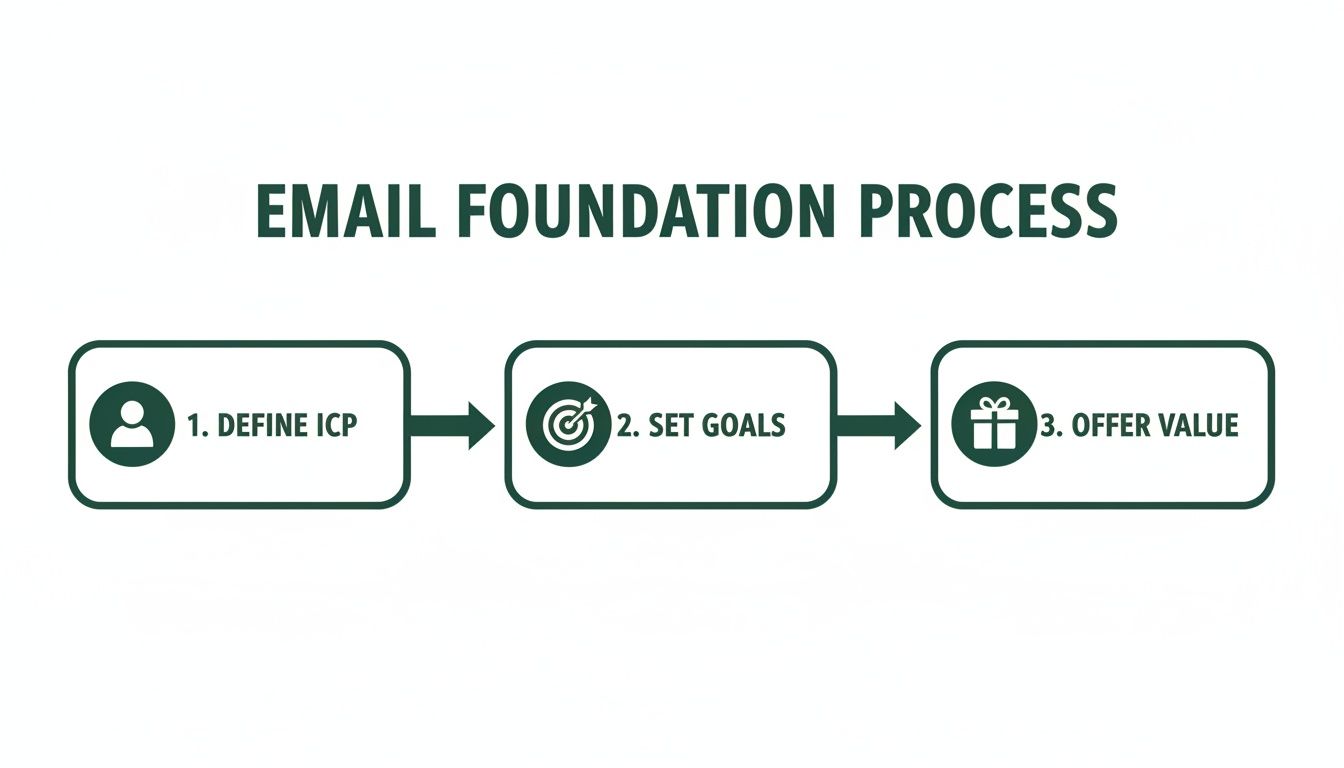
    This simple flowchart shows how these foundational pieces fit together.

    Flowchart illustrating the Email Foundation Process with three steps: Define ICP, Set Goals, and Offer Value.

    As you can see, a successful list always starts with a deep understanding of your audience, followed by clear goals and a compelling reason for them to join.

    Craft an Irresistible Value Proposition

    Finally, you have to answer the subscriber's most important question: "What's in it for me?" People guard their inboxes. They won't hand over their email address without a seriously compelling reason. This is where your value proposition comes in—it’s the promise you make in exchange for their trust.

    This could be a valuable resource (often called a "lead magnet"), like an exclusive ebook, a practical checklist, or free access to a webinar. It could also be the promise of consistently amazing content, like a weekly newsletter packed with industry insights they can't get anywhere else.

    Whatever you offer, it has to be valuable enough to make the exchange feel like a clear win for them.

    To make sure you have all your bases covered, here’s a quick-glance table of these core components.

    Core Components of a Successful Email List Strategy

    Component Key Objective Example Action
    Ideal Customer Profile (ICP) To deeply understand who you're targeting. Create a one-page document detailing the demographics, pain points, and goals of your perfect subscriber.
    Clear Goals To define what success looks like for your list. Set a primary KPI, such as "Increase webinar sign-ups by 20% this quarter."
    Value Proposition To give people a compelling reason to subscribe. Design a high-value lead magnet, like a 10-page guide solving a common industry problem.

    Think of these three elements—ICP, Goals, and Value—as the pillars of your entire email marketing program. With a strong foundation in place, you’re ready to start capturing leads the right way.

    Proven Methods for Capturing High-Intent Leads

    Alright, you’ve got your strategy locked in. Now it’s time to build the machinery that actually collects emails. This is where your plans turn into action, transforming passive website visitors and social media scrollers into genuinely interested subscribers. The goal is to create multiple, compelling entry points that feel natural and valuable to your Ideal Customer Profile (ICP).

    A laptop and tablet on a wooden desk displaying lead capture forms, with text 'CAPTURE LEADS'.

    Think of these digital touchpoints—your website, a landing page, an event form—as gateways. Each one is a potential opportunity for a new subscriber to join your list. These aren't just empty forms; they're invitations backed by a clear value exchange.

    A solid grasp of lead generation marketing is the bedrock of any sustainable email list. It's all about building a system that consistently attracts and converts strangers into qualified leads, keeping the top of your funnel full.

    The numbers don't lie. Email marketing is still the heavyweight champion, with 89% of marketers using it as their primary lead-gen channel. It's an incredible 40 times more effective than social media for acquiring customers, and email traffic converts to purchases at a rate of 4.24%. That absolutely crushes search (2.49%) and social media (0.59%).

    Create High-Value Lead Magnets

    A lead magnet is essentially an ethical bribe you offer in exchange for an email address. Its quality has a direct impact on the quality of leads you attract. Generic, one-size-fits-all offers will only pull in low-intent subscribers who are quick to hit the unsubscribe button.

    Instead, create resources that solve a specific, nagging problem for your ICP.

    • Ebooks and Guides: Offer a deep dive into a core topic your audience is wrestling with. A marketing agency, for example, could create something like "The SaaS Founder's Playbook for Scaling with SEO."
    • Checklists and Templates: Provide a practical tool that gets users an immediate win. A project management software company might offer a "Flawless Project Kickoff Checklist."
    • Webinars and Workshops: Host a live or on-demand training session to showcase your expertise. This format is a magnet for high-intent leads who are actively looking for solutions right now.

    The best lead magnets are hyper-specific, easy to consume, and deliver instant value.

    Optimize Your Website Opt-In Forms

    Your website is prime real estate for building your list. But just slapping a "Subscribe" form in your footer and calling it a day is a recipe for disappointment. Placement, timing, and design are everything.

    You have to think about the user's journey. A first-time visitor reading a blog post probably isn't ready to subscribe to your newsletter. But an exit-intent popup offering a checklist directly related to the article they just read? That’s a hook.

    Consider a few strategic placements:

    1. Header or Announcement Bar: A thin, non-intrusive bar at the top of your site is always visible without being annoying.
    2. Within Blog Posts: Offer "content upgrades"—a bonus resource that complements the article they're reading.
    3. Dedicated Landing Pages: Build a specific page for your best lead magnet to drive targeted traffic from ads, social media, or other channels.

    Don't be afraid to experiment. I once saw a 300% increase in daily sign-ups just by changing the headline on an exit-intent popup and making the call-to-action more specific. A/B testing your forms isn't just a good idea; it's essential.

    Leverage LinkedIn for B2B Lead Generation

    For B2B companies, LinkedIn is an absolute goldmine. It's where decision-makers hang out, making it the perfect hunting ground for contacts that match your ICP. The problem? Manually searching profiles and sending connection requests is painfully slow.

    This is where the right tool can completely change the game. An email finder that integrates into your browser can transform how you source B2B contacts.

    Take the EmailScout Chrome extension, for instance. It lets you visit a LinkedIn profile and uncover a verified professional email address with a single click. This simple action turns passive browsing into a scalable lead generation machine. You can build a highly targeted list of decision-makers in your niche without ever leaving their profiles. For a deeper look, check out our guide on https://emailscout.io/how-to-get-email-addresses-for-marketing/.

    This direct approach helps you bypass gatekeepers and connect straight with the right people, making your entire outreach process more effective from the very start.

    How to Keep Your Email List Healthy and Engaged

    Getting someone's email is just the starting line. The real work—and the secret to long-term success—is keeping that list clean, active, and full of people who actually want to hear from you. An unhealthy list isn't just a waste of time; it's actively harmful. It tanks your sender reputation, inflates your bounce rates, and burns marketing budget on messages that go nowhere.

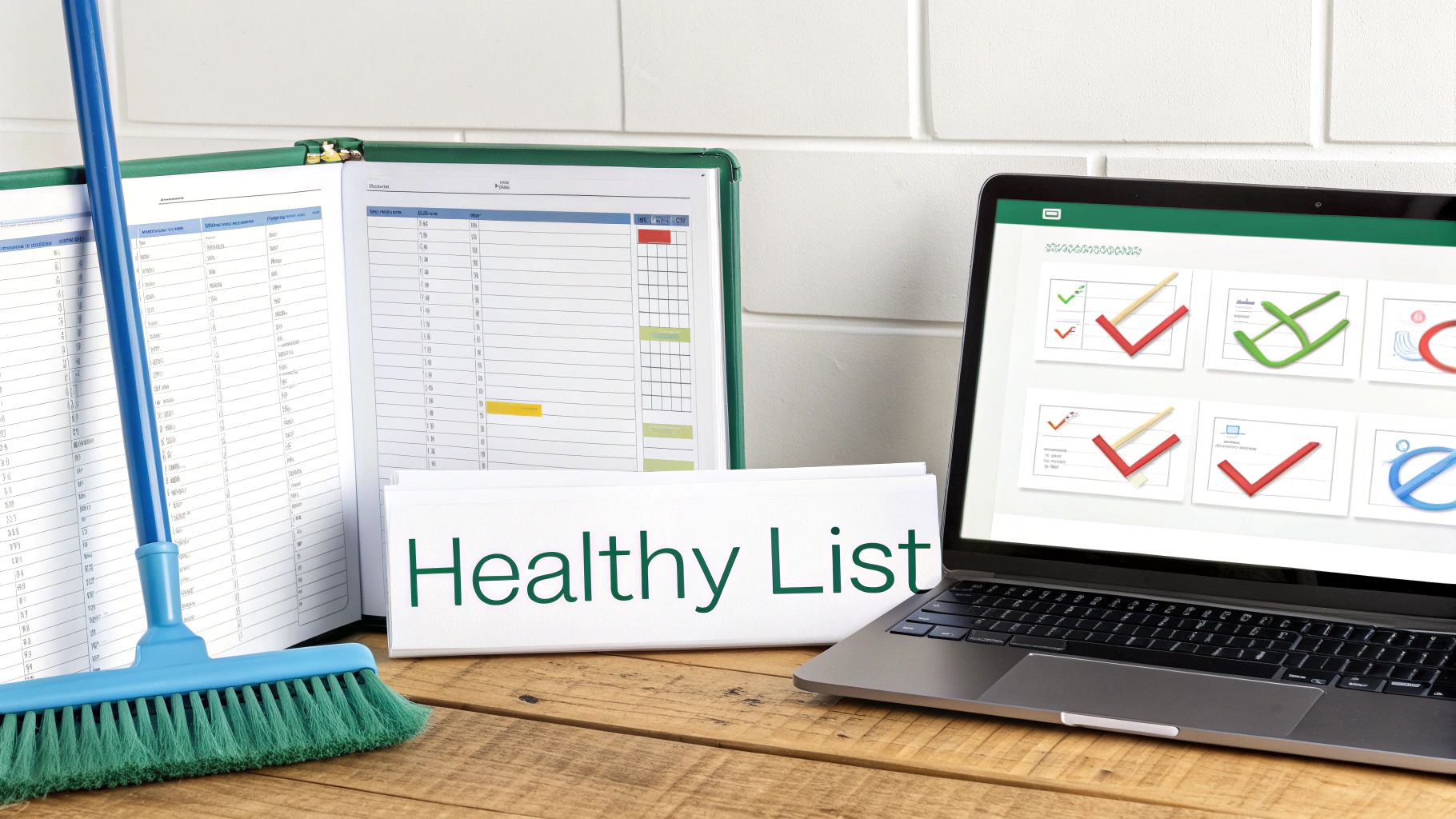
    A blue broom, an open binder, a "Healthy List" sign, and a laptop with checkmark graphics on a wooden desk.

    I always tell people to think of their email list like a garden. You can't just plant seeds and walk away. You have to constantly tend to it—pulling out the weeds (bad contacts) and nurturing the good ones—if you want to see any real growth. Without that regular maintenance, your list will get overrun with dead-end contacts.

    The Critical Role of Email Verification

    If you do only one thing for your list hygiene, make it email verification. This is how you confirm an email address is valid and can actually receive mail before you hit send. When you email a bad address, you get a hard bounce, which is a massive red flag for providers like Gmail and Outlook.

    Too many hard bounces make you look like a spammer. Suddenly, your emails start landing in the junk folder for everyone, even your most loyal subscribers. That's why you have to verify emails at two crucial points:

    • At the Point of Capture: A real-time verification API on your signup forms is a must. It catches typos and fake emails the second they're entered.
    • Periodically for Your Entire List: Every few months, run your whole list through a bulk verification tool. You'll be surprised how many emails go bad over time.

    For a deeper look at the mechanics, you can learn more about the fundamentals of email address verification and how it protects your sender score.

    Combating Natural List Decay

    Every email list has a shelf life. It's just a fact of life in this business. People change jobs, ditch old email accounts, or just stop caring. This is called list decay, and it happens way faster than you’d think.

    Your email list is degrading as we speak. On average, at least 23% of a list goes bad within a single year. That means without constant building and cleaning, you could lose a quarter of your audience annually. To put that in perspective, in 2025 alone, over 2.6 billion emails were found to be invalid. That's a staggering amount of bad data that can wreck a campaign.

    A decaying list isn't just shrinking; it's getting weaker. The longer you put off cleaning it, the more your deliverability, open rates, and ROI will crater. Proactive hygiene isn't just a good idea—it's a survival tactic.

    The best defense is simple: clean your list regularly. This means getting rid of contacts that hard bounce or have been completely unengaged for 90 to 180 days. I know it feels wrong to shrink your list on purpose, but trust me on this. A smaller, highly engaged list will always crush a massive, inactive one.

    Re-Engaging Inactive Subscribers

    Now, before you go deleting every quiet subscriber, it's worth a shot to win them back. A re-engagement campaign (or a "win-back" campaign) is your chance to remind them why they signed up in the first place.

    The goal here isn't just a cheap open or click. It's about sparking a genuine connection again.

    Here’s a simple, effective way to do it:

    1. Find the Sleepers: First, create a segment of everyone who hasn't opened or clicked an email in the last 90 days.
    2. Send a "We Miss You" Email: This is your opening shot. Try a special offer, a poll asking what content they want to see, or a simple question to get a reply. Keep it friendly and low-pressure.
    3. Send the "Last Chance" Email: If you still hear crickets, send one last message. Let them know you'll be removing them from your list unless they click a link to stay. No hard feelings.

    This process gives people a fair chance to stick around while making sure you're cleanly removing the ones who are truly gone. By combining solid verification, regular cleaning, and smart re-engagement, you'll make sure your emails actually land in the inbox and get the results you're after.

    Turning Your List into an Engine with Segmentation and Automation

    Okay, so you've started collecting emails. That's a great first step, but it's just that—a first step. A raw list of emails is like a pile of lumber. The real magic happens when you build something with it. Just blasting the same generic message to everyone is a fast track to high unsubscribe rates and dismal engagement.

    Laptop showing a workflow diagram and a smartphone with a green app icon, demonstrating digital marketing automation.

    This is where you get smart with segmentation and automation. By slicing your audience into focused groups and setting up automated email workflows, you can send messages that feel personal, relevant, and perfectly timed. It makes people feel like you get them, which is the cornerstone of building real loyalty.

    Unlock the Power of Smart Segmentation

    Segmentation is just a fancy word for dividing your email list into smaller subgroups based on shared characteristics. Instead of shouting into a crowded room, you're having meaningful conversations with people who actually want to hear what you have to say. It makes your marketing so much more effective.

    You can slice and dice your list in a million ways, but these are the big ones:

    • Demographic Segmentation: This is the basic stuff—location, age, job title, company size. A B2B software company isn't going to send the same pitch to a startup CEO as they would to an enterprise marketing manager.
    • Behavioral Segmentation: This is all about what people do (or don't do). Think purchase history, pages they've visited on your site, or if they clicked a link in your last newsletter. It’s powerful stuff.
    • Engagement Segmentation: This is where you group subscribers based on how they interact with your emails. You can create buckets for your die-hard fans, the occasional openers, and the folks who have gone radio silent.

    Segmentation transforms your list from a static database into a dynamic communication tool. A simple split between new subscribers and repeat customers lets you nurture one group and reward the other. It's a simple change that maximizes the impact of every single email.

    Imagine an e-commerce store that sells outdoor gear. They can create a segment of everyone who bought hiking boots in the last year. When a new line of waterproof socks comes out, that specific group gets a targeted email. The rest of the list doesn't. That relevance is what drives sales.

    Set Up Your Automation Workflows

    Once your list is segmented, you can let automation do the heavy lifting. An email automation workflow is just a series of pre-written emails that get sent automatically when someone meets a specific trigger.

    This isn't just about saving time; it's about creating a consistent, positive experience for every single subscriber, right from the start. There are two automated campaigns that every business needs, no exceptions.

    The Nurturing Welcome Series

    Your first email is your most important. Seriously. Welcome emails have an average open rate of a staggering 82%. That's your best shot to make a killer first impression, so don't waste it. A welcome series builds on that initial momentum, introducing new subscribers to your brand and what you're all about.

    Here’s a simple but effective sequence:

    1. Email 1 (Immediate): Deliver the goods. Send the lead magnet they signed up for, along with a warm, personal welcome.
    2. Email 2 (2 Days Later): Tell a story. Share your brand's mission or a customer success story to build a connection.
    3. Email 3 (4 Days Later): Add pure value. Send them your best blog post, a helpful tutorial, or a useful resource with no strings attached.
    4. Email 4 (7 Days Later): Make a soft pitch. Gently introduce your core product or service, maybe with a small introductory offer.

    Check out some great welcome email examples to see how the pros nail that first impression. This initial nurturing process really sets the tone for the entire relationship.

    The Re-Engagement Campaign

    It’s just a fact of life: some subscribers will eventually tune out. A re-engagement campaign (also called a win-back campaign) is your automated attempt to bring them back into the fold before they're gone for good.

    This workflow usually triggers when someone hasn't opened or clicked an email in a while—say, 90 days. The campaign could be a simple "We miss you" email with a special discount, a quick poll asking what content they want to see, or a final "goodbye" email before you clean them from your active list. This keeps your list healthy and full of people who actually want to hear from you.

    Navigating Compliance and Building Subscriber Trust

    Let's get one thing straight: building a powerful email list comes with real responsibility. It’s not just about what you send, but how you collect and handle people's information. Getting this part right isn't just about ticking a legal box—it's the bedrock of a long-term, trust-based relationship with your audience.

    Screw this up, and you're looking at more than just hefty fines. You'll torpedo your sender reputation and end up with a list of people who hit the spam button the second they see your name.

    Think of compliance as the ultimate sign of respect. When you play by the rules, you're telling your subscribers that you value their privacy and their time. This isn't some annoying hurdle; it's your chance to build a loyal, engaged community right from the start.

    Understanding the Rules of the Road

    Two major regulations basically set the global standard for email marketing: the CAN-SPAM Act in the U.S. and the General Data Protection Regulation (GDPR) in the European Union. Even if you're not based in those regions, your subscribers could be, so treating these rules as best practices will keep you safe everywhere.

    • CAN-SPAM Act: This law is all about commercial emails. It boils down to this: be honest in your subject lines, clearly state your message is an ad, include a physical mailing address, and—this is the big one—give people a dead-simple way to unsubscribe.

    • GDPR: This one is much broader and way stricter. It's all about data privacy and user rights. The key mandate for list builders is that you must get explicit and affirmative consent before adding someone. That means no pre-checked boxes or sneaky, fine-print sign-ups.

    Following these regulations isn't just about dodging fines that can climb into the tens of thousands of dollars. It’s about proving you're a trustworthy brand that doesn't play fast and loose with personal data.

    Consent Is Everything

    If you remember one thing, make it this: consent is the most important principle in building a compliant list. You must have clear, undeniable permission to email someone. This is where opt-ins come into play. A single opt-in, where someone fills out a form and is instantly added, is generally fine under CAN-SPAM.

    But the double opt-in process is the undisputed gold standard, especially if you have any subscribers in the EU. This is where a new subscriber has to click a confirmation link in an email before they’re officially on your list.

    Using a double opt-in is one of the smartest moves you can make. It proves the email address is real and that its owner genuinely wants to hear from you. The payoff is dramatically better engagement rates and a rock-solid sender reputation down the line.

    That little extra step acts as a powerful filter. It weeds out typos, bots, and half-interested people, leaving you with a list of subscribers who are actually ready to engage.

    Make Unsubscribing Effortless

    It sounds backward, but a clear, easy-to-find unsubscribe link is one of your best friends. Hiding it or making people jump through hoops is a direct violation of CAN-SPAM and a guaranteed way to get your emails marked as spam.

    Think about it. When someone can't easily opt out, they don't just delete your email—they report it. Get enough of those spam complaints, and email providers will blacklist your domain. Once that happens, it becomes nearly impossible for any of your messages to land in the inbox.

    An obvious unsubscribe link respects your subscriber's choice. It also keeps your list healthy by pruning people who are no longer interested, which naturally boosts your open and click-through rates. Following these rules isn’t a chore; it’s just smart marketing. It's how you build an email list that actually lasts.

    Measuring Your Success and Optimizing for Growth

    Building an email list without measuring its performance is like driving blind. Sure, you're moving, but you have no clue if you're headed in the right direction. If you want to turn your list-building efforts into a predictable growth engine, you have to track what works and kill what doesn't.

    This means looking beyond vanity metrics like the total subscriber count. A huge list of unengaged contacts is just dead weight. Instead, you need to zero in on the key performance indicators (KPIs) that signal a healthy, growing list of actual potential customers.

    Key Metrics That Actually Matter

    To get a real sense of your list-building health, you only need to track a few core metrics. These numbers tell a story, revealing how well you're attracting the right people and keeping them hooked over time.

    Get started by keeping a close eye on these essentials:

    • Sign-Up Conversion Rate: This is the percentage of visitors who see your opt-in form and actually sign up. A low rate (anything below 1-2%) is a red flag that your offer isn't compelling enough or your form is buried.
    • Lead Quality: This one is less about a single number and more about observation. Are the new subscribers you're getting actually your ICP? Are they opening your welcome emails? High-quality leads engage right from the get-go.
    • Long-Term Engagement: Keep an eye on your open and click-through rates over a 3-6 month period. A healthy list will maintain steady engagement, while a decaying one will show a slow but steady decline.

    Your goal isn't just to get an email address; it's to start a conversation. Tracking these specific metrics helps you see if you're attracting people who actually want to listen, which is the only way to build an email list that drives real business results.

    A Simple Framework for A/B Testing

    The fastest way to improve your metrics is through relentless optimization. Your best friend here is A/B testing, also known as split testing. It's a simple concept: you create two versions of something (like an opt-in form), show each to a different segment of your audience, and see which one performs better.

    You don't need fancy, expensive software to get started. Most modern email service providers like Mailchimp or ConvertKit have A/B testing features baked right in.

    Here’s what you can test for an immediate impact:

    1. Your Headline: Try pitting a benefit-driven headline ("Get the 5-Step SEO Checklist") against one that sparks curiosity ("The SEO Mistake 99% of People Make").
    2. The Call-to-Action (CTA): Test a generic CTA button like "Subscribe" against something more specific and action-oriented like "Send Me the Guide!"
    3. The Lead Magnet: See what your audience really wants by testing two different offers against each other, like a comprehensive ebook versus a quick video tutorial.

    By methodically testing just one element at a time, you can systematically dial in your conversion rates. This data-driven approach takes the guesswork out of the equation, transforming your list-building from a shot in the dark into a reliable growth machine.

    Got Questions About Building Your List? We've Got Answers.

    When you're just getting started, a few questions always seem to pop up. Let's run through the big ones so you can move forward with confidence and clarity.

    How Big Does My List Need to Be Before I Start Marketing?

    This is easily the most common question I hear, and the answer almost feels too simple: start with one.

    Seriously. The goal isn't to hit some magic number. It's about building a small, hyper-engaged group of people who actually want to hear from you. An email list with just 50 true fans who open every email is infinitely more valuable than a list of 5,000 people who send you straight to the trash.

    Focus on quality over quantity from the get-go. Those first subscribers are your goldmine for figuring out what works.

    How Often Should I Actually Email a New List?

    Consistency trumps frequency, every time. For a brand new list, a great rhythm to get into is emailing once a week. This keeps you top-of-mind and helps build a real relationship without drowning your new subscribers in content.

    Once you start getting some data back, you can play with the timing. The most important thing is picking a schedule you can realistically stick to, whether that's weekly, bi-weekly, or something else.

    A high-value newsletter that lands in their inbox every Tuesday morning like clockwork is far better than sending random emails whenever you feel like it. Predictability builds trust.

    What’s a Good Open Rate for a Brand New List?

    For a fresh, healthy list—especially one you built using a double opt-in process—you should be aiming for an open rate of 30-40%, or maybe even higher. Your first subscribers are usually your biggest fans, so it's normal for these initial numbers to be well above industry averages.

    But if you're seeing open rates below 20% right out of the gate, that’s a red flag. It’s time to take a hard look at a few things:

    • Your subject lines: Are they actually interesting enough to make someone stop scrolling and click?
    • Your audience quality: Did your lead magnet attract the right people, or just anyone looking for a freebie?
    • Your first emails: Did you deliver on the promise you made when they signed up?

    Ready to turn LinkedIn profiles into a pipeline of verified leads? The EmailScout Chrome extension lets you find unlimited emails for free and build a high-quality list in seconds. Start connecting with the right decision-makers today. Get started with EmailScout.

  • How to Build an Email List That Actually Grows Your Business

    How to Build an Email List That Actually Grows Your Business

    At its core, building an email list is a simple value exchange. You offer something genuinely useful, and in return, people give you permission to land in their inbox. It all starts with figuring out who you want to attract, creating something they can't resist, and then putting that offer in front of them. This direct line to your audience is one of the most powerful tools you can have for growing a business.

    Why an Email List Is Your Most Valuable Marketing Asset

    Image

    Before we get into the nuts and bolts of how to build a list, we need to talk about why it’s such a big deal. Here’s the reality: your social media followers don’t really belong to you; they belong to the platform. Your email subscribers, on the other hand, are yours.

    You own that relationship. You're not at the mercy of a surprise algorithm update or the ever-rising cost of ads just to reach the people who chose to follow you. An email list isn't just another marketing channel—it's a real, durable asset for your business. It's a reliable way to talk to people who have already raised their hands and said, "Yes, I'm interested." That's the foundation for predictable revenue and real customer loyalty.

    The Power of a Direct Connection

    Think about the difference. On social media, your post is just one more thing in an endless, noisy feed. An email, however, arrives in someone's personal space. It’s a much more intimate and focused environment, which gives you a unique opportunity to build actual rapport and guide people from being casually interested to becoming loyal fans.

    And let's not forget the financial side of things. Email marketing consistently delivers one of the highest returns on investment out there. For every dollar you put in, you can expect an average return of around $57. That’s not a typo. This incredible ROI is possible precisely because you're talking directly to people who want to hear from you. You can learn more about the financial impact of email list building and related strategies to see just how effective it can be.

    An email list is the only marketing channel you can truly own. It acts as an insurance policy against platform volatility and gives you complete control over your audience communication.

    Building a Foundation for Growth

    Ultimately, a quality email list brings stability to your business. It’s the engine that lets you:

    • Drive Repeat Business: Keep the conversation going and turn one-time buyers into repeat customers.
    • Launch New Products: Announce your next big thing to an audience that's already eager to listen.
    • Gather Valuable Feedback: Who better to ask for input than your most engaged followers?

    Every single person who subscribes is a potential long-term relationship in the making. Your list is an asset that only gets more valuable over time.

    Defining Your Perfect Subscriber Persona

    Image

    Before you even think about writing a welcome email or designing a signup form, you have to get crystal clear on one thing: who are you actually trying to reach?

    An email list filled with random people is just noise. But a list filled with the right people? That’s a genuine asset for your business. This is why spending time on your subscriber persona is a non-negotiable first step.

    This isn’t about broad, generic labels. It’s about understanding the living, breathing person on the other side of the screen. What are their biggest headaches at work? What keeps them up at night? What are they secretly hoping to achieve in the next year? The answers to these questions are pure gold—they're the key to creating lead magnets and content they can't resist.

    Moving Beyond Basic Demographics

    A truly useful persona goes way past simple demographics. We need to get into psychographics—the attitudes, ambitions, and core values of your ideal subscriber. This is what helps you connect with them on a human level.

    For instance, "small business owners" is way too vague. A much stronger persona would be something like, "Meet Sarah. She’s a 35-year-old founder of a bootstrapped e-commerce store. Her biggest challenge is driving sales on a shoestring budget." See how that specificity immediately sparks ideas for content she'd find genuinely helpful?

    Getting this kind of detail doesn't require a huge research budget. You can start digging with these practical steps:

    • Analyze Your Competitors' Audience: See who's commenting on their social media posts. What questions pop up again and again? The comments section is a free-for-all of market research.
    • Run Social Media Polls: Use LinkedIn or X to ask your followers simple questions about their work challenges. A quick poll can give you valuable insights in less than a day.
    • Talk to Your Current Customers: Your best customers are a living, breathing example of your ideal persona. Hop on a quick call and ask what problems they were trying to solve when they found you.

    The goal here is to paint such a vivid picture of your ideal subscriber that you feel like you know them. This clarity makes every other step in building your email list ten times easier and more effective.

    Trust me, the upfront effort pays off. Email is still a powerhouse, projected to reach over 4.6 billion users by 2025. More telling is that 60% of consumers say they prefer brands to contact them via email. When you know your persona inside and out, you can write messages that truly land, turning that preference into real connection and loyalty. If you want to see the numbers for yourself, check out the latest email marketing statistics to understand the full potential.

    Creating Lead Magnets That People Actually Want

    Let's be honest—people are protective of their inboxes. To get someone to hand over their email address, you need to offer something truly valuable in return. This is where your lead magnet comes in. Think of it as a compelling ethical bribe: a high-value resource you give away for free that solves a real problem for your ideal customer.

    Forget the generic "subscribe to our newsletter" pop-up. That's not enough anymore. Your lead magnet needs to be a knockout punch, offering an immediate win that makes giving you their email feel like a no-brainer.

    Going Beyond the Basic PDF

    While a simple checklist or ebook can still do the trick, the most powerful lead magnets today are often interactive or provide instant utility. The goal is to deliver a quick, satisfying result that showcases your expertise and builds trust right out of the gate.

    Here are a few ideas I've seen work wonders across different industries:

    • Interactive Quizzes: Quizzes are fantastic for engagement. A marketing agency, for instance, could create a "What's Your Marketing Blind Spot?" quiz that delivers personalized results. It's fun, insightful, and a great way to capture a lead.
    • Practical Templates: Who doesn't love a good template? A downloadable spreadsheet, a social media content calendar, or a project plan can be incredibly valuable. You're not just giving information; you're saving your audience precious time.
    • Exclusive Video Workshops: A short, pre-recorded training that teaches one specific skill has a much higher perceived value than a PDF. It's a powerful way to let your personality shine through and demonstrate your teaching style.

    The secret ingredient is specificity. A lead magnet titled "10 Quick SEO Fixes for E-commerce Sites" will crush a generic one like "Guide to SEO" every time. It promises a clear solution for a specific audience with a specific problem.

    To help you brainstorm, I've put together a few ideas tailored to different business models.

    Lead Magnet Ideas for Different Industries

    Choosing the right format is half the battle. This table breaks down what kind of lead magnet works best for different types of businesses and, more importantly, why it works.

    Industry/Business Type High-Value Lead Magnet Idea Why It Works
    SaaS Company A free, limited-feature version of your tool or a feature-specific template. Gives a direct taste of the product's value, turning a cold lead into a warm one.
    E-commerce Brand A "first-time buyer" discount code (15% off) or an exclusive style guide. Drives an immediate sale and segments new customers for future marketing.
    Agency/Consultant A detailed case study or a "5-day email course" on a core topic. Establishes authority and demonstrates your ability to deliver tangible results.
    Blogger/Creator An exclusive resource library or a checklist for a popular tutorial post. Provides a ton of value upfront and encourages repeat visits to your content.

    The key is to align the lead magnet with your core offer. You want to attract people who are not just looking for a freebie, but who are potential customers down the line.

    Designing a High-Converting Landing Page

    Once you've crafted an irresistible lead magnet, you need a dedicated landing page to showcase it. This page has one job: to convince visitors to sign up. Don't clutter it with anything else.

    A killer opt-in page needs just a few core elements:

    1. A Compelling Headline: Clearly state the benefit. What pain will this solve?
    2. A Few Key Bullet Points: Quickly list the main takeaways or results they'll get.
    3. A Visual of the Offer: Show a mockup of the ebook, a screenshot of the template, or a still from the video. People want to see what they're getting.
    4. A Simple Opt-in Form: Only ask for what you absolutely need. For most, just an email address is perfect. Every extra field you add will lower your conversion rate.

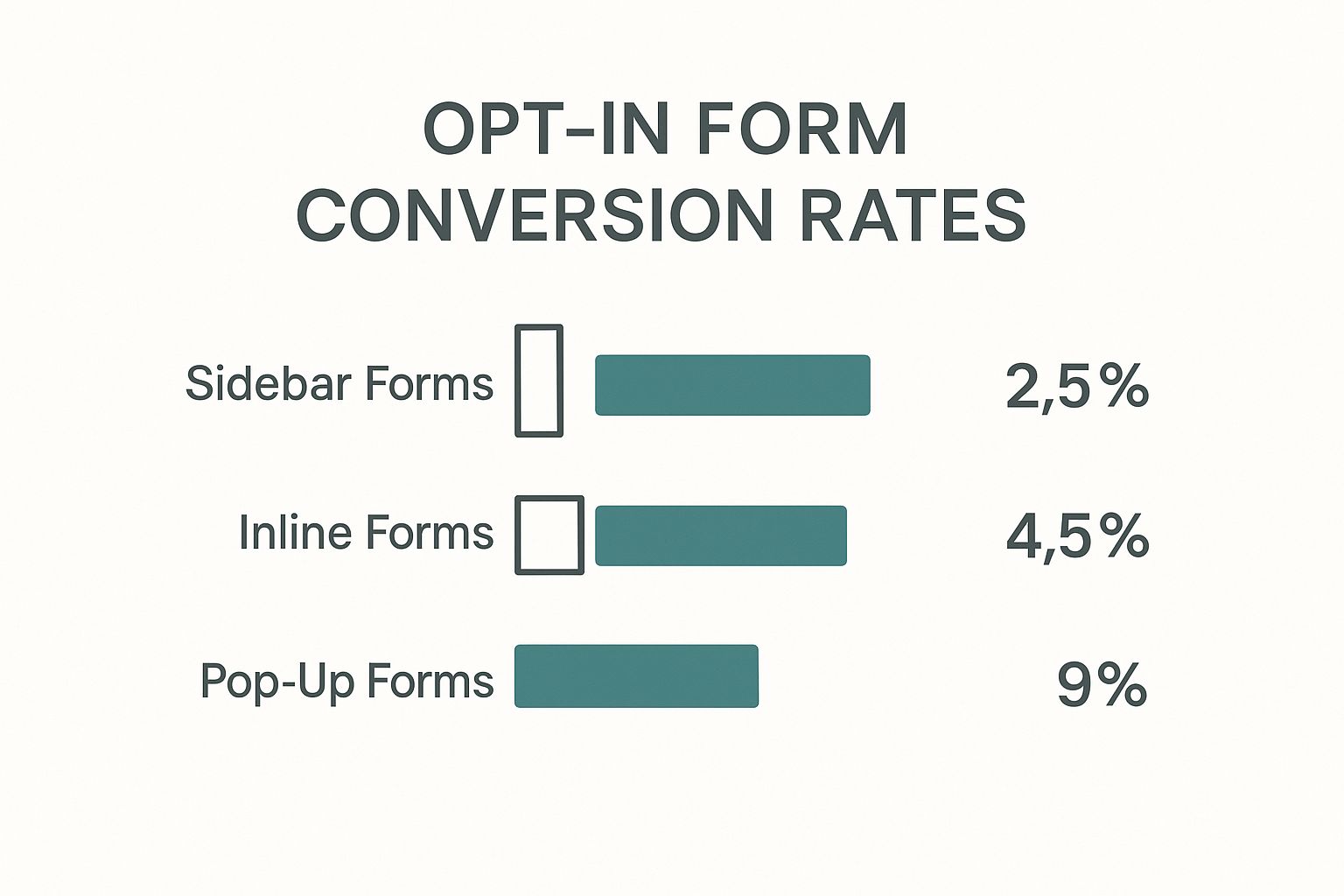
    Where you place your opt-in form can also make a huge difference. This infographic breaks down the performance of different form types and placement strategies.

    Image

    As you can see from the data, pop-up forms are clear winners, converting significantly better than static sidebar or footer options. They do a great job of capturing a user's attention at just the right moment without being overly intrusive.

    Finding Verified Emails for Targeted Outreach

    So far, we’ve covered strategies for getting people to come to you. But what about going out and finding the exact people you want to talk to? Building an email list isn't just about attracting inbound leads; it's also about proactively identifying the key decision-makers at companies you’d love to work with.

    This is where a good email finder tool changes the game.

    Instead of waiting for prospects to stumble upon your lead magnet, you can build a hyper-targeted list of people who perfectly match your ideal customer profile. Let's say you're targeting marketing managers at B2B SaaS companies in North America. An email finder lets you pinpoint those exact individuals and get their professional contact information.

    This approach is all about precision. You're not casting a wide net and hoping for the best. You're using a spear to connect directly with the people who matter most to your business. It's a powerful way to complement your inbound marketing, especially if you're in sales, run an agency, or provide B2B services.

    How Email Finders Put List Building on Fast-Forward

    Email discovery tools like EmailScout work by scanning public data sources to find and verify professional email addresses tied to a specific person or company. The process essentially turns a name, a job title, and a company website into a real, actionable contact.

    Here’s a quick look at how the EmailScout browser extension makes this incredibly simple. You can find contacts right from a company's website.

    As you can see, the extension just sits in your browser. When you're on a target company's site, you can pull up verified contacts with a single click. This completely cuts down the time you'd otherwise spend digging around for contact info, letting you build a quality outbound list in a fraction of the time.

    Why You Can't Skip Email Verification

    Just finding an email address isn't enough—you absolutely have to know if it's valid.

    Sending emails to dead-end addresses leads to high bounce rates, and that’s a massive red flag for providers like Gmail and Outlook. Once your bounce rate creeps over 2%, you risk damaging your sender reputation. When that happens, even your legitimate emails—the ones going to people who actually subscribed—can end up buried in the spam folder.

    Verification isn't just a technical checkbox. It's about protecting your entire email strategy. A clean list keeps your sender score healthy, ensures your messages actually get delivered, and gives your hard work a chance to be seen.

    This is why any decent, modern email finder has verification built right in. It doesn't just guess an email pattern; it runs real-time checks to confirm the address is active and can receive mail. This step is non-negotiable if you're serious about building a list that supports a healthy, long-term marketing plan. If you want to get into the weeds on this, you can learn more about how to validate an email address and see why it's so vital for your campaigns.

    Using a tool for this gives you a huge leg up. It lets you:

    • Build Targeted Lists in Minutes: Turn a list of target companies into a spreadsheet of verified contacts in the time it takes to drink a cup of coffee.
    • Personalize Your Outreach: When you know exactly who you're talking to, you can tailor your message to their role and company, which dramatically increases your odds of getting a reply.
    • Protect Your Domain's Health: By keeping your bounce rate low, you maintain a high sender reputation and avoid getting blacklisted.

    When you pair inbound strategies like lead magnets with smart, targeted outbound prospecting, you create a powerful, two-pronged approach to growth. You’ll capture the interest of people who find you while also proactively connecting with the high-value contacts you've identified yourself.

    Promoting Your Offer to Attract New Subscribers

    Image

    You’ve created an incredible lead magnet—that’s the hard part, right? Well, mostly. Even the most valuable resource won't promote itself. You need a repeatable system to get it in front of the right people, or it’ll just end up gathering digital dust.

    The good news is you don’t need a massive ad budget to get things moving. By focusing on channels you already control and exploring a few smart partnerships, you can create a steady flow of high-quality subscribers. The trick is to figure out where your ideal audience already hangs out online and meet them there.

    Weave Your Offer into Your Content

    One of the simplest and most effective ways to promote your lead magnet is to embed it directly into the content people are already consuming. This approach catches visitors when they're already engaged with your brand and actively looking for more.

    A really powerful way to do this is with a content upgrade. Instead of a generic, site-wide offer, you create a resource that's a perfect companion to a specific blog post. For example, if you have an article on "10 Social Media Scheduling Tips," a fantastic content upgrade would be a downloadable social media content calendar. It’s the logical next step for anyone reading that post.

    Here are a few a great places to feature your opt-in offers:

    • In-line Text Links: Naturally link to your landing page right in the body of your articles where it makes sense.
    • Feature Boxes: Use a visually distinct box at the end of a post to draw attention to your lead magnet.
    • Homepage Call-to-Action: Dedicate a prominent spot on your homepage to showcase your absolute best offer.

    Use Social Media for Maximum Visibility

    Your social media profiles are prime real estate for building your list. So many people treat their bio as an afterthought, but it's often the first place new followers look to figure out who you are and what you do.

    That bio link is gold. Use it wisely. You can use a tool like Linktree to feature multiple links or just point it directly to your lead magnet's landing page. But don't just drop the link—tell people what's in it for them. A simple call-to-action like "Grab my free 5-day email course on freelance writing 👇" is way more effective than a bare URL.

    Think of your social media channels as distribution networks for your lead magnet. Every post is an opportunity to remind your audience of the value you offer, driving them from a passive follower to an active email subscriber.

    And don't just "set it and forget it." You should be regularly creating posts, stories, and even short videos that specifically highlight your freebie. Show a sneak peek of the checklist or share a key insight from your guide to get people curious. For more ideas on driving consistent sign-ups, check out these lead generation best practices to build a more robust system.

    Expand Your Reach with Collaboration

    Tapping into someone else's audience is one of the fastest ways to grow. Partnering with complementary businesses or creators in your space introduces your offer to a warm, relevant audience that already trusts the source. It’s a win-win.

    Here are a few collaboration ideas to get you started:

    • Co-hosted Webinars: Team up with another expert in your niche for a joint training session. You both promote it to your audiences, and everyone who signs up joins both of your email lists.
    • Guest Posting: Write an article for a popular blog in your industry. When you write your author bio, don't just link to your homepage. Link directly to your lead magnet's landing page to capture those leads.
    • Podcast Interviews: Being a guest on a podcast is a fantastic way to share your expertise. At the end of the show, the host will almost always ask where people can find you—that's your chance to mention your lead magnet.

    So, you’ve got their email address. That's a huge win, but it's really just the starting line. Now, the real work begins: turning that flicker of interest into a lasting connection. This is where you move from just collecting names to actually building a community.

    Your chance to make a real impression starts the second they hit "subscribe." That first email they get from you? It’s easily the most important one you’ll ever send. It’s not just about handing over the freebie they signed up for; it’s your golden opportunity to prove they made a smart decision.

    We've actually put together a deep dive on how to nail this, which you can check out in our guide on the perfect welcome email example.

    Craft a Killer Welcome Series

    A single welcome email is great, but a well-thought-out welcome series is what truly sets you apart. Think of it as an automated onboarding sequence that rolls out the red carpet for every new person who joins your list.

    This series should do a few key things right off the bat:

    • Deliver the goods, fast. Your very first email needs to contain the promised lead magnet. No excuses, no delays.
    • Show them who you are. Share a bit about yourself or your brand's mission. People connect with people, not faceless companies.
    • Set the scene. Let them know what to expect. How often will you email? What kind of stuff will you be sending? Managing expectations is a huge part of building trust.

    Imagine a freelance coach's three-part series. The first email delivers their "Ultimate Client Proposal Template." The second shares a personal story about the ups and downs of their own freelance journey. The third sends them a link to one of their most popular blog posts full of practical tips. See how that builds a relationship and provides value way beyond the initial download?

    Your welcome sequence is your best shot to prove your worth. Don't just drop the lead magnet and vanish. This is when subscribers are most engaged, so use that window to build a real connection and make them feel like they've found their people.

    Unlock The Power of Smart Segmentation

    Once your new subscribers have settled in, it's time to stop talking to everyone the same way. Blasting one generic message to your entire list is a surefire way to get ignored, or worse, get a flood of unsubscribes.

    The answer is segmentation. It’s just a fancy word for splitting your audience into smaller, more focused groups based on what you know about them.

    And it works. Seriously. Segmented campaigns can drive 30% more opens and a whopping 50% more click-throughs than one-size-fits-all emails. When your messages feel relevant and personal, people actually look forward to them. If you want to see the numbers for yourself, there are some great insights on email personalization and performance that back this up.

    You don't have to get complicated, either. Start with simple segments like:

    • Their entry point: What lead magnet did they download to join your list?
    • Engagement level: Who are your super-fans that open every email?
    • Purchase history: Do you have first-time buyers vs. loyal, repeat customers?

    When you send the right message to the right person at the right time, your email list stops being a megaphone and starts being a powerful tool for building genuine relationships.

    Got Questions About Building an Email List?

    When you're diving into email marketing, a lot of questions pop up. It's totally normal. Let's tackle some of the most common ones I hear from people just getting started.

    How Long Does It Take to Build a Good Email List?

    There’s no magic number here, and honestly, anyone who gives you a hard-and-fast timeline is guessing. It really boils down to your niche and how much effort you're putting into your lead magnets and promotion.

    If you're hustling and have a solid strategy, you could see your first 100 subscribers within a few weeks. Getting to 1,000 truly engaged subscribers? That’s more of a long-term game, likely taking several months of consistent work.

    Remember, the real win is quality over quantity. An engaged list of 500 people who actually open your emails and look forward to what you send is infinitely more valuable than a list of 5,000 who ignore you.

    What Is a Good Email Open Rate to Aim For?

    Industry benchmarks will tell you a "good" open rate is somewhere between 15% and 25%. But that's a huge range, and it varies wildly. A specialized B2B newsletter will have a completely different baseline than an e-commerce brand's promotional emails.

    My advice? Don't get too hung up on industry averages. The only metric that matters is your metric. Focus on beating your own numbers month over month. Keep testing your subject lines, segmenting your lists, and delivering real value. That's how you build a loyal audience that opens your stuff.

    Should I Ever Buy an Email List?

    Let me be crystal clear: No. Never. It’s tempting, I get it—a shortcut to a massive audience. But it’s a shortcut that leads directly off a cliff.

    Buying a list is the fastest way to kill your email marketing before it even starts. Here’s why:

    • You'll destroy your sender reputation. These are cold contacts who didn't ask to hear from you. Expect sky-high bounce rates and a flood of spam complaints, which will get your domain blacklisted by email providers like Gmail and Outlook.
    • You could break the law. Sending unsolicited emails can put you in violation of privacy and anti-spam laws like GDPR and CAN-SPAM, which come with hefty fines.
    • It’s a complete waste of money. These people have no idea who you are and aren't interested in what you're selling. Your conversion rates will be abysmal.

    The only way to build a list that actually works is to earn it, one opt-in at a time. It's slower, but it's the only path to sustainable results.


    Ready to start building your own targeted email lists the right way? EmailScout helps you find verified emails from key decision-makers in a single click, right from your browser. Discover unlimited contacts for free and turn your outreach into results. Get started at https://emailscout.io.