Tag: email finder tool

  • How to Find Business Emails That Actually Get Replies

    How to Find Business Emails That Actually Get Replies

    When it comes to finding business emails, you really have two main paths to go down: good old-fashioned manual detective work or using automated email finder tools. I've found that the best approach is a mix of both. It's the quickest way I know to build solid outreach lists that actually get you in front of decision-makers, instead of landing in some generic inbox black hole.

    Why Finding the Right Emails Is a Game Changer

    Let’s be real for a second. Pouring your heart into a perfect pitch just to send it to the wrong person is a huge waste of time. Firing off messages to info@company.com or sales@company.com is a long shot at best; they rarely make it to the people with the power to say "yes." This is why knowing how to find direct business emails isn't just a nice-to-have, it's a core skill for anyone in sales or marketing.

    A man in a suit jacket works intently on a laptop displaying a business graph, next to a "Find Right Emails" banner.

    Once you have the direct line to a decision-maker, your odds of starting a real conversation shoot up immediately. That kind of precision has a ripple effect across your entire sales and marketing funnel.

    The Real Cost of Bad Email Data

    Every email that bounces back chips away at your sender's reputation. Before you know it, your carefully crafted messages start getting flagged as spam. On top of that, think about all the hours wasted chasing dead-end leads. That’s time and energy that could have been spent closing deals.

    The frustration is real, but thankfully, so is the solution. Think of email discovery as a skill you can sharpen. It really boils down to two strategies: manual digging and automated tools. If you're looking to go deep on the different techniques, there are some great comprehensive guides on finding email addresses that cover all the bases.

    The line between a winning campaign and a total flop often comes down to the quality of your contact list. Nailing down the right email is the first—and most important—step to getting a reply.

    Choosing Your Approach: Manual vs. Automation

    So, how do you decide where to start? The two primary methods for finding emails are built for different needs and scales.

    • Manual Detective Work: This is where you roll up your sleeves and do some hands-on research. You're scouring company websites, LinkedIn profiles, and industry blogs. It's perfect when you're targeting a handful of high-value prospects and want to get it right.
    • Automated Tools: This is where email finder extensions and platforms come in to do the heavy lifting. They're an absolute must-have for building larger lists quickly without burning out your team.

    To give you a clearer picture, here's a quick rundown of how these methods stack up.

    Email Discovery Methods At a Glance

    Method Best For Speed Accuracy
    Manual Search High-value, targeted prospects Slow High
    Email Finder Tools Building lists at scale Fast Varies, often high
    Email Permutations When you have a name and domain Medium Requires verification
    WHOIS Lookup Finding site owners/admins Fast Hit-or-miss for decision-makers

    Each method has its place, and knowing when to use which is key.

    The demand for slick, automated solutions is exploding for a reason. The global Email Search Engine Tool market is on track to hit $316.8 billion by 2025, and it's growing at an annual rate of 9.4%. Sales teams using these tools report building lists up to 30% faster, which is a massive competitive edge.

    Ultimately, the smartest strategy is a hybrid one. You might use manual research to pinpoint a few dream clients, then use an email finder to quickly locate and verify their contact details. This guide will walk you through both worlds, helping you master the art of connecting with the right people and driving real results.

    Becoming an Email Detective with Manual Techniques

    Before you even think about automated tools, it pays to master a few old-school manual techniques. Think of this as your foundational detective work—the stuff that helps you uncover contact information others completely miss.

    These methods are perfect when you're targeting a small number of high-value prospects and need to be absolutely certain you've got the right person.

    A woman uses a magnifying glass to inspect a green folder labeled 'EMAIL DETECTIVE' on a wooden desk.

    This hands-on approach isn't just about snagging an email. It’s about understanding the context behind that contact. You end up gathering little bits of intel along the way that will make your outreach message far more compelling and personal.

    Start with the Company Website

    The company's own website is an often-overlooked goldmine. It's the most direct source, and a bit of patient digging can often yield exactly what you're looking for without ever leaving their domain.

    Your first stop should be the obvious pages. Hunt around these spots for direct contact details or clues about who's who:

    • About Us/Our Team: This is ground zero. It's the best place to find names, titles, and sometimes even direct emails for leadership and key department heads.
    • Press/Media Room: Press releases almost always list a media relations contact. This person is usually well-connected internally and can be a fantastic starting point.
    • Blog or News Section: Look for articles written by employees. Author bylines can sometimes include a direct email or a link to a personal portfolio that has their contact info.

    Leverage the Power of LinkedIn

    For B2B, LinkedIn is the undisputed king of professional directories. While it won't just hand you an email address on a silver platter, it gives you the two most critical puzzle pieces: a person’s full name and their company.

    Once you’ve identified a decision-maker on LinkedIn, note their exact name and title. This info is the raw material you'll use to make an educated guess, a technique we'll get into shortly. Pay close attention to spelling and whether they use a middle initial.

    Pro Tip: Don't just look at their current role. Check their activity feed. Have they recently published an article on LinkedIn or been featured in an industry publication? These external links often lead to more direct contact opportunities.

    Hunt for Digital Breadcrumbs

    Beyond the corporate site and LinkedIn, people leave digital footprints all over the web. A well-crafted Google search can often unearth an email address hiding in plain sight. This is where your inner detective really gets to shine.

    Try searching for specific combinations to cut through the noise. These advanced search operators can be surprisingly effective:

    • "[First Name] [Last Name]" email
    • "[First Name] [Last Name]" contact
    • site:companydomain.com "[First Name]"

    For example, a search like site:acmecorp.com "jane doe" will search only the Acme Corp website for mentions of Jane Doe. This might pull up an author page or a staff directory you missed during your initial browse.

    Check Social Media Bios and Personal Sites

    Many professionals, especially in tech, marketing, and creative fields, maintain a personal brand outside of their 9-to-5. Their social media profiles and personal websites are often full of contact information they're happy to share publicly.

    Scan their bios on platforms like Twitter/X or even their GitHub profile if they're in a technical role. A personal blog or portfolio site almost always has a "Contact Me" page. This approach is fantastic for individuals who are active online and can give you a direct line of communication that bypasses corporate gatekeepers.

    These manual methods take a bit of effort, but the quality of the leads you uncover is often unmatched.

    How to Intelligently Guess and Verify Email Addresses

    Once you’ve done a bit of initial digging, you'll probably have two key pieces of information: a person's name and their company's domain. This is where you can shift gears from pure searching to smart deduction. Instead of blindly hunting for an email, you can make an educated guess based on common corporate email patterns.

    This isn’t just random guesswork. It’s a process of elimination. Most companies use a standard format for their emails, and if you can figure out the pattern for one person, you've likely cracked the code for everyone else there.

    Uncovering Common Email Patterns

    Companies tend to stick to a handful of predictable email structures. Your job is to test the most common ones to see which one works. I always start with the most frequently used formats before I even think about the more obscure combinations.

    Here are the patterns I see most often in the wild:

    • First Name: john@company.com
    • First Initial, Last Name: jdoe@company.com
    • First Name, Last Initial: johnd@company.com
    • First Name.Last Name: john.doe@company.com
    • First Name_Last Name: john_doe@company.com

    So, if you’re looking for Jane Smith at innovatech.com, you’d quickly generate a list like jane@innovatech.com, jsmith@innovatech.com, and jane.smith@innovatech.com. It’s a simple technique, but it can get you the right address more than 50% of the time.

    The beauty of this method is its scalability. If you can find just one publicly available email from a company, you can often figure out their entire email syntax. That means you can confidently build the addresses for other key decision-makers in the same organization.

    This simple trick transforms a one-off task into a repeatable system. You're not just finding one email; you're unlocking a template for the whole company.

    The Crucial Verification Step

    Guessing is only half the battle. Firing off an email to a guessed address without checking it first is a fast track to a high bounce rate. That can seriously hurt your sender reputation with providers like Gmail and Outlook. Verification is a non-negotiable final step.

    The good news is you don’t have to actually send an email to see if it’s valid. There are plenty of free and simple online email verification tools that do the heavy lifting for you. They perform a real-time check to see if an address exists and can receive mail, giving you a clear "valid" or "invalid" result.

    It’s an incredibly straightforward process. You just copy and paste your potential emails into the verifier one by one. The tool pings the mail server without sending a message and reports back on the address’s status. For a deeper look at how this works, you can learn more about how to validate an email address with free tools.

    Putting It All Together: A Real-World Example

    Let’s say you’re targeting a Marketing Director named David Miller at a startup called "NextGen Solutions" (nextgensolutions.com). You can’t find his email anywhere, but you spot the CTO's email—s.chen@nextgensolutions.com—in an old press release.

    Bingo. That single email reveals the company's pattern: First Initial.Last Name@domain.com.

    Applying that same logic, you can construct David Miller's email as d.miller@nextgensolutions.com. You then pop it into a verifier, which confirms the address is valid. In less than a minute, you’ve gone from just a name to a confirmed, deliverable email address without spending a dime. This one-two punch of intelligent guessing and immediate verification is one of the most effective ways to build hyper-targeted prospect lists.

    Using an Email Finder to Accelerate Your Workflow

    Look, manual methods are great when you’re hunting for just a few specific emails. But let's be realistic—they just don't scale. The moment you need to build a prospect list with dozens, or even hundreds, of contacts, all that manual detective work becomes a massive bottleneck. This is where a good email finder tool, like the EmailScout Chrome extension, stops being a "nice-to-have" and becomes absolutely essential.

    These tools are built to do one thing and do it extremely well: find and verify business emails in seconds, not hours. They plug right into your browser, letting you grab contact info from LinkedIn profiles or company websites with a single click. For anyone in sales, marketing, or even a founder trying to make connections, this means more time spent actually talking to people and way less on mind-numbing data entry.

    From Manual Guesswork to Instant Discovery

    Picture this: you're an SDR who needs to build a list of 50 marketing managers in a niche industry. Doing that by hand? You're easily looking at an entire afternoon of sifting through websites, guessing email patterns, and verifying each one. It's a grind.

    Now, imagine integrating an email finder tool like GetProspect into your process. As you browse LinkedIn search results, the tool hums along in the background, automatically pulling and verifying emails for the profiles right on your screen. A task that once ate up your day is now done in minutes.

    The real magic is in how seamless it is. No more flipping between ten different tabs or constantly copying and pasting names into a verification tool. It delivers the data you need, right where you're already working.

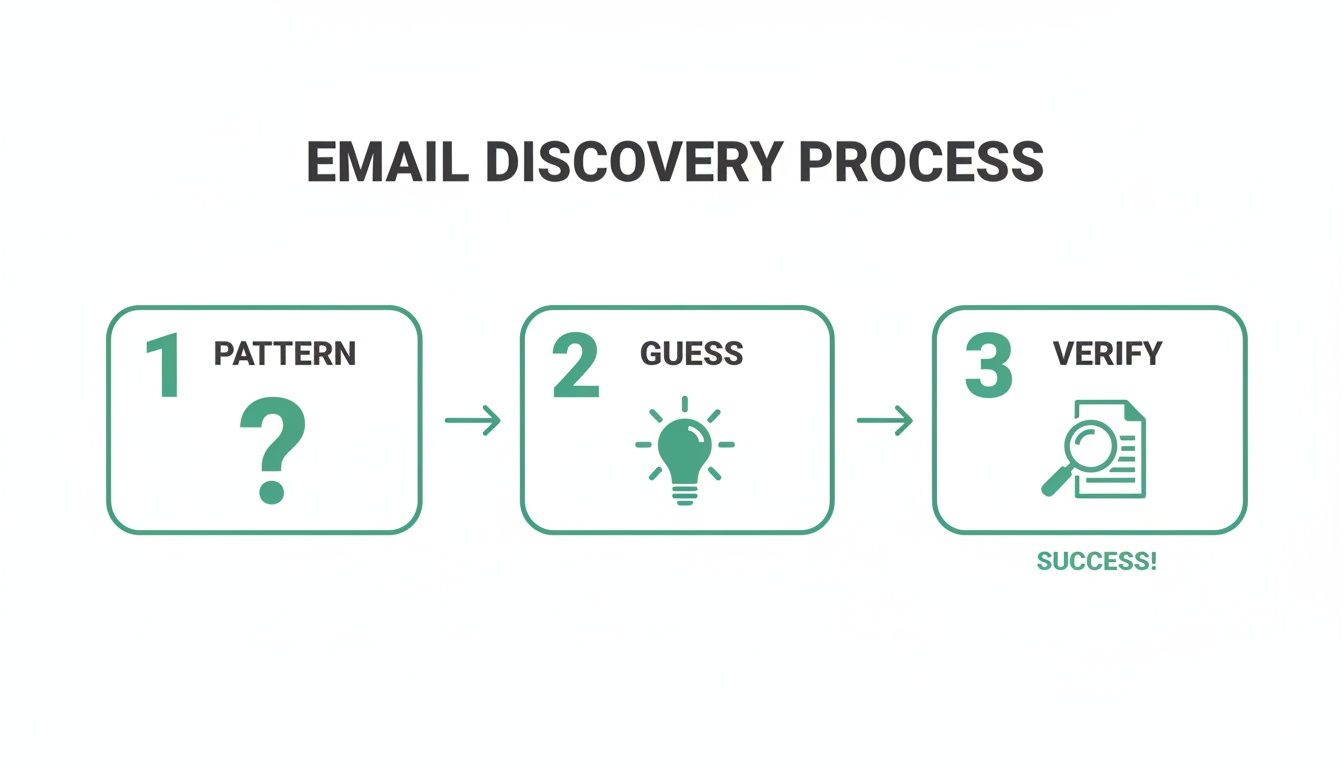
    This simple flowchart breaks down the logic email finders use to automate the whole process, from spotting a pattern to getting a verified address.

    A three-step email discovery process flowchart showing pattern, guess, and verify stages leading to success.

    It really just automates the whole "pattern, guess, and verify" cycle we all do manually. What was a multi-step chore becomes a nearly instant and reliable result.

    A Practical Walkthrough with EmailScout

    Let's walk through a real-world example. You’ve found a key decision-maker on LinkedIn and need their email to kick off a conversation. With the EmailScout extension installed, a small button appears directly on their profile page.

    Click that button. The tool instantly gets to work, cross-referencing multiple data points to find the most probable email address. Then, it runs a quick verification check to make sure it's actually deliverable. A few seconds later, a verified email pops up, ready for you to use.

    The real value here is confidence. The tool doesn't just give you a guess; it provides a verified, high-confidence email address, dramatically reducing your bounce rate and protecting your sender reputation.

    This simple, one-click process is a total game-changer for anyone doing regular outreach. It removes all the friction from prospecting and lets you get back to what matters: crafting the perfect message. If you want to get into more advanced strategies, our complete guide on how to find business emails is a great next step.

    Go Beyond Single Searches with Advanced Features

    While one-click finding is powerful, modern email finders come packed with features designed for building lists at scale. Two of the most useful are AutoSave and URL Explorer.

    • AutoSave for Passive Collection: Imagine you’re scrolling through a LinkedIn search page for "Software Engineers in San Francisco." With AutoSave turned on, the tool quietly collects and saves the emails of the profiles you view into a list. You end up building a highly targeted prospect list without any extra work.
    • URL Explorer for Bulk Extraction: Let's say you have a list of 100 target company websites from a conference you attended. Instead of visiting each site one by one, you can just paste the whole list of URLs into the URL Explorer. The tool will then crawl those domains and pull out all available business emails, handing you a ready-to-use list in minutes.

    Email is still king in B2B. Projections show that daily email volumes will hit a staggering 376 billion messages in 2025 alone. Globally, the number of email users is expected to climb to 4.73 billion by 2026. For business development teams, this is a massive opportunity, especially since 81% of B2B marketers rely on email as their primary channel.

    These advanced features bridge the gap between targeted, individual prospecting and large-scale list-building. They give you the flexibility to adapt your strategy for any campaign, big or small. Tools like EmailScout are built to handle the grunt work, so you can focus on building relationships and closing deals.

    Building Outreach Lists That Get Results

    Finding a verified business email is a huge win, but let's be honest, it's only half the battle. The real magic happens when you turn that contact info into a real conversation. This is where building smart, clean outreach lists comes into play—it's the critical bridge between discovery and actually getting a response.

    Simply dumping every email you find into one giant spreadsheet is a recipe for disaster. That's how you end up with generic, impersonal messages that get ignored or, even worse, flagged as spam. The goal isn't just a big list; it's an intelligent and actionable one.

    The Foundation of a Great List: Segmentation

    So, what does an "intelligent" list look like? It all starts with segmentation. This just means breaking your master list into smaller, more focused groups based on things they have in common. Instead of blasting the same message to everyone, you can tailor your pitch to what a specific group actually cares about. This precision is what separates high-performing campaigns from a one-way ticket to the spam folder.

    You can slice and dice your lists in a bunch of different ways. Here are a few practical examples to get you started:

    • By Job Title: Grouping contacts like "Marketing Managers" or "VPs of Sales" lets you speak directly to their specific professional challenges and goals.
    • By Industry: A software pitch for a healthcare company should sound very different from one for a financial services firm. Segmenting by industry keeps your message relevant.
    • By Company Size: The pain points of a 10-person startup are worlds away from those of a Fortune 500 enterprise. This helps you frame your solution in a way that makes sense for their scale.

    Cold emailing thrives on this kind of precision. Marketers who segment their campaigns can see a staggering 760% increase in revenue. And with the average B2B email open rate hitting 43.46% in 2025 and sectors like software seeing a 36:1 ROI, mastering this is non-negotiable.

    Don't Forget Email Deliverability

    Even the most perfectly crafted email is totally useless if it never reaches the inbox. Email deliverability is all about making sure your messages land where they're supposed to. ISPs like Google and Microsoft are always watching for spammy behavior, and a few wrong moves can seriously damage your sender reputation.

    To keep your deliverability score high, focus on these key practices:

    1. Warm Up Your Sending Account: If you’re using a new email account, don't start blasting hundreds of emails on day one. Slowly ramp up your sending volume over a few weeks to build a positive history.
    2. Avoid Spam Trigger Words: Certain words in your subject lines and email body (like "free," "act now," or way too many exclamation points!!!) can set off spam filters. Keep your language natural and professional.
    3. Personalize, Personalize, Personalize: A custom opening line does more than just grab attention; it signals to spam filters that your email isn't a generic blast. Mention a recent blog post, a shared connection, or a company achievement.

    The ultimate goal isn't just to find business emails—it's to deliver value to the person on the other end. A clean, segmented list combined with strong deliverability practices ensures your message has the best possible chance to be seen and acted upon.

    The Legal and Ethical Side of Outreach

    Finally, let’s talk about the rules of the road. Responsible outreach means you have to understand regulations like the CAN-SPAM Act in the U.S. and GDPR in Europe. These set clear guidelines for commercial emails.

    While the specifics vary, the core principles are pretty consistent. Always provide a clear and easy way for people to unsubscribe, be upfront about who you are, and make sure your message is relevant to their professional role. Following these rules doesn't just keep you compliant—it helps build trust with your prospects from the very first email.

    Need a hand with that next step? Check out our guide on how to write cold emails that actually get replies.

    Frequently Asked Questions

    Even with the best tools, you’re bound to run into a few questions when you start digging for business emails. From legal gray areas to making your workflow more efficient, it pays to know the answers. Here are some of the most common things people ask.

    Is It Actually Legal to Find and Use Business Emails for Outreach?

    For B2B outreach, the short answer is yes, but you have to follow the rules. In the U.S., the main regulation is the CAN-SPAM Act, while Europe operates under GDPR.

    The key idea, especially with GDPR, is "legitimate interest." If your product or service is truly relevant to someone's professional role, you generally have a good reason to contact them. But that’s not a blank check.

    Always be upfront about who you are, make it dead simple to unsubscribe, and focus on providing real value. When in doubt, especially for your specific situation, it's always smart to talk to a legal professional.

    How Accurate Are Email Finder Tools, Really?

    The top-tier email finders are impressively accurate, often getting it right over 95% of the time. They pull this off by checking multiple public data sources and running real-time verification checks before giving you an address.

    That said, no tool is ever 100% perfect. The business world moves fast—people switch jobs, companies merge, and old email addresses get shut down.

    This is exactly why you should run your final list through a separate bulk email verifier before you launch a big campaign. It’s a simple step that protects your sender reputation by weeding out any emails that have gone bad since you found them.

    An email finder's job is to give you the highest probability of success. Combining a high-quality tool with a final verification sweep is the professional standard for protecting your sender reputation and ensuring your message lands.

    What's the Best Way to Find Emails for Hundreds of Companies?

    When you’re working at scale, manual searching is a non-starter. It’s just not practical. This is precisely what bulk email finder features were made for.

    For instance, using a feature like EmailScout’s "URL Explorer," you can just upload a list of company website domains. The software then goes to work, crawling those sites, identifying contacts, and pulling their verified email addresses automatically.

    It turns a project that would take days of mind-numbing work into a task you can knock out in minutes. This frees you up to focus on the important stuff, like personalizing your outreach.

    Should I Just Guess an Email or Always Use a Tool?

    Honestly, it depends on what you’re trying to do. If you're targeting one or two dream clients, a little manual research and some smart guessing can work just fine. Just make sure you verify the address with a tool before you hit send.

    But for any kind of repeatable outreach, a dedicated email finder is a must. It automates the whole find-and-verify process, saving you a massive amount of time.

    More importantly, it drastically cuts down on your email bounce rate. Too many bounces can wreck your domain's sending authority, making it harder for all your future emails to get through. A good tool helps you avoid that risk right from the start.


    Ready to stop guessing and start finding emails in seconds? EmailScout gives you the power to discover verified contact information directly from LinkedIn and company websites with a single click. Try it for free and see how much faster you can build your outreach lists. Get the EmailScout Chrome extension now!

  • Email Lookup by Domain A Practical Guide

    Email Lookup by Domain A Practical Guide

    An email lookup by domain is simply the process of finding email addresses tied to a specific company’s website—like finding all the marketing contacts at company.com. It’s a targeted approach that lets sales, marketing, and recruiting teams skip the generic info@ inbox and connect directly with the people who actually make decisions. This makes your outreach so much more effective.

    Why Email Lookup by Domain Is a Game Changer

    A person using a laptop with an interface showing a successful email domain lookup, symbolizing precision and targeting in digital outreach.

    Forget about casting a wide, ineffective net with your cold outreach. The real power is in precision, and that all starts with knowing exactly who to contact at your target accounts. When you perform an email lookup by domain, you shift your entire strategy from hopeful guesswork to a targeted, data-driven operation.

    Instead of hunting for individual contacts one by one, this method lets you map out an entire organization's structure. Imagine you're a salesperson trying to land a new client. You can instantly find contacts in engineering, product, and the C-suite, and then tailor your pitch for each one. That’s a powerful advantage.

    The Strategic Advantage of Precision Targeting

    The biggest benefit here is pure efficiency. Manually searching for contacts is a soul-crushing task that just doesn't scale. Thankfully, modern tools have automated this, turning what used to take days of grunt work into a task that takes a few minutes. For this guide, we'll be zeroing in on EmailScout, a platform built to make this process fast, accurate, and scalable.

    This shift has a massive impact on several key business functions:

    • Sales Development: Reps can build super-targeted prospect lists for their account-based marketing (ABM) campaigns, making sure they reach every single stakeholder in a buying committee.
    • Marketing Outreach: Content marketers can find the right people to hit up for link-building or partnership opportunities, which dramatically increases their success rate.
    • Recruiting: Recruiters can pinpoint and connect with passive candidates at competing firms, building a solid pipeline of top-tier talent.

    The goal isn't just to find an email address; it's to find the right one. A targeted domain lookup helps you start real conversations that lead to tangible results, instead of just adding another name to a generic mailing list.

    From Manual Labor to Automated Intelligence

    Not too long ago, finding company emails meant guessing common patterns like first.last@domain.com and just hoping for the best. This "spray and pray" method was plagued with high bounce rates that could seriously damage your sender reputation.

    Today, platforms like EmailScout have completely changed the game.

    By using sophisticated algorithms and massive databases, these tools can verify email patterns and spit out a list of valid contacts with an impressive degree of accuracy. This guide will walk you through exactly how to use EmailScout to run your first domain search, understand the results, and build a powerful engine for all your outreach efforts.

    Getting Started with EmailScout Domain Searches

    Jumping into a new tool can sometimes feel like a chore, but getting started with EmailScout is incredibly straightforward. The first thing you'll do is create an account—it’s a quick process that immediately hooks you up with a batch of free search credits.

    This is a great way to kick the tires and see the platform's power for yourself without pulling out your credit card.

    Once you’re in, you’ll land on the main dashboard. It’s clean and intuitive, deliberately designed to avoid the clutter that makes other tools a headache to use. Take a second to look around. You’ll quickly see the two main features for an email lookup by domain: the single domain search and the bulk domain search.

    Your First Look at the Dashboard

    The single search is your go-to for quick, one-off lookups. Let's say you just heard about a promising new startup and want to find their head of marketing. You'd pop their website domain in here, and EmailScout gets right to work. It’s perfect for those moments when you need an answer fast.

    For bigger projects, the bulk search feature is the real powerhouse. This is where you can upload a whole list of company domains and let the tool find contacts from all of them at once. We'll dive into how to find business emails and build your first list later, but just know this is where the magic happens for scaling up.

    The single most important thing about any email finder is accuracy. After all, a huge list of bad emails is worse than useless—it actively tanks your sender reputation by jacking up your bounce rate.

    This is exactly why picking a reliable tool matters so much. Direct B2B outreach is still a critical channel, and the best tools deliver accuracy rates as high as 91%. That means fewer bounces and much more effective campaigns. For a deeper dive, skrapp.io has some great comparisons of the top email finder tools out there.

    Understanding Credits and Plans

    EmailScout runs on a simple credit system, which is pretty standard for these platforms. Generally, one successful email found costs one credit. The free credits you get for signing up are more than enough to run a few tests and get a good feel for the results.

    When you're ready to ramp up your outreach, you can check out the subscription plans. They’re built to fit everyone from freelancers and small startups to big sales teams running massive campaigns. Just think about your monthly outreach goals, and you can easily pick a plan that fits without paying for more than you need.

    Before you start your first search, get familiar with a few key spots in your account settings:

    • API Key: Planning to connect EmailScout with other apps? Your unique API key lives here.
    • Billing Information: This is where you’ll manage your subscription, upgrade your plan, or look at old invoices.
    • Usage Dashboard: Keep an eye on this to see how many credits you've used and how many you have left for the month.

    With your account set up and a good handle on the dashboard, you're ready to run your first domain lookup. The next section will walk you through that process step-by-step, turning theory into action.

    Alright, theory is great, but let's get our hands dirty. This is where you actually start finding the contacts you need. We'll walk through how to run your first email lookup by domain in EmailScout, starting with a single, focused search before ramping up to the more powerful bulk search feature.

    Running a Single Domain Search

    Let's say you've been tracking a new SaaS startup and want to connect with their product team. All you need is their domain to get started.

    Inside the EmailScout dashboard, the single domain search bar is right there in front of you. Just type in the company's domain—for instance, newsaasstartup.com—and hit "Search." In seconds, EmailScout scans for publicly known email patterns and contacts tied to that domain and gives you a list. It really is that simple.

    This approach is perfect when you have a specific company in your crosshairs. It cuts through the noise and bypasses generic "info@" inboxes, getting you the direct contact info you need to start a real conversation.

    Scaling Up with Bulk Domain Searches

    When you're working on larger campaigns, searching one domain at a time just won't cut it. That's where the bulk search feature becomes your best friend. It lets you pull emails from an entire list of companies at once, helping you build a massive, targeted prospect list in a single shot.

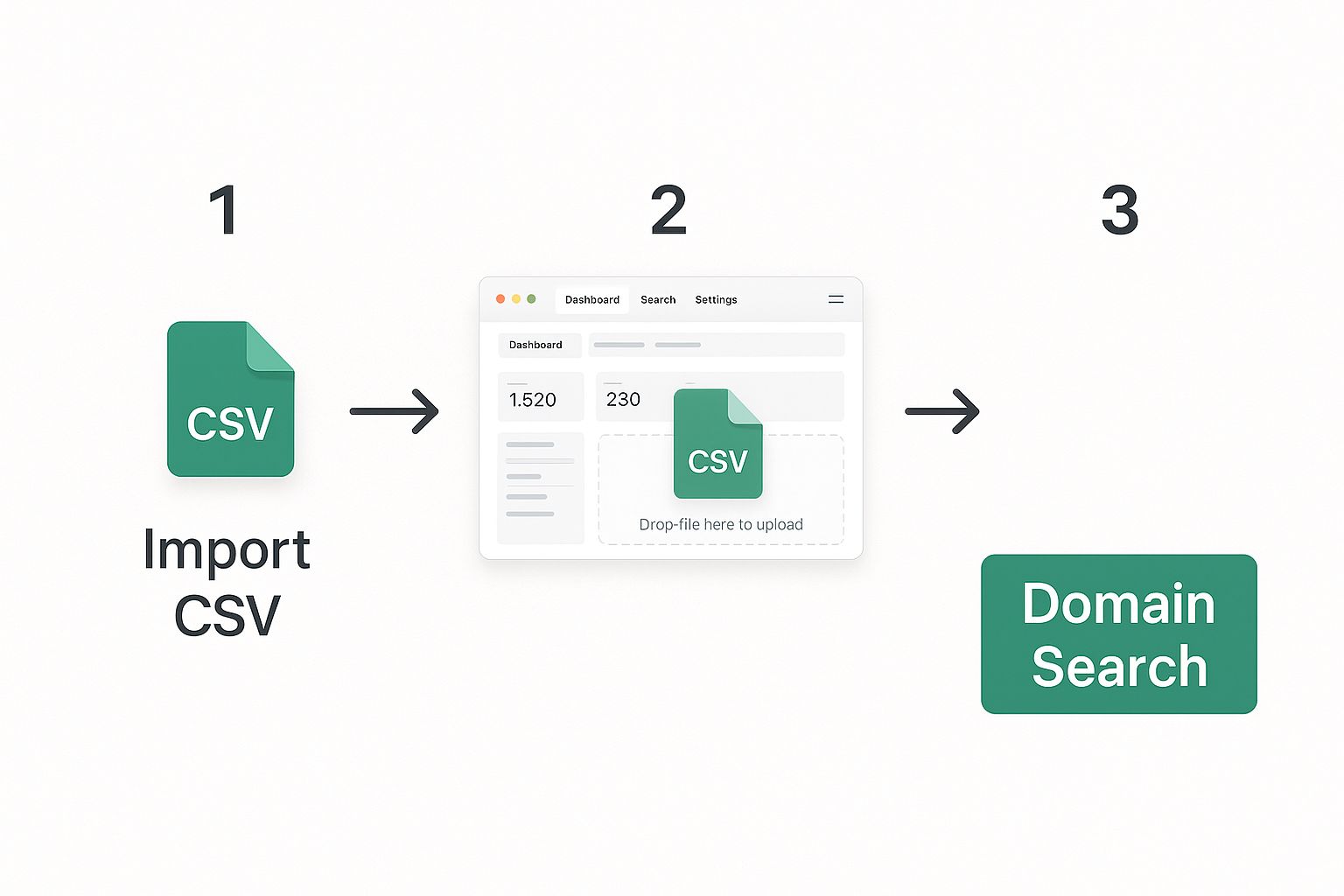
    This infographic shows just how easy it is—a simple drag-and-drop.

    Infographic showing a CSV file being dragged onto an upload area within a web dashboard, illustrating the process of a bulk email lookup by domain.

    To kick things off, all you need is a basic CSV file.

    • Create Your List: Open up any spreadsheet program and list out your target domains, one per row, in the first column (e.g., company-a.com, company-b.net). Nothing else is needed.
    • Save as CSV: Export or save your file in CSV (Comma-Separated Values) format.
    • Upload to EmailScout: Head over to the bulk search section, upload your file, and let it run. EmailScout will process the entire list and let you know when the results are ready to go.

    This workflow is a huge time-saver for anyone in sales, marketing, or recruiting. If you want to explore this further, you can check out our free email extractor online tool.

    Making Sense of Your Search Results

    Once EmailScout finishes, you get more than just a raw list of emails. Every contact comes with a verification status, which is absolutely critical for protecting your sender reputation and making sure your emails actually get delivered.

    Modern email finders have gotten incredibly sophisticated. Top-tier platforms like Snov.io report bounce rates as low as 1.72% on their valid emails because they lean on huge databases and robust verification to ensure accuracy. This is why understanding these statuses is non-negotiable for any serious outreach campaign.

    EmailScout gives you a few key statuses to help you decide who to email.

    Knowing what these mean will help you build a clean, effective email list. Here’s a quick breakdown of what you'll see in your results and what to do with them.

    EmailScout Search Result Statuses Explained

    Status What It Means Recommended Action
    Valid This email address has been fully verified and is confirmed to exist. Send with confidence. These have the lowest risk of bouncing.
    Risky This is often an "accept-all" or role-based address (contact@, sales@). Use with caution. They can have lower engagement and a higher bounce risk.
    Invalid This email is confirmed to be inactive, misspelled, or non-existent. Do not send. Emailing these will result in a hard bounce, hurting your sender score.

    By focusing your outreach efforts primarily on the "Valid" contacts, you give your campaign the best possible chance of success. This ensures your carefully crafted messages actually land in front of the right people.

    Advanced Techniques to Scale Your Outreach

    Once you’ve got the hang of the basics, it’s time to turn your email lookup process into a genuine lead generation engine. Finding a few emails here and there is one thing, but building a scalable, automated workflow that keeps your pipeline full is where the real value lies. This is where you can start leveraging EmailScout's more advanced features, moving beyond one-off searches into strategic, large-scale campaigns.

    The real power move is refining your searches with laser-like precision. Instead of just grabbing every email you can find from a domain, you can apply filters to zero in on the exact people you need to talk to. This simple step turns a generic list into a truly valuable, hyper-targeted asset.

    Building Hyper-Targeted Contact Lists

    Let's imagine you need to connect with marketing managers at mid-sized tech companies. With EmailScout, you can run a bulk search across several domains and then layer on filters to find exactly who you're looking for.

    • Filter by Job Title: Search for keywords like "Marketing Manager," "VP of Sales," or "Product Director."
    • Filter by Department: Isolate contacts within specific business units like Engineering, Human Resources, or Finance.

    This level of precision means every email you send is directly relevant to the recipient, which dramatically boosts your chances of getting a response. You're no longer just sending cold emails; you're starting meaningful conversations with the right decision-makers from the get-go. For more on this, our guide on the best email lookup tool offers a much deeper dive.

    Automating Your Workflow with CRM Integrations

    Finding emails is only half the job. The next, and arguably more important, step is getting that data into the systems your team uses every day without wasting hours on manual data entry. Connecting EmailScout directly to your Customer Relationship Management (CRM) platform is a total game-changer here.

    EmailScout offers native integrations with popular CRMs like HubSpot and Salesforce. Once you set it up, you can automatically push newly discovered leads straight into your sales pipeline. This simple connection gets rid of manual copy-pasting, cuts down on human error, and makes sure your sales team always has the latest contact info at their fingertips.

    By automating the data transfer, your team can spend less time wrestling with spreadsheets and more time doing what they do best: building relationships and closing deals. It transforms your outreach from a series of clunky, manual tasks into a smooth, automated process.

    The way we find emails at scale has improved dramatically. Recent analysis shows that modern tools using a 'Waterfall Email Finder' method can boost email find rates from the industry average of 50-60% to well over 80%. This approach intelligently queries multiple data sources in sequence, maximizing the number of valid contacts you get from any given domain. For anyone in B2B lead generation, that kind of efficiency directly impacts revenue and engagement.

    Common Mistakes to Avoid in Domain Lookups

    A digital illustration of a magnifying glass hovering over a computer screen, with red X marks over common errors, symbolizing the process of avoiding mistakes in domain lookups.

    Having a powerful tool for an email lookup by domain is a great start, but I've seen countless teams stumble because they overlooked the process. It's easy to get excited by the sheer volume of data you can pull, but a few common pitfalls can derail your entire outreach strategy before it even begins.

    The single biggest mistake? Skipping verification before you hit send.

    Sending emails to a list packed with unverified or flat-out invalid addresses is a surefire way to get a high bounce rate. That’s a massive red flag for email providers like Gmail and Outlook. It can tank your sender score fast, which means even your legitimate emails are more likely to end up in the spam folder. Trust me, a clean list is always more valuable than a big one.

    Another frequent error I see is people running lookups on outdated domain lists. Companies pivot, they rebrand, they get acquired. Using an old list is like navigating with a year-old map—you're going to get lost. Always make sure your source of domains is fresh and actually relevant to what you’re trying to achieve right now.

    Forgetting There’s a Person on the Other End

    This is the one that really stings. Treating the emails you find as just data points is probably the most damaging mistake you can make. A successful lookup isn't the end of a task; it’s the start of a conversation. Sending a generic, impersonal blast to a highly targeted list completely wastes all the hard work you just did.

    Your outreach needs to be personal. Mention their company, their specific role, or even a recent project they launched. It immediately shows you’ve done your homework and aren't just another automated template clogging up their inbox. This simple step can make a world of difference in your response rates.

    The real goal of a domain lookup isn't just to build a list. It's to build a foundation for meaningful relationships. Each valid email represents a potential partner, client, or candidate, and you have to treat it with that level of respect.

    Quality Over Quantity, Every Single Time

    It’s so tempting to chase huge numbers, but a smaller, highly engaged list will outperform a massive, unvetted one every day of the week. Here’s how you can focus on quality to get sustainable results:

    • Segment Your Lists: Don't lump everyone together. Organize contacts by industry, job title, or company size. This lets you write much more tailored messages that actually resonate.
    • Clean Your Data Regularly: Make it a habit to re-verify your email lists every so often. This weeds out contacts who have left their roles or addresses that have gone inactive.
    • Track Your Engagement: Pay close attention to your open rates, click-through rates, and replies. This data is pure gold—it tells you exactly what’s working and what isn’t.

    By sidestepping these common missteps, your email lookup by domain efforts will stop being a simple data collection exercise and become a strategic asset that fuels real, long-term growth.

    Common Questions Answered

    Even the most seasoned pros have questions when adding a new tool to their workflow. Let's tackle a few of the most common ones we hear about doing an email lookup by domain so you can get started with complete confidence.

    Is This Legal for B2B Outreach?

    Absolutely. Finding and using business emails for professional outreach is a standard, and generally permissible, B2B practice under regulations like the CAN-SPAM Act here in the US.

    The key is to follow the rules of the road: have a legitimate business reason for making contact, give them a clear and obvious way to opt out, and never use deceptive subject lines. It all boils down to professional courtesy, not spam.

    How Accurate Are the Results?

    This is the big one, and the answer is: it depends on your tool. Top-tier platforms like EmailScout consistently hit an accuracy rate in the 85-95% range for emails they mark as "Valid."

    They pull this off by running multiple verification checks behind the scenes. This confirms an address is active and ready to receive mail before it ever gets to you, which dramatically cuts down your bounce rate.

    You have to remember that no tool will ever be 100% perfect. People leave jobs and companies shut down old inboxes all the time. The goal is to use a service that gets you the cleanest, most reliable data possible.

    What Should I Do with "Risky" Emails?

    Ah, the "risky" or "accept-all" email addresses. These can be tricky because the server doesn't outright confirm or deny that the inbox exists, making them a potential bounce risk.

    So, what do you do?

    The safest bet is to simply avoid them. Protecting your sender reputation is priority number one. However, if you've identified a super high-value target, you might decide the potential reward is worth the small risk. If you choose to send, just keep a close eye on your bounce rate and be ready to pull those contacts from future campaigns if they don't land.


    Ready to stop guessing and start connecting with the right people? EmailScout makes building targeted lead lists effortless. Find unlimited verified emails and scale your outreach today at https://emailscout.io.