
An email extractor extension is a simple but powerful tool that lives in your web browser. It's designed to do one thing incredibly well: automatically find and pull email addresses from any webpage you visit.
This turns the painful, manual process of hunting for contacts into a quick, automated workflow. For anyone in sales, marketing, or recruiting, it’s a way to build targeted outreach lists in minutes, not hours.
What Is an Email Extractor Extension?
Imagine you’re a detective trying to find a specific clue—a single name—written somewhere inside a massive library. You could spend days pulling books off shelves and flipping through every page. It would be exhausting.
Now, what if you had a special scanner that could instantly highlight every mention of that name in the entire library? That's exactly what an email extractor does for contact information.
It’s a small piece of software you add to your browser, usually appearing as a little icon next to the address bar. As you browse a company’s website, a professional’s blog, or a list of conference speakers, the extension is ready to work. With a single click, it scans the page's code and gives you a clean list of every email address it found.
From Manual Drudgery to Automated Power
Without a tool like this, building a contact list is a grind. A salesperson might burn 20-30 minutes just to find one or two good emails on a single corporate site. The old way involves:
- Manually clicking through "Contact Us" or "About" pages.
- Searching employee directories.
- Guessing email formats like
first.last@company.com. - Copying and pasting every single discovery into a spreadsheet.
This isn't just slow—it's also riddled with human error. An email extractor extension gets rid of that friction completely. It performs a smart type of email scraping that uses intelligent patterns to spot and collect addresses for you. If you want a deeper dive, you can learn more about how to get emails from a website in our detailed guide.
Who Benefits From This Technology?
This kind of automation is a genuine game-changer across several roles. It isn’t just about saving time; it’s about freeing up that time for high-value work like personalizing your outreach, building real relationships, and actually closing deals.
The real value of an email extractor isn't just finding emails—it's reclaiming the hundreds of hours typically lost to manual prospecting. That reclaimed time is what leads to more opportunities, shorter sales cycles, and better client conversations.
Let's look at how this plays out for different professionals. The table below breaks down how an email extractor helps various roles streamline their work and achieve better results.
How Email Extractors Empower Different Professionals
| Professional Role | Primary Benefit | Key Outcome |
|---|---|---|
| Sales Representatives | Quickly build targeted lead lists from company websites and industry blogs. | Increased pipeline velocity and more time spent on actual selling. |
| Digital Marketers | Source contacts for PR outreach, influencer collaborations, or link-building campaigns. | Expanded brand reach and more effective content promotion. |
| Recruiters & HR | Identify potential candidates from competitor team pages or professional networks. | Faster talent acquisition and a stronger pool of qualified candidates. |
| Entrepreneurs | Gather contacts for networking, partnership opportunities, and initial customer feedback. | Accelerated business growth and stronger industry connections. |
As you can see, the impact goes far beyond simple data collection. An email extractor extension acts as a productivity engine, automating the very first step of any outreach campaign. It empowers you to find and connect with the right people, faster and more effectively than ever before.
How These Extensions Find Emails Automatically
Ever wonder how an email extractor extension can pluck a specific email address out of a cluttered webpage in the blink of an eye? It’s not magic. It’s a smart, lightning-fast process of scanning, pattern matching, and verification that happens behind the scenes.
Think of the extension as a super-librarian. If you asked them to find a specific phrase in a library with millions of books, they wouldn't read every single page. They'd use a system—checking the catalog, scanning indexes, and looking for keywords. An email extractor does the same thing, but for the internet.
This automated approach is worlds away from hunting for emails by hand. The diagram below shows just how much simpler the workflow becomes, turning a manual chore into a quick, automated process that gives you a verified list.
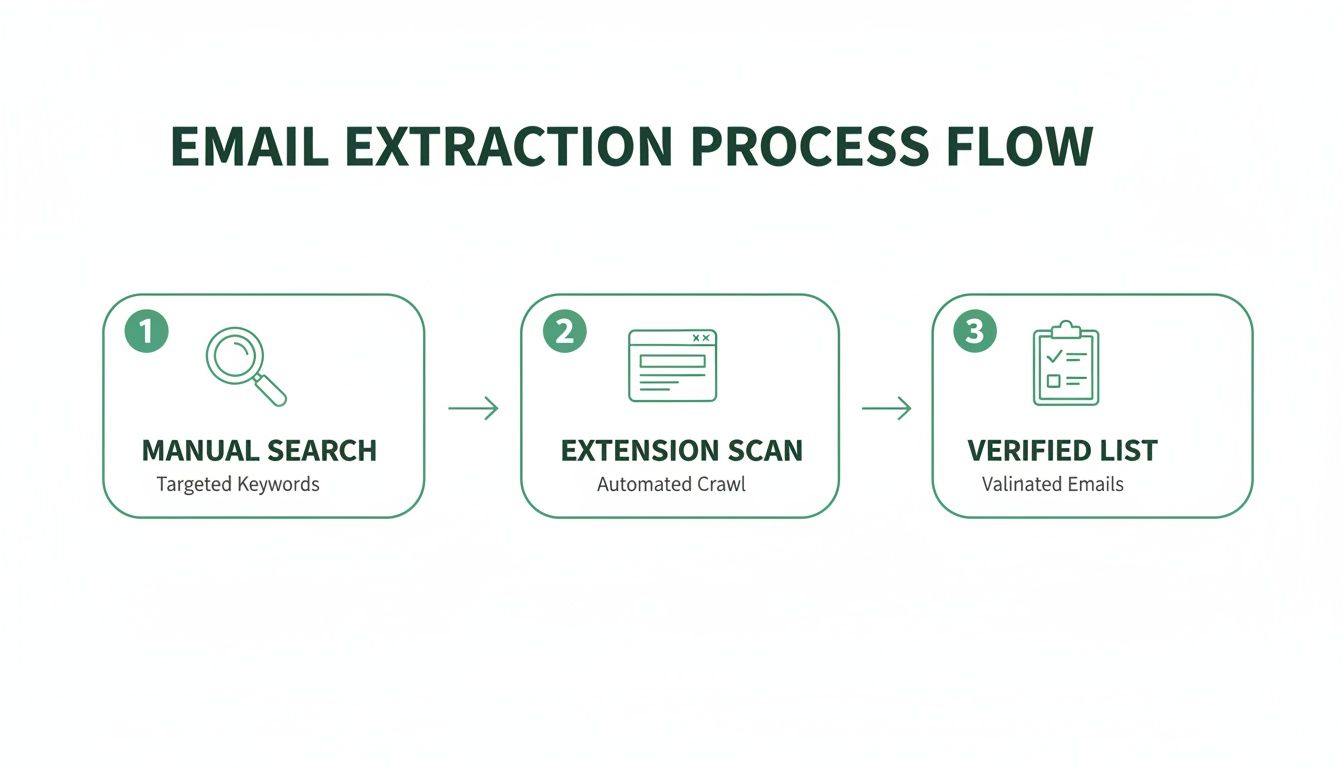
As you can see, it’s a clear upgrade from slow, manual work to an efficient system that delivers a clean list you can actually use.
Decoding the Page Structure
The moment you click the extension's button, it gets to work. But it doesn't "look" at the website like we do. Instead, it reads the source code—the HTML (HyperText Markup Language)—that acts as the blueprint for the entire page.
This code contains every piece of text, every link, and every script, whether you can see it on your screen or not. By analyzing these blueprints directly, the extension gets an unfiltered look at everything on the page.
Identifying Email Patterns
With the raw code in hand, the real hunt begins. The tool uses a powerful technique called pattern recognition, typically relying on something called Regular Expressions (RegEx). A RegEx is simply a special sequence of characters that defines a search pattern.
For any email address, the pattern is universal and easy to recognize:
- A string of characters (the username)
- The "@" symbol
- Another string of characters (the domain)
- A top-level domain like ".com" or ".org"
The extension scans the entire HTML for any text that matches this exact structure. It’s an incredibly efficient way to sift through thousands of lines of code and pinpoint potential email addresses. At their core, email extractor extensions act as a specialized type of instant data scraper, zeroing in on contact information to fuel your outreach.
Key Takeaway: An email extractor doesn't just scrape what you can see. It dives deep into a website's code, using sophisticated pattern matching to find anything that fits the structure of a valid email address.
The Crucial Step of Verification
Finding text that looks like an email is only the first step. A lot of addresses buried in a site's code might be old, generic (info@), or just plain wrong. This is where top-tier tools like EmailScout really shine by adding real-time verification.
After flagging a potential email, an advanced extension sends a harmless, invisible ping to the email server tied to that domain. It's a quick check to see if the inbox actually exists and can receive mail—all without ever sending an actual email.
This step is absolutely critical for maintaining good data hygiene. A smaller, verified list is always more valuable than a huge list full of emails that will just bounce. High bounce rates can tank your sender reputation and get your account flagged as spam.
Accuracy is the biggest difference-maker here. The best extensions deliver incredible precision. In fact, our testing shows leading tools can hit a 95% accuracy rate, while weaker options might only be 55-70% accurate. That gap matters—teams using unverified lists often see up to 21% more bounces, which can completely derail a campaign's momentum.
Alright, let's move from theory to practice. You get what an email extractor can do and how it works—now it's time to actually put that power into your browser. This quick walkthrough will get you set up in minutes, using EmailScout as our example.
The whole process is designed to be painless. We'll get you from installation to your first successful extraction without hitting any technical roadblocks. We'll find the extension, add it to your browser, and make it dead simple to access with a single click.

Installing the Extension in 3 Easy Steps
Getting your first email extractor extension installed is a quick, three-step deal. It's no different than adding a new app to your phone and takes less than a minute.
- Head to the Chrome Web Store: This is the official and safest spot for browser add-ons. A quick Google search for "Chrome Web Store" will get you there.
- Search for Your Extractor: Type "EmailScout" into the search bar. The official extension will pop right up. Just double-check the name and logo to make sure you've got the right tool.
- Click 'Add to Chrome': You can't miss the big blue "Add to Chrome" button on the EmailScout page. Click it. A small pop-up will ask for permissions—just click "Add extension" to finish things up.
And that's it. The extension is now officially part of your browser, ready to go to work.
Pinning the Extension for Quick Access
Right after you install it, the extension’s icon might be tucked away in a menu. To make your workflow as smooth as possible, you’ll want to "pin" it to your toolbar so it's always one click away.
Just click the puzzle piece icon (🧩) in the top-right of your Chrome browser. This shows you all your installed extensions. Find EmailScout in the list and click the little thumbtack icon next to it. The pin will turn blue, and the EmailScout icon will now stay put in your toolbar.
Pinning the extension turns a few clicks into just one. It's a simple move, but it's key to making email extraction a seamless part of your daily browsing and prospecting. Those seconds you save on every search really add up.
Running Your First Email Extraction
With the extension installed and pinned, you're ready for the fun part. Let's run a quick test on a common target for lead gen: a company's team or "About Us" page. These pages are often a goldmine for contacts.
Go to a company's website and find their team page. Once it’s fully loaded, just click the pinned EmailScout icon in your toolbar.
The extension gets to work instantly, scanning the page. In a few seconds, a pop-up appears with a clean, organized list of every email address it found. You can then copy the emails with a click or, if you're using a feature like EmailScout's AutoSave, they'll be automatically added to a running list for you. It’s that simple—you’ve just built a prospect list in seconds.
Key Features of a Top-Tier Email Extractor
So, you're looking for an email finder. It’s easy to assume they all do the same thing, but that’s not quite right. While plenty of free tools can scrape the obvious emails from a webpage, a top-tier email extractor extension is a different beast altogether. It’s the difference between casting a simple net off a pier and using a high-tech sonar to find where the real prize-winning fish are hiding.
Choosing the right tool isn't just about grabbing emails; it's about investing in efficiency, accuracy, and the success of your outreach. Let's break down the features that separate a hobbyist gadget from a professional-grade tool that will genuinely level up your workflow.

Go Beyond Single-Page Scraping
Most basic extractors work on the one page you have open. That’s fine for a quick one-off task, but what if you need to build a real list? A powerful tool thinks bigger, turning hours of mind-numbing manual work into a few clicks.
Here are the capabilities you should be looking for:
- Bulk URL Extraction: This is a massive time-saver. Instead of visiting hundreds of websites one by one, you just paste a list of URLs. The tool then does the heavy lifting, crawling and extracting emails from all of them at once.
- Auto-Saving and List Building: The best extensions don’t just flash a list of emails at you and disappear. Features like EmailScout's AutoSave automatically add every email you find to a running list, so you’re constantly building your prospect database without even trying.
If you’re serious about building a solid outreach list without spending your entire week on it, these features are non-negotiable.
Prioritize Data Accuracy and Hygiene
Here's a hard truth: an email list is worthless if the addresses are bad. Sending campaigns to invalid or dead emails cranks up your bounce rate, which is a huge red flag for email providers. Do it too often, and your domain could get blacklisted, making it nearly impossible to reach anyone's inbox.
A good email extractor acts as a gatekeeper for your sender reputation.
The single most critical feature separating premium tools from the free ones is built-in email verification. It’s an instant quality check, making sure the emails you collect are actually active and deliverable before you add them to a campaign.
This isn't just a nice-to-have; it's a strategic must. The numbers don't lie. 82% of digital marketers count on email marketing, and with 4.73 billion users worldwide, the ROI is huge. We also know that 80% of sales take at least five follow-ups, yet 44% of sales reps give up after the first try. An extractor can slash the time spent hunting for contacts from 40 hours a week to just 40 minutes, freeing you up for that persistent follow-up that actually closes deals.
Seamless Workflow and Integration
Finally, a great tool should slide right into your existing process. It shouldn't feel like another clunky piece of software you have to manage; it should feel like it was always meant to be there.
Look for these key integrations:
- CRM Integrations: The ability to push contacts directly into your CRM, like Salesforce or HubSpot, is a game-changer. It cuts out manual data entry, prevents typos, and keeps your pipeline fresh.
- Flexible Export Options: At a bare minimum, you need to be able to export your lists as a CSV or Excel file. This gives you the freedom to use your data in any other platform or tool you need.
Comparing Basic vs Advanced Email Extractors
The table below really puts the differences into perspective. While a free email extractor online can handle simple, one-off tasks, a professional tool is built for serious, scalable results.
| Feature | Basic Free Extractor | Advanced Tool (e.g., EmailScout) |
|---|---|---|
| Extraction Scope | Single active webpage only. | Bulk URL processing and domain-level search. |
| Email Verification | Not included; high risk of bounces. | Built-in, real-time verification for high deliverability. |
| List Management | Manual copy-paste required. | Auto-saving to persistent lists and projects. |
| Data Export | Limited to basic text copy. | Multiple formats (CSV, Excel) and direct CRM integrations. |
| Support & Updates | Minimal to none. | Dedicated customer support and regular updates. |
Ultimately, choosing an advanced email extractor isn't just about getting more features. It's about making a smart investment in your most valuable resource: your time.
Best Practices for Ethical Email Extraction
An email extractor extension is a powerful tool, no doubt. It puts a ton of automation right at your fingertips. But how you use that power is what really separates a pro from a spammer. Success isn't just about how many emails you can collect; it's about the quality of your outreach and the trust you manage to build along the way. Ignoring the ethical side of things isn't just bad form—it's genuinely bad for business.
Think of privacy laws like GDPR in Europe and the CAN-SPAM Act in the U.S. not as annoying roadblocks, but as a clear framework for building a solid brand reputation. These regulations exist for a reason: to protect people from getting spammed with irrelevant junk. When you follow these rules, you position yourself as a trustworthy professional, and you make sure your messages actually land in the inbox and get read.
The massive growth of these tools tells a bigger story about the digital outreach economy. The global web scraper software market was valued at USD 718.86 million and is expected to climb to USD 2,209.88 million by 2033. This boom is fueled by sales pros who need efficient ways to find leads, pushing top tools to include features that help them stay on the right side of the law.
Shift Your Mindset From Blasting to Connecting
Here’s the fundamental rule of ethical outreach, and it’s pretty simple: your goal is to start a conversation, not just blast out a promotion. Every single email you send should be grounded in legitimate interest, which means the person on the receiving end could actually benefit from what you have to say.
Before you add a freshly extracted email to your next campaign, just ask yourself this one question: "Is my message helpful and relevant to this specific person?" If you hesitate or the answer is no, just don't send it. That single filter can dramatically improve your results and safeguard your reputation.
An email address is more than just data; it's a direct line to a person. Ethical extraction respects that connection by prioritizing relevance and value over sheer volume. This approach builds trust and ensures your brand is welcomed, not blocked.
Actionable Rules for Ethical Outreach
To keep your campaigns effective and compliant, you need to bake these non-negotiable best practices right into your workflow. They are the pillars of responsible and successful email outreach.
- Always Provide a Clear Opt-Out: Every single email you send must include an easy-to-find unsubscribe link. Hiding this option is a direct violation of laws like CAN-SPAM and is a surefire way to get your emails marked as spam.
- Be Honest and Transparent: Never, ever use misleading subject lines or "From" names. Your message should be an accurate reflection of who you are and what you're offering. Deception is the fastest way to destroy trust.
- Focus on Personalization and Value: Use what you know to tailor your message. Mention their company, their role, or a recent post they made to show you've done your homework. A generic blast is the very definition of spam. If you're building lists from professional networks, you can also check out our guide on scraping emails from LinkedIn ethically.
- Maintain Excellent Data Hygiene: Clean your email lists regularly. Get rid of inactive or incorrect addresses. Using a tool with built-in verification is a great start, as it helps protect your sender reputation and improves your overall deliverability.
By sticking to these guidelines, you turn your email extractor extension from a simple scraping tool into a strategic asset for building meaningful professional relationships. This responsible approach is what drives long-term success and keeps your outreach effective and welcome.
How Sales and Marketing Teams Use Extractors
Alright, let's move beyond the technical "how" and into the practical "why." How does an email extractor extension actually make a difference in the day-to-day grind? For sales and marketing pros, these tools aren't just for gathering data—they’re for creating opportunities, collapsing timelines, and getting real results.
Think about a sales team trying to crack a new market. The old way involved weeks of mind-numbing manual searches. With a tool like EmailScout, that entire process gets supercharged. This is where the magic happens: you're swapping grunt work for smart automation and turning tedious prospecting into a genuine competitive edge.

Accelerating Sales Prospecting
Let’s put ourselves in the shoes of a B2B sales development representative (SDR) who needs to find contacts at mid-sized tech companies. Their specific goal is to book meetings with engineering managers.
Here’s what their workflow looks like with an extractor:
- Identify Target Companies: First, the SDR pulls a list of 50 target company websites from a few industry reports.
- Run a Bulk Extraction: Instead of clicking through each site one by one, they drop the whole list into EmailScout's bulk URL feature and let it run.
- Refine and Verify: The tool spits back a few hundred emails. The SDR quickly filters them for titles like "Engineering Manager" or "Head of Engineering" and trusts the built-in verification to weed out bad addresses.
The result? In about an hour, the SDR has a hyper-targeted, verified list of over 150 solid prospects. Manually, that would've been days of work. Now, they can spend their time actually crafting personalized emails that will get a response.
Powering Marketing and PR Outreach
Now, let's switch gears to a marketer gearing up for a big product launch. They need to get the word out, and that means getting coverage from tech bloggers and journalists.
They start by listing the top tech blogs and publications in their niche. As they visit each site, they pop open the extension on the "About Us" or "Contributors" page. Instantly, the tool grabs the direct email addresses of editors and writers, letting them bypass those generic contact@ inboxes that are basically black holes.
Using an email extractor for PR is about building direct lines of communication. It's the difference between blindly sending a press release and putting your story right in front of the person who can actually tell it.
This gives them a curated list of real people with influence. Now the marketer can send out personalized pitches that are far more likely to land press coverage and build some serious buzz. And the numbers back this up: 82% of global digital marketers rely on email, and 65% automate it because the ROI is just that good. Using verified data from a quality extractor can slash bounce rates by 21%—a massive win for any campaign. You can dig into more digital marketing stats to see just how critical these strategies are.
Streamlining Recruitment and Talent Sourcing
Finally, imagine a recruiter on the hunt for a specialized software developer. They know the best candidates are probably already working for their top competitors.
So, the recruiter browses the "Team" or "Engineering Blog" pages on those competitor websites. With one click, the email extractor extension scans the page and pulls the professional emails of potential candidates. This helps the recruiter build a solid pipeline of passive candidates—talented people who aren't actively job hunting but would listen to the right offer. It’s a direct, discreet way to connect, and it’s way more effective than just throwing a job posting online and hoping for the best.
Common Questions About Email Extractors
When you start digging into automated outreach, a few questions always pop up. It's only natural to wonder about the legal side, how effective these tools really are, and whether they're worth it. Let's clear the air and tackle the most common questions we hear about email extractor extensions.
My goal here is to give you the straight answers so you can move forward with confidence and get the best results possible.
Are Email Extractor Extensions Legal?
Yes, using an email extractor extension to find and gather publicly available information is perfectly legal. The important thing isn't how you find the emails, but how you use them afterwards. Your outreach has to play by the rules of anti-spam and privacy regulations like GDPR and the CAN-SPAM Act.
This means you should always:
- Make sure your message is genuinely relevant and offers real value to the person you're contacting.
- Never, ever use deceptive or misleading subject lines.
- Include a clear and easy way for people to opt-out of hearing from you again.
Honestly, ethical use is just good strategy. It's the foundation of any outreach that actually gets results.
Can Extractors Find Any Email on Any Website?
While these extensions are incredibly powerful, they aren't magic. They can only find email addresses that are present somewhere in a website's code or text. If an email address isn't listed publicly on the page, the tool can't just invent it.
That said, the best tools do more than just scan for what's visible. They can spot common email patterns for a specific company (like firstname.lastname@company.com) and then use verification tech to check if that predicted address is live. This trick dramatically boosts the odds of finding the right contact, even when their email isn't spelled out for everyone to see.
Why Use an Extension Instead of Searching by Hand?
It really boils down to three things: speed, scale, and accuracy. Manually hunting for just a few emails on a single website can easily eat up 20 minutes or more of your time. An extension can do the same job in a couple of seconds.
But the real game-changer is scale. An extension lets you build a targeted list of hundreds of contacts in the time it would take to find a handful manually. This isn't just a small time-saver; it frees you up for what really matters, like crafting a killer outreach message.
On top of that, top-tier extensions like EmailScout have email verification built right in. This is a critical step that checks if an email is active, which slashes your bounce rates and protects your sender reputation—something that’s nearly impossible to do efficiently by hand.
Ready to stop searching and start connecting? The EmailScout extension delivers the speed, accuracy, and automation you need to build high-quality contact lists in minutes. Try EmailScout for free today!