Tag: email discovery

  • Company Email Domain Finder: Boost Outreach & Connect in 2026

    Company Email Domain Finder: Boost Outreach & Connect in 2026

    So, what exactly is a company email domain finder? Think of it as any tool or technique you use to figure out a business's email domain—that @company.com part of their email address. Getting this right is the absolute first step for any outreach, because it's the key to figuring out and verifying the actual email addresses you need.

    Why Finding the Right Email Domain Changes Everything

    A man types on a laptop displaying 'Accurate Domains' branding and business analytics.

    In sales and marketing, sending emails into a black hole is a massive waste of time and money. When you guess an email or use old info, you get high bounce rates. This doesn't just mean your message wasn't delivered; it actively hurts your sender reputation and can get your entire domain flagged as spam. Precision is the name of the game.

    Nailing down the correct company email domain is the foundation of any successful outreach. It takes you from blindly guessing to making a calculated move. Once you know the domain, you can start intelligently building and verifying a contact's email address.

    The Real-World Impact of Getting It Right

    The difference here is huge. Let's say you're an SDR trying to reach a marketing manager at a hot new startup. You send a message to a guessed address, and it bounces. Not only did you fail to connect, but you just signaled to email servers that you’re sending to bad addresses. That's a serious red flag.

    Now, flip that around. You use a company email domain finder to confirm the right domain. From there, you can piece together the likely email pattern, like firstname.lastname@company.com. When that email lands in their inbox, you've just opened a direct line of communication. It's a small step that completely changes the trajectory of your outreach.

    Your outreach is only as good as your data. An accurate email domain isn't just a small detail—it's the single most important factor determining whether your message even has a chance to be seen.

    How Accuracy Boosts Your Outreach Metrics

    The payoff for being precise shows up directly in your campaign numbers. When you guarantee your emails are deliverable, you'll see an immediate improvement in the metrics that actually matter for ROI.

    • Better Open Rates: Emails that actually get delivered can be opened. Getting rid of bounces is the first and most critical step to improving this metric.
    • Higher Response Rates: When you reach the right person, your message is instantly more relevant. That personal connection naturally leads to more replies.
    • Stronger Sender Reputation: Consistently sending to valid addresses tells providers like Google and Microsoft that you’re a legitimate sender. This helps keep your future emails out of the dreaded spam folder.
    • More Conversions: At the end of the day, connecting with the right decision-makers leads to more qualified meetings, demos, and closed deals.

    The digital world is noisy. With global email volume expected to reach 392.5 billion messages per day by 2026, you have to find a way to cut through. Research shows that targeted and segmented email campaigns can boost revenue by a staggering 760%, and email brings in 40 times more customers than social media. You can find more data on the power of email at Clean.email. These stats make it clear: precision isn't optional, it's essential for growth.

    Mastering Manual Email Domain Discovery

    A focused man intently researches on a laptop, writing notes in a notebook, with a magnifying glass.

    Before you even think about automated tools, it pays to get your hands dirty with some old-school detective work. Mastering the manual approach to finding a company's email domain is a skill that will serve you well, even after you start using faster software.

    Think of it as learning to read a map before you rely on a GPS. Knowing the terrain makes you a much smarter navigator. And the first stop on any manual search is almost always the company's own website.

    Scouring the Company Website

    A company’s website can be a goldmine if you know where to dig. The most obvious places to start are the "Contact Us" or "About Us" pages. You might get lucky and find a general address like info@companyname.com or press@companyname.com right away.

    Even if you only unearth a generic inbox, you’ve found what you came for: the domain. Jot it down. But don't stop there; the real gems are often hidden in plain sight.

    • Press Releases: These are fantastic. They often include a media contact with their full name and email, giving you both the domain and a clue to the company’s email pattern.
    • Legal Pages: Give the Privacy Policy or Terms of Service a quick scan. Companies are usually required to list an email for legal or data privacy matters, which is another way to confirm the domain.
    • Company Blog: If the blog posts are written by employees, check the author bios. Sometimes they'll include a direct email address.
    • Footer: Always scroll to the bottom. The website footer is a common spot for a support or general contact email.

    Just a few minutes of focused searching here can often give you the domain. If the website is a dead end, though, it’s time to head over to the world’s biggest search engine.

    Advanced Sleuthing With Search Operators

    Google becomes an incredibly powerful company email domain finder when you use specific search commands, known as operators. They help you slice through the noise to pinpoint exactly what you need.

    For example, you can use a query like "@companydomain.com" email to tell Google you only want to see pages that mention email addresses with that specific domain. It’s a simple but effective way to find publicly indexed contact information.

    Pro Tip: When you’re trying to find a company's domain, always start with your most logical guess. If the business is called "Acme Innovations," their website is probably acmeinnovations.com. Use that as your starting point for your Google searches.

    This trick also works for finding specific people. A search for "John Doe" email acme innovations might pull up a conference speaker bio or a news article with his direct email. This is how you find the information that isn't always obvious on the company's own site. If you're hunting for more ways to find contact details, take a look at our complete guide on how to find a company email address for more advanced techniques.

    Manual Email Domain Discovery Techniques

    To help you choose the right manual method, here’s a quick-reference table comparing the most common techniques. Each has its own strengths and is best suited for different situations.

    Technique Where to Look Success Rate Best For
    Website Search Contact, About, Press, Legal Pages, Footer High Quick, initial confirmation of the primary domain.
    Google Operators Google Search Medium Finding publicly indexed emails and verifying domain guesses.
    LinkedIn Analysis Employee Profiles Low (for domain) Gathering names to test email patterns once the domain is known.

    This table shows that a combination of methods is often the most effective strategy. Start with the website, then expand your search to Google, and use LinkedIn to gather names for pattern testing.

    Analyzing LinkedIn for Clues

    LinkedIn is another key piece of the puzzle. While most people don't broadcast their email address on their public profile, they provide everything else you need to figure it out.

    Start by searching for a few employees at your target company. You're looking for their full names and job titles. The goal is to gather a small sample—maybe three to five people from different departments—to help you spot the company’s most common email format later on.

    By collecting a few names, you're laying the essential groundwork for piecing together their email addresses once you have the domain confirmed. It’s this manual research that makes all the difference in building accurate and effective outreach lists.

    Decoding Common Email Patterns and Verification

    Okay, you've found the company's email domain. That’s a huge first step, but you’re only halfway to the inbox. Now comes the real detective work: figuring out the exact email address for your contact.

    This isn't just a shot in the dark. Most companies stick to a handful of predictable email patterns, so you can make a highly educated guess.

    Cracking the Code of Common Email Formats

    Let's say you're trying to reach a marketing manager named Sarah Jones at innovatecorp.com. Rather than fumbling around, you can test a few logical variations based on the most common formats out there.

    You’ll see these patterns again and again:

    • First Name: sarah@innovatecorp.com
    • First Initial + Last Name: sjones@innovatecorp.com
    • First Name + Last Initial: sarahj@innovatecorp.com
    • First Name . Last Name: sarah.jones@innovatecorp.com
    • Full Name (No Separator): sarahjones@innovatecorp.com

    My advice? Start with the most popular ones first. Formats like firstname.lastname@ and firstinitial.lastname@ are incredibly common, so they're great places to begin. For a more complete list of combinations, you can check out these email address formats to cover all your bases.

    The Critical Step of Verification

    Guessing patterns is smart, but sending an email to an unverified address is a recipe for disaster. Every email that "hard bounces" because the address doesn't exist tells email providers you're a potential spammer. This tanks your sender reputation.

    A bad reputation gets your emails sent straight to the spam folder, or worse, gets your entire domain blacklisted.

    Never send a real outreach email to an unverified address. Verification isn't optional—it's the only thing protecting your deliverability and making sure all your hard work actually pays off.

    Sending emails to dead-end addresses is a complete waste of time and actively damages your future campaigns. While standard open rates are around 20.8%, properly segmented campaigns using verified, domain-targeted emails can boost revenue by as much as 760%. With the average person spending just 10 seconds reading an email, you have to make sure it lands in the right place the first time. You can read more about these powerful email marketing statistics on The Loop Marketing.

    Safe Verification Practices

    So, how do you check an address without hurting your reputation? The absolute worst thing you can do is send a "Hey, is this you?" email. It's unprofessional and just adds noise to someone's inbox.

    Instead, you need to use tools built specifically for verification. These services run a series of background checks to confirm an inbox is active without sending a message.

    Your Verification Checklist:

    1. Grab a Dedicated Tool: Use a standalone email verifier or an all-in-one company email domain finder like EmailScout that includes built-in verification.
    2. Test Your Guesses: Take your list of potential email formats (like s.jones@ and sarah.j@) and run them through the tool.
    3. Check the Results: The tool will give you a clear status: "valid," "invalid," or "risky/unknown." Only "valid" addresses should ever make it onto your outreach list.
    4. Clean Your List: Get rid of any "invalid" addresses immediately. Keeping your list clean is a non-negotiable habit for long-term success.

    By pairing smart guesswork with solid verification, you stop playing a game of chance and start running a precise, data-backed outreach strategy. This two-step process is the key to getting your messages into the right hands, every single time.

    How to Use an Automated Company Email Domain Finder

    While manual methods give you a solid starting point, they hit a wall pretty quickly. Let's be honest, they just don't scale when you need to build a real prospect list with dozens, let alone hundreds, of contacts. This is where an automated company email domain finder stops being a "nice to have" and becomes a critical part of your sales and marketing toolkit. It can turn hours of mind-numbing work into just a few minutes.

    Tools like the EmailScout Chrome extension are built to do all that heavy lifting. Instead of you manually digging through websites and trying to piece together clues, these tools find and verify emails with a single click—right from a company's website or a prospect's LinkedIn profile.

    From Manual Guesswork to Automated Precision

    Picture this: you have a target list of 50 companies. Doing it the old way means finding each domain, figuring out their email pattern, and then trying to verify every single contact. That could easily eat up your entire day.

    With an automated tool, the whole workflow changes. You visit a company’s website, and the extension instantly surfaces the emails it finds, letting you save them directly to a list. You spend way less time on tedious data entry and more time on what actually moves the needle: writing personalized outreach and building relationships.

    At its core, any email search—manual or automated—is about guessing and verifying patterns.

    Diagram showing a 3-step email pattern analysis process: Pattern Recognition, Guess Hypothesis, Verify & Refine.

    The best tools just happen to do this instantly and with incredible accuracy, taking all the manual work off your plate.

    A Practical Walkthrough With EmailScout

    Let's walk through a real-world scenario. You’ve found a key decision-maker on LinkedIn. With the EmailScout extension installed, you just go to their profile page. The extension icon appears, and one click is all it takes to analyze the page and pull up their verified corporate email address.

    Here’s how you can put this into action with a couple of powerful features:

    • AutoSave Feature: As you browse company sites or LinkedIn, just switch on the AutoSave function. This feature works in the background, automatically grabbing any emails it finds and building your prospect list without you having to lift a finger.
    • URL Explorer for Bulk Extraction: Got a list of company websites you want to hit? Instead of visiting them one by one, pop them into the URL Explorer. Paste your list of URLs, and the tool will crawl them all to pull out every available email address in one single operation.

    Finding Unlimited Emails on Key Platforms

    The real strength of a good company email domain finder is how versatile it is. It's not just for finding a single email here and there; it's about creating a system for continuous lead generation.

    On a Company Website:
    Head over to any company’s homepage, blog, or “About Us” page. Click the EmailScout icon in your browser. A small window will pop up showing a list of every email address found on that domain, often complete with names and job titles.

    On LinkedIn:
    The process is just as seamless on LinkedIn. When you’re viewing a prospect’s profile, the extension identifies them and cross-references data to find their work email. For sales pros who live on LinkedIn, this is an absolute game-changer.

    While these tools handle the automation, knowing a bit about email structure is still valuable. For instance, understanding common email patterns and verification methods is key to learning how to detect phishing emails and protecting your own accounts from bad actors.

    By bringing an automated tool into your workflow, you aren't just buying software; you’re adopting a smarter, faster, and more effective outreach strategy. If you're weighing your options, take a look at our guide on the best email finder tools for sales and marketing to see how the top contenders stack up.

    Integrating Email Discovery into Your Outreach Workflow

    Finding a verified email address feels like a huge win, but it’s really just the starting point. The real magic happens when you plug that contact data into your sales and marketing systems, turning a simple list into a powerhouse for personalized outreach. Using a company email domain finder is the first step, but what comes next is what truly drives results.

    Once you’ve got a list of good emails, the work isn't over. The goal is to move beyond just having data and start having smart, relevant conversations that actually get a response. It’s all about making your new contacts a core part of your outreach strategy.

    From List Building to Personalized Outreach

    A list of emails is pure potential. To unlock it, you have to build campaigns that feel personal and targeted. We all know how easy it is to ignore generic, one-size-fits-all messages. The trick is to use what you’ve learned—names, job titles, and company details—to write emails that connect with each person.

    Let's say you just pulled a list of 50 marketing managers at tech startups. Instead of blasting them all with the same generic pitch, you could create a template that speaks directly to their world, maybe touching on challenges like scaling user acquisition or getting noticed in a crowded market. Even this basic level of personalization can make a huge difference in your engagement rates.

    The Power of Smart Segmentation

    The most effective outreach I've seen always comes down to smart segmentation. It’s simple, really: you just break your master list into smaller, more focused groups based on things they have in common. When you do this, you can tailor your message with incredible precision, and your emails are far more likely to get noticed.

    Here are a few ways I like to segment prospect lists:

    • By Job Role: Group contacts by their title, like Sales Directors, CTOs, or HR Managers. This lets you zero in on the specific pain points and goals that come with their job.
    • By Industry: A healthcare company has totally different priorities than a SaaS business. Segmenting by industry means you can use the right lingo, case studies, and value props that will actually resonate.
    • By Company Size: The problems of a 10-person startup are worlds away from a 1,000-employee enterprise. Your pitch should match their scale and complexity.
    • By Geographic Location: If your service has a local angle, segmenting by city or region lets you add location-specific details that grab attention.

    After you've found the right company email domains, the next logical move is to optimize LinkedIn outreach with verified email access to make sure your message is consistent and deliverable across platforms.

    A well-segmented list is one of the most valuable assets in your sales arsenal. It transforms cold outreach into a series of warm, relevant conversations, which is where real relationships and deals are built.

    This isn't just theory—it delivers real, measurable results. Well-segmented campaigns consistently generate higher open rates and drive significantly more revenue because they put the right message in front of the right person at the right time.

    Maintaining List Hygiene and Data Privacy

    Building a great list is one thing, but keeping it fresh is a whole other challenge. Your contact database isn't a "set it and forget it" asset. People change jobs, companies merge, and emails go bad. If you don't perform regular maintenance, your once-perfect list will start decaying, leading to higher bounce rates and a damaged sender reputation.

    You absolutely need to have a routine for list hygiene.

    Essential Hygiene Practices:

    • Regularly Re-Verify: Every few months, run your existing lists back through a verification tool. This will help you catch and remove any emails that have gone stale.
    • Remove Hard Bounces Immediately: Any email that hard bounces needs to be scrubbed from your list right away. This is non-negotiable for protecting your deliverability.
    • Honor Unsubscribe Requests: Always give people a clear and easy way to opt out. Respecting their choice isn't just good manners—it’s often a legal must-have under rules like GDPR and CAN-SPAM.

    Data privacy should always be top of mind. When you collect contact info, you're a custodian of that data. Be transparent about how you plan to use it and make sure your outreach is professional, relevant, and respectful. The goal is to build trust from the very first email.

    Frequently Asked Questions

    When you're digging for company emails, a few questions always pop up. It's smart to think about the legal side, how reliable these tools are, and what to do when things don't go as planned. Let's get those common questions answered.

    Is It Legal to Use a Company Email Domain Finder?

    Yes, using a company email domain finder is perfectly legal. These tools work by piecing together publicly available information or figuring out a company's email structure—a standard practice in B2B sales and marketing.

    The real focus isn't on the tool, but on how you use the emails you find. It's your job to follow regulations like CAN-SPAM in the U.S. and GDPR in Europe.

    This just means your outreach should be professional and relevant to their job. And always, always give them a clear, easy way to opt out. You're starting a business conversation, not sending spam.

    How Accurate Are These Email Finders?

    Accuracy can swing wildly from one provider to another. The best tools, though, get high verification rates by using multiple methods at once. They'll combine pattern recognition, check public data sources, and run real-time server checks to see if an email is live.

    While no tool can promise 100% accuracy—people switch jobs and companies get acquired—a solid finder will dramatically cut down your bounce rate compared to just guessing.

    The most trustworthy tools have real-time verification built right in. This is a game-changer because it means the data you get is fresh and ready to use, which protects your sender reputation and gets more of your emails delivered.

    Can I Find Personal Email Addresses with These Tools?

    No, and that's by design. Reputable B2B tools are built specifically to find professional email addresses, not personal ones. A company email domain finder is looking for formats like jane.doe@companyname.com.

    These tools are not designed to find personal emails from services like Gmail, Yahoo, or Outlook. This is a crucial distinction for staying ethical and compliant with privacy laws. Your communication should always be aimed at someone in their professional role.

    What Should I Do If an Email Bounces?

    Even with the best tools, you'll get a bounce now and then. First thing's first: check for simple typos. A misspelled name or domain is a common culprit.

    If it still bounces, don't throw in the towel just yet. Try another common email pattern for that company. If f.lastname@domain.com failed, give firstname.lastname@domain.com or first.last@domain.com a shot.

    You can also fall back on your manual search skills. A quick look at the company website or the person's LinkedIn profile might give you the right address.

    Most importantly, any email that gives you a hard bounce needs to be deleted from your list immediately. This is called list hygiene, and it's not optional. Keeping your list clean is fundamental to maintaining a good sender reputation and making sure your campaigns stay effective.


    Ready to stop guessing and start connecting? With EmailScout, you can find unlimited verified emails from company websites and LinkedIn profiles in a single click. Transform your outreach process from hours of manual work into minutes of automated precision. Get the EmailScout Chrome extension for free and start building your perfect prospect list today.

  • A Modern Guide to Finding Contact Info for Sales

    A Modern Guide to Finding Contact Info for Sales

    Before you jump straight to automated tools, it’s worth mastering the art of manual contact discovery. Honestly, it gives you a serious edge. Learning how to dig into a company's digital footprint, use advanced search operators, and spot common email patterns can deliver surprisingly good results. Think of it less as a backup plan and more as building a solid foundation.

    Building Your Foundation for Contact Discovery

    Rushing to use an automated tool without understanding the basics is like trying to build a house without a foundation. Sure, you might get something up, but it won't be sturdy. When you master these manual techniques first, your entire outreach strategy becomes more resourceful. You'll be able to find almost anyone, even when the easy options come up empty.

    The fact is, email is still the king of professional communication. By 2025, nearly 4.5 billion people worldwide will be using it, sending over 376 billion emails every single day. That’s a massive opportunity for anyone trying to connect with the right people.

    Start With The Company Website

    Your first stop should always be the company's own website. It's the most direct and reliable source of information, and it often has exactly what you need if you just know where to click.

    • About Us and Team Pages: These pages are absolute goldmines. They often list key employees, their job titles, and sometimes even link directly to their professional profiles.
    • Press Releases or News Sections: Hunt for media contact info here. A press release might name the person in charge of communications, giving you a name and email to start with.
    • Blog Author Bios: If the company runs a blog, check out who’s writing the posts. Key team members often contribute, and their bios frequently include contact details or social links.

    By poking around these areas, you can quickly piece together the company's structure and pinpoint the person you need to reach. This groundwork is also a key part of figuring out who your ideal customer is, which you can learn more about in our guide on how to identify your target audience.

    Before moving on to more advanced methods, run through this quick checklist to make sure you've covered the basics on their website.

    Manual Contact Discovery Checklist

    This table breaks down the core manual steps you should take before firing up any automated tools. It’s a simple process, but it’s incredibly effective for building an initial profile of your target.

    Technique Where to Look Key Objective
    Team Page Review "About Us," "Our Team," "Leadership" pages Identify key personnel, titles, and reporting structures.
    Press Kit Mining "Press," "News," "Media" sections Find a dedicated media contact or communications manager.
    Author Bio Scan Company blog posts Discover subject matter experts and their direct contact info.
    Contact Page Check Main "Contact Us" page Look for departmental emails (e.g., sales@, info@) as a last resort.

    Once you've exhausted these direct sources, it's time to broaden your search without leaving the fundamentals behind.

    Using Advanced Search Operators

    Google is your best free tool for finding contact info, but you have to go beyond simple keyword searches. This is where advanced search operators come in. They act like special filters, letting you cut through the noise and uncover hidden gems.

    Key Takeaway: Using operators like site: and inurl: turns a generic search engine into a precision instrument. You can force Google to look for information only within a specific website or within documents containing certain keywords in the URL.

    For example, a quick search for "Jane Doe" site:company.com tells Google to only show you results for "Jane Doe" that appear on that specific company's website. This simple command can uncover team pages, blog posts, or staff directories you might have missed during your initial look.

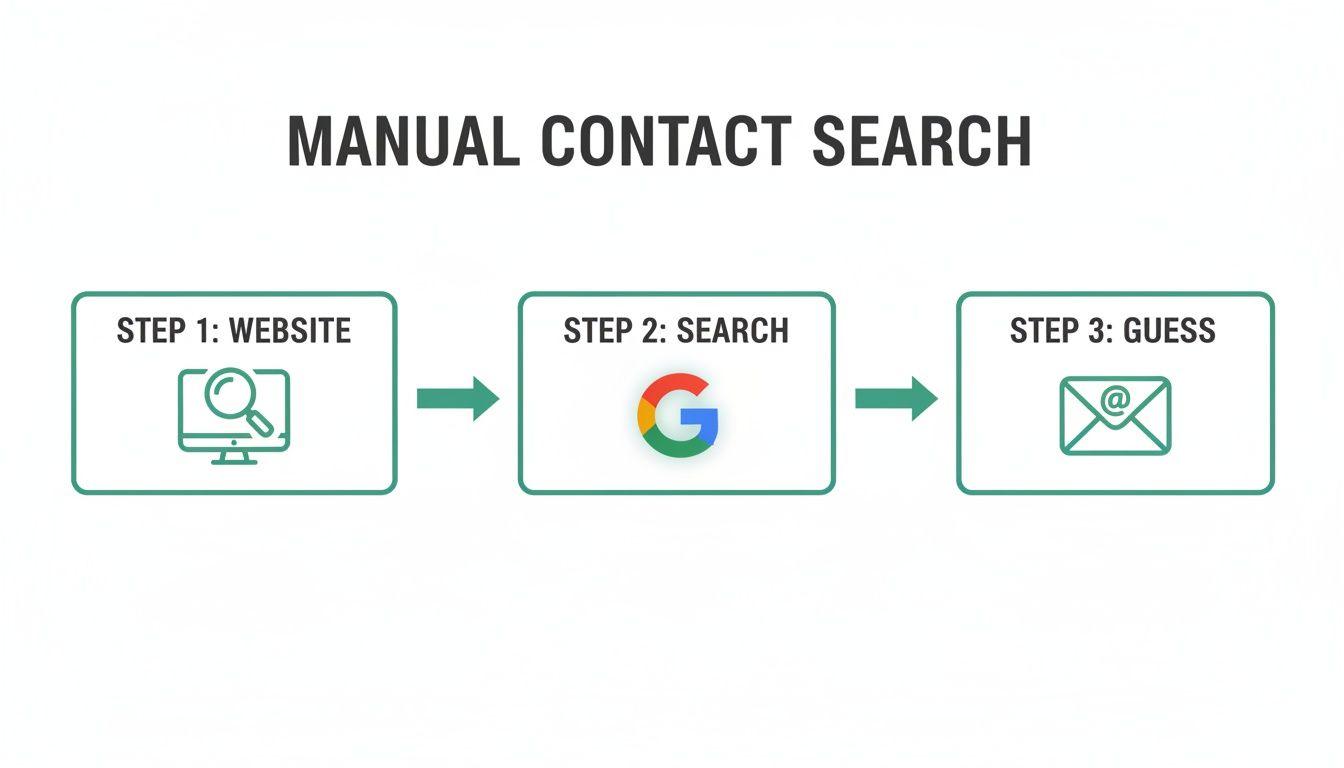
    The whole manual process is often just this simple: inspect the website, run a targeted search, and then make an educated guess.

    A three-step flowchart illustrating manual contact search: website, Google search, and email guessing.

    This flowchart really shows how a systematic, step-by-step manual approach can quickly narrow down your search for the right person.

    The Art of The Educated Guess

    So what do you do when you have a name and a company domain, but no email? It's time for an educated guess, a technique also known as email permutation. Most companies use a consistent format for their email addresses, and figuring out that pattern is a huge step in learning how to find business emails on your own.

    Some of the most common patterns you'll see are:

    Jot down a list of these potential combinations. In the next section, we’ll get into how you can verify which of these addresses is the correct one—without sending a test email and getting a bounce. This manual prep work makes any automated tool you use later far more powerful and accurate.

    Using Digital Tools for Efficient Prospecting

    Mastering the manual techniques gives you a great foundation for finding contact info, but let's be honest—technology is what lets you do it at scale. Digital tools take the slow, methodical process of digging for details and turn it into a fast, efficient workflow. Instead of spending an hour hunting for a single email, you can uncover dozens in just a few minutes.

    The best tools plug right into your existing process, whether you’re scrolling through LinkedIn profiles or checking out company websites. This is all about working smarter, not harder, and building a lead-gen engine that doesn't add a bunch of friction to your day.

    Integrating Email Finders into Your Workflow

    The most practical way to get started is with a browser extension that works where you already are. An email finder like EmailScout installs directly into Chrome, putting powerful contact discovery tools just a click away. It's way more efficient than constantly flipping between tabs to use some separate web-based tool.

    Think about a real-world scenario. You land on the LinkedIn profile of a prospect who looks like a perfect fit. Instead of kicking off a manual search, a good extension will pop a button right there on the page. One click, and it finds and displays their verified professional email address.

    A person uses a laptop and magnifying glass to research decision-makers on an 'About Us' page.

    As you can see, the tool overlays the interface without getting in your way, giving you exactly what you need, right when you need it. This immediate access to data is what transforms passive browsing into active prospecting.

    Advanced Features for Bulk Discovery

    While one-click discovery is great for snagging individual prospects, you need more firepower to really scale your efforts. This is where features designed for bulk processing come into play. They let you shift from finding one email at a time to finding hundreds.

    Two powerful features you should look for are:

    • URL Explorer: This function lets you drop in a list of company website URLs and automatically pulls any available email addresses from each site. So, instead of manually visiting ten different "About Us" pages, you can run the whole list through the tool and get a single, consolidated report.
    • AutoSave Functionality: Imagine building a lead list without even trying. An AutoSave feature works quietly in the background, automatically grabbing contact information from the profiles you visit and adding it to a list you've designated. It’s passive lead generation at its finest.

    These kinds of advanced capabilities are built for high-volume prospecting. They’re absolutely essential for sales teams and marketers who need to build large, targeted lists on the fly.

    Comparing Your Tooling Options

    The market for email finders is crowded, and picking the right one can feel a little overwhelming. A lot of tools run on a credit-based system, where you pay for each email you find or verify. That model can work, but it gets expensive fast, especially if you're a startup or freelancer.

    Pro Tip: Keep an eye out for tools that offer a generous free tier or an unlimited model. This lets you scale your prospecting without constantly worrying about a running meter. Cost shouldn't be a barrier to finding valuable contact info.

    EmailScout, for instance, offers an unlimited free model, which really sets it apart from the credit-based crowd. This approach lets you find as many emails as you need without ever hitting a paywall—a massive advantage for anyone doing consistent outreach. When you're weighing your options, think about the balance between cost, features, and how easy it is to use. You can get a much deeper look in our full guide to the best email finder tools available today.

    Here’s a quick breakdown of the common pricing models you'll run into.

    Model Type How It Works Best For
    Credit-Based You buy a block of credits. Each email find or verification costs one or more credits. Teams with a predictable, fixed budget and lower-volume needs.
    Subscription Tier You pay a monthly fee for a set number of credits or features, with higher tiers offering more. Growing teams that need more features and a higher volume of searches.
    Unlimited Free The core email-finding feature is free and unlimited, with paid plans for premium features. Startups, freelancers, and anyone wanting to prospect without budget constraints.

    Ultimately, the goal is to find a tool that fits your workflow and your budget. By moving from manual methods to a tool-assisted process, you can dramatically crank up the speed and scale of your prospecting. That frees you up to focus on what really matters—building relationships and closing deals.

    Advanced Strategies for Hard-to-Find Contacts

    Sometimes, the easy way just doesn't work. When you're trying to reach a high-value executive, an elusive founder, or any decision-maker who keeps a low profile, you need to start thinking like a detective. The standard methods fail because these people often have gatekeepers or a minimal digital footprint on purpose.

    This is where you gain a serious edge by getting creative. It’s about digging deeper and looking in places your competition completely ignores. These tactics will help you uncover the direct lines of communication that you won't find on a company website or LinkedIn profile.

    A laptop on a wooden desk shows a business networking site, with text 'Automate Prospecting' in a green box.

    Go Beyond LinkedIn

    Look, LinkedIn is the go-to for a reason, but it's not the only game in town. High-level prospects often hang out in niche communities where they feel more comfortable sharing ideas—and sometimes, their contact info.

    Your mission is to find these digital watering holes. Think about industry-specific forums, private Slack communities, or even the comment sections on influential blogs. If your prospect runs a personal blog or has a GitHub profile, you’ve hit a goldmine. These are fantastic places to find a direct email they use for side projects or personal correspondence.

    Engaging on these platforms feels more authentic. You're not just another salesperson in their inbox; you're part of their community.

    Dig Into Public Company Documents

    Publicly traded companies—and even many large private ones—leave a breadcrumb trail of documents that most people never think to check. This information isn't hidden; it's just buried in plain sight.

    Here are a few places to start your search:

    • Press Releases: Always scan for the "Media Contact" section. It often lists the direct name, email, and phone number of a communications director or a PR rep who can get your message to the right person.
    • Investor Relations Reports: Annual reports and quarterly filings can name key executives. While a direct email is rare, you get a verified name to plug into your email permutation strategy.
    • Conference Speaker Lists: Has your target ever spoken at an industry event? Conference websites frequently publish speaker bios that include direct contact details or links to their personal websites.

    This approach takes a bit more patience, but the payoff can be highly accurate contact information for executives who are otherwise unreachable.

    Check WHOIS Data for Smaller Companies

    For smaller businesses and startups, a slightly more technical trick works wonders. Every domain name has a public record attached to it called WHOIS data, which lists the administrative and technical contacts for that domain.

    Sure, privacy services can sometimes hide this info, but it's always worth a look. A quick WHOIS search on a company's domain might just reveal the founder's email address. In a small organization where everyone wears multiple hats, this contact can often point you exactly where you need to go.

    Key Insight: The person who registered the company's domain is often a founder or an early, trusted employee. Reaching out to them can be a super effective backdoor approach.

    The sheer volume of online communication shows why verified information is so critical. With a projected 376 billion emails sent daily in 2025, your success depends on finding accurate decision-maker info among 4.6 billion users. This is where business development teams get a crucial advantage with tools like EmailScout's URL Explorer, which can pull emails from multiple pages at once. Considering many employees spend over two hours a day on email, cutting through the noise is everything. You can read more on these trends by exploring workplace email statistics and their impact.

    Ultimately, these advanced strategies are all about being resourceful and persistent. By combining a bit of digital sleuthing with creative thinking, you can find the contact info for almost anyone and start building the relationships that others can only dream of.

    Verifying Emails to Protect Your Sender Reputation

    That rush you get when you find what looks like the right email address? It's a great feeling, but it’s only half the job. Firing off a message to an unverified address is a gamble that can seriously backfire.

    Email verification isn't just a "nice-to-have" step; it's a non-negotiable part of any outreach strategy. Without it, your entire campaign could fall apart before it even gets off the ground.

    Every time you send an email that bounces, it’s a small red flag for email providers like Google and Microsoft. Let those bounces pile up, and your sender reputation takes a massive hit. Before you know it, even your emails to perfectly valid addresses are getting flagged as spam or blocked completely.

    The True Cost of a High Bounce Rate

    A high bounce rate is way more than just a failed delivery notice in your inbox—it's a direct threat to your domain's credibility.

    When email servers see a constant stream of failed deliveries coming from you, their algorithms start to assume you're a spammer using a junky, outdated list. As a result, they stop trusting you, and your chances of landing in anyone's primary inbox plummet.

    Think of your sender reputation like a credit score for your email domain. Each bounced email is a missed payment. Too many, and your score gets trashed, making it nearly impossible to get your messages delivered in the future.

    This means all the hard work you put into finding contacts and writing the perfect email could be for nothing. Your carefully planned campaign dies a quiet death in the spam folder, never seen by the people you need to reach.

    Understanding Different Types of Invalid Emails

    Not all bad emails are created equal. To clean up your lists, you need to know what you’re looking for. Some are simple typos, but others are more devious.

    • Syntax Errors: These are the easy ones to spot. Think john.doe@company (missing the .com) or jane@doe..com (with double dots). Most are simple mistakes.
    • Non-Existent Addresses: The address looks perfect, but the account was deleted ages ago or never even existed. These cause a hard bounce, which is especially damaging to your reputation.
    • Catch-All Servers: This is the tricky one. Some companies set up their servers to accept email sent to any address at their domain. You won't get a bounce, but your message often lands in an unmonitored black hole. It feels like a successful delivery, but it’s just a wasted effort.

    Learning to spot these different types is the first move toward building a clean, powerful contact list that actually gets results.

    Practical Verification Methods

    The good news is you don't have to risk a bounce to see if an email is valid. There are several ways to confirm an address's deliverability without sending a single thing.

    For those quick, one-off checks, plenty of free online tools let you paste in an email and get an instant verdict. They're perfect for when you've just tracked down a high-value prospect and need immediate confirmation before you hit "send."

    When you're working with a bigger list, a bulk verification service is your best friend. These platforms let you upload a whole spreadsheet of contacts and run a deep check on every single one. They’ll analyze the syntax, check the server responses, and flag risky addresses like catch-alls.

    For a closer look at the technical side of things, our guide on email address verification breaks it all down in more detail.

    Ultimately, building verification into your process is a must. Whether you're finding one email or a thousand, that extra step protects your reputation, boosts your deliverability, and gives your message a real shot at being read.

    Ethical Outreach and Data Privacy Practices

    So, you've mastered the art of finding contact info. That's a powerful skill, but it comes with some serious responsibility. How you actually use that information is just as important as how you found it.

    This isn't about finding legal loopholes. Ethical outreach is about building a sustainable strategy that creates positive, long-term relationships instead of just burning bridges with potential clients. When you access someone's data—even if it's publicly available—you need to handle it with respect. Following these principles doesn't just keep you out of legal trouble; it makes your outreach far more effective because it's built on a foundation of trust.

    Laptop screen displaying an email verification service with multiple checkmark icons on a wooden desk.

    Navigating Key Data Privacy Regulations

    You don't need to be a lawyer, but you absolutely have to know the rules of the road. The two big ones governing email outreach are the CAN-SPAM Act in the United States and the General Data Protection Regulation (GDPR) in the European Union.

    These laws set the ground rules for commercial emails. Ignoring them can lead to massive fines and a permanently torched sender reputation.

    Their core principles are pretty straightforward and all about protecting the recipient:

    • Be Honest: Your "From" name, subject line, and the message itself must be accurate. No trickery.
    • Provide an Exit: Every single email has to include a clear, easy-to-use unsubscribe link.
    • Identify Yourself: You must include your valid physical postal address somewhere in your email.

    To keep your outreach on the right side of the law, it's also smart to understand frameworks like ISO 27001 and specific regional rules, like the Australian Data Privacy Laws.

    Key Takeaway: Compliance isn't optional. Think of the unsubscribe link as a non-negotiable part of your email signature. It gives the recipient control and shows that you respect their inbox.

    Best Practices for Building Trust

    Staying compliant is just the bare minimum. Truly effective outreach goes a step further by focusing on practices that build genuine trust and rapport from the very first message. This is what separates a professional from a spammer.

    The goal is to start a conversation, not just blast a sales pitch into the void. This requires a shift in mindset from "what can I get?" to "what can I give?"

    Lead with Value and Personalization

    Generic, one-size-fits-all emails are a one-way ticket to the trash folder. Before you even think about hitting "send," ask yourself: what’s in it for them? Your first message should offer something genuinely useful.

    This could be anything from:

    • A helpful article relevant to a project they recently posted about.
    • An interesting observation you made about their company or industry.
    • A potential solution to a problem you've identified they might be facing.

    Real personalization shows you’ve done your homework. Mentioning a specific article they wrote, a recent company achievement, or a shared connection instantly proves this isn't another mass email. That respect for their time and work is what earns you a response.

    The incredible ROI of email marketing is built on this approach. Pros can see a 760% surge in revenue from well-built, targeted lists, but that only happens when you find the right people and approach them respectfully. With 82% of marketers using email, personalization is how you stand out. For anyone using a tool like EmailScout, that one-click email discovery can fuel campaigns with welcome email open rates as high as 80%—crushing the 20% average.

    Ethical Outreach Quick Guide

    The table below breaks down the clear difference between an ethical, effective approach and one that's destined to fail.

    Practice Ethical Approach (Do This) Unethical Approach (Avoid This)
    Personalization Reference specific details about their work or company. Using generic templates with only the name changed.
    Value Proposition Offer a useful insight or resource in your first email. Immediately asking for their time or money.
    Unsubscribe Include a clear, one-click unsubscribe link in every email. Hiding the opt-out link or requiring a login to unsubscribe.
    Transparency Clearly state who you are and why you are contacting them. Using misleading subject lines or a fake "From" name.

    At the end of the day, finding contact info is just the first step. When you combine your discovery skills with a solid commitment to ethical, value-first outreach, you turn a simple email address into a potential long-term business relationship built on mutual respect.

    Got Questions? We've Got Answers

    Even with the best tools and a solid game plan, you're going to hit a few snags trying to find someone's contact info. It happens to everyone. Here are some of the most common questions we get, along with some straightforward answers to help you get unstuck.

    What’s the Best Way to Find an Email for Free?

    Honestly, the most powerful free method is just a bit of clever detective work combined with a few free tools. It's a simple process that works surprisingly often, and it won't cost you a penny.

    First things first, you need to confirm the person's full name and their current company. A quick look at their LinkedIn profile is usually the most reliable way to do this.

    Next, head over to Google and use a specific search operator. Try a search like "[First Name] [Last Name]" email site:[companydomain.com]. You’d be surprised how often this uncovers an email address mentioned in a blog post, a press release, or a company bio.

    If that doesn't work, it's time to make some educated guesses based on common email patterns:

    • f.lastname@domain.com
    • firstname.lastname@domain.com
    • firstinitiallastname@domain.com

    Once you have a few possibilities, use a free email verifier or a tool like EmailScout's free extension to see if you've struck gold. This last step is key—it automates the verification and often finds the right email with a single click, saving you a ton of manual effort.

    How Do I Find Someone Who Isn’t on LinkedIn?

    When a prospect you really want to reach isn't on LinkedIn, it just means you have to get a little more creative. Think of it as looking for other digital footprints they’ve left behind. This is often how you find the contact info for decision-makers who fly under the radar.

    Your first stop should be the company's website. Dig into the "About Us," "Press," or "Media" pages. Key people who aren't big on social media are often listed there.

    If the company website is a dead end, broaden your search to other corners of the internet:

    • Industry Forums: Are they active in any niche online communities related to their work?
    • Event Speaker Lists: Check the websites for conferences, trade shows, or webinars where they might have spoken. Speaker bios are a goldmine for contact details.
    • Articles and Interviews: Search for their name alongside podcast interviews, articles, or white papers they've written.

    This kind of digging often uncovers direct contact info that isn’t listed anywhere else. It’s all about figuring out where they hang out online beyond the usual professional networks.

    Is It Legal to Email Someone for Business After Finding Their Info Online?

    Yes, it's generally legal to reach out for legitimate business reasons, but you must follow data privacy rules. The two big ones to be aware of are the CAN-SPAM Act in the United States and GDPR in the European Union.

    Staying compliant isn't that difficult, but it's non-negotiable. Your email can't be misleading, you have to be clear about who you are, and—this is the most important part—you must give them an easy, obvious way to opt out of future messages.

    The real key here is to stop thinking about it as just sending emails and start thinking about it as starting a valuable conversation. As long as your outreach is relevant, transparent, and respects their right to say "no thanks," you're on solid legal and ethical ground.


    Ready to stop guessing and start connecting? EmailScout lets you find verified email addresses with a single click, right from a social profile or website. Give it a try and find unlimited emails for free.

    Start Finding Contacts with EmailScout