

You send the campaign, your provider reports acceptance, and nothing happens. No bounce arrives. The prospect doesn't reply, the open data looks empty, and a colleague insists the message was delivered. That situation is frustrating because the email may not have failed in the way your sending platform reports.
The useful question isn't just whether the message was sent. How to know if your email is blocked requires tracing what happened after submission: was the recipient server reached, did it accept the message, did the mailbox place it in spam, or did a filter quarantine or discard it without creating a visible error?
Understanding the Missing Email Phenomenon
Most teams still use a two-outcome model: delivered or bounced. Modern filtering makes that model incomplete. A receiving server can accept a message during the SMTP transaction, while a later filtering layer keeps it out of the primary inbox, routes it to spam, quarantines it for an administrator, or drops it into a hidden “missing” state.
The distinction between delivery rate and inbox placement rate matters. Delivery means the receiving server accepted the message. Inbox placement asks whether the recipient can find it in a visible mailbox location. A low bounce rate can therefore coexist with poor inbox visibility.
In 2026 benchmark data, about 63% of tested emails reached the primary inbox, 33% went to spam, and 1% went missing or was blocked, according to Mailgun's deliverability takeaways. The percentages describe different destinations, but the operational lesson is more important than the split: acceptance by a server doesn't guarantee that a person will see the message.
What the missing state looks like
A silent failure often has this pattern:
- Your sending log shows acceptance: Your provider records the handoff as successful.
- No hard bounce appears: The recipient address may be valid, so the server has no reason to return an invalid-recipient error.
- The mailbox remains empty: The message isn't visible in the inbox, and it may not be visible in spam either.
- Engagement disappears: Opens, clicks, and replies fall away for one provider or recipient domain.
Don't treat spam placement and true blocking as identical. Spam is visible and potentially recoverable by the recipient. A quarantined or discarded message requires provider-level evidence, seed testing, or administrator confirmation.
Practical rule: No bounce means “the receiving server didn't report a hard failure.” It doesn't mean “the recipient saw your email.”
Segment your reports by recipient domain before changing the copy. If Gmail contacts behave normally while Microsoft or a corporate domain shows no engagement, the issue may be provider-specific rather than a universal content problem. A structured email deliverability improvement workflow can help you separate address validity, server acceptance, filtering, and inbox placement instead of treating every failure as a bad prospect.
Interpreting Bounce Messages and SMTP Codes
When a receiving server rejects a message outright, the response usually appears in your email service provider's event log or bounce report. Start there. Don't infer a block from an open-rate change until you've checked the machine-readable response attached to the send.
Read the code before changing the campaign
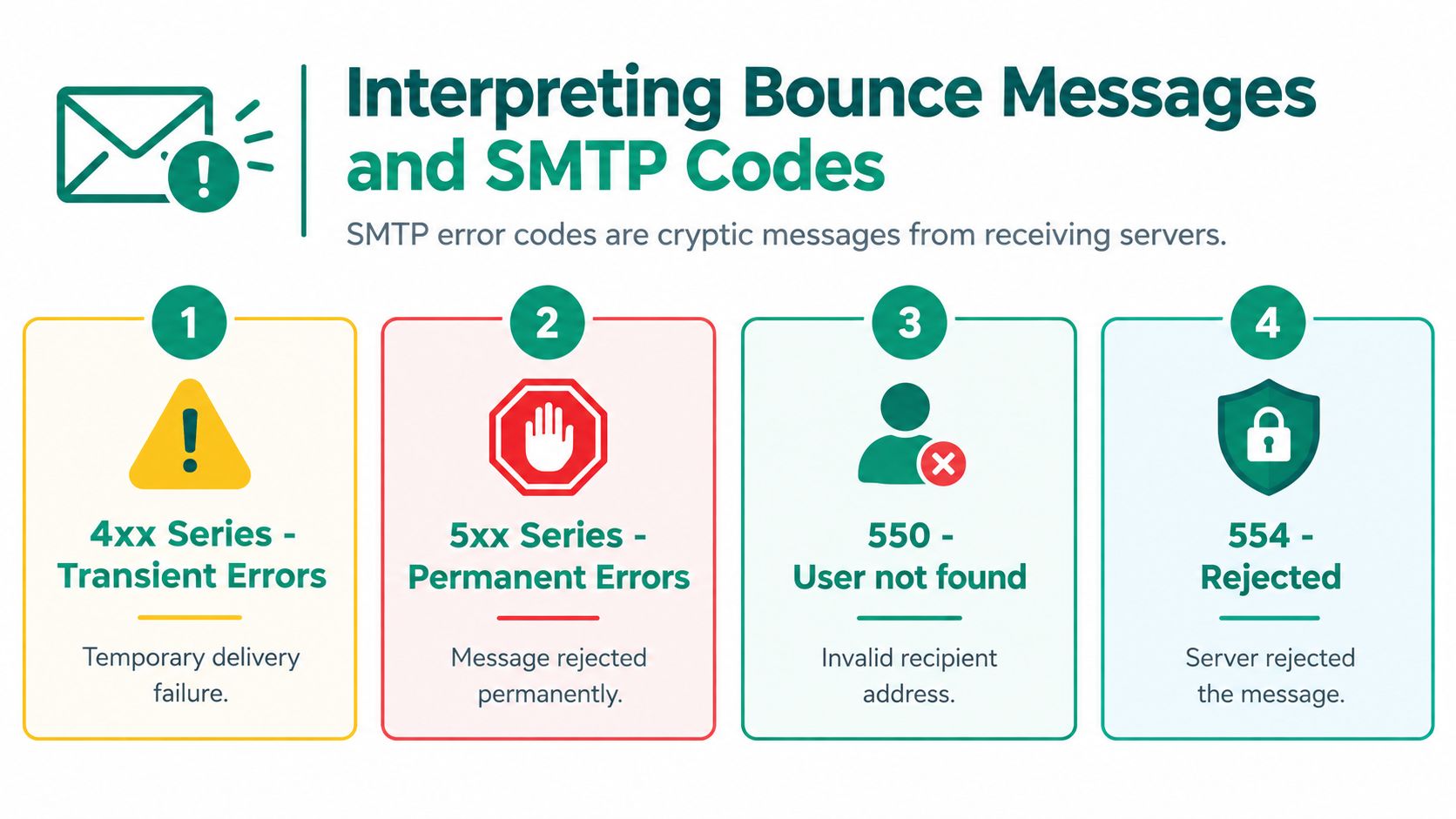
SMTP status families provide the first classification:
- 4xx responses are temporary: The recipient server may be throttling, unavailable, or asking you to retry later. Pause automated retries and check whether the message later succeeds.
- 5xx responses are permanent: The server rejected the transaction or determined that delivery shouldn't continue. Repeated 5xx responses require investigation, not more retries.
- 550 responses need context: “User not found” points toward an invalid address. A 550 response mentioning policy, reputation, or a blocked client host points toward filtering or sender rejection.
- 554 responses indicate rejection: The server refused the message or transaction, but the accompanying text determines whether the cause is content, policy, reputation, or another restriction.
Codes such as 550 5.7.1 and 554 5.7.1 are commonly associated with sender blocking or content rejection. Checking the sending IP and domain against blocklists such as Spamhaus or SORBS adds evidence, as described in this blocklist diagnostic guide.
Use the event log as a decision tree
Open the individual event, then record the recipient domain, response code, full server text, and whether the event is temporary or permanent. A message marked “deferred” shouldn't be treated as proof of a permanent block. A message marked “bounced” with a policy rejection deserves immediate attention, especially if the same response repeats across multiple recipients at one provider.
For a specific 550 5.7.1 response, this resource on the 550 571 CS message blocked fix can help interpret the provider's wording. Use the exact response, not a paraphrase from a sales rep, when escalating to your email platform or the recipient's administrator.
Don't keep sending through a confirmed rejection. Repeated attempts can reinforce the same reputation or policy signal and create more noise in your logs. First establish whether the problem is the address, the message, the sending identity, or a provider-side restriction.
Testing Inbox Placement Across Major Providers
A single test to your personal Gmail account is a weak diagnostic. Gmail may accept and place the message while Microsoft filters the same sender more aggressively, or Yahoo may place it differently from both. You need a small seed list containing live mailboxes at the providers your audience uses.
Send the same controlled message to each seed account. Keep the sender, subject, links, and body unchanged, then record three outcomes: primary inbox, spam, or missing. Match those results with your SMTP and provider logs. If the log says “accepted” but the seed mailbox shows no message, you're investigating post-acceptance filtering rather than an invalid address.
Compare the providers
The following 2026 benchmark figures show why one mailbox can't represent the entire campaign:
| Provider | Inbox Rate | Missing/Blocked |
|---|---|---|
| Gmail | 87.2% | 6.0% |
| Microsoft | 75.6% | 9.8% |
| Yahoo | 86.0% | 9.2% |
These figures come from Brevo's email marketing benchmarks. Microsoft shows the weakest inbox rate and highest missing figure in this comparison, but the practical conclusion isn't that one provider is always problematic. Your own sender identity, audience, consent history, and message characteristics determine the result.
Build a test that isolates the variable
Use a fresh, plain-text or lightly formatted message for the first test. Then repeat with the campaign version. If the simple message reaches the inbox while the campaign version disappears, inspect links, attachments, tracking, and copy. If both fail at one provider, examine authentication and reputation before rewriting the subject line.
A seed list also helps when reviewing master newsletter writing. Strong writing can improve relevance, but it can't repair a sender that a provider already distrusts. Test the finished message, not only the draft, and preserve the results so your team can identify a gradual decline before a large send.
Running Blocklist and Reputation Diagnostics
If your SMTP logs show acceptance while seed accounts report missing mail, inspect the sending infrastructure next. A blocklist hit doesn't prove that every provider will reject you, but it gives you a concrete reputation signal to investigate. The reverse is also true: a clean blocklist result doesn't guarantee inbox placement.
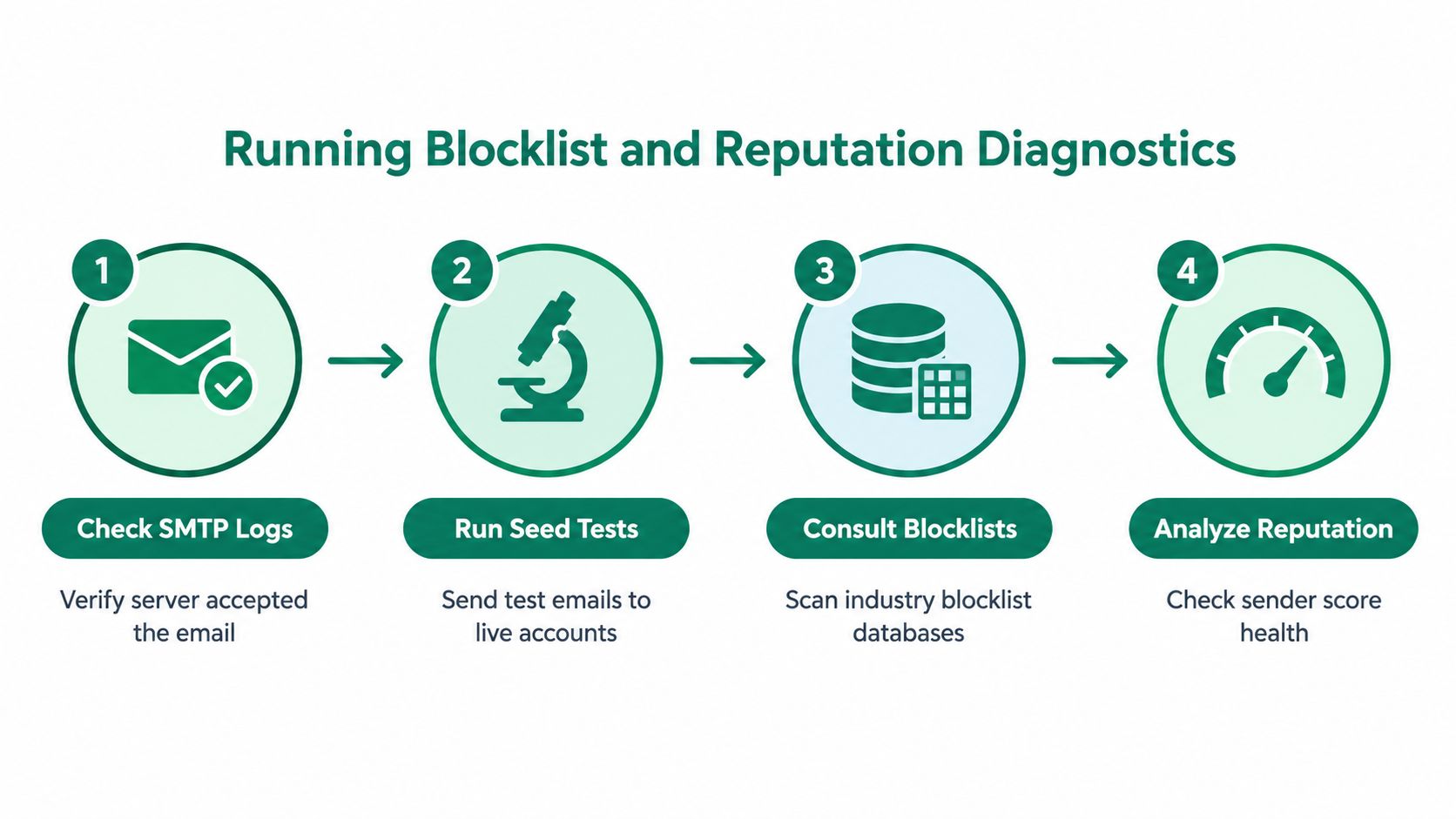
Follow the evidence in order
- Check SMTP logs first. Confirm whether the recipient server accepted, deferred, or rejected the message. Save the complete response and separate temporary throttling from permanent policy rejection.
- Run seed tests next. Send controlled messages to live Gmail, Microsoft, and Yahoo accounts. Record inbox, spam, and missing outcomes by provider.
- Consult blocklists. Check the sending IP and domain against recognised databases, including Spamhaus and SORBS. Note the listing name, reason, and removal instructions.
- Analyze reputation. Compare current delivery behavior with your historical baseline and inspect whether one provider or recipient segment is deteriorating.
Operational benchmarks offer a useful warning line: healthy programs often sit above 85% deliverability, while rates below 70% are a red flag that a large share of messages may be blocked, bounced, or filtered, according to MailTester's blocklist diagnostic guidance. Treat those figures as triage signals, not a universal pass or fail standard.
Interpret a listing without overreacting
A listing is a reason to stop and investigate, not an excuse to replace the sending domain immediately. Review recent volume changes, complaint activity, list sources, and authentication results. Correct the underlying problem before requesting delisting, because removing a listing while the behavior continues won't restore trust for long.
Use domain verification before outreach as another control point. The email verification workflow helps your team distinguish an address that can receive mail from a sender reputation problem affecting delivery after acceptance. That distinction keeps sales operations from deleting valid prospects because a provider filtered the campaign.
Fixing Authentication and Engagement Signals
Authentication and engagement solve different parts of the same problem. SPF, DKIM, and DMARC help a mailbox provider verify that your domain is authorised and aligned with the message. Recipient behavior tells the provider whether people recognise, read, ignore, delete, or report your mail.
A 2026 dataset reports 89.1% inbox placement for fully authenticated domains versus 44.2% for domains without full DMARC authentication, as reported by Digital Applied's email marketing data. The gap makes authentication a priority, but it doesn't turn authentication into an inbox guarantee.
Audit the technical identity
Check that your sending platform has the correct SPF and DKIM records, that DKIM signing is active, and that DMARC aligns the visible From domain with the authenticated identity. Review DMARC reports for unauthorised senders and configuration failures. If your organisation sends from several platforms, document which service is responsible for transactional mail, newsletters, and sales outreach.
A practical explanation of the three protocols is available in SPF, DKIM, and DMARC explained. Use it to create a shared checklist for marketing, sales operations, and IT. Authentication errors often survive because each team assumes another team owns the domain records.
Pair trust with recipient signals
A technically authenticated sender can still produce poor engagement. Suppress addresses that repeatedly don't engage, remove invalid contacts before sending, and narrow outreach to people who have a legitimate reason to receive the message. Keep the sender name and domain recognisable, and make the reply path work.
Don't try to repair a reputation problem by suddenly changing every variable. Reduce risky volume, pause the affected segment, fix authentication, and resume with the most engaged recipients. Providers need consistent evidence that the sender has changed, not a single clean test followed by another aggressive campaign.
Building a Sustainable Deliverability Routine
Deliverability is an operating discipline, not a launch-day setting. A sales team can have correct authentication today and still damage its reputation tomorrow by importing stale contacts, sending to uninterested recipients, or ignoring provider-specific warnings.
A practical weekly routine is simple enough to follow and specific enough to catch silent failures:
- Review performance by provider: Compare delivery, inbox placement, spam, missing results, bounces, and complaints by recipient domain. Look for a concentrated decline instead of relying only on campaign averages.
- Inspect exceptions: Read representative SMTP responses and separate invalid addresses from policy rejections, throttling, and post-acceptance disappearance.
- Verify before outreach: Use an address verification process before adding prospects to a sequence. EmailScout can check whether an address is valid and deliverable, including domain and mail-server response checks, so the team has a better starting point for list hygiene.
- Protect complaint rates: Healthy sender performance usually keeps spam complaints under 0.1%, while 0.3% is a danger threshold where major providers may begin enforcing restrictions, according to Mailgun's deliverability guidance.
- Control new sending capacity: Increase volume gradually for new infrastructure and watch provider responses after each change. A temporary throttling message isn't the same as a permanent block.
A clean list prevents address failures. It doesn't replace consent, authentication, or a useful message.
When a rep reports “they didn't get it,” don't immediately resend. Check the recipient domain, event log, seed placement, and complaint pattern first. That short pause often reveals a hidden filtering problem that another send would only worsen.
EmailScout helps sales and marketing teams find and verify prospect addresses before those contacts enter an outreach sequence, reducing avoidable address failures during deliverability investigations. Visit EmailScout to check prospects, organise verified contacts, and build a cleaner process for diagnosing missing email.