
Ever wonder how some sales reps seem to have a magic key for reaching anyone? It’s not magic—it's just a solid understanding of corporate email address formats.
At its core, an email format is the simple, repeatable pattern a company uses for its professional email accounts. Think things like firstname.lastname@company.com. Getting a handle on these common structures is a game-changer for anyone in sales or marketing. It stops you from just guessing and hoping for the best, drastically cutting down your bounce rates and getting your message seen by the right people.
Why Email Formats Are Your Outreach Superpower

Let's cut through the jargon. For those of us on the front lines of sales and marketing, knowing email formats is a seriously underrated skill. It’s the difference between your message disappearing into the ether and it landing squarely in your ideal prospect's inbox.
Think of it this way: you could knock on a random wall, or you could have the right key to the right door. When you can accurately predict a company’s email pattern, you're not just finding an address; you’re building a smarter, more efficient outreach machine.
The Foundation of Modern Communication
The basic local-part@domain syntax has been the standard since RFC 822 was published way back in 1982. This simple structure—up to 64 characters for the local part and 255 total—is still the backbone of all modern email. It's how the world is projected to handle over 408 billion daily emails by 2027.
This isn't just a fun fact; it's a strategic advantage. When you can spot these patterns, you can:
- Slash Your Bounce Rates: Sending emails to bad addresses tanks your sender reputation. Getting it right from the start protects your domain.
- Connect Faster: You get to skip the gatekeepers and generic inboxes and go straight to the decision-makers.
- Personalize Better: Using someone's correct, direct email shows you did your homework. It adds a layer of credibility right off the bat.
Understanding the logic behind corporate email formats turns cold outreach from a guessing game into a calculated science. It’s one of the fastest ways to improve your campaign's ROI.
From Format to Conversation
Of course, finding the right email is just the first step. The real magic happens when you pair that accurate address with a message that actually connects. For a deep dive into crafting outreach that gets replies, the Strategic Cold Outreach Personalization Blueprint has some fantastic templates and insights.
At the end of the day, mastering email formats isn't some technical chore. It's a foundational strategy to make every single email you send count, laying the groundwork for real business relationships.
Cracking the Code on Corporate Email Patterns
Figuring out a corporate email address is less about wild guessing and more about understanding the simple, logical patterns most companies use. Whether it's a small startup or a massive enterprise, organizations almost always stick to a standard format for their emails. It just makes things easier and more consistent.
Once you get a handle on these common structures, you can turn a prospect's name and their company's website into a solid, educated guess for their email. This isn't just a neat trick for salespeople—it's a core skill that directly helps you connect with the right people. The best approach? Start with the most common patterns and work your way down the list.
The Most Common Email Address Formats
Let's dive into the patterns you'll run into most often. I'd wager these account for over 80% of all corporate emails out there, so they are absolutely the best place to begin.
-
First Name Only:
john@company.com
You see this one a lot with smaller companies and tech startups. It's personal, easy to remember, and usually reflects a more modern, less formal culture. -
First Initial + Last Name:
jdoe@company.com
This is a classic for a reason. Mid-sized to large companies love this format because it's short, professional, and helps clear up confusion when you have two people with the same first name. -
First Name + Last Name Initial:
johnd@company.com
While not as common as the first two, you'll still see this one a fair bit. It's often the go-to alternative when a company has already assigned thejdoe@company.comversion to someone else.
These three patterns are your bread and butter. When you're trying to find someone's email, always start by testing these variations. If you're looking for more advanced ways to track down emails, our guide on mastering domain email lookup in 2024 goes into much greater detail.
Just remember, the goal isn't just to find an email address—it's to find the right one. Sticking to the highest-probability formats first saves you a ton of time and, more importantly, keeps you from sending emails into the void, which can tank your sender reputation.
The Separator Patterns: Dot and Underscore
If the basics don't work, the next logical step is to check for formats using separators. Dots and underscores are the most popular additions, and you'll typically find them at larger, more traditional corporations that prefer a more structured look.
I've put together a quick table that breaks down these patterns with some real-world context.
Common Corporate Email Formats and Real-World Examples
| Email Format Pattern | Example | Common Use Case |
|---|---|---|
| First Name . Last Name | john.doe@company.com |
Extremely common in large, established corporations across all industries, from finance to manufacturing. It's considered the standard for formal B2B communication. |
| First Initial . Last Name | j.doe@company.com |
A variation often used when the company wants a shorter format but still desires the formal separation that a dot provides. |
| First Name _ Last Name | john_doe@company.com |
While less frequent than the dot, the underscore serves the same purpose. It's sometimes seen in older tech companies or organizations with legacy systems. |
These separator-based formats are your next best bet after you've exhausted the most common patterns. They're a staple in the corporate world for a reason.
Why Company Size and Culture Matter
Believe it or not, a company's email format can tell you a lot about its age, size, and even its culture. A hip tech startup might go with the casual firstname@company.com to seem more approachable and modern. On the flip side, a Fortune 500 law firm will almost certainly use the formal firstname.lastname@company.com to project a traditional, professional image.
Thinking about this context gives you a real strategic advantage. Before you even start guessing, take a second to consider the company you're targeting. Is it a fast-moving SaaS business or a hundred-year-old bank? A little bit of analysis upfront can help you prioritize which formats to try first and dramatically boost your odds of getting it right on the first shot.
Your Workflow for Finding and Verifying Emails
Knowing the most common email patterns is like having a map, but you still need a car to get where you're going. A solid workflow for finding and verifying emails is that car—it saves you countless hours and, more importantly, protects your sender reputation from getting trashed. It’s all about moving from educated guesses to confirmed contacts before you even think about hitting send.
The whole process starts with a bit of smart, manual digging using tools you already have. Your goal is to find clues left on a company's digital footprint. A quick scan of their website, especially the "About Us" or "Team" page, can be a goldmine. Sometimes, you'll find an employee's email right there, instantly revealing the company's pattern. No luck? LinkedIn is your next stop. Just finding the names of the right people in your target department is a huge first step.
This visual shows the simple but powerful loop of identifying, testing, and confirming corporate email patterns.
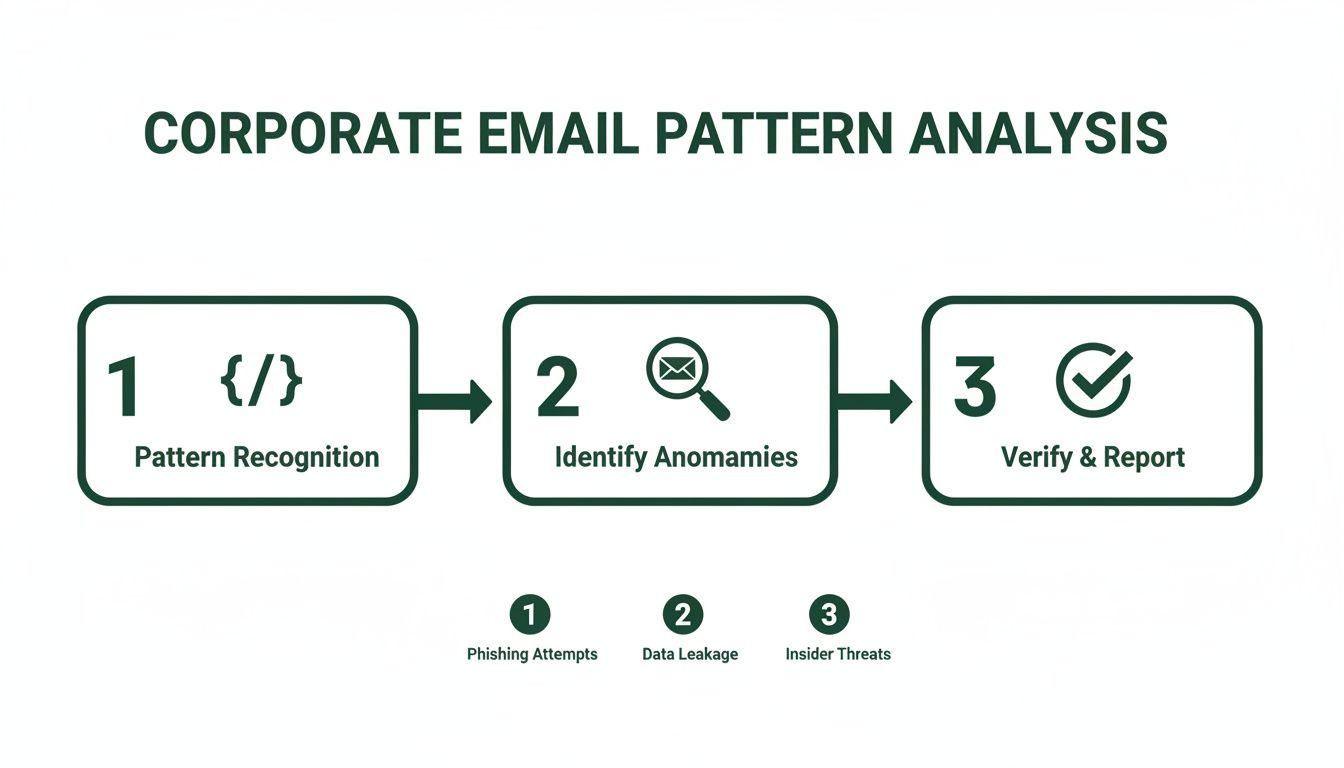
This really drives home the point that successful outreach isn't about finding one email. It’s about building a repeatable system to spot patterns, generate the right variations, and then prove they're legit.
Manual Techniques and Smart Tools
Once you have a name (say, Jane Doe) and the company domain (acmecorp.com), you can start generating a list of likely combos based on the formats we've already covered. Your first-pass list might look something like this:
jane.doe@acmecorp.comjdoe@acmecorp.comjaned@acmecorp.comjane@acmecorp.com
But here's the critical part: don't just blast emails to all of them and hope for the best. That's where specialized tools come into play. Email finders and verification platforms are built to test these possibilities without actually sending a message. They ping the mail server to see which address is valid and ready to receive. For a seriously effective method, you should look into what's known as waterfall enrichment for finding B2B emails.
The golden rule for any good workflow is verify, then send. A bounce rate of even 5% is enough to start damaging your sender reputation with providers like Gmail and Outlook. Once that happens, it gets a lot harder for your future emails to ever see the light of day in a primary inbox.
Choosing Your Verification Arsenal
The market is flooded with tools, from simple browser extensions to powerful, all-in-one platforms. The right one for you really just depends on your needs and how many contacts you're working with.
Browser Extensions
These are perfect for quick, on-the-fly lookups. When you're prospecting on LinkedIn, a good extension can often find and verify an email with a single click, fitting right into your research process. They're all about speed and convenience for one-off or small-batch searches.
Full-Scale Verification Platforms
If you're staring down a list of hundreds or thousands of contacts, a bulk verification platform is non-negotiable. You can just upload a CSV file with all your generated email guesses, and the platform will scrub the entire list, telling you which ones are valid, risky, or flat-out invalid. This is an absolute must for any large-scale marketing campaign.
The Verification Step Is Non-Negotiable
No matter which method you use, that final verification step is what separates professional outreach from spammy guesswork. Using a reliable service gives your messages the best possible chance of actually getting delivered. A well-built workflow that combines manual research with powerful verification tools turns your outreach from a game of chance into a predictable system for connecting with the right people.
If you want to dive deeper into the technical side, check out our complete guide to email address verification.
Using Email Formats to Power Your Marketing

While sales teams are often the ones hunting down individual emails, marketers can turn this same knowledge into a massive strategic advantage. It’s the secret sauce for building cleaner, more accurate lists right inside your marketing automation platform, and it directly moves the needle on the metrics that matter most.
When your contact database is pristine, every campaign you launch has a much better shot at success. You’ll see higher open rates, more click-throughs, and, ultimately, stronger conversion numbers. This isn't just about finding an email; it's about making sure your hard work actually lands in the right inbox.
List Hygiene and Campaign Performance
A clean marketing list is a high-performing asset, plain and simple. When you proactively use what you know about email formats to scrub your database, you’re not just removing bad contacts—you're protecting your sender reputation and boosting deliverability for everything you send.
Think about it. Every bounced email sends a negative signal to inbox providers like Gmail and Outlook. Rack up too many bounces, and your messages can get flagged as spam, even for your most engaged subscribers. Regular list maintenance is your first line of defense against that.
This proactive approach is critical in an email marketing ecosystem projected to hit $36.3 billion by 2033. With an average ROI of $36 for every $1 spent, you can’t afford to have your messages go missing because of sloppy data.
Turning Data Into a Reliable Asset
Your marketing database should be a source of truth, not a source of bounces. When you combine your understanding of email formats with the right tools, you can transform a messy, unreliable list into a powerful growth engine.
Here’s a practical workflow I've used for ongoing list maintenance:
- Segment and Analyze: First, break down your main list into smaller chunks based on how people signed up or how engaged they are. Look for patterns in your bounce reports. Are they all coming from a specific company or lead source?
- Apply Format Logic: Let’s say you notice a high bounce rate for contacts at "acmecorp.com" using the
firstname@acmecorp.comformat. Time to test a different pattern. Run a verification test usingfirstname.lastname@acmecorp.comjust for that segment. - Use Enrichment Services: For your most valuable segments—like high-intent leads or key accounts—it's worth using data enrichment tools. These services can automatically find and verify correct contact info, filling in the gaps and fixing outdated emails for you.
Your marketing automation platform is only as good as the data you feed it. By actively managing your list hygiene with an understanding of email address formats, you ensure your brilliant campaigns don’t just get sent—they get delivered.
Ongoing Maintenance for Peak Performance
List maintenance isn't a "one-and-done" task; it's a habit. I recommend setting a recurring schedule—either monthly or quarterly—to run your lists through a verification process. This helps you catch issues as they happen, like when contacts change jobs or companies update their email patterns.
Better yet, integrate format-checking directly into your lead capture process. This prevents bad data from ever entering your system in the first place and saves you a ton of cleanup time down the road. Our guide on how to get email addresses for marketing dives deeper into strategies for building a quality list from day one.
When you prioritize list hygiene powered by an understanding of corporate email patterns, you turn your database from a simple contact list into your most reliable, high-performing marketing asset.
How Major Email Providers Influence Your Outreach
Figuring out the right corporate email format is a huge first step, but the job isn't done. The real challenge, the final boss, is always the inbox itself. These days, a few giants like Google and Apple act as the gatekeepers for a staggering amount of all email traffic.
Their power over your outreach is massive. Think of them less as passive mailboxes and more as active, intelligent systems built to shield users from spam. Understanding how they operate is just as crucial as getting the email address right in the first place.
The Impact of Advanced Filtering
The old days of simple, keyword-based spam filters are long gone. Today's providers use sophisticated algorithms that look at everything—your sender reputation, how people engage with your emails, and what your message actually says.
If you send to a list with even a small number of bad addresses (which is exactly what happens when you guess formats without checking them), you can get your domain flagged in a hurry. A single sloppy campaign can have lasting damage, making it harder for even your best emails to land in the primary inbox down the road.
Your sender reputation is your most valuable asset in email outreach. Major providers track it relentlessly, and protecting it begins with sending emails only to verified, valid addresses. A clean list is the foundation of deliverability.
Navigating Tabbed Inboxes and Rendering Engines
Even when your email gets through, you're not in the clear. You still have to deal with the inbox layout itself. Gmail's tabbed inbox, for instance, completely changed the game by sorting mail into folders like Primary, Social, and Promotions. If your outreach email looks too much like a generic marketing blast, it's getting filtered away from your prospect's main view.
On top of that, how your email actually looks can vary wildly from one client to another. Apple Mail and Gmail process HTML and CSS differently, which can easily break your formatting and make you look unprofessional.
It's absolutely essential to design clean, simple emails that look good everywhere. You want to make sure your call-to-action is always clear and easy to find. With Gmail boasting over 2.5 billion active users and Apple Mail owning 54.04% of the email client market share, you can't afford to ignore either of them. You can dive deeper into Gmail's dominance here.
At the end of the day, knowing the right email format gets your foot in the door. But it's respecting the rules and design of the major providers that lets you step inside and actually start a conversation.
Common Questions About Email Address Formats
Even with the best tools, you're going to run into questions when you're hunting down email formats. It just happens. Let's walk through some of the most common ones that sales and marketing pros ask.
Think of this less as a set of rules and more as a field guide. The goal is to understand the logic so you can think on your feet and adapt to whatever a company throws at you.
What Is the Most Common Email Format for Businesses?
Hands down, the format you'll see most often is firstname.lastname@company.com. It's the default for a reason—it’s clean, professional, and scales well, which is why you see it everywhere in larger, more established companies.
But don't stop there. A few other patterns are incredibly common and should be the first ones you test:
f.lastname@company.com(first initial, last name)firstname@company.com(just the first name)
Your best bet is to always start with these top three when you're looking for a new contact. A little context goes a long way, too—a tech startup might lean toward firstname@company.com, while a law firm will almost certainly use firstname.lastname@company.com.
How Can I Check an Email Format Without Sending a Message?
Simple: use a dedicated email verification tool. This is non-negotiable for anyone doing serious outreach, because it’s the only way to protect your sender reputation.
These services run a bunch of technical checks behind the scenes to see if an address is actually live and can receive mail. The whole process happens instantly without sending a single email. That means you get confirmation without the bounces that tell Gmail and Outlook you're a spammer.
Never, ever "test" an email by sending your pitch to it. Even one bounce is a red flag for inbox providers. A good verification tool does the check safely and instantly, keeping your sender score intact.
Are There Legal Rules for Using Guessed Email Formats?
Yes, and you absolutely need to know them. Regulations like GDPR in Europe and the CAN-SPAM Act in the U.S. set the rules for all commercial email. Finding a business email address for legitimate B2B outreach is standard practice, but your job isn't done once you find it.
The law is clear: your message has to be relevant to their job, you must provide an obvious and easy way to opt out, and you have to follow all local requirements. Before you launch any campaign, make sure you've consulted with a legal professional to ensure you’re fully compliant. It’s just not worth the risk.
Ready to stop guessing and start connecting? EmailScout's powerful Chrome extension helps you find and verify the right email addresses in a single click, right from your browser. Find unlimited emails for free and build your outreach lists faster with EmailScout.