
The best email address finder for free is one that gives you a steady stream of verified emails without asking for a credit card. It should let you build targeted lead lists for sales, marketing, or networking on the fly. A tool like EmailScout’s Chrome extension does exactly this, letting you pull contacts straight from websites and professional networks with a single click.
Why a Free Email Finder Is Your Outreach Superpower

In a world overflowing with digital noise, just getting your message to the right person is the first—and often the hardest—part of the battle. Every cold email, partnership proposal, or sales pitch lives or dies by its ability to land in the correct inbox.
Sending your message to a generic info@ or contact@ address is like shouting into a void. Your carefully crafted email gets lost in a sea of spam and support tickets, never reaching the decision-maker who actually matters.
This is where a solid, free email finder becomes more than a simple utility; it’s a genuine strategic advantage. It’s not about finding any email. It's about finding the right email, fast. This simple shift turns your outreach from a game of chance into a targeted, effective operation.
The True Cost of Bad Data
Let's be clear: guesswork is expensive. Every bounced email hurts your sender's reputation, making it more likely that your future messages will end up in spam folders. Every message sent to the wrong person is a wasted opportunity and a drain on your most valuable resource: time. For anyone in sales or marketing, that inefficiency translates directly into lost revenue and missed connections.
A reliable email address finder for free cuts right through that problem. It gives you the power to:
- Connect Directly: Get past the gatekeepers and generic inboxes to engage with the people who make decisions.
- Boost Engagement: A personalized message sent to a specific person has a dramatically higher chance of getting opened and read.
- Protect Your Reputation: Verified emails slash your bounce rates, which signals to email providers that you’re a legitimate sender.
- Maximize ROI: By focusing your energy on qualified contacts, you get better results from your outreach without spending a dime upfront.
The Market Is Shifting Toward Precision
The demand for accurate contact information isn't just a fleeting trend; it’s a massive market shift. The global email finder tools market was valued at around $642 million just a few years ago and is on track to explode to $5.6 billion by 2032.
Why the huge jump? Because businesses see real results. Companies that use precise email finders consistently report a 30% boost in open rates and 25% higher reply rates. It just works.
To help you see the bigger picture, here’s a quick rundown of how free tools stack up against their paid counterparts.
Free vs. Paid Email Finders at a Glance
| Feature | Free Tools (Like EmailScout) | Typical Paid Tools |
|---|---|---|
| Cost | $0, no credit card required | Monthly or annual subscription fees |
| Email Credits | Often unlimited or very generous | Tiered, with limited credits per month |
| Core Functionality | Excellent for finding emails on-the-fly from websites and social profiles | Often includes bulk finding, CRM integrations, and advanced APIs |
| Verification | Basic to moderate verification included | Advanced, multi-step verification to ensure high deliverability |
| Ease of Use | Simple, one-click browser extension | Can be more complex with dashboards and campaign features |
| Best For | Individuals, freelancers, and small teams starting outreach | Larger sales/marketing teams with high-volume, automated needs |
While paid tools offer advanced features for large-scale operations, a powerful free tool like EmailScout provides the essential functionality most people need to get started and see immediate results.
The real value of an email finder isn't just about collecting data. It’s about starting meaningful conversations that would otherwise be impossible. It’s the first step in every successful outreach campaign.
This is the power EmailScout delivers. By offering an unlimited free model, it removes the financial barrier to effective outreach, giving you the essential tool you need to cut through the noise. To fully grasp how a free email finder fits into the broader picture, it's worth exploring modern lead acquisition strategies. After all, finding the right contact is the critical first step to opening doors, building relationships, and ultimately, growing your business.
Find Emails Instantly with the EmailScout Chrome Extension
While the manual methods definitely have their place, let's be honest—the fastest way to get your hands on verified contact info is with a tool built for the job.
This is where the EmailScout Chrome extension comes in. It’s designed to turn your browser into a powerful, on-demand email address finder for free. It just sits quietly in the background, ready to pull contact details with a single click. No more tedious searching, guessing patterns, or manually verifying addresses.
You can find the email you need right on a person’s professional profile or company website. It’s a massive time-saver, freeing you up to focus on actually reaching out.
Quick and Easy Installation
Getting started with EmailScout is a breeze and takes less than a minute. The first thing you need to do is add the extension to your Chrome browser straight from the official Chrome Web Store.
Here’s what the Chrome Web Store looks like, where you can find and install extensions like EmailScout.
Once you find it, just click "Add to Chrome." The EmailScout icon will pop up in your browser's toolbar, and you're good to go.
Here's a pro-tip: "pin" the extension to your toolbar so it's always visible. Click the little puzzle piece icon in Chrome, find EmailScout in the list, and hit the pin icon. Now, it's always ready for action. For a more detailed walkthrough, you can check out our guide to the EmailScout email extractor Chrome extension.
A Real-World Scenario: Finding a Key Contact
Okay, so you've got the tool installed. Let's put it to work in a situation you've probably faced a dozen times.
Imagine you're a sales rep for a SaaS company. Your mission is to connect with the Head of Marketing at a promising tech startup to pitch your new analytics platform. Your first stop? LinkedIn, of course.
After a quick search, you land on the profile of "Jane Doe, Head of Marketing at InnovateTech." Her profile is a goldmine—full of details about her role and accomplishments. But the one thing you actually need, her email address, is nowhere to be found.
This is exactly where EmailScout shines. With the extension active, all you do is stay on her LinkedIn profile.
A single click on the EmailScout icon is all it takes. The extension instantly scans the page data and reveals Jane's professional email address, often with her full name and title, right there in a small pop-up.
You never have to leave the page or run complicated searches. The info appears right where you need it, letting you jump straight from prospecting to outreach without missing a beat.
Automate Your Lead Collection with AutoSave
Finding emails one by one is great, but what if you could build an entire lead list just by browsing the web? That's the idea behind EmailScout’s AutoSave feature.
When you flip this feature on, it works silently in the background. As you browse company websites, professional network profiles, or online directories, the extension automatically grabs and saves any email addresses it finds.
This is a game-changer for tasks like:
- Building Prospect Lists: Just browse the "Team" or "About Us" page of a target company, and EmailScout will automatically collect the contact details for everyone listed.
- Networking at Scale: Working through the speaker list for an upcoming conference? The tool will save the emails of every potential connection for you.
- Market Research: Exploring a list of companies in your target industry? AutoSave will build a list of key contacts as you go.
All the contacts collected via AutoSave are neatly organized in your EmailScout account. From there, you can export them as a CSV and upload them directly into your CRM or outreach platform. It turns casual browsing into a productive lead-gen activity, making sure you never miss an opportunity.
Scale Your Outreach with Bulk URL Email Extraction
Finding one email with a single click is a nice little win. But what happens when you need to find contacts for dozens, or even hundreds, of people across different companies? Suddenly, that one-click tool feels slow, and you're staring down hours of tedious, manual work.
When you need to scale, you need a different game plan. Forget hunting for contacts one by one. The real power comes from gathering them in bulk from a list of highly targeted websites. That’s exactly what EmailScout’s URL Explorer was built to do—turn a simple list of web pages into a ready-to-use list of leads.
This feature is a lifesaver for anyone building targeted lists at scale. Sales teams can use it to map out entire departments at key accounts. Marketers can pull together contact lists from industry blogs or conference speaker pages. It completely automates what used to be a major bottleneck in any outreach process.
Your Workflow for High-Volume Lead Generation
The process itself is surprisingly simple. It all starts with putting together a list of URLs where your ideal contacts are likely to be found. Get strategic here—think about where your prospects are publicly listed online.
Good sources for URLs include:
- Company 'About Us' or 'Team' Pages: These are often goldmines for direct contact information of key people.
- Conference Speaker Rosters: Grab the URLs from speaker bios to connect with industry experts and thought leaders.
- Industry Association Member Directories: If a directory is public, its pages can be a source of highly relevant contacts.
- "Top 10" Lists and Round-Up Blog Posts: Articles like "Top 20 SaaS Companies to Watch" have already done the curation work for you.
Once you have your list of URLs, just paste them into the URL Explorer. EmailScout takes over from there, visiting each page and pulling every email address it finds. The results are then neatly compiled into a clean, downloadable list, ready for your next campaign.
A Practical Example in Action
Let's imagine you're trying to connect with marketing leaders at fast-growing SaaS companies. You could start by gathering the 'About Us' page URLs for 10-15 of your top target companies.
Instead of visiting each page yourself, clicking on profiles, and copying emails one by one—a task that could easily burn an hour—you just feed the entire URL list into the tool. Within minutes, EmailScout spits out a consolidated list of every email it found across all of those pages.
This simple workflow is at the heart of the process.
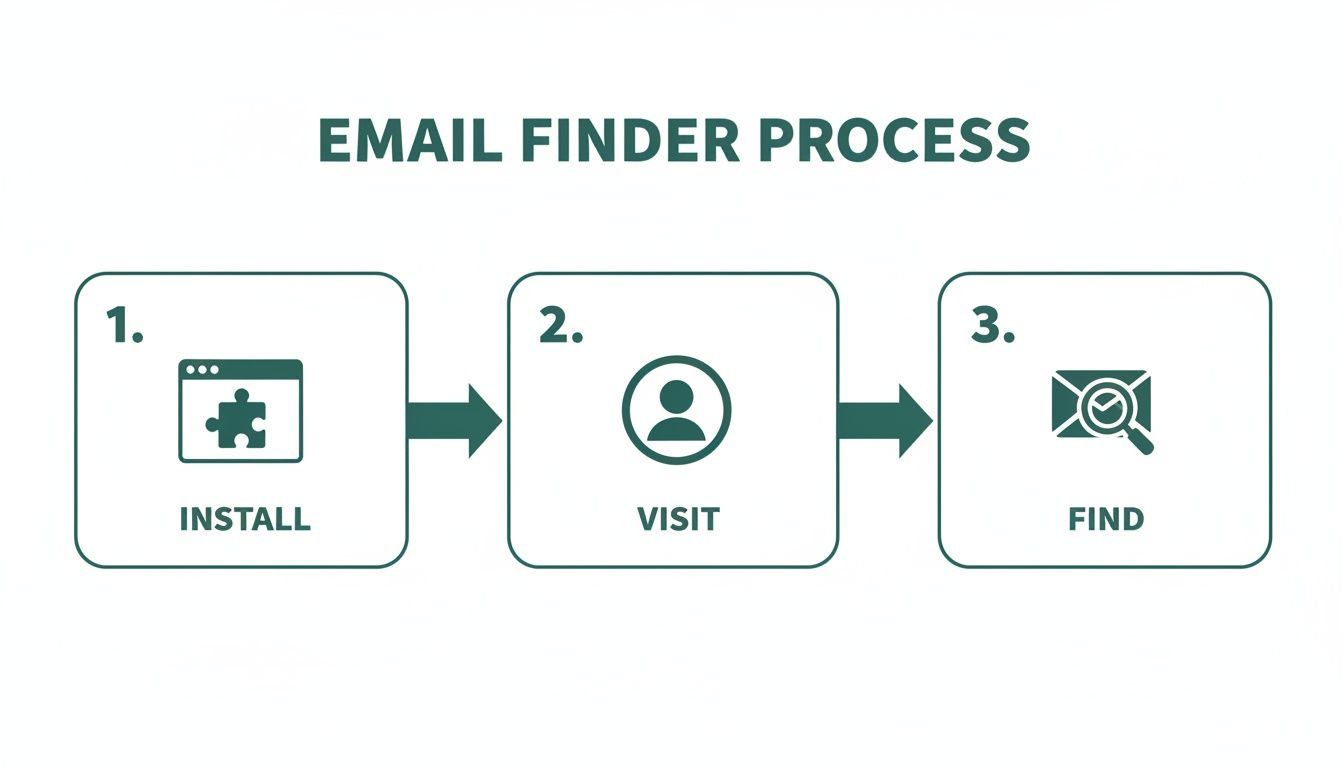
The graphic nails the simplicity: install the tool, visit a source, and find the email. This efficiency gets even more dramatic when you're working with dozens of URLs at once, turning a major time-sink into a minor task on your to-do list.
The Impact of Scalable Email Discovery
The ability to extract emails in bulk isn't just a time-saver; it’s about moving faster on market opportunities. Email marketing is absolutely booming, with a projected market value of $36.3 billion by 2033—a massive jump from $14.8 billion in 2025. With over 4.6 billion global email users, the channel delivers an incredible ROI of $36 for every $1 spent, but that only works if your messages actually get to the right people.
By automating the discovery process, you can build bigger, more targeted lists faster than your competitors. This allows you to run larger campaigns, test different messaging, and ultimately generate more leads and revenue.
Tools like the URL Explorer empower marketers and sales teams to tap into this potential at scale. You can learn more about the specifics in our guide on how to use an email extractor from a website. Ultimately, this approach bridges the gap between knowing who your target companies are and actually having the contacts you need to start a conversation, making your outreach both efficient and incredibly effective.
Manual Tricks for Finding Hard-to-Get Emails
While an automated email address finder for free is a massive shortcut, no tool is perfect. You’re bound to hit a wall eventually, especially when hunting for a high-level executive or someone who keeps a low digital profile. When the easy button fails, it’s time to put on your detective hat.
Picking up a few manual search skills is the secret weapon that separates amateur outreach from professional prospecting. Think of these techniques as your fallback plan, ensuring that even the most elusive contact is still within your grasp. With a little cleverness, you can often uncover exactly what automated tools miss.
Master the Art of Google Dorking
Google is far more than a search engine; it's a colossal, searchable database. "Google Dorking" is just a fancy term for using advanced search operators to force Google to give you hyper-specific results. It’s like having a secret key to unlock hidden information.
Instead of a generic search like "Jane Doe email," you can use powerful commands to really narrow the field. These operators act as filters, telling Google precisely what to look for and where.
For instance, a search like site:linkedin.com/in/ "Jane Doe" "VP Sales" email tells Google to only search within LinkedIn profiles for pages that contain Jane Doe's name, her title, and the word "email." This simple string can often surface profiles or related documents where her contact info is mentioned.
This is a game of trial and error. You're searching for digital breadcrumbs—a mention in a press release, a bio on a conference website, or an old forum post. The right combination of search terms often leads you straight to the prize.
Intelligently Guess and Verify Email Patterns
Most companies follow a predictable pattern for their email addresses. This is a huge advantage. If you know a person's name and their company's domain, you can make a highly educated guess. Honestly, this is often the fastest manual method.
Common patterns you'll see are:
firstname.lastname@company.com(e.g., jane.doe@company.com)firstinitiallastname@company.com(e.g., jdoe@company.com)firstname@company.com(e.g., jane@company.com)firstname_lastname@company.com(e.g., jane_doe@company.com)
Once you have a few likely candidates, you don't have to just send a blind email and hope for the best. Use a free email verification tool to check if the address is valid without sending a message. These tools do a quick ping to see if the server recognizes the address, giving you a green light before you hit send. If you want to dive deeper into this topic, you can read our guide on finding email addresses by name.
Top-tier email finders often use this same pattern-deduction logic. But even the best tools aren't flawless. Benchmarks show that leading services can have a surprisingly high rate of unusable emails—sometimes as high as 25.4%. This really highlights why knowing how to manually guess and verify is such a crucial backup skill. You can learn more about these findings on email finder accuracy.
Mine Company Websites for Hidden Clues
Sometimes, the contact information you're looking for is hiding in plain sight. Company websites, especially for smaller to mid-sized businesses, are often filled with direct contact details if you know where to dig.
Go beyond the main contact page and explore these less-obvious sections:
- The 'About Us' or 'Team' Page: This is the first place to look. Many companies proudly list their leadership team, and you might get lucky with direct email addresses or links to their professional profiles.
- Press Releases or 'News' Section: When a company issues a press release, they almost always include a media contact. This is often a real person in marketing or PR, and their direct email is usually listed right there.
- Blog Author Bios: If your target has ever written for the company blog, check their author bio at the bottom of the article. It's a common spot to find an email address or a link to a personal site with more contact info.
These manual strategies take a bit more elbow grease, but they're incredibly effective when automated tools come up short. By combining smart searching, logical deduction, and thorough website investigation, you dramatically increase your odds of finding the exact email you need to start a real conversation.
How to Conduct Ethical and Effective Outreach

Finding a verified email address feels like a win, but it’s just the starting line. The real work—and the real opportunity—is in what you do next. How you use that email will determine if you build a genuine connection or just add to the noise in someone's inbox.
Effective outreach has nothing to do with blasting a generic template to hundreds of people. It’s about being thoughtful, respectful, and personal. Your goal should be to start a conversation, not just shove a sales pitch in someone's face.
Personalization Is Your Secret Weapon
In a world drowning in automated messages, a small touch of real personalization can make you stand out immediately. I'm not just talking about using a {FirstName} tag. I mean real personalization that shows you’ve actually done your homework.
This proves you see the recipient as a human being, not just another lead on a spreadsheet.
Think about what you can reference that shows you've paid attention:
- A Recent Accomplishment: Did they just publish a killer article on their company blog? Mention a specific point you found interesting.
- A Shared Connection: Reference a mutual colleague you both know or a conference you both attended.
- A Company Milestone: Congratulate them on a recent product launch, funding announcement, or a great piece of press.
A simple sentence like, "I really enjoyed your recent post on sustainable marketing—your point about supply chain transparency was spot on," instantly proves you’re not a robot. It turns a cold email into a warm introduction.
Navigating Compliance and Ethics
Using an email address finder for free means you also have a responsibility to be an ethical sender. Bending the rules isn't just bad practice; it can bring on serious penalties and do lasting damage to your brand's reputation. Always keep two key regulations in mind: GDPR (for EU contacts) and the CAN-SPAM Act (in the U.S.).
Don't get bogged down in the legal jargon. The core principles are just good business sense.
The essence of ethical outreach is providing clear value, being transparent about who you are, and making it incredibly easy for people to opt out. Respect the inbox, and you'll protect your sender reputation.
At an absolute minimum, every outreach email you send should include your physical address and a clear, one-click unsubscribe link. Never use shady or misleading subject lines, and always honor opt-out requests right away. This isn’t just about dodging fines; it’s about building trust from the very first interaction.
To keep things straightforward, here's a quick reference table for what to do—and what to avoid—in your outreach.
Email Outreach Dos and Don'ts
| Do | Don't |
|---|---|
| Personalize your message with specific details. | Use a generic, one-size-fits-all template. |
| State your purpose clearly and concisely. | Hide your intention in long, vague paragraphs. |
| Include a clear, one-click unsubscribe link. | Make it difficult or confusing to opt out. |
| Provide genuine value or a solution to a problem. | Focus only on your product or sales pitch. |
| Honor opt-out requests immediately. | Continue sending emails after a person unsubscribes. |
| Be transparent about who you are and your company. | Use deceptive or misleading subject lines. |
Following these simple rules helps ensure your emails are welcomed, read, and acted upon, all while keeping your sender reputation intact.
A Simple and Effective Outreach Template
You don't need a five-paragraph essay to get a response. In fact, shorter is almost always better. Here’s a simple, value-first template you can adapt for your own use. To really boost your open rates, check out these expert tips on writing catchy email subject lines.
Subject Line: Quick question about [Their Company]'s [Specific Area]
- Opening: Kick things off with your personalized compliment or observation. (e.g., "Hi Jane, I saw your team just launched the new X feature—congratulations, it looks fantastic.")
- Value Proposition: Get straight to the point. State your purpose clearly, focusing on a problem you can solve for them. (e.g., "We help B2B SaaS companies like yours reduce user onboarding friction by about 25%.")
- Call to Action: Make your ask simple and low-commitment. No one wants to book a 60-minute demo off a cold email. (e.g., "Would you be open to a brief 15-minute call next week to explore if this could be a fit?")
This structure works because it respects their time, shows you've done your research, and gets directly to the point. It frames the entire conversation around their world, making them far more likely to reply. When you combine a verified email with a thoughtful message, you turn cold outreach into a powerful way to build real relationships.
Got Questions? Here Are Some Answers
Even with the best tools, you're bound to have some questions. That's a good thing—it means you're thinking critically about how to find emails the right way.
Let's clear up a few of the most common things people ask when they start using free email finders.
Is It Legal to Use an Email Finder?
This is the big one, and the short answer is yes, it’s legal. Finding a publicly available business email is not the problem. It’s what you do with that email that counts.
Laws like the CAN-SPAM Act in the U.S. and GDPR in Europe are not there to stop you from doing business. They exist to stop spam. As long as you're reaching out with a legitimate business reason, being transparent about who you are, and providing an easy way to opt-out, you're generally in the clear.
Think of it this way: The tool is just a map. Where you drive and how you drive is on you. Always be respectful and provide real value.
How Accurate Are These Free Tools, Really?
It’s important to set the right expectations here. Free email finders are incredibly useful, but they're not crystal balls. No tool can guarantee 100% accuracy because the business world is constantly changing—people switch jobs, companies rebrand, and email structures get updated.
A good tool like EmailScout works by cross-referencing multiple data points to give you the highest possible chance of a valid email. You can generally expect a success rate anywhere from 70% to 95%. This is more than enough to fuel a powerful outreach campaign, but you should always plan for a small percentage of emails to bounce. That’s just part of the game.
Why Do These Tools Only Find Professional Emails?
You’ve probably noticed that email finders are built to find name@company.com addresses, not personal ones like name@gmail.com. There are a few very practical reasons for this:
- Keeping it Professional: When you’re doing business outreach, you want to reach people in a professional context. Their work email is the right place for that conversation.
- Staying Compliant: Privacy laws are much stricter with personal data. Contacting a business email for a relevant business purpose is widely accepted, but landing in someone's personal inbox uninvited can feel intrusive and cross a legal line.
- They're Easier to Find: Business emails usually follow predictable patterns, which makes them far easier for algorithms to find and verify. Personal emails are totally random.
Focusing on professional emails helps you run smarter, more effective outreach that respects people’s boundaries.
What if I Still Can't Find an Email?
It happens. Sometimes a person has a tiny digital footprint or works at a company with a bizarre email format. When your automated tools come up short, it’s time to put on your detective hat and go back to the manual methods.
Don’t just give up on a great prospect. Try these moves:
- Advanced Google Searches: Use "Google dorking" tricks with different combinations of their name, company, and words like "email" or "contact."
- Dig Through the Company Website: Check out the "About Us," "Press," or "Team" pages. You might find an author bio on a blog post or a media contact that gives you a clue.
- Guess and Verify: This is a classic for a reason. Try the most common patterns (
first.last@domain.com,firstinitial.lastname@domain.com) and pop them into a free verification tool. You’d be surprised how often this works.
When you combine a great tool with a bit of manual sleuthing, there aren't many contacts who can stay hidden for long.
Ready to stop guessing and start connecting? With EmailScout, you get an unlimited free email finder that integrates directly into your browser. Find verified emails, build lead lists automatically, and supercharge your outreach in minutes. Get started with EmailScout for free today