
You've spent days building a prospecting file. The spreadsheet looks impressive, the titles appear senior, and the sending platform is ready. Then the campaign launches. Some addresses bounce, several contacts no longer work at the company, and the people who do receive the message have no authority over the purchase. A large list has produced very little pipeline.
That failure usually starts before the copy is written. A decision makers email list only creates value when the contacts are current, role-relevant, reachable, and appropriate to contact. The practical target isn't the biggest database. It's the smallest usable audience that gives your team a credible chance of earning replies.
Why Most Decision Maker Lists Fail Before the First Email
A campaign can fail before the first message leaves your sending platform. The file contains thousands of addresses, the job-title filter looks precise, and the team expects volume to create relevance. Then sales reps research contacts with no buying role, marketers send to stale inboxes, and the domain carries the cost of poor targeting.
A large decision makers email list can scale to 1,500,000 verified contacts, showing how B2B prospecting has moved from manually maintained address books to industrial-scale data assets (decision-makers email list database overview). Scale helps only when filtering and verification keep pace. Without those controls, a larger file hides more bad records.
Volume disguises targeting problems
Take a software vendor selling an operations platform. Its file includes chief executives, consultants, assistants, former employees, generic inboxes, and department heads who influence the project without approving the budget. Open rates can sit anywhere in a broad 20% to 60% range, while replies remain much lower (cold email benchmark report). That difference often sends teams back to the copy when the fault is contact selection.
The core issue is role accuracy. An open records activity detected by a tracking system. A reply shows that the recipient found enough relevance, authority, and motivation to respond. Those outcomes should not be treated as interchangeable.
Practical rule: If a contact cannot plausibly explain why your offer belongs among their current priorities, leave them out of the first campaign segment.
Smaller lists expose quality faster
Industry benchmark data places open rates around 18% to 26% and reply rates around 3% to 7% for large B2B lists. Healthcare and medical campaigns commonly fall within the 18% to 26% open-rate range, while manufacturing and engineering sit around 16% to 23% (B2B decision-maker list benchmarks). These figures are baselines, not promises. Use them to check whether list construction and delivery are functioning, not to set guaranteed results.
Independent outreach research reports that 65% of companies agree email prospecting can reach decision-makers that other channels struggle to reach. It also reports C-level executives responding at 6.4% versus 5.2% for non-C-suite employees (cold email outreach statistics). The practical lesson is narrower: identify the seniority and buying context that justify direct outreach instead of emailing every executive in the database.
A new-market list should begin as a tightly defined pilot. Tie each record to a specific account profile, buying role, and reason for contact. If replies do not appear, inspect the records before rewriting the sequence. A personal brand email list resource can also help teams think through audience definition and relevance instead of treating raw contact volume as the goal. A smaller verified list gives deliverability and reply quality a clearer test, and it makes every bad record easier to find and remove.
Mapping Who Actually Decides and How to Target Them
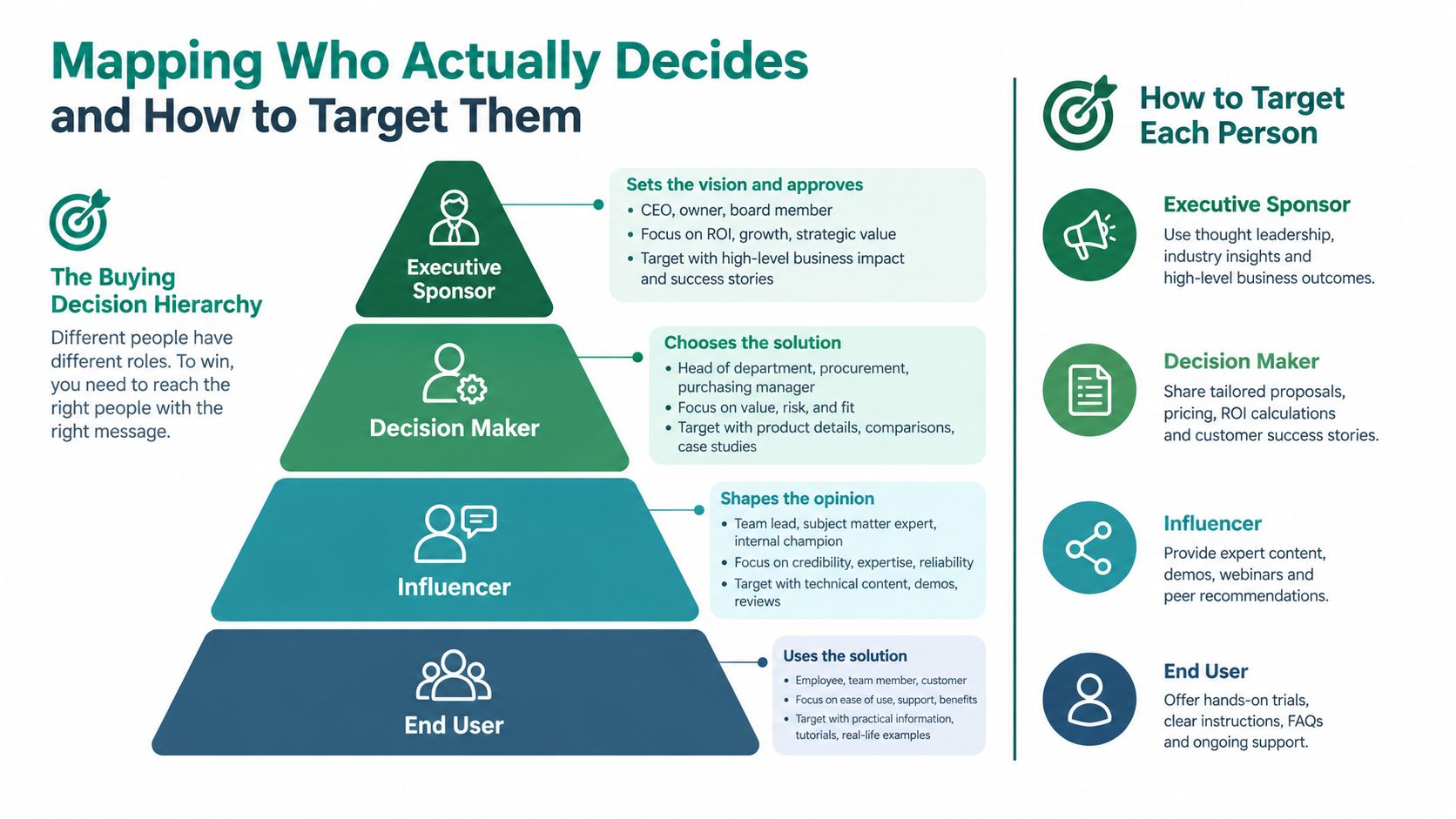
Job titles are clues, not buying maps. A chief technology officer may own the strategic decision, while a director evaluates vendors and an operations leader controls the workflow that makes the purchase urgent. If your list includes only the most senior title, you may miss the person who creates internal momentum.
Start with the buying role, then translate it into titles.
Build the account map
For each target account, identify four types of participants:
- Economic buyer: The person accountable for budget approval, business impact, or executive sign-off.
- Operational owner: The leader who owns the process your product changes and can describe the current pain.
- Technical evaluator: The person who tests integration, security, implementation, or system fit.
- Potential blocker: Procurement, legal, finance, security, or another group that can delay or reject the purchase.
These roles vary by company size and industry. In a smaller company, one person may hold several of them. In a larger organization, the champion and economic buyer may sit in separate departments. A generic “VP” filter won't reveal that distinction.
Turn buying roles into search criteria
Create an ideal customer profile with more than industry and geography. Include:
- Department ownership: Decide whether the issue belongs to IT, finance, revenue operations, human resources, procurement, or another function.
- Seniority range: Include executives, vice presidents, directors, and managers where the offer requires hands-on ownership.
- Title variations: Add equivalent terms, such as “Head of Infrastructure,” “Director of Systems,” and “VP of Technology,” rather than relying on one exact title.
- Company context: Note business model, operating complexity, existing technology, growth signals, or organizational structure.
- Buying trigger: Record why this account might care now, such as a new initiative, hiring activity, expansion, or a visible operational change.
LinkedIn profiles and company websites help validate reporting lines, department ownership, and current employment. Don't treat a profile headline as proof of authority. Look for the person's responsibilities, team scope, published initiatives, and connection to the problem you solve.
This guide to finding decision-makers inside a company is useful when title searches return too many plausible but poorly matched contacts. The objective is a contact record with context, not merely an email address.
The hierarchy below is helpful as a working model, but your campaign should reflect the actual approval path in the target market.
Here's a short visual explanation of how buying influence differs from seniority:
Finding and Compiling Decision Maker Emails Without Guesswork
Once the buying map is clear, sourcing becomes a controlled research process. The strongest workflow combines several signals instead of trusting a single database export. Names, companies, job titles, domains, public role information, and email verification should reinforce one another.
Start with the account, not the address
Build an account list first. Use your ICP to identify companies that fit the market, then inspect their websites, leadership pages, team pages, press releases, and relevant professional profiles. Search operators can narrow discovery when public information is available:
site:company.com leadershipsite:company.com "head of"site:linkedin.com/in "VP of Operations" "company name"site:company.com procurementsite:company.com technology OR infrastructure
These searches don't prove that an email is valid. They help confirm the person, department, and likely buying role before you attempt enrichment.
LinkedIn is most useful for discovery and context. Record the profile URL, current company, title, location, department, and any evidence that connects the contact to your offer. A name without a company domain is not a finished prospect.
Use multiple signals before export
A repeatable collection sequence looks like this:
- Select the account: Confirm that the company fits the ICP and isn't already excluded by territory, customer status, or compliance rules.
- Find the role cluster: Locate the economic buyer, operational owner, and technical evaluator where relevant.
- Confirm current employment: Compare professional profiles with the company site and recent public activity.
- Enrich the record: Match first name, last name, company, domain, title, and profile URL.
- Verify the address: Run the candidate through an email verification process before it enters a sending queue.
- Deduplicate: Merge records by company, person, and address. Preserve the strongest source and the latest verification result.
- Capture the reason: Add a short note explaining why this account and role were selected.
A browser-based workflow can help sales teams collect contact details while researching company pages and professional profiles. EmailScout, for example, can discover email addresses from a company website or LinkedIn profile, save gathered contacts, export them as a CSV, and enrich uploaded prospect records using names and company domains. Treat the output as a sourcing input, not permission to skip validation.
Teams working on broader acquisition strategy may also find the B2B marketing strategy category from Mick-Mar useful for connecting outbound research with content, positioning, and demand generation.
For a more focused lookup workflow, use this company email address discovery guide to structure the fields you capture and the checks you perform before export.
Preserve the research trail
A clean CRM record should answer more than “who is this?” It should show where the contact came from, when the role was checked, which company domain was used, what buying role they represent, and whether they have opted out or should be excluded. That context protects the team from repeating the same weak research and makes future list refreshes faster.
Verifying Enriching and Cleaning Your List for Deliverability
A large database can still produce a small usable list. An address may match the right title yet point to a closed mailbox, a former employer, a catch-all domain, or a contact who should never enter a campaign. Verification decides which records are safe to test.
Enrichment quality also varies by provider and source. Published benchmarks report coverage ranging from about 41.3% to 87.1%, while controlled tests found real enrichment as low as 14.2% for some providers and around 54.9% for stronger ones (B2B enrichment accuracy benchmarks). Database size therefore says little about the number of usable contacts. A smaller verified list can produce cleaner tests and more reliable reply signals than a large scraped file.
Treat verification as a gate
Keep discovered addresses out of active campaigns until each record passes a defined quality gate:
- Mailbox status: Remove addresses that fail verification or return a clear invalid result.
- Domain relationship: Confirm that the email domain matches the stated company where appropriate.
- Role alignment: Check that the current title still maps to the buying role you selected.
- Duplicate status: Consolidate the same person across sources and aliases.
- Catch-all risk: Separate uncertain domains from confirmed deliverable contacts.
- Suppression status: Compare records with internal opt-out, complaint, customer, and legal suppression files.
- Evidence date: Store when the contact and company relationship were last checked.
A tool such as EmailScout's email verification workflow can support this stage by checking addresses before export or campaign entry. It does not replace internal rules. Decide which risk categories are excluded, held for manual review, or allowed in a controlled test.
Judge the list after bounce control
Evaluate reply performance only after bounce control. Sending to invalid or poorly matched records makes the test difficult to interpret because deliverability problems and targeting problems become mixed together.
The cleaning cycle should remove contacts who changed companies, left the relevant function, or no longer fit your outreach policy. Privacy guidance also supports regular hygiene checks, removal of stale contacts after 12 to 18 months, documented legal basis, verified sourcing, and synchronized opt-out handling (B2B email privacy and legitimate interest guidance).
Record the reason for every exclusion. That history helps sales operations identify recurring source failures and refresh the list without rebuilding the same bad records.
Quality control principle: Don't ask whether a list is large enough. Ask whether every record has earned the right to enter a sending queue.
Segmenting and Targeting Outreach That Earns Replies
A list can be verified and still produce no replies when every contact receives the same pitch. Consider a sales director, an operations leader, and a technical evaluator reviewing the same offer. Each person has a different problem, authority level, and reason to respond. Seniority, department, industry, trigger, and buying stage should shape the message.
Segment around the recipient's likely problem, not the fields your database happens to contain. Smaller, well-matched groups usually give you clearer deliverability and reply feedback than a massive scraped database.
Create segments with a job to do
Every segment needs a distinct message and a measurable success condition. Useful groups include:
- Executive owners: Lead with concise business outcomes and ask whether the issue is on the current agenda.
- Operational leaders: Reference a workflow, bottleneck, or process that the department owns.
- Technical evaluators: Address compatibility, implementation effort, security, or architecture.
- Industry-specific groups: Adapt examples and vocabulary to the operating environment.
- Trigger-based accounts: Connect the message to a visible event without claiming knowledge of private priorities.
Use replies as the primary quality signal. Large-scale cold email data places average reply rates at about 3.43%, while top performers exceed 10% (cold email benchmark report). A separate benchmark reports global B2B open rates around 18.3% and click-through rates around 2.5% (B2B outreach statistics). Treat these figures as directional benchmarks, not targets that override qualified conversations. An open can show that a subject line attracted attention. It cannot show that the segment contains the right buyers.
Use segment size to control message depth
List size should determine how much research and message variation your team can support.
| Segment Size | Average Reply Rate | Best Use Case |
|---|---|---|
| 21 to 50 recipients | 6.2% | High-context outreach to tightly matched accounts |
| 51 to 500 recipients | Not specified | Structured testing with meaningful role and industry filters |
| Over 500 recipients | 2.4% | Broad coverage only when data quality and relevance remain controlled |
Hunter's cold email benchmark reports 6.2% for campaigns with 21 to 50 recipients and 2.4% for lists over 500 (state of cold email). The middle row intentionally avoids an invented average. Use it as a testing range, not a performance promise.
For a small segment, research each account and write around a specific operational hypothesis. For a larger segment, use modular copy with controlled variables such as industry, role, trigger, and problem. Keep the variables limited enough to identify what changed. A first sentence that demonstrates an understanding of the recipient's job is more useful than a decorative reference to a recent post.
Measure replies with quality filters
Track positive replies, neutral replies, objections, referrals to the correct owner, and opt-outs. A response such as “I'm not the buyer, speak with our operations director” is valuable list feedback even when it does not create a meeting.
Pause a segment when replies show repeated role mismatch, confusion about the offer, or timing-related objections. Separate data problems from message problems before rewriting. If the right people are not receiving the email, stronger copy will not rescue the campaign.
Use each test to shrink uncertainty. A smaller verified segment that produces clear reply patterns is more useful than a large database that obscures whether the problem is data, targeting, or message fit.
Keeping Your Decision Makers Email List Compliant and High Performing
List maintenance is an operating responsibility, not a quarterly cleanup after a campaign fails. A usable database needs a documented reason for outreach, a reliable source record, jurisdiction-aware handling, and an opt-out process that works across every sending system.
Privacy guidance for B2B outreach recommends a documented legal basis, verified sourcing, synchronized opt-out handling, and regular hygiene checks (B2B privacy and legitimate interest guidance). Exact obligations depend on the recipient's jurisdiction, the message, and the relationship with your company. A vendor's “verified” label does not transfer your responsibility to assess whether you may use the contact.
Build compliance into the record
Each contact should contain enough evidence for a reviewer to understand why outreach is allowed. Record the source, collection date, company and role evidence, jurisdiction, campaign purpose, suppression status, and every opt-out event. Send suppression updates to sales sequences, marketing automation, CRM exports, and enrichment workflows.
Segment by jurisdiction before sending. Keep opt-in contacts, cold prospects, customers, and former customers in separate audiences so messaging, consent treatment, and retention rules can be applied correctly.
Stop trusting opens as the main signal
Open reporting is noisy because Apple Mail Privacy Protection and Gmail proxy opens can inflate reported opens without proving engagement. Replies, meaningful clicks, booked conversations, opt-outs, complaints, and bounce rates provide better operating signals.
A practical maintenance rhythm looks like this:
- Before every send: Recheck suppression records, role fit, and verification status.
- After each campaign: Review bounces, complaints, replies, referrals, and unsubscribes by segment.
- During ongoing operations: Remove contacts that are stale under your retention policy, especially after the recommended 12 to 18 month hygiene window.
- When roles change: Update or suppress the record instead of assuming the old address remains relevant.
- Before scaling: Test a small, tightly matched segment and confirm that bounce control and reply quality justify expansion.
A decision makers email list earns continued use through accurate roles, lawful sourcing, deliverability checks, and evidence from real conversations. Smaller verified lists often outperform scraped databases because they protect sender reputation and make reply quality easier to diagnose.
EmailScout helps sales and marketing teams discover contact details from company websites and LinkedIn profiles, save prospects during research, export records for CRM workflows, and enrich lists with names and company domains. Visit EmailScout to prepare a cleaner, more controlled decision-maker list before the next outreach test.