Tag: api integration

  • Master Email Checker API: Boost Deliverability in 2026

    Master Email Checker API: Boost Deliverability in 2026

    You pulled a list, loaded it into your sequence tool, checked the copy twice, and launched. Then the damage starts showing up in the least glamorous places. Bounce notices climb. Replies stay quiet. The next campaign underperforms even though the offer is solid.

    That usually isn't a copy problem. It's a data-quality problem.

    An Email Checker API fixes that upstream. Instead of discovering bad addresses after they've polluted your CRM or hurt your sender reputation, you validate emails before they enter the system, before reps enroll them, and before marketing automation starts firing.

    For sales ops and marketing ops teams, that shift matters because outreach performance is tied to list quality more tightly than often acknowledged. A strong verification layer doesn't just remove obvious junk. It helps you decide which contacts to accept, which to quarantine, and which to route into lower-risk follow-up paths.

    Why Your Email Outreach Needs an API Check

    A bad email address creates work twice. First, someone finds or types the address. Then someone else has to clean up the result after the bounce, complaint, or failed handoff.

    That's why the modern email checker api belongs near the top of the workflow, not at the end. The market changed when verification moved from slow batch cleaning into real-time validation at the point of capture. By the 2020s, major vendors were promoting API checks that run in milliseconds or a few seconds, and one service says a single-email validation can complete in about 3 seconds. That changed email verification from a maintenance task into an upstream data-quality control layer.

    For outreach teams, the business impact is straightforward:

    • Forms stay cleaner: Mistyped, disposable, and malformed addresses can be intercepted before they enter your CRM.
    • Reps waste less effort: Sales development teams stop sequencing contacts that were never reachable.
    • Deliverability is easier to protect: Fewer bad addresses means fewer self-inflicted problems later in the sending lifecycle.

    If you're building outbound systems from scratch, it helps to understand how list quality supports the larger operating model. Teams thinking through service delivery can use this guide on how to build an email marketing agency service to see how process, fulfillment, and data standards connect.

    There's also a timing issue. Cleaning once per quarter isn't enough if new records enter your stack every day from forms, imports, enrichment vendors, webinars, and rep-sourced prospecting. The API approach works because it catches bad records at entry and keeps bad data from spreading downstream.

    Practical rule: The cheapest bad lead is the one that never enters your CRM.

    That is its true value. You're not buying a neat validation response. You're buying protection for routing, segmentation, scoring, and sender reputation.

    If your team is already troubleshooting inbox placement, this deeper guide on how to improve email deliverability is a useful companion to verification strategy.

    How an Email Checker API Actually Works

    Most non-technical buyers assume validation means checking whether an address “looks right.” That's only the first layer. A real Email Checker API behaves more like a series of delivery checkpoints.

    How an Email Checker API Actually Works

    Start with format, not confidence

    The first pass is syntax validation. This checks whether the email is structurally usable. Is there an @ symbol? Is the domain portion formatted correctly? Are there obvious character problems?

    This step catches low-quality input fast, but it doesn't tell you whether the mailbox can receive mail. An address can be perfectly formatted and still be unusable.

    Then verify the domain can handle mail

    The next layer is the domain and mail server check. This step is comparable to verifying that the building exists before attempting package delivery. The API checks whether the domain is set up to receive mail and whether the necessary mail-routing signals are present.

    That matters because many broken addresses fail here. Sales and marketing teams often focus on user typos, but domain issues are just as common in scraped, aged, or manually entered data.

    Then test deliverability signals

    A stronger provider will go further with SMTP-level verification. This is the closest thing to asking, “Will the mailbox likely accept mail?” without sending a message.

    The difference between a toy validator and a production tool becomes apparent with modern API capabilities. Modern APIs commonly combine syntax validation, MX lookups, SMTP-level verification, and disposable-domain detection in a single request, which is why they're now used in lead capture and prospecting workflows instead of just list cleanup.

    Risk checks are where business decisions happen

    The last layer is the one ops leaders should care about most. Not every address is valid or invalid. Some are risky.

    That usually includes categories like:

    • Disposable addresses: Often used to bypass forms or avoid follow-up.
    • Catch-all domains: The domain accepts mail broadly, but that doesn't mean the specific person exists.
    • Role accounts: Addresses like info@, sales@, or support@ may be deliverable but poor fits for one-to-one outreach.
    • Abuse or spam-trap indicators: These need stricter handling because they can affect deliverability.

    A good validation response should tell your system what happened, not just return a yes or no.

    That's the gap many teams miss when comparing tools. The best buying question isn't “Does it validate email?” It's “What level of decision support do I get back?”

    If you're comparing categories of tools before choosing a provider, this overview of email validation software is helpful for understanding how API-based verification fits into the wider stack.

    Key Metrics to Evaluate API Performance

    Vendors love to lead with accuracy. Buyers shouldn't stop there.

    An API can look strong in a demo and still create operational problems if it's slow on forms, too vague in responses, or too brittle under production volume. The right evaluation lens is a mix of technical performance and business usability.

    Key Metrics to Evaluate API Performance

    Accuracy is table stakes, not the whole story

    Many providers advertise around 99% accuracy, and some report over 30 different email status codes including spam traps, abuse addresses, and catch-all domains, as described by QuickEmailVerification's API overview. That's useful context, but the marketing number alone won't tell you whether the API fits your workflow.

    What matters in practice is how often the system makes bad decisions in ways that hurt revenue.

    A “good” outcome isn't just catching invalid mailboxes. It's also avoiding unnecessary rejection of good leads.

    Latency affects conversion

    If you validate on a signup form, speed matters. If the response feels slow, users abandon or resubmit. If the call fails and your form logic is brittle, your team starts collecting broken records again because someone removed the check to “fix conversion.”

    For user-facing flows, ask simple questions:

    • Does the validation happen fast enough to feel invisible?
    • What does the form do if the API is temporarily unavailable?
    • Can your stack fail gracefully without losing the lead?

    Granularity is what powers policy

    Pass/fail outputs are limiting. Granular statuses let ops teams create real business rules.

    For example:

    Metric Good signal Bad signal
    Accuracy Stable classification you trust in production Broad claims with little result detail
    Response time Fast enough for form and rep workflows Delays that slow entry or sequencing
    Granularity Clear risky categories and reasons One generic “unknown” bucket
    Operational fit Easy to map into CRM logic Hard to automate downstream actions

    A strong system lets you block some addresses, warn on others, and route edge cases into review. That's where ROI shows up. You don't want reps debating every catch-all result manually.

    What works: APIs that return enough context to support routing rules in forms, CRM enrichment, and pre-send checks.

    Teams tightening this process should also review email verification best practices so the API decision aligns with list management and sending policy.

    Choosing the Right Email Checker API Provider

    Buying on price alone is how teams end up replacing the tool six months later.

    Most vendors can validate a single email in a test environment. The harder question is whether the provider fits your actual operating model. That means form capture, CRM syncs, list imports, prospecting workflows, legal review, and exception handling.

    Risk visibility matters more than a basic valid status

    A key buying question is how the provider handles risk signals, not just pass or fail. Stronger APIs should expose why an address is risky, such as catch-all behavior, disposable use, or role-account status, and support decisioning at capture, in the CRM, and at send time, as explained in Allegrow's guidance on email verification API use cases.

    That matters because sales and marketing teams rarely treat all risky emails the same way. A webinar registration form might allow a role account with a warning. Cold outbound probably shouldn't.

    Use a buyer checklist, not a feature sheet

    Here's a practical comparison framework.

    Criterion What to Look For Why It Matters
    Pricing model Clear usage tiers, predictable billing, and a model that matches your volume pattern Cheap per-call pricing can become expensive if you validate at every lifecycle step
    Result detail Specific statuses for invalid, risky, catch-all, disposable, role-based, and unknown outcomes Granular outputs give you control over routing and suppression logic
    Documentation Clear endpoints, sample requests, error handling notes, and implementation examples Your engineering team needs to ship this without repeated support tickets
    Developer support Responsive support channels and practical onboarding help Integration work stalls when edge cases appear and no one can answer quickly
    Compliance posture Privacy terms, retention policies, and fit for your data-handling standards Email data touches legal, procurement, and security reviews
    Workflow fit Support for real-time checks and bulk processing Most teams need both. Forms need instant calls, while old lists need cleanup jobs
    CRM compatibility Easy mapping of statuses into custom fields, workflows, and suppression lists Verification only matters if downstream systems can act on the result
    Unknown handling A clear policy for ambiguous outcomes Your ops team needs deterministic rules, not endless manual review

    What usually fails in vendor selection

    Three mistakes show up repeatedly:

    • Buying the cheapest API: Low entry cost means little if the result model is too vague to automate.
    • Ignoring edge cases: Catch-all and role-account handling shape real deliverability outcomes.
    • Skipping internal policy design: If sales, marketing, and rev ops don't agree on how to treat risky statuses, the tool won't create consistency.

    The right provider is the one your systems can operationalize cleanly.

    Quick-Start Integration Examples

    A proof of concept for an Email Checker API is usually small. One request. One response. One decision.

    That's useful because it removes a common blocker inside teams. Non-technical stakeholders can see how little code is involved, and developers can test a provider before designing the full workflow.

    cURL example

    This is the fastest way to confirm an endpoint works and inspect the raw response.

    curl -X GET "https://api.your-provider.com/verify?email=prospect@example.com" 
      -H "Authorization: Bearer YOUR_API_KEY"
    

    What this does:

    • Sends one email address to the provider
    • Authenticates the request with your API key
    • Returns a status payload your app can parse

    In production, the payload is usually mapped into fields like verification status, risk reason, and checked-at timestamp.

    Python example

    This is a simple server-side pattern for a form handler or internal enrichment script.

    import requests
    
    api_key = "YOUR_API_KEY"
    email = "prospect@example.com"
    
    response = requests.get(
        "https://api.your-provider.com/verify",
        params={"email": email},
        headers={"Authorization": f"Bearer {api_key}"}
    )
    
    data = response.json()
    print(data)
    

    A sales ops team might use this in a nightly CRM hygiene job. A marketing ops team might use the same pattern in a webhook that processes demo requests before routing leads.

    Node.js example

    This version works well for JavaScript-based apps, landing pages, and middleware services.

    const fetch = require("node-fetch");
    
    const apiKey = "YOUR_API_KEY";
    const email = "prospect@example.com";
    
    fetch(`https://api.your-provider.com/verify?email=${encodeURIComponent(email)}`, {
      headers: {
        Authorization: `Bearer ${apiKey}`
      }
    })
      .then(res => res.json())
      .then(data => console.log(data))
      .catch(err => console.error(err));
    

    What to do with the result

    The code call is the easy part. The business logic is where the value sits.

    Use the response to make an immediate decision:

    • Accept: Let clearly valid addresses proceed.
    • Warn: Flag risky records for rep review or softer follow-up.
    • Block: Stop obviously invalid or disposable addresses from entering core workflows.

    Keep the first implementation narrow. Validate one entry point, store the result, and prove the policy works before expanding to every system.

    That approach gets adoption faster than a giant cross-platform rollout.

    Best Practices for API Implementation

    The provider matters. Your implementation matters just as much.

    A weak rollout turns a good API into a noisy, inconsistent gate that frustrates users and reps. A disciplined rollout turns the same API into a dependable control layer across forms, CRM imports, and outbound operations.

    Best Practices for API Implementation

    Put validation in the right places

    Not every workflow needs the same treatment.

    Use real-time validation where bad records are expensive immediately, such as demo forms, lead-gen forms, partner signup flows, and rep-facing contact creation. Use batch verification for existing databases, event lists, old prospecting exports, and pre-send hygiene before a major campaign.

    Treat verification as a policy layer, not a one-time cleanup exercise.

    Design for load and failure

    Production traffic is where many teams discover they implemented the API too rigidly. Real APIs can impose meaningful throughput limits. One verifier documents 10 requests per second and 300 per minute, while a batch endpoint may cap submissions and involve long processing times, as noted in Hunter's API documentation.

    That leads to practical requirements:

    • Use backoff logic: Retry temporary failures with exponential backoff instead of hammering the endpoint.
    • Queue high-volume jobs: Don't make large imports compete with live form traffic.
    • Cache stable results: Rechecking the same unchanged address repeatedly wastes calls and adds latency.

    Build decision rules before launch

    Most implementation problems aren't technical. They come from unclear policy.

    Create explicit handling for each result category your provider returns:

    Status type Recommended action
    Valid Allow into CRM and outreach workflows
    Invalid Block or suppress immediately
    Risky Route based on source and use case
    Unknown Retry later or send to manual review

    For example, a product signup may tolerate some risky addresses if the user confirms ownership later. Cold outbound should usually be stricter.

    A reliable implementation doesn't aim to reject everything suspicious. It aims to apply the right level of trust for each workflow.

    Secure the boring parts

    This part gets ignored until audit season.

    Store API keys securely. Limit who can access logs containing validation results. Monitor call volume and error rates so ops can spot broken automations quickly. Review provider documentation periodically because endpoint behavior and result taxonomies can change.

    That discipline is what separates a proof of concept from a dependable production control.

    Putting It All Together for Sales and Marketing

    A common failure pattern looks like this. Sales builds a target list, marketing pushes contacts into automation, and only after bounce rates climb does anyone check whether the addresses were valid in the first place.

    Putting It All Together for Sales and Marketing

    That is an expensive order of operations. Bad addresses waste rep time, inflate list size with records that will never convert, and create deliverability problems that make good contacts harder to reach.

    The better model is operational. Teams identify target accounts and contacts, find likely email addresses, and verify those addresses before they enter the CRM, the sequencing platform, or the marketing automation system. That turns verification from a cleanup task into an entry control.

    A working outbound flow

    In practice, the workflow usually looks like this:

    1. Find contacts in the accounts your team wants to reach.
    2. Check each email address before sync or enrollment.
    3. Apply routing rules so valid records move forward, risky records are reviewed, and invalid ones are blocked.
    4. Launch from cleaner data so campaign performance reflects message quality and targeting, not preventable list problems.

    That sequence matters because email finding and email verification solve different business problems. Finding creates coverage. Verification protects sender reputation and keeps downstream systems cleaner.

    One option in that workflow is EmailScout, which provides email finding and a real-time API that can be used in forms and applications to stop bad email data from entering downstream systems. A finder does not replace a checker, and a checker does not replace a finder. Teams usually need both if they care about pipeline quality from prospect discovery through outreach.

    Here's a short walkthrough that helps visualize how verification fits into lead generation and outreach workflows:

    The strongest use case for an Email Checker API is not technical elegance. It is better operating discipline. Marketing can stop weak leads at capture. Sales can avoid enrolling junk records into sequences. RevOps can set rules once and reduce manual cleanup later.

    The business impact is straightforward. Better data enters the funnel. Fewer bad emails get sent. Teams can trust campaign metrics because list quality is under control instead of being treated as an afterthought.


  • Validate Email Api: A Quick Guide to validate email api for Clean Lists

    Validate Email Api: A Quick Guide to validate email api for Clean Lists

    An email validation API is your first line of defense against bounces. It’s a simple service that verifies if an email address is real and can actually receive messages before you ever hit "send." For anyone in sales or marketing, this is a must-have tool. It works in real-time to clean your lists as you build them, protecting your sender reputation from the get-go.

    Why an Email Validation API Is Non-Negotiable

    Man working on laptop with email analytics dashboard, showing 'Protect Sender Reputation' text.

    Just "cleaning your list" every so often is old advice. The real problem is the domino effect a single bad email can have on your entire outreach strategy. When an email bounces, it’s not just a failed delivery; it’s a negative mark on your record with Internet Service Providers (ISPs) like Gmail and Outlook.

    A high bounce rate—and it doesn’t take much, even just creeping above 2%—is a huge red flag. It tells ISPs that you have poor data hygiene, which makes you look like a spammer. This tanks your sender reputation, an invisible score that dictates whether your emails land in the inbox or get sent straight to junk. Once that reputation is damaged, even your perfectly legitimate emails to valid contacts will struggle to get seen.

    The Real-World Impact of Bad Data

    Let’s look at a common scenario. A startup is launching its first big cold outreach campaign. They’ve scraped a list of 5,000 prospects and are ready to go. But without validating that list, 15% of those emails are duds—full of typos, old addresses, and fake sign-ups.

    That first send results in 750 hard bounces. Instantly, their sending domain is flagged as spammy. Every campaign after that one underperforms, with open rates diving as their emails are rerouted away from the primary inbox. This is exactly what a validate email api is designed to prevent.

    A high bounce rate is the fastest way to get your domain blacklisted. It tells email providers you aren't managing your data, making you look like a spammer even when your intentions are good.

    Beyond a Simple Syntax Check

    A good API does a lot more than just look for an "@" symbol. It runs a whole series of checks to give you a clear picture of an email's quality.

    Here’s a quick breakdown of the most common checks you'll see and why each one is important.

    Core Email Validation Check Types

    Check Type What It Verifies Why It Matters
    Syntax Check Checks if the email address format is correct (e.g., user@domain.com). The most basic check. Catches obvious typos and formatting errors instantly.
    MX Record Check Confirms the domain has a Mail Exchange (MX) record to receive emails. If there's no MX record, the domain can't accept email at all. A definite bounce.
    SMTP Check Pings the recipient's mail server to see if the specific mailbox exists. This is the most reliable way to confirm a user account is active without sending an actual email.
    Disposable Email Identifies temporary, "throwaway" addresses from services like 10minutemail. These contacts are worthless for building relationships and often used to bypass sign-up forms.
    Role-Based Email Flags generic addresses like info@, support@, or sales@. While valid, these rarely reach a decision-maker and typically have low engagement.
    Catch-All Server Detects domains configured to accept email for any address, valid or not. These are risky. You can't be sure the person exists, which can still hurt your metrics.

    These checks work together to give you a comprehensive verdict on each email, allowing you to build lists with confidence.

    The market for these APIs is growing for a reason. With daily global email volume projected to hit 392 billion in 2025, deliverability is everything. Without proper validation, average deliverability rates are stuck at 83.1%, meaning nearly one in six emails simply vanishes.

    For sales and marketing pros using email outreach tools, an API is critical for hitting the 95%+ inbox placement rates that top performers expect. By automating these checks, you can focus on what matters—crafting great messages for a clean, engaged audience. This is a foundational step if you want to how to improve email deliverability and see a real return on your campaigns.

    How to Choose the Right Email Validation API

    Picking a validate email api can feel like a chore. Dozens of providers pop up in a search, and they all seem to make the same promises. But not all validation services are built the same, and the one you choose impacts everything from your budget to your sender reputation. Let's cut through the marketing fluff and focus on what really matters.

    Your first and most important checkpoint is accuracy. You'll see claims of 99% accuracy everywhere, but that number can be seriously misleading. The true test of a great API is how it handles the tricky stuff, like "catch-all" servers designed to accept mail for any address at a domain. A top-tier service won't just mark these as "valid"—it will give you a more nuanced response, flagging them as "risky" so you can make a smarter decision.

    A good way to set your expectations is to play around with a high-quality email verifier tool first. This gives you a solid baseline for the kinds of features and accuracy you should look for in a professional-grade API.

    Evaluate Speed and Performance

    Next up is speed. If you're verifying emails in real-time on something like a signup form, you can't afford to make users wait. A slow API will cost you conversions. A good benchmark to aim for is a response time under 500 milliseconds. Anything more, and you risk frustrating potential customers.

    For cleaning big email lists in bulk, raw throughput is what you should be looking at. Ask potential vendors how they handle massive files. Do they offer asynchronous processing? This is a huge plus, as it prevents your own application's resources from being tied up while you wait for a giant job to finish.

    Scrutinize Documentation and Support

    Let’s be honest, even the most powerful API is worthless without clear instructions. Before you even think about committing to a provider, take a deep dive into their API documentation.

    • Is it well-organized? You should be able to find what you need without a headache.
    • Are there code examples? Good docs will provide copy-and-paste snippets for popular languages like Python, JavaScript, and PHP.
    • Is error handling explained? The documentation should clearly list all possible error codes and tell you exactly how to handle them.

    A great API with poor documentation is a recipe for frustration. The quality of the developer resources often reflects the quality of the product and the company's commitment to its users.

    Support is just as critical. What happens when you run into a problem you can't solve? See if you can easily find a way to contact a real human. Look for multiple support channels (email, chat, phone) and check out reviews that specifically mention how responsive their team is.

    Understand the Pricing Models

    API pricing usually comes in a few different flavors. The right one for you really just depends on how you plan to use it.

    1. Pay-As-You-Go: You pay a tiny amount for each API call. This is perfect for startups or anyone with unpredictable, low-volume needs.
    2. Subscription Tiers: You pay a flat monthly fee for a certain number of validations. These plans almost always offer a lower cost-per-validation, making them ideal for businesses with consistent, high-volume traffic.
    3. Freemium: Lots of services give you a free tier with a limited number of validations each month. This is your best friend for testing an API's accuracy and speed before you pull out your credit card.

    One final check: always look for compliance with data privacy laws like GDPR. Make sure the provider has a clear, transparent policy on how they handle your data. Choosing an API that's secure, fast, and well-documented is the first step toward building a healthy and effective email program.

    Putting the API to Work with Your First Code Snippets

    Alright, you've picked a service and have your API key ready. Now for the fun part: making your first API call. This is where you see the magic happen, turning a concept into something real that you can actually use in your own projects. It’s surprisingly simple and usually only takes a few lines of code.

    We're going to walk through how to build a basic request, authenticate it with your key, and fire it off to the validation endpoint. Most email validation APIs are RESTful, which just means you’ll be making standard HTTP requests—the same kind your browser uses to load websites every day.

    The API economy has exploded, with the global market expected to hit $12.54 billion by 2026. This isn't just a random statistic; it shows how fundamental these kinds of integrations are for modern businesses. For a tool like EmailScout, a solid API backend is what allows for real-time validation, making sure every email it finds is clean and ready for outreach.

    Making a Request with Python

    Python is a fantastic starting point for API work, mostly because its requests library makes things so simple and clean. The main ingredients are the API endpoint URL, your API key, and the email you want to check.

    First, if you don't already have the requests library, you’ll need to install it. Just run this in your terminal: pip install requests.

    With that sorted, you can use a snippet like the one below. Take a look at how we pass the API key in the headers (for security) and the email as a parameter right in the URL.

    import requests
    import json

    Your API key and the email to validate

    API_KEY = "YOUR_API_KEY_HERE"
    email_to_validate = "test@example.com"

    The endpoint for the validation service

    api_url = f"https://api.emailvalidationprovider.com/v1/validate?email={email_to_validate}"

    Set up the headers for authentication

    headers = {
    "Authorization": f"Bearer {API_KEY}"
    }

    Make the GET request

    try:
    response = requests.get(api_url, headers=headers)
    response.raise_for_status() # This will raise an exception for HTTP errors

    # Print the JSON response from the API
    validation_result = response.json()
    print(json.dumps(validation_result, indent=2))
    

    except requests.exceptions.HTTPError as err:
    print(f"HTTP error occurred: {err}")
    except Exception as err:
    print(f"An error occurred: {err}")

    Making a Request with JavaScript

    If you're working on the front-end—like validating an email address right on a signup form—JavaScript's fetch API is your go-to. This code works perfectly in a browser or even in a Node.js environment. The setup is almost identical to the Python example: define your credentials, build the request, and handle whatever comes back.

    This example uses an async function, which is super important. It keeps your webpage from freezing up while it waits for the API to respond.

    // Your API key and the email to validate
    const apiKey = "YOUR_API_KEY_HERE";
    const emailToValidate = "test@example.com";

    // The endpoint for the validation service
    const apiUrl = https://api.emailvalidationprovider.com/v1/validate?email=${emailToValidate};

    // Set up the headers for authentication
    const headers = {
    'Authorization': Bearer ${apiKey},
    'Content-Type': 'application/json'
    };

    // Make the async GET request using fetch
    async function validateEmail() {
    try {
    const response = await fetch(apiUrl, {
    method: 'GET',
    headers: headers
    });

    if (!response.ok) {
      throw new Error(`HTTP error! status: ${response.status}`);
    }
    
    const validationResult = await response.json();
    console.log(JSON.stringify(validationResult, null, 2));
    

    } catch (error) {
    console.error('There was a problem with the fetch operation:', error);
    }
    }

    validateEmail();

    Pro Tip: Never, ever hardcode your API keys directly into your scripts like this for production code. Always use environment variables to keep them secure. It’s a critical security habit that prevents your keys from getting leaked if your code ends up in a public repository.

    With these examples, you're ready to validate an email directly inside your own applications. The next step is to understand what all the data in the API's response actually means.

    Decoding API Responses and Handling Errors

    Getting a response from the API is only half the battle. The real magic happens when you know how to interpret what the validate email api is telling you. That JSON object you get back is a goldmine of information, but you need to know which nuggets to look for to clean your list effectively.

    A solid API response won't just give you a simple "good" or "bad." It breaks down the quality of an email into several key pieces of data. While the specific field names can differ a bit from one provider to another, the core concepts are always the same. Your most important field is typically called status, which gives you the final verdict.

    What the Key Status Fields Mean

    You'll usually encounter three primary statuses, and each one signals a different action for your outreach list:

    • Valid: This is a green light. The API is highly confident the email address exists and can receive messages. Keep these contacts.
    • Invalid: This is a dead end. The address is confirmed to be nonexistent, maybe due to a typo or a deleted account. Sending to it will cause a hard bounce, so get it off your list immediately.
    • Risky: Welcome to the gray area. The API couldn't get a definitive "yes" or "no." This often happens with "catch-all" domains, which are set up to accept mail for any address, making it impossible to confirm if a specific user inbox actually exists.

    For a deeper dive, look for a sub_status field. This adds crucial context, flagging things like disposable emails (from temporary inbox services) or role-based accounts like info@ or support@. A role-based email might be valid, but it’s probably not going to reach a specific person. You might want to pull those out of your main cold outreach campaigns.

    Pro Tip: Don't automatically trash "risky" or "catch-all" contacts. A better approach is to segment them into a separate, low-stakes campaign. Send them a soft engagement email first to test the waters without risking your primary sender reputation.

    To make this crystal clear, here’s a quick reference for the most common statuses you'll see and what you should do with them.

    Interpreting Common Validation Statuses

    API Status Meaning Recommended Action
    Valid The email address is active and can receive mail. Safe to send. Keep on your primary mailing list.
    Invalid The email address does not exist. Remove immediately to avoid a hard bounce.
    Risky / Catch-all The server accepts all mail, so the specific address can't be confirmed. Segment and test with a low-priority campaign.
    Disposable The email is from a temporary, throwaway service. Remove. These are low-quality contacts.
    Role-Based An address for a function, not a person (e.g., sales@, admin@). Segment out of personalized campaigns. May be useful for general inquiries.

    Understanding these statuses ensures you're not just cleaning your list, but you're doing it intelligently.

    Graceful Error Handling for a Stable Integration

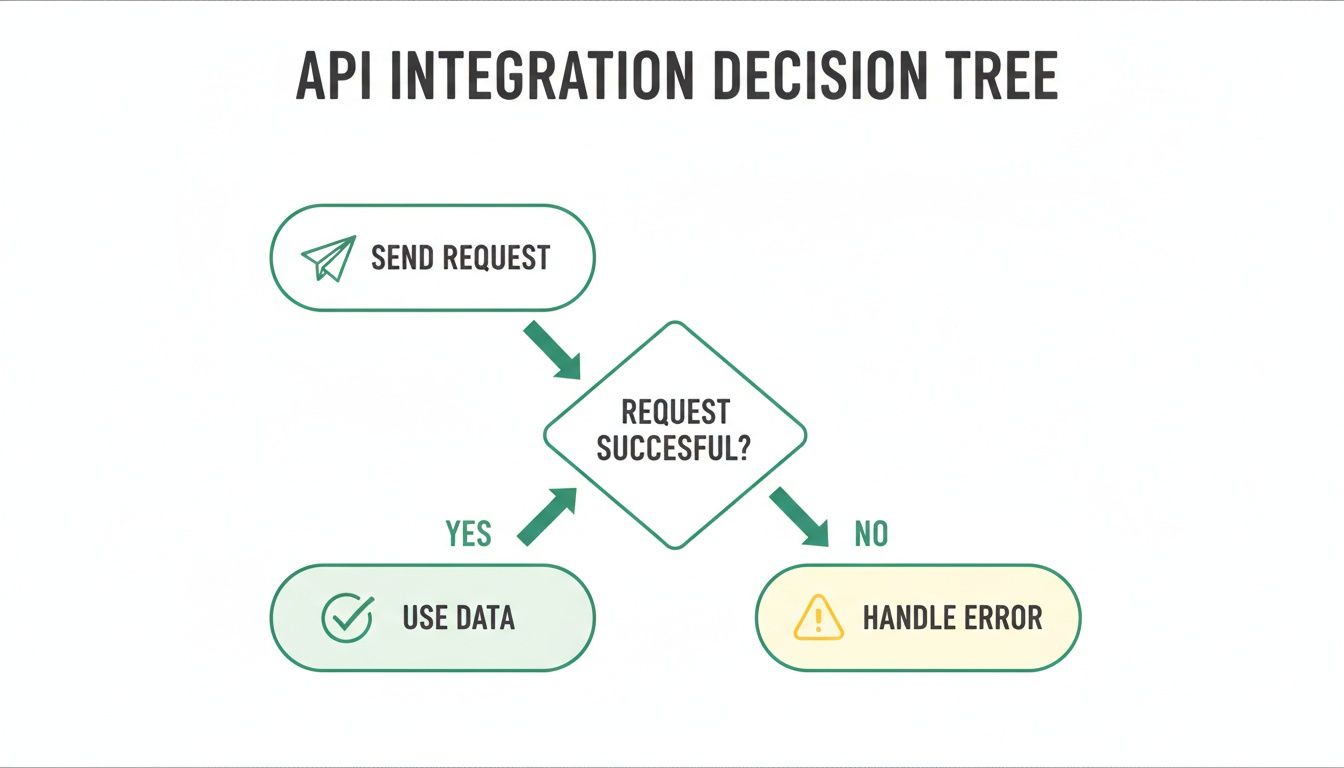
    Let's be realistic—not every API call will go according to plan. Networks glitch, keys get mistyped, and servers have bad days. Your application needs to be built to handle these hiccups gracefully instead of crashing. A fundamental first step is to always check the HTTP status code of the response before you even try to read the JSON data.

    This simple flowchart shows the logic your code should follow for every single API call.

    A flowchart illustrating an API integration decision tree: Send Request, then check if successful. If yes, Use Data; if no, Handle Error.

    As you can see, every request leads to a fork in the road: you either get usable data or an error that your application needs to manage.

    Here are a few common HTTP status codes you absolutely need to build logic for:

    • 401 Unauthorized: Nine times out of ten, this means your API key is wrong, expired, or just missing. Your code should log this and fire off an alert so you can check your credentials.
    • 429 Too Many Requests: You’ve hit your plan's rate limit. The standard best practice here is to implement an "exponential backoff." Basically, you pause for a brief moment (like 1 second) and retry. If it fails again, you double the wait time before trying again, and so on.
    • 5xx Server Error: This means something went wrong on the API provider's side. It's usually temporary. Your app should be smart enough to pause requests to that service for a little while and then try again later.

    By building in solid logic to handle both successful responses and error codes, you make your integration far more reliable and ensure you get the maximum value out of your data cleaning process.

    Advanced Integration Tips for Better Performance

    A modern desk setup with two computer screens displaying code, a coffee cup, keyboard, and mouse.

    Alright, once you’ve got the basics running, it's time to level up. A simple, one-off check is fine for a contact form, but you need professional-grade performance and security when you're validating emails at scale without dragging down your entire application.

    A classic bottleneck is trying to validate a big list one-by-one, where your app just waits for each response before sending the next request. This synchronous approach ties up resources and makes for a clunky user experience. The fix? Asynchronous requests and batch processing. Most API providers worth their salt offer batch endpoints for this exact reason. You can bundle hundreds of emails into a single request and get a consolidated result, slashing network overhead and speeding everything up.

    Secure Your API Keys Properly

    This is a big one, so listen up. It's incredibly tempting to just paste your API key right into your code to get things working. Don't do it. If that code ever ends up in a public repository like GitHub, your key is exposed, and anyone can start racking up charges on your account.

    The professional move is to use environment variables. This keeps your sensitive credentials completely separate from your application's source code. It’s the standard for a reason.

    Here’s a quick breakdown of why it matters:

    Method Security Risk Best For
    Hardcoding Very High Never, ever in production. Maybe a quick local test.
    Environment Variables Low The industry standard for any production app.

    Making this small shift is non-negotiable for any serious integration. For a deeper dive, check out our guide on best practices for email address validations.

    Respecting Rate Limits and Monitoring Usage

    Every validate email api has rate limits—a ceiling on how many requests you can make in a certain timeframe. If you ignore them, you’ll get temporarily blocked, which can easily break your application. The goal is to build your integration to work with these limits, not fight them.

    If you hit a 429 Too Many Requests error, your code shouldn't just crash. It should be smart enough to implement an exponential backoff strategy. This means it pauses for a moment (say, one second) and tries again. If it fails a second time, it doubles the wait time before the next attempt, and so on.

    Don’t just set it and forget it. A simple logging system that tracks your API calls and costs can save you from a surprise bill and help you catch performance problems before they snowball.

    At the end of the day, a clean list is what drives a high ROI. Email marketing benchmarks show that while deliverability can hit 98%, getting into the actual inbox averages a tougher 83.1%. A well-integrated API closes that gap. It's how you get the kind of engagement that leads to the 36:1 to 40:1 ROI email marketing is famous for. By putting these advanced tips into practice, you'll build an integration that's not just functional, but also robust, secure, and efficient.

    Common Questions About Email Validation APIs

    Even with a solid plan, jumping into a new technology always brings up a few questions. Let's walk through some of the most common ones I hear about using a validate email API to make sure your integration goes off without a hitch.

    How Accurate Are These APIs, Really?

    This is the big one. Top-tier services usually claim 98-99% accuracy, but it’s crucial to know what that actually means in the real world. That high number comes from a layered approach: they run syntax checks, verify the domain exists, and then perform a direct SMTP handshake with the mail server.

    But here’s the thing: no API can ever be 100% perfect. You'll run into "catch-all" servers designed to accept mail for any address, which can be tricky to validate definitively. The real goal isn’t perfection; it’s about drastically cutting your bounce rate by flagging the huge majority of invalid, disposable, and risky emails. And at that, these APIs are incredibly effective.

    An API's value isn't just finding 'valid' emails, but also in identifying the 'risky' ones. This nuanced insight allows for smarter list segmentation and protects your sender reputation from gradual decay.

    Real-Time vs. Bulk Validation

    People often ask about the difference between real-time and bulk validation. They’re two sides of the same coin, solving different problems that are equally important.

    • Real-time validation is for checking a single email address instantly. Think of it as your bouncer at the door—perfect for signup forms or CRM entry fields. It stops bad data from ever getting into your system. Most APIs respond in less than a second, so it doesn't slow down the user experience.
    • Bulk validation is your spring-cleaning tool for existing lists. You can upload a whole file (like a CSV) or hit a batch endpoint to process thousands or millions of emails at once. This is absolutely essential for keeping your established databases healthy and effective.

    At the end of the day, a good validation API has a massive positive impact on your sender reputation. When you clean your list before sending, you minimize bounces. Email providers notice this and see you as a responsible sender, which improves your reputation and gives your messages a much better shot at landing in the inbox.


    Ready to build cleaner, more effective outreach lists from day one? Try EmailScout and integrate powerful, real-time email finding and validation directly into your workflow. Get started for free at https://emailscout.io.