Author: EmailScout

  • B2B Sales Strategy: A 2026 Playbook for Scaling Revenue

    B2B Sales Strategy: A 2026 Playbook for Scaling Revenue

    You can feel the quarter slipping before the pipeline report says it out loud. Reps are sending clean sequences, the lists look tight, and the inbox is still quiet. The problem usually isn't effort. It's that B2B buying has changed faster than many organizations have changed their playbooks.

    A modern b2b sales strategy has to reflect how buyers behave now. That means enabling research, aligning to buying groups, building a process reps can execute, and using tools that make prospecting and follow-up more precise, not just busier.

    Why Traditional B2B Sales Playbooks Are Failing

    A lot of teams are still running the same motion they used five years ago, or ten. They build targeted lists, fire off cold emails, layer in LinkedIn DMs, then wonder why meetings stall after the first reply. The execution might be decent, but the assumption underneath it is broken.

    Buyers don't wait for a rep to educate them anymore. Forrester data cited by Walnut says 74% of B2B buyers research at least half of their purchase online before speaking to a sales representative, while Gartner data in the same source says 43% prefer a rep-free experience and 87% of buying groups include 4 or more stakeholders. Those numbers explain why a pitch-first motion keeps underperforming, even when the outbound engine is active. Walnut's B2B sales and marketing stats

    The old model assumes one buyer and one conversation

    That assumption is gone. The actual deal is usually moving through research, internal comparison, and committee alignment before your rep gets a seat at the table. If the message only speaks to one person, the rest of the group creates friction later.

    That's why seller-led persuasion keeps losing to buyer enablement. The team that wins isn't the one that shouts the loudest, it's the one that makes self-serve evaluation easier and helps each stakeholder see the decision clearly. If you want a useful outside lens on the channel shifts shaping this year, the 2026 B2B marketing trends discussion from Sprints & Sneakers is a practical companion read.

    Practical rule: if your outreach only works when a buyer is already eager, you don't have a strategy, you have a timing problem.

    The broader market shift makes the same point. Independent research cited by industry sources puts global B2B e-commerce at roughly $17.6 trillion in 2023, with forecasts as high as $36.7 trillion by 2030, and Gartner's Future of Sales outlook says 80% of B2B sales interactions will occur in digital channels by 2025. That market context is why the winning motion now starts with digital discovery, not generic interruption.

    What Makes a B2B Sales Strategy Different From a Sales Plan

    A sales plan tells people what to do. A sales strategy tells them why those actions should work in your market, with your buyers, at your deal size. Confusing the two creates a lot of busy teams with very little edge.

    Think of strategy as the map and plan as the day's driving route. The map tells you which roads matter, which territory is worth entering, and which dead ends to avoid. The itinerary only helps if the map is right.

    Strategy connects market choice to execution

    A real strategy starts with market positioning, then moves into ICP definition, channel architecture, process design, and measurement. If those pieces don't fit together, the team ends up optimizing isolated tactics instead of a revenue system. A rep can hit activity targets and still miss the market if the account selection or message is off.

    That's also where the line between motion and math matters. The most useful strategy decisions aren't about how many calls to make, they're about where your best-fit buyers spend time, what they need to believe, and how your team should show up before a rep is invited into the room.

    Strategic test: if you remove the word “we” from your messaging and the customer's buying process still makes sense, you're probably getting closer to strategy.

    The cleanest way to evaluate your own operating model is to ask one question. Is the team just executing a cadence, or is it making deliberate choices about who to target, which path to pursue, and how to prove relevance? If it's the first one, you've got a sales plan. If it's the second, you're building a b2b sales strategy.

    Setting B2B Sales Goals and KPIs That Actually Predict Quota Attainment

    Too many dashboards are full of activity that makes managers feel informed and tells them almost nothing useful. Opens, dials, clicks, and generic meeting counts can all look healthy while revenue slips. What matters is whether the numbers predict actual deal movement.

    Operational benchmark data says cold lead-to-customer conversion sits at roughly 2–5% versus about 10% for MQLs, lead response times in best-in-class teams are under 5 minutes versus an average of 47 hours, win rates are around 19–21%, and pipeline coverage targets are 3x–4x quota. Martal's KPI benchmark summary makes the point clearly, faster first-touch and enough pipeline depth matter more than heroic activity bursts.

    Outcome metrics beat activity noise

    The most reliable KPIs tend to sit closer to revenue. That doesn't mean top-of-funnel activity is useless. It means activity should be managed as a leading indicator, not treated like success by itself.

    Metric Type Why It Matters
    Emails sent Activity Shows rep effort, but says little about buyer intent
    Calls placed Activity Useful for volume tracking, not for pipeline quality
    Meeting count Activity Only helpful if meetings convert into real opportunities
    Lead response time Outcome Faster first-touch improves the odds of engagement
    Pipeline coverage Outcome Shows whether quota is actually supported by enough opportunity
    Win rate Outcome Reveals whether the team is turning pipeline into revenue

    For a practical view on pipeline math, the pipeline metrics for SaaS founders resource from HelpWithMetrics is worth bookmarking if you manage a recurring revenue motion.

    Baselines and definitions come first

    A technically sound sales analytics stack starts with baseline definition, then stage-level visibility, buyer-behavior tracking, forecasting, coaching, experimentation, and governance, according to Directive Consulting's roadmap for a data-driven B2B sales strategy. Their analytics framework is useful because it gets the order right. Standardize field hygiene, stage definitions, KPI formulas, and dashboard logic before you try to optimize outreach.

    If the schema is messy, the forecast is messy. If stage exits mean different things to different managers, conversion rates stop being comparable. That's not a reporting issue, it's a strategy issue.

    Building Buyer Personas Around Buying Groups Not Individuals

    A lot of persona work still centers on one person, one job title, one pain point. That's too narrow for modern B2B selling. The deal is usually being shaped by a group, not a lone decision-maker.

    A diagram illustrating three key buying group personas in B2B sales: Economic Buyer, Technical Evaluator, and Champion.

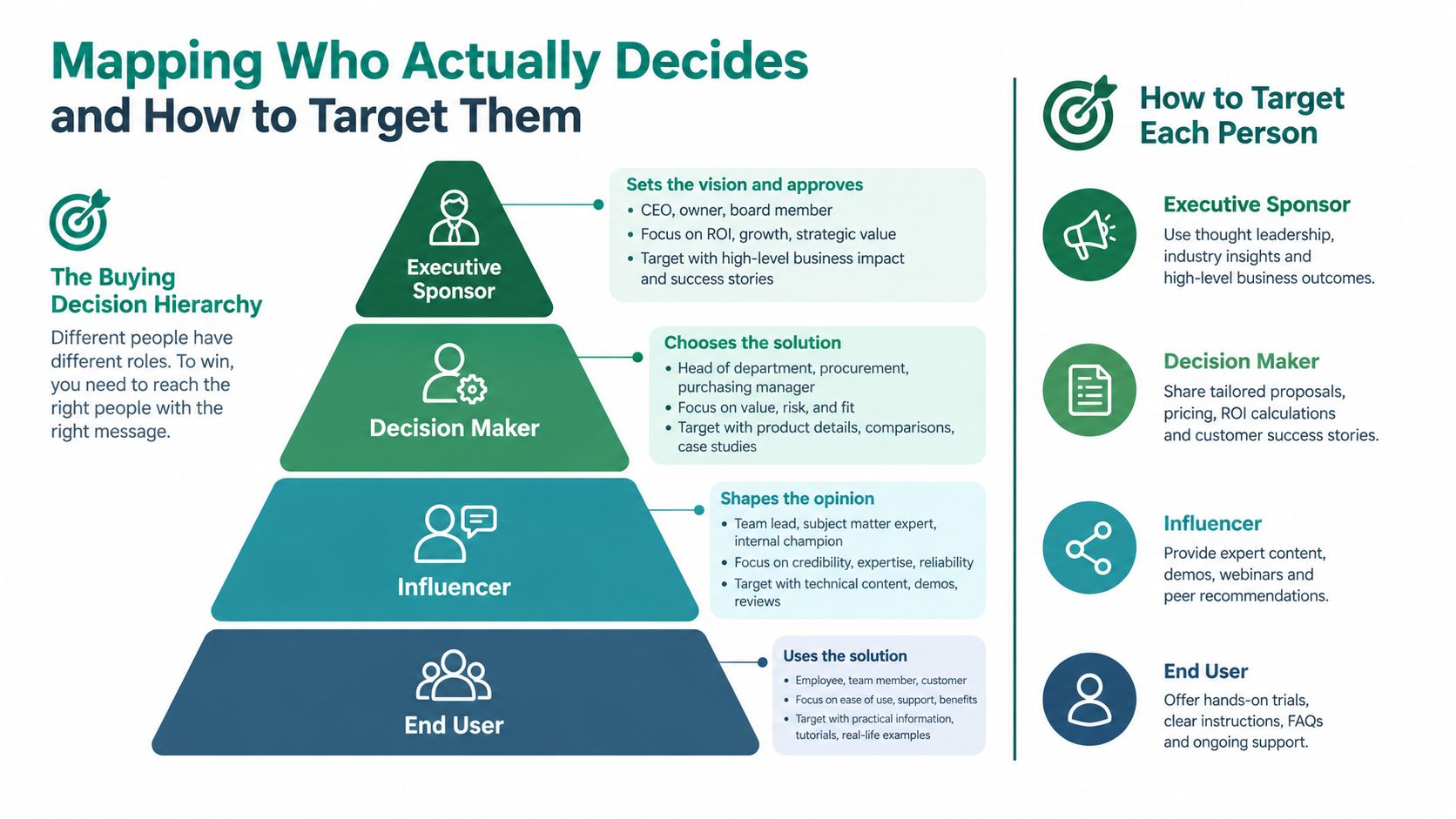
    A better persona model starts with the roles inside the buying committee. Economic buyers care about budget and sign-off. Technical evaluators care about fit, implementation, and risk. Champions care about getting consensus internally and keeping momentum alive.

    Why single-threaded selling breaks deals

    A mid-market SaaS team I worked with had the usual problem. They were getting attention from the CTO, the demos were solid, and the pipeline looked promising. Then deals slowed down because procurement and finance were being surfaced too late.

    Once the team mapped the full buying group, the friction became obvious. Procurement needed different proof than the technical team. Finance wanted a cleaner business case. The outreach and content shifted to address those concerns early, and the team stopped losing opportunities that had looked healthy from the outside.

    A deal often doesn't die because the solution is weak. It dies because one stakeholder's concern never got answered.

    That's why buyer personas have to be built around roles, not just traits. If you want a practical way to structure that work, the guide on how to create buyer personas is a solid internal reference point.

    A usable template for buying-group personas

    For each role, document three things. What they protect, what they fear, and what proof they need to move forward. Then map that back to the stage of the journey where they usually enter.

    • Economic Buyer: budget control, ROI, risk of overspend.
    • Technical Evaluator: implementation effort, integration, security.
    • Champion: internal selling, consensus building, momentum.

    That structure is simple, but it changes targeting, content, and sequencing. It also keeps sales from over-investing in the loudest contact while neglecting the people who can block the deal.

    Designing a Repeatable B2B Sales Process From Discovery to Close

    A strong process makes the team calmer, faster, and easier to coach. A weak process lives in CRM dropdowns and nowhere else. The difference shows up in forecast quality, rep confidence, and how often deals move without manager intervention.

    The best version is stage-based, but not rigid. Each stage should have a clear job, a clear exit criterion, and a reason to exist. If a stage can't be explained in plain language, it usually isn't helping anyone sell.

    Build exit criteria, not just activities

    Discovery should confirm fit and surface the problem. Demo should connect the problem to the solution in the buyer's language. Proposal should turn into a business case, not just a pricing document. Negotiation should be about trade-offs, not surprise objections. Close should end with signed paperwork and a handoff that doesn't lose momentum.

    The point is to make the process visible without making it brittle. Reps need room to work the opportunity, but they also need a common definition of what “ready” means. That's where time often leaks.

    Operational rule: if two managers would advance the same deal at different times, the stage definition isn't good enough.

    The data side matters too. Directive Consulting's emphasis on standardized definitions is important because inconsistent schema distorts conversion, velocity, and forecast signals. If your CRM stage names are tidy but the actual process isn't, the report is cosmetic.

    A simple structure works well:

    1. Discovery: confirm the business problem and the right contacts.
    2. Demo: show a relevant use case, not a feature parade.
    3. Proposal: tie scope and pricing to outcomes.
    4. Negotiation: resolve objections with trade-offs, not blanket concessions.
    5. Close: confirm sign-off and handoff.

    The flowchart below is a useful way to visualize the handoff points.

    A five-step flowchart illustrating a repeatable B2B sales process from discovery to closing a contract.

    The structure shown in the process graphic is strongest when marketing and customer success feed back into it. Marketing should shape qualification and messaging. Customer success should inform what helps a new customer get value after signature.

    Choosing and Combining Inbound Outbound and Partner Channels

    Channel choice is where a lot of teams default to habit. They copy what competitors do, then wonder why the same motion produces average results. The better question is not which channel is trendy, it's which channel fits your buyer's trust level, urgency, and buying complexity.

    Inbound, outbound, and partner channels all have a role. None of them wins everywhere. The right mix depends on whether your deals are short or long, simple or committee-led, and whether your buyers are already looking for you or need a reason to start.

    Compare the channels by fit, not fashion

    Channel Avg Cost per Qualified Meeting Time to First Reply Best For
    Inbound Higher upfront content effort, lower marginal cost over time Slower, because the buyer comes to you Buyers actively researching solutions
    Outbound Depends on list quality and personalization depth Fast when the message is relevant Targeted accounts, new market entry, controlled pipeline generation
    Partner Shared effort across both sides Variable, often slower to ramp Credibility transfers, ecosystem plays, niche verticals

    That comparison is directional, not absolute. What matters is the motion behind each channel. Inbound works when the buyer wants to learn. Outbound works when you can create relevance quickly. Partner channels work when trust already exists in the ecosystem.

    For a narrower perspective on the pull-based motion, the what is inbound sales explainer is a useful internal reference for teams balancing demand capture and outbound creation.

    Crowded outbound needs better listening

    A lot of prospecting still looks like this. Generic messaging, light personalization, and no evidence that the sender understands the buyer's world. That's exactly where trust falls apart.

    Recent guidance points to a different approach. Walnut recommends social listening and a 2 to 3 week observation period before engaging, while McKinsey says B2B teams should use generative AI to speed prospecting and scale lead acquisition amid uncertainty. Walnut's 2025 strategy piece highlights the listening piece well. The takeaway is simple, use AI to move faster, but only after you've narrowed the message to the niche and the conversation buyers are already having.

    The best outbound doesn't feel broad. It feels like a knowledgeable person showing up in the right context.

    That's where the channel mix becomes strategic. Inbound builds trust over time. Outbound creates reach on demand. Partners add borrowed credibility. A strong b2b sales strategy chooses the right combination instead of forcing one channel to do all the work.

    Using EmailScout to Power Your B2B Prospecting Workflow

    A rep's prospecting workflow should do two things well. It should find the right people, and it should feed clean data into the rest of the sales motion. If it can't do both, the process slows down as soon as outreach starts.

    Say an SDR needs a targeted list of 50 CTOs at mid-market SaaS companies in healthcare. The first step is building a tight account list, then finding verified contacts, then pushing those records into the CRM and sequencing tool without manual cleanup. That's where a browser-based finder such as EmailScout can fit into the workflow, alongside your CRM, enrichment, and outreach stack.

    A simple workflow that keeps the data usable

    The SDR browses target company sites and saves verified contacts with AutoSave as they go. For broader sweeps, the team can use the bulk URL workflow and export the results in CSV or TXT for follow-up. The point isn't just collection, it's keeping the prospect list organized enough that sales can work it without extra admin.

    Here's the clean handoff:

    1. Build the account list from your ICP and buying-group map.
    2. Find the right contacts for each target company.
    3. Save and export the records into your CRM or outreach platform.
    4. Segment the list by persona so messaging isn't generic.
    5. Use the same data to support multithreaded outreach and stage progression.

    For the contact-finding step, the find business emails resource is the most direct fit inside that workflow.

    The value here is strategic, not just operational. Good prospecting data supports the outbound channel discussed above, gives buyer personas more precision, and helps reps identify which stakeholders are missing from the deal. If the list is clean, the outreach is sharper and the process is easier to manage.


    EmailScout helps sales teams build targeted prospect lists with one-click email discovery, AutoSave, and exportable contact data. If you're turning strategy into actual outreach, visit EmailScout and use it to find the right contacts, organize them cleanly, and keep your prospecting workflow moving.

  • What Is Sales Intelligence and How Modern Teams Use It

    What Is Sales Intelligence and How Modern Teams Use It

    Sales intelligence reached USD 2.95 billion in 2022 and is projected to keep expanding toward USD 6.68 billion by 2030 and USD 12.45 billion by 2034 in major forecasts, which matches what many revenue teams already feel in practice, they need better data to decide who to contact and when. If you've ever opened a CRM full of names, half-finished records, and leads that look vaguely relevant, you're already living the problem sales intelligence is built to solve.

    The easiest way to think about it is this, sales intelligence is the structured use of prospect, account, and market data to choose the right target, the right timing, and the right message. It's not just a contact database, and it's not magic, it's the operating layer that turns scattered signals into better selling decisions.

    A Day in the Life of a Sales Rep With and Without Sales Intelligence

    At 9 a.m., a rep logs in and sees a pile of inbound names, stale CRM notes, and a few accounts the team touched last quarter. One contact bounced, another changed jobs months ago, and three “hot leads” turn out to be students, vendors, or companies that don't fit the ICP at all. The rep spends the first hour sorting noise instead of selling.

    Now rewind that same morning with a sales intelligence stack in place. The rep sees that one account hit the pricing page overnight, a contact at that account just moved into a new VP Sales role, and intent data points to a spike in research around the problem the product solves. Instead of guessing, the rep knows which account deserves first attention, which person to reach, and why the message should speak to the new role and the current buying context.

    That's the heart of the category. Sales intelligence is the systematic use of structured data to guide who to contact, when to reach out, and what message is most likely to resonate.

    From random activity to a prioritized worklist

    The difference isn't only speed, it's focus. A rep without data confidence often works the queue as it appears. A rep with sales intelligence works from a ranked list of accounts and contacts that already reflect fit, timing, and likely relevance.

    If you want a companion explanation that frames the revenue side of the topic, the guide on understanding revenue intelligence for SaaS is a useful next read. It helps separate raw activity from the signals that shape pipeline.

    Practical rule: if a tool only helps you find an email address, it's doing one job. If it helps you decide who matters today, it's doing sales intelligence work.

    The broader category has moved well beyond lookup. In major markets, it now sits inside day-to-day selling as a decision aid, especially where deal cycles are more complex and more people influence the buy.

    The Six Core Data Layers That Power Sales Intelligence

    A diagram illustrating the six core data layers of sales intelligence including contact, firmographic, technographic, intent, events, and engagement data.

    A helpful way to picture sales intelligence is a restaurant booking system. Contact data is the table reservation, firmographic data tells you how large the party is, technographic data tells you what kitchen equipment the restaurant already uses, intent signals show what people keep ordering, trigger events are the surprises, like a birthday booking or a sudden spill, and competitive intelligence is knowing what the restaurant down the street is offering. Put together, those layers help a rep decide whether the prospect is worth chasing and how to approach them.

    The six layers in plain language

    • Contact data, this is the person itself, names, titles, emails, and social profiles. If the job title is wrong or the person left six months ago, everything downstream starts shaky.
    • Firmographic data, this is company context, like size, industry, revenue, and location. A startup and a multinational can both click your ad, but they don't belong in the same motion.
    • Technographic data, this tells you what tools the account already runs. If the stack includes Salesforce or Snowflake, that changes how you position integration, migration, or compatibility.
    • Buyer intent signals, these are clues that someone is actively researching. The signal might come from website behavior, topic research, or broader market activity.
    • Trigger events, these are business changes that open a conversation, such as a leadership change, funding, a new initiative, or expansion.
    • Competitive intelligence, this shows what alternatives the account is already considering or using. It helps a rep avoid a generic pitch that ignores the actual context.

    The category matters because a single-source tool rarely covers all six well. A contact finder gives you one slice, enrichment tools fill gaps, and broader intelligence platforms try to combine the stack into something a rep can use.

    If you're evaluating data collection methods, the Agenty guide on use a scraping agent to pull site shows one way teams think about structured extraction, though the challenge is still verification and refresh. And if your team is comparing enrichment options, the internal roundup on https://emailscout.io/best-data-enrichment-tools/ is worth reviewing alongside your own stack.

    How the Layers Turn Into a Decision System

    A diagram illustrating the five-step process of a sales intelligence decision system, from intent signals to targeted pitches.

    A sales intelligence stack becomes useful when it stops being a database and starts behaving like a decision system. The raw data still matters, but the rep doesn't need every signal, they need the answer to one question, what should I do next?

    A real account move

    Say a SaaS team sees one account spend time on the pricing page. That's a buying signal, but it's not enough by itself. Then the rep notices the main contact just took a new VP Sales role, the company profile shows a 500-employee logistics firm in the U.S., the tech stack includes Snowflake and Salesforce, and CRM notes show a competitor case study surfaced in recent interactions.

    Each of those inputs adds context. The system can score them, weigh them, and surface the account as a priority with a suggested next move, maybe a custom outreach angle, maybe a multithreaded approach, maybe a follow-up to a trigger event. That's where AI and machine learning usually sit, on top of the data layers, doing pattern detection and ranking so the rep doesn't have to mentally sort every signal by hand.

    Sales intelligence doesn't replace judgment, it reduces the amount of guesswork a rep has to carry.

    The point is plumbing, not just data volume. The platform connects scattered facts into a path the rep can act on, which is why teams care about integration, scoring, and workflow design as much as they care about coverage.

    For a practical look at prioritization logic, the internal explainer on https://emailscout.io/predictive-lead-scoring/ fits naturally here because predictive scoring is the bridge between raw signals and action.

    Benefits and KPIs That Show Sales Intelligence Is Working

    A sales team usually adopts intelligence tools for one reason, to help reps spend more time on the right accounts. The clearest proof isn't a vendor promise, it's whether the work becomes easier to measure and easier to repeat. Industry research says 67% of B2B sales teams use sales intelligence tools daily, 82% of sales reps reported higher productivity from these platforms in 2024, and the average ROI is 8.5x within 12 months (industry research). Those figures don't tell you what your team will get, but they do show that buyers are treating this as a measurable operating layer.

    Translate benefits into dashboard metrics

    The most useful KPIs are the ones that reflect both activity quality and pipeline effect. A rep who spends less time researching and more time reaching the right people should show it in connect rates, replies, ramp time, and deal quality.

    The easiest way to think about the measurement chain is this, leading indicators tell you whether the workflow changed, and lagging indicators tell you whether revenue behavior changed later. If both move in the right direction, the stack is doing real work.

    Sales Intelligence KPI Leading Indicator Lagging Indicator
    Productivity per rep Less time spent on manual research More selling time captured in CRM activity
    Connect and reply rates More outreach to verified contacts Better meeting set and response volume
    Ramp time for new hires Faster list building and account research Shorter time to first qualified meetings
    Average deal size More relevant account selection and personalization Larger closed-won opportunities
    Forecast accuracy Cleaner account and contact data More reliable pipeline roll-ups

    For a cleaner internal benchmark conversation, the guide on sales efficiency metrics is a practical companion because it helps teams tie workflow changes to revenue KPIs without overclaiming.

    A second useful angle is adoption quality. If reps use the tool daily but still complain about stale records or bad routing, the stack is active but not effective. If the tool shortens research and improves targeting, managers usually feel it first in pipeline hygiene and forecasting confidence.

    Three Real Workflows for Sales and Marketing Teams

    An infographic showing three sales and marketing workflows: SDR Outbound, ABM Prioritization, and Inbound Enrichment.

    The same intelligence layer looks different depending on the motion. An SDR team cares about list quality and timing, an ABM team cares about account ranking and orchestration, and an inbound team cares about enrichment and speed. The stack changes because the workflow changes.

    SDR outbound, ABM prioritization, and inbound enrichment

    SDR outbound usually starts with prospect research, then moves to email discovery and sequence personalization. In that motion, contact data and intent data do most of the heavy lifting, because the rep needs a usable name, a valid email, and a reason to send a message now. A browser-based finder like EmailScout can fit here as one discovery layer inside a broader process, especially when the team needs quick email lookups while building a list.

    ABM prioritization leans more on firmographic data, technographic data, and trigger events. The team uses account scoring to decide which companies deserve air cover, which ones need a rep touch, and which signals justify a custom campaign. Marketing and sales then coordinate around the same prioritized accounts, rather than working from different definitions of fit.

    Inbound enrichment is about speed and confidence. The moment a form fill arrives, the system should enrich the lead, assign firmographic context, route it correctly, and reduce the time it takes for a rep to respond. That's where CRM integration matters more than flashy dashboards, because the point is to move the right lead to the right owner without manual cleanup.

    You can see the categories as different combinations of the same ingredients, but the workflow moment changes what matters most. SDRs want discovery, ABM wants selection, and inbound wants routing.

    Here's a short video that shows how sales intelligence thinking gets operationalized in a revenue workflow.

    Building Your Sales Intelligence Stack Step by Step

    A good stack usually starts with cleanup, not buying. If the CRM is full of duplicates, stale titles, and missing company data, adding more signals just makes the mess harder to trust. The sequence below matches how many teams adopt these tools.

    A phased build that won't overwhelm the team

    1. Audit your data and clean the CRM. Fix obvious duplicates, old titles, and missing fields first. This gives you a baseline you can trust.
    2. Define the use case and motion. Decide whether you're solving outbound prospecting, ABM prioritization, inbound routing, or all three. One stack rarely serves every motion equally well on day one.
    3. Layer in intent and trigger-event sources. Add the signals that help reps know when to act, not just who to contact.
    4. Wire enrichment and email discovery into the CRM. Tools should remove manual work, not create another place for reps to log in.
    5. Set scoring and routing rules, then train the team. If the rules don't map to actual workflow moments, adoption will lag no matter how good the data looks in demos.

    Practical filter: ask every vendor how often data is refreshed, where it comes from, how it integrates with your CRM, and what happens when the data is wrong.

    When you evaluate vendors, score them on coverage, freshness, integration depth, compliance posture, and price per seat. Those criteria tell you far more about day-to-day usefulness than feature pages do.

    If you want a reference point for how one tool can fit into a broader workflow, The AI CMO's page on The AI CMO's sales toolkit is a practical example of how teams frame HubSpot-connected intelligence inside a stack. The right sequence is usually audit first, automate second.

    Common Pitfalls and the Governance Habits That Prevent Them

    A sales intelligence stack can look impressive on a dashboard and still fail in practice. Once CRM activity, website behavior, buyer intent, public filings, social signals, and AI layers all feed into the same workflow, noise rises fast unless someone defines the rules. That is the part many explainers leave out. Sales intelligence can become a confidence problem if governance is weak (HubSpot glossary).

    The failure modes that show up most often

    Stale records show up when titles, companies, and contact details change faster than the system refreshes them. Adding more fields usually does not solve that. A refresh policy and a clear owner for data hygiene do.

    Signal saturation happens when reps receive so many alerts that they stop trusting any of them. The better approach is to reserve alerts for moments that change action, not every minor activity blip.

    Privacy and consent gaps create risk across markets because data expectations are not the same everywhere. A process that works in one region may fail in another without legal review and clear sourcing rules.

    Tool sprawl appears when teams buy separate tools for contact lookup, enrichment, intent, and routing without connecting them. The result is duplicate records, inconsistent handoffs, and lower confidence in the CRM.

    Mis-scored accounts happen when the scoring model rewards activity that looks busy but does not map to conversion. Revisit the scoring logic with sales, marketing, and RevOps together so the score reflects real workflow moments.

    A useful vendor question list is simple. Ask where the data comes from, how often it is refreshed, what compliance controls are built in, and how deletion or correction requests are handled. In a global GTM motion, those answers matter as much as the feature demo.

    Sales intelligence works best when teams treat it like infrastructure, not decoration. If the data cannot be trusted, the workflow breaks before it starts.

    If you want a simpler way to put this into practice, EmailScout helps teams find decision-maker emails while they build prospect lists and work through outbound research. Visit EmailScout to see how it fits into a sales intelligence workflow alongside enrichment, routing, and follow-up.

  • Email Append Service: What It Is and How to Choose One

    Email Append Service: What It Is and How to Choose One

    You've got the CRM export open, the old list is full of missing emails, and someone on the team is asking whether an email append service can “fill the gaps” before next week's send. That's usually the right moment to slow down, because the question isn't how many rows a vendor can match. It's how many appended addresses will survive verification, pass your compliance rules, and still be worth mailing after the file leaves the vendor.

    An append project looks simple on the surface. You hand over a CSV, a provider matches records against its identity graph, and a new file comes back with more email addresses than you started with. In practice, the output is smaller, riskier, and more operationally sensitive than the pitch suggests, which is why the best teams treat append as a verification-and-compliance decision, not a list-size trick. For a broader framing of how enrichment should be measured, the benchmark thinking in data enrichment KPIs and strategy is a useful companion.

    What an Email Append Service Actually Does

    A marketer uploads a 40,000-row customer file and expects a near-clean return. What usually comes back is closer to 12,000-20,000 usable addresses after matching and verification, not because the vendor failed, but because the category never promises a one-for-one recovery rate. That gap is the first thing to understand about an email append service, it's about restoring reach to records you already own, not creating a new audience from scratch.

    At its simplest, append adds missing email addresses to existing records that already contain some other identifier, such as a name, postal address, company, or domain. The vendor tries to reconnect the offline record to an online identity, then returns an address where confidence is high enough to use. That means the headline match rate and the final usable output are different numbers, and buyers who treat them as the same thing usually overestimate what they bought.

    Practical rule: if a vendor talks only about “matches” and never about verification or deliverability, you're looking at a file-count story, not an outreach-ready result.

    The cleanest way to think about append is as identity resolution. The service takes what you already know, normalizes it, searches a third-party graph, and tries to recover the missing contact path. That's why append is useful for dormant CRM data, trade-show scans, and legacy customer files, but weak as a substitute for permission-based growth. It can reopen a channel, but it can't manufacture permission or interest.

    How the Matching Process Works Step by Step

    A four-step infographic illustrating the data matching process for email appending services, from normalization to verification.

    A real append workflow usually has four stages, and each one affects whether the final address is usable. The asset above shows the flow well, but the details matter more than the visuals.

    First comes normalization. The vendor standardizes messy input, so “John Doe,” “J. Doe,” and “J. D.” are treated as variants of the same underlying person where possible. Inconsistent casing, suffixes, company abbreviations, and free-text fields can otherwise send the file down the wrong path before matching even begins.

    Then comes entity matching. The vendor compares your row against its identity graph using keys such as name, company, postal address, and sometimes phone. Stronger combinations raise confidence, while weak identifiers create false matches, which is why a file with only a company name is much harder to recover than a file with name plus domain. The database behind the service is the key asset here, because append can only recover people already represented in that graph.

    Next is email attachment. Once the vendor believes it has identified the right person, it attaches the stored email address to that row. Stale data can sneak in at this stage, especially if the underlying identity record is older than the person's current mailbox or job status.

    Finally comes verification. A modern workflow checks syntax, domain validity, and mailbox acceptance before the file is used in outreach. That step is not optional, because it's what cuts down bounce risk and keeps the returned list from looking better on paper than it is in a sending system.

    The basic lesson is simple. Append is not a lookup service. It's a chain of normalization, identity resolution, attachment, and verification, and the file is only as reliable as the weakest link.

    Match Rates, Deliverability, and Engagement Numbers

    A file can look useful on paper and still fail in production. That is why I judge append by three numbers, match rate, deliverability, and engagement. Vendors usually lead with the first one because it is the easiest to sell, but the second and third decide whether the appended data supports revenue.

    Match rate is the share of records a vendor can confidently connect to an email address. Public industry summaries often place append in the 30-60% range, and cleaner B2B files can sit in the 40-60% band when the identifiers are strong (tomba.io). That benchmark comes from relatively complete files, not from scraped lists, partial CRM exports, or aged records. In practice, the number drops fast when a file lacks company, domain, postal data, or other strong identifiers.

    Verification trims that number further. After the append step, only a portion of matched records survive syntax, domain, and mailbox checks, which means a high match rate does not automatically produce a sendable file (atdata.com). I have seen teams celebrate a match rate that looked strong in a vendor report, then lose a meaningful share of those records during verification because the mailbox was inactive, the domain was unreliable, or the address could not accept mail.

    Deliverability is the next filter, and it is the one that protects sender reputation. A returned address still needs to pass mailability checks before it belongs in an outreach stream. If you want a practical way to separate inbox placement problems from list-quality problems, a guide on how to check if emails are going to spam is more useful than relying on vendor output alone. For pre-send cleanup, email address verification is the step that keeps bad records from entering the sending system in the first place.

    Engagement is the last reality check. Appended contacts often perform worse than organic subscribers, and some industry references say they can engage at lower rates than opt-in files (email append glossary). That does not make append a bad channel. It means you should treat it as a recovery and enrichment tactic, then watch response closely instead of assuming matched data will behave like hand-raised leads.

    The trade-off is straightforward. Append can recover reach you do not have, but each layer of recovery, matching, verification, and inbox placement removes more records from the original promise. A matched contact that does not verify, or verifies and still does not engage, is not a success. It is a more expensive way to find the same data-quality problem later.

    B2B Versus Consumer Email Append

    A B2B list and a consumer file can both be appended, but they behave differently enough that they should be treated as separate buys. The practical differences are the identifiers you have, the match rate you can expect, the economics, and the amount of compliance risk you are accepting.

    B2B append works best when the file includes full name, company, and domain. That combination gives the vendor enough structure to match against identity-resolution databases instead of filling gaps with assumptions, and clean files commonly sit in the 40-60% range. Consumer append depends more on postal or household records, so results are more sensitive to how current and complete the underlying file already is. That is one reason why match rates that look similar in a vendor deck can fall apart once you test them against older or scraped records.

    Dimension B2B Append Consumer Append
    Identifier strength Full name, company, domain Postal or household records, weaker business context
    Expected match rate 40-60% on clean files Clean opt-in files can reach 40-60%, while weaker scraped or aged data often drops to 20-35%
    Minimum order size Some vendors cite minimums around $700 Similar minimums can apply in larger-volume markets
    Typical pricing Roughly $0.01-$0.10 per match in major markets, depending on file quality and volume Historic quotes have ranged from about $0.15-$0.55 per record at different volume levels

    That table is useful, but it only tells part of the story. B2B append is usually the more defensible buy when the source file is structured and the target is a known contact. Consumer append can still work, but it is more exposed to data decay and permission problems, so the bar for file hygiene and suppression handling is higher. For a plain-English reminder of why permission quality matters, the email marketing ROI guide is a useful counterweight to list-growth hype, and a closer look at data privacy regulations helps frame the compliance side before you buy.

    Compliance and Consent Risks You Cannot Ignore

    An append project can look clean on the acquisition side and still fail on consent. The first question is whether the appended address fits your permission model, your market rules, and the way your sending system handles suppression.

    The safest posture is to append for existing or past supporters, then carry opt-outs and suppression records across the full file. Neutral guidance for nonprofits makes that boundary explicit, and it warns against emailing people who opted out (npoinfo.com). In commercial programs, the legal basis may differ by geography, but the operational rule stays the same, do not append into a file that cannot respect prior opt-outs.

    Mailbox providers also expect more from bulk senders now. Google and Yahoo tightened their requirements, and analysts noted that only about 0.8% of emails sent carried the required List-Unsubscribe header (email marketing ROI guide). That gap matters because it shows how far many teams still are from current mailbox expectations. If your process cannot handle suppression and unsubscribe routing cleanly, appended contacts will create more operational friction than revenue.

    For a plain-English framing of permission and channel quality, the email marketing ROI guide is a useful counterweight to list-growth hype. For a broader policy pass, the data privacy regulations reference is worth checking before you route appended data into a live campaign.

    Appended contacts carry more risk than organic opt-ins because they did not hand you the address directly. In GDPR, PECR, and CASL environments, that difference affects lawful basis, source documentation, purpose limitation, and suppression handling. The practical move is to treat appended records as a separate audience with separate reporting, not as a normal part of the house file.

    An infographic comparing the pros and cons of compliance and consent risks for email marketing campaigns.

    If your compliance story is vague, your deliverability story usually gets worse a few sends later.

    A Practical Implementation Checklist

    A useful append project starts before any records leave your system. If the file is messy, the match rate looks better on paper than it will in the ESP, and the cleanup work just shifts downstream.

    Start with file hygiene. Remove duplicate rows, standardize names and company fields, and suppress anyone who has already opted out or is stale enough to be a poor mailing candidate. Strong inputs give the vendor less room to guess, and that usually means fewer false positives, fewer bad sends, and less cleanup after the fact.

    Then stage the append in small batches instead of pushing the full file at once. In practice, that means using a controlled slice of the house file, watching the first send results, and only then deciding whether to continue. The point is to catch bounce or complaint drift while the exposure is still limited, not after the whole domain has already felt the effect.

    Operational rule: finish the ramp-up before your busiest send window starts so you are not learning deliverability lessons during peak season. Teams that leave the ramp too late usually find out about weak matches when inbox placement matters most. A practical planning note on phased rollout and append timing is also covered in this data enrichment services overview.

    Pair the appended output with verification before upload, not after the first bounce report. That means checking the mailability of the returned records, tagging them inside the CRM, and separating them into their own segment so their performance does not get blended into the house file. On a real program, that separation is what tells you whether append improved reachable audience quality or just increased list volume.

    A simple weekly workflow looks like this:

    • Clean the source file first: Standardize names, company fields, and suppression records before any vendor lookup.
    • Append in controlled slices: Keep batches small enough that you can stop quickly if quality slips.
    • Verify before sending: Filter out malformed, stale, or mailbox-invalid records before they reach the sender.
    • Segment appended contacts separately: Track complaints and bounces on their own trend line.
    • Ramp before the season starts: Give the file time to settle before peak demand.

    How to Evaluate and Choose an Email Append Vendor

    The vendor you choose should do more than claim a high match rate. In practice, the better choice is the one that can explain how it matches records, how it verifies them, and where its process stops short of turning matched data into records you can send.

    Start with reference database coverage. Providers often describe databases that span hundreds of millions to billions of consumer or business records (prospeo.io). Size helps, but only if it covers the people you need to reach. A large database still misses narrow industries, local markets, and niche business segments, so ask how the vendor handles coverage gaps instead of accepting a broad claim at face value.

    Then look at the verification stack. Syntax checks, domain-level validation, and mailbox-level SMTP verification each catch different problems before the record reaches your ESP. That difference matters, because a file that only looks matched can still fail once it hits production.

    An infographic titled How to Evaluate and Choose an Email Append Vendor showing five key criteria.

    The commercial details need the same scrutiny. Pricing in this category is often framed as a low per-match cost, but the actual number depends on data quality, volume, and how much verification is included. Some vendors also set minimum order thresholds that may not fit a small test file. If a provider will not explain its pricing logic, its minimums, or what happens to records that fail verification, you are looking at opacity, not a workable service.

    For a broader view of how append fits into enrichment workflows, see this data enrichment services overview. Before you sign anything, ask every vendor the same questions:

    • What identifiers do you match on?
    • What share of matched records survive verification?
    • How do you handle opt-outs and suppression files?
    • What minimum order applies to my file size?
    • Can you run a sample on my data before I commit?

    A vendor that will run a small test on your own rows gives you something more useful than a sales deck. You see how the file behaves on your actual data, which is the only test that matters.

    When Email Append Is the Right Move and When to Skip It

    Use an email append service when you already own a strong first-party file, the identifiers are clean, and the campaign goal is to reach known customers or known prospects through a missing channel. It's also the right move when your team can verify the return, suppress bad records, and ramp sends slowly enough to protect reputation.

    Skip append when the source is scraped, aged, or too thin to support confident matching. Skip it when you need net-new prospecting volume, because append doesn't create new leads, it just tries to reconnect existing ones. And skip it when your compliance posture can't absorb a higher-risk audience, especially if you can't separate appended contacts from organic subscribers in reporting.

    The simplest decision rule is this. If the file is structured, permission-aware, and operationally controlled, append can extend reach. If the file is weak, legally ambiguous, or expected to carry your entire growth motion, build the list organically instead.


    EmailScout helps teams work from the opposite direction when append isn't the cleanest option, by finding and enriching contact data from known signals rather than guessing from a stale file. If you're deciding between appending a legacy list and rebuilding outreach from better inputs, visit EmailScout and compare how its enrichment workflow fits your process.

  • How to Build a Lead List That Actually Converts

    How to Build a Lead List That Actually Converts

    You've probably got a spreadsheet open right now with far more names than meetings. The list looked promising when it was downloaded, the subject line got approved, and the first batch went out. Then replies stalled, bounce warnings showed up, and the team started arguing about copy when the problem was the list itself.

    How to build a lead list that converts starts with a harder truth than you might want to hear. The issue is rarely just messaging. It's usually a weak ICP, unverified data, and sloppy segmentation, which means the list was broken before outreach even began.

    Why Most Lead Lists Fail Before Outreach Even Starts

    A lot of B2B teams still build lead lists like a one-time export. Pull contacts, load them into a sequence, and hope the reply rate sorts itself out. That usually leaves you with a spreadsheet full of names that were never a fit, never had clean data, or never belonged in the same outreach stream.

    The better approach is a quality pipeline. Lead-list building has to connect ICP definition, email verification, and segmentation before a send ever happens. That is how you protect deliverability and give the first message a real chance to get read. It also matches how sales operations has worked for years, with structured contact data and workflow rules handled inside the CRM rather than left to chance. In practice, the work starts with a tightly defined segment, often only 500–1,000 contacts, so you can test fit and data quality before you scale, as noted in Martal's lead list guidance.

    A funnel diagram illustrating why lead list marketing often fails to generate business revenue.

    Bad fit is the first leak

    If the ideal customer profile is vague, the rest of the list falls apart. Industry, company size, and revenue band are the starting filters, but a usable ICP also includes the tools a company already runs and the timing signals that show why outreach might land now, like hiring, funding, or leadership changes. A B2B SaaS team selling workflow software to mid-market operations groups should not start with “any ops leader” and expect relevance to appear later.

    Practical rule: build the ICP before you touch a contact source. If the account does not match the problem you solve, personalization will not make the list usable.

    A simple scoring template keeps the team honest. Rank each account on fit and intent, then move only the strongest matches forward. Fit covers company type, stack, and size. Intent covers trigger signals that suggest the account has a real reason to talk now.

    • High fit, high intent: prioritize first.
    • High fit, low intent: keep for nurture or slower outreach.
    • Low fit, high intent: review carefully before adding.
    • Low fit, low intent: leave off the list.

    The point is not to build a perfect model. It is to stop filling the list with names because they were easy to find.

    A useful internal reference for the process is EmailScout's email list management guide, especially if your team's current system is a shared sheet with no ownership.

    Bad data kills the send

    List quality also shows up in deliverability. A clean list keeps bounce rates low, protects sender reputation, and reduces the risk that a good message gets filtered before anyone sees it. Once hard bounces start stacking up, inbox placement gets harder to recover, and reply rates usually fall with it. That is why verification is part of list building, not a cleanup task after the fact.

    The fix is simple in theory and annoying in practice. Verify before outreach. Reverify on a regular cadence because titles change, people leave, and stale records pile up. If your team sends first and cleans later, the list does more damage than the copy ever could.

    The same logic applies to contact discovery. Google can surface public emails on company pages, directories, event listings, and local business pages, but those records still need to pass the same quality check before they go into a sequence. For teams that want a practical walkthrough on the search side, the Dooza AI lead generation guide is a useful companion.

    Sourcing Leads From LinkedIn, Google, and List Providers

    The best source depends on what you're trying to solve. LinkedIn is usually strongest when you need account clarity, Google is useful when contact data is already exposed on public pages, and vendor lists make sense when you need speed or scale and are willing to do the cleanup work after. No single source wins every time, and pretending otherwise just creates a mess somewhere downstream.

    LinkedIn gives you the cleanest way to define who belongs in the account list. You can filter by role, company, and profile context, then use that to shape your ICP. It still doesn't solve emails, which is why a separate email-finding workflow matters. If you want a practical walkthrough on that channel, EmailScout's LinkedIn lead generation guide is a useful companion.

    Google is different. It surfaces emails tucked into company pages, directories, event listings, and local business pages, so it's especially handy when the contact trail is already public. A tool-focused walkthrough like the Dooza AI lead generation guide is worth skimming if your team is trying to pair search behavior with contact discovery.

    List providers are the fastest way to cover more ground. They're also the easiest place to import noise, duplicates, and stale records if you skip verification. That's why vendor-sourced lists should be treated as raw material, not finished assets.

    Sales ops reality: the source matters less than the cleanup discipline. A weaker source with tight verification beats a flashy source with unreviewed garbage.

    Finding Emails and Saving Them Automatically With EmailScout

    When the account list is clear, the job becomes contact discovery without wasting half the day copying and pasting. The fastest workflow is to use a browser extension while you're already browsing LinkedIn or search results, then save what you find as you go.

    Screenshot from https://emailscout.io

    A Chrome extension like EmailScout fits that pattern. Open a LinkedIn profile or a Google results page, let it surface the email in the sidebar, and capture it without leaving the page. The small gain matters because the work isn't usually one search. It's dozens, and manual copying is where good list hygiene starts to slip.

    If you're using it heavily, the master your email extractor Chrome extension guide helps with the browser workflow. The key time-saver is AutoSave, which stores each found email during the session without forcing a manual click every time. That matters when a rep is moving through search results, profile pages, and directories all day.

    The other useful workflow is URL Explorer. Instead of opening every page one by one, paste a batch of LinkedIn search-result URLs or directory pages, extract the emails in one pass, and export the result to CSV. That CSV can then be uploaded into CRM or an outreach platform after cleanup.

    For teams that live in tabs, the rule is simple. Collect first, then validate. Don't confuse fast capture with send-ready data.

    Verifying Emails and Enriching Records Before You Send

    Verification is the gate, not a nice-to-have. If a record cannot pass this step, it does not belong in a sequence. Bounce rate is one of the few list metrics that shows quickly whether the pipeline is healthy or already drifting into send-risk territory.

    An infographic showing steps for verifying email bounce rates and enriching contact records for better deliverability.

    The practical line for cleanup is simple. Low bounce volume is where a list should live, a rising bounce rate means records need to be cleaned and rechecked before more sends go out. Teams that treat bounce behavior as a quality signal usually catch bad domains, stale contacts, and weak sourcing before those problems spill into reply rates and inbox placement.

    Verification first, enrichment second

    The order matters. Verify every email before sequencing, then enrich only the contacts that survive. Enrichment on unverified records just makes bad data look finished. Add the fields SDRs use: job title, seniority, company size, industry, and LinkedIn URL. Those fields make segmentation possible later, and they also let a rep write a relevant first line without doing manual research on every prospect.

    That workflow also supports the rest of your sending setup. If the list is clean and the records are rich enough to segment, the message can stay tight, the target can stay focused, and you avoid sending generic copy to contacts who were never a fit in the first place. For teams trying to tighten the sending side as well, improve email deliverability is a useful reference, because list hygiene and deliverability problems usually show up together.

    The pre-send checklist stays short:

    • Verify the email: no exceptions.
    • Keep only usable records: remove invalid or stale entries.
    • Enrich the survivors: add the fields needed for segmentation.
    • Review for duplicates: do not let the same person enter twice under different records.

    If a record lacks verification, it is not a lead yet. It is a liability with a name attached.

    A quick workflow with EmailScout is to capture the email during browsing, use AutoSave or URL Explorer for volume, then push the clean set into verification before anything reaches a sequence. That keeps the handoff between sourcing, cleanup, and sending under control, which is where reply-rate problems usually start.

    Segmenting the List Into Outreach-Ready Tiers

    A flat spreadsheet is hard to work from because every record looks equally urgent. A good lead list behaves more like a queue. The priority is obvious, the message angle is obvious, and the SDR doesn't have to invent a strategy on the fly.

    Practitioners recommend ranking accounts by ICP fit and buying intent signals such as funding rounds, relevant hires, recent engagement, or hiring triggers, then prioritizing the highest-scoring accounts first, according to IV Lead's guide. That's the right logic because timing and fit are doing different jobs. Fit says the account belongs in your world. Intent says it belongs in this week's outreach.

    Tier the list by buying readiness

    Use three broad tiers. Tier 1 is high-fit, high-intent, and gets the most personalized sequence. Tier 2 is high-fit but not showing enough urgency yet, so it goes into a longer nurture lane. Tier 3 is the test bucket, useful for message experiments and low-stakes validation.

    Persona segmentation sits on top of that. A VP of Sales and a RevOps manager at the same company may care about the same problem, but they won't want the same first line or the same proof point. Industry segmentation works the same way. A generic blast wastes both the list and the send.

    Before outreach, each record should have three things, no excuses:

    • A verified email
    • A persona tag
    • A tier assignment

    That combination turns raw data into an actionable queue. Without it, the SDR is still staring at a spreadsheet and guessing.

    Compliance, Deliverability, and the Privacy-First Mindset

    The best lead list isn't the biggest one. It's the one you can send without burning the domain, creating duplicates, or inviting complaints. That's why privacy and deliverability can't be an afterthought. They're part of list design.

    A useful perspective on the gap in the market is that many guides talk about cleaning and validating, but fewer explain how to build lists that still work when data access tightens and inbox providers get stricter. That matters because the operational trade-off is real. Teams want reach, but the safest path is usually a smaller, better-defined list with clearer source verification and regular maintenance.

    An infographic comparing the pros and cons of adopting a privacy-first email marketing mindset for better deliverability.

    What a privacy-first list actually looks like

    Start with source discipline. If the contact source isn't clear, don't force it into the list. Keep segmentation tight so each record has a real reason to be there. Where local rules require consent context, respect that. Where legitimate-interest basis is relevant, make sure your process supports it. The point isn't legal theater. It's reducing risk before the send.

    The deliverability side is just as practical. Warm the domain, keep sending volume controlled, and authenticate properly through your email infrastructure. Then make sure the list isn't undermining all of that work with stale contacts and bad fit. A clean list helps inbox placement. A sloppy one drags everything down.

    When someone on the team argues for a bigger list, the response is simple. Bigger doesn't help if it's full of people who won't respond, shouldn't receive the message, or will bounce on arrival. A smaller, tighter list is easier to defend because it gives you a cleaner path to replies, not just sends.

    Treating Your Lead List as a Living System

    A lead list is never really done. The moment you export it, the data starts aging. Titles change, companies shift direction, and intent signals go stale. That's why the strongest teams manage the list like a living system instead of a static asset.

    The right maintenance cadence is straightforward. Re-verify emails regularly. Prune bounced or stale contacts. Refresh titles and company data. Re-score accounts as new intent signals show up. The teams that stay ahead are usually the ones that accept maintenance as part of list building, not as cleanup work after the damage is done.

    The best diagnosis comes from three metrics. Reply rate tells you whether the messaging matches the segment. Bounce rate tells you whether the data is healthy. Meeting conversion rate tells you whether the segment itself is worth the time. You need all three, because a list can look busy and still be useless.

    A list is only complete when it can pass quality checks repeatedly, not when it's been exported once.

    Before pushing anything into CRM or outreach, hand off a clean set with source notes, verified contacts, persona tags, and tier assignments. That makes follow-up easier and keeps ownership clear. It also stops the team from treating list building like a disposable task.

    The old habit is to celebrate volume. The better habit is to defend relevance. Tight-fit contacts beat untargeted ones because they're easier to verify, easier to segment, and easier to send without damaging the sending environment.


    If you want a faster way to turn LinkedIn profiles, Google results, and directory pages into organized prospect data, EmailScout can help capture and save emails directly from the browser. Visit EmailScout to see how the extension fits into a cleaner, verification-first lead-list workflow.

  • 10 Best Chrome Extensions for LinkedIn in 2026

    10 Best Chrome Extensions for LinkedIn in 2026

    You're probably staring at a LinkedIn profile, a Sales Navigator search, or a recruiting shortlist right now, knowing the next step is useful but tedious. The work is always the same, find the right contact, capture the data, organize the list, and move fast enough that the lead or candidate doesn't go cold. That's where chrome extensions for LinkedIn earn their keep, because the right one trims the dead time out of prospecting, sourcing, and outreach. If you're also tightening your profile before you push harder on outreach, it's worth taking a minute to optimize your LinkedIn profile so the traffic you create has somewhere credible to land.

    1. EmailScout

    EmailScout is the strongest starting point if your main bottleneck is finding emails without leaving the browser. It turns routine browsing into list-building, which is exactly why it fits sales reps, marketers, founders, and freelancers who want a fast path from interest to contact data. Its LinkedIn workflow also matches the broader direction of the category, where extensions have moved from convenience tools into actual data infrastructure for growth teams, with analytics, applicant intelligence, and exportable reports becoming normal features in the market as seen in the Chrome Web Store ecosystem.

    The reason it stands out is the mix of free discovery and bulk automation. You can discover and export emails tied to the domain you're visiting, including results from Google search pages, then scale up with AutoSave and URL Explorer when you're ready to build larger lists. The product also keeps the handoff simple, with CSV, TXT, and clipboard export for fast CRM or sequence imports. Its LinkedIn extension supports profile pages and search result pages, so it's useful both for one-off lookups and for fuller prospecting sessions through the browser EmailScout's LinkedIn extension.

    Practical rule: Use EmailScout when you want email discovery to happen during normal research, not as a separate data-entry project.

    The trade-off is straightforward. Scraped emails can be outdated or unverified, so verification still matters, and the tool's scraping approach means you should stay aligned with applicable email and data regulations. That's not unique to EmailScout, it's the normal reality of browser-based enrichment, especially when you're moving quickly.

    Privacy & Safety: Reasonable for controlled prospecting, but don't treat scraped results as automatically deliverable. Verify addresses before sending, keep your data handling compliant, and prefer targeted use over broad harvesting.

    Website: EmailScout

    Best for

    • High-volume email discovery: The free tier is useful when you need momentum before budget.
    • Browser-native list building: AutoSave and URL Explorer reduce repetitive manual work.
    • Simple exports: CSV and TXT output make CRM imports easier.

    Not ideal for

    • Phone-first teams: It's built around email discovery, not direct dials.
    • Users who want deep outreach automation: You'll still need a sequencing tool if that's your next step.

    2. Apollo.io Chrome Extension

    Apollo is the classic all-in-one sales choice when you don't want to stitch together separate tools for finding, enriching, and engaging prospects. The extension works on LinkedIn, Sales Navigator, and company sites, which makes it attractive for reps who live inside the browser and want contact data to appear in context. For teams that care about a broader prospecting stack, Apollo's Chrome extension is one of the most complete options available, especially when you want email discovery and phone numbers in the same workflow Apollo.io Chrome Extension.

    The biggest operational benefit is reduced tab switching. You can save contacts and accounts to Apollo, push prospects into sequences, and move them into CRMs such as Salesforce or HubSpot without leaving the page. That makes it much better for teams running structured outbound motions than for users who just want a quick email finder. In practical terms, Apollo makes sense when prospecting, enrichment, and outreach all happen in one motion.

    A good fit is a sales team that already has a process for routing leads into a CRM and sequence engine. A bad fit is someone who only needs an occasional email lookup and doesn't want the overhead of a broader platform. The extension's power is real, but so is the complexity that comes with an all-in-one system.

    Practical rule: Choose Apollo when you want one sidebar to do the work of several tools, not when you only need one contact detail.

    Privacy & Safety: The extension is useful, but broader integrations mean more data movement across systems. Review permissions carefully, use only the workflows your team needs, and keep account controls tight.

    Website: Apollo.io

    3. Hunter for Chrome

    Hunter is the cleaner pick when you want email-only prospecting with a lighter interface. It's useful on LinkedIn profiles and company domains, and it stays focused on the core jobs most teams need, finding a work email, checking the domain pattern, and verifying the result. For users who don't want a sales suite on every browser page, that restraint is the selling point. If you want to compare it against EmailScout in more detail, there's also a focused Hunter email extension guide that shows how the workflows overlap and where they differ.

    Hunter's strength is simplicity. The extension is built for quick lookups, and that matters when a recruiter or SDR is moving through a long shortlist. You're not forced into a multistep workflow before the first result appears, which keeps friction low during active sourcing. Its domain search is also useful when you already know the company and need to map an address pattern before launching outreach.

    The main limitation is equally clear. Hunter doesn't try to be a full sales platform, and it doesn't give you direct phone discovery. That makes it less attractive for calling-heavy teams or for users who need multichannel engagement baked into the same tool. It's a better fit for clean, reliable email gathering than for end-to-end prospecting.

    Privacy & Safety: A narrower tool is usually easier to govern. Keep the workflow limited to email lookup and verification, and avoid loading it with unnecessary data-sharing habits.

    Website: Hunter for Chrome

    4. Lusha Extension

    Lusha is built for teams that care about emails and direct phone numbers, especially SDRs and recruiters who still pick up the phone. On LinkedIn profile pages, the extension surfaces verified contact data in a way that's easy to act on immediately. That makes it especially useful in high-touch sales motions where a phone number can save a whole follow-up sequence.

    The practical advantage is speed. Instead of exporting a profile and waiting for a downstream process, you can reveal usable contact data while you're still on the profile. Lusha also works in CRMs and on company websites, so it fits users who jump between source pages and pipeline tools all day. For many teams, the extension becomes a repeatable lookup step rather than a separate task.

    The downside is the credit model. Heavy calling teams can chew through credits quickly, so the economics matter more here than with simpler email finders. If you're only prospecting occasionally, it may feel smooth. If you're enriching at scale, you need tighter usage discipline or the cost structure starts to bite.

    Practical rule: Lusha works best when the phone number is worth more than the credit you spend to get it.

    Privacy & Safety: Because the extension reveals direct contact details, make sure your team understands what data it can access and how credits are consumed. That keeps usage predictable and reduces surprise overages.

    Website: Lusha Extension

    5. Snov.io Email Finder

    Snov.io makes sense for users who want finder, verifier, and outreach in one ecosystem without moving into a massive enterprise platform. Its LinkedIn extension finds and verifies emails, and then the broader platform gives you tracking and basic deliverability tools. That combination is useful for lean teams that want a single home for the early stages of outbound.

    The workflow is straightforward. Find a contact from LinkedIn or the web, verify the result, save the prospect, and move into outreach with less friction than a patchwork stack. That can be enough for a small sales team, a solo marketer, or a founder running initial campaigns. The extension's free usage also makes it easier to test before committing to the paid platform.

    The limitation is scope. Snov.io is not trying to win on phone discovery, and it tends to work best when you're comfortable operating inside its own platform rather than mixing best-of-breed tools from different vendors. If you want the shortest path to email-led outreach, it's a sensible choice. If you need deep phone coverage or a heavier revenue stack, you'll likely outgrow it.

    Privacy & Safety: Keep the workflow disciplined, verify before sending, and use the broader platform features only as far as your process really needs them.

    Website: Snov.io Email Finder

    6. Wiza Chrome Extension

    Wiza is the list-builder's tool. It's especially strong when you already have a LinkedIn or Sales Navigator search and want to export that search into a cleaned lead list instead of rebuilding it by hand. That makes it a practical fit for SDRs, recruiters, and operations teams that need search results turned into usable records fast.

    The extension exports profiles from LinkedIn, Sales Navigator, and Recruiter, then pairs that with real-time email verification and CSV output. That saves a ton of time in the middle of a sourcing sprint because the handoff from discovery to list prep is compressed into one browser action. For teams managing structured pipelines, that's often more valuable than a flashy interface.

    What Wiza does not try to be is a full multichannel engagement suite. It's narrower by design, and that's good if you want a tool that stays focused on list building rather than drifting into everything-at-once territory. If your workflow depends on turning searches into operational files, Wiza fits neatly.

    Practical rule: Use Wiza when your biggest headache is cleaning and exporting LinkedIn search results, not running the rest of the outreach stack.

    Privacy & Safety: The narrower the export workflow, the easier it is to control. Still, treat bulk extraction carefully, review permissions, and use it for targeted list building rather than indiscriminate collection.

    Website: Wiza

    7. SalesQL

    SalesQL is the straightforward option for people who want fast LinkedIn enrichment without a steep learning curve. It's designed around email and phone discovery from LinkedIn profiles, Sales Navigator, and Recruiter, with a lightweight dashboard that doesn't get in the way. That makes it a practical choice for recruiters and SDRs who want speed more than a sprawling feature set.

    The core value is ease of use. You can save contacts into folders, enrich them, and export CSVs without needing a heavy onboarding process. For individuals and smaller teams, that simplicity can matter more than a longer list of bells and whistles. It's the kind of tool you can install, test on a few profiles, and understand quickly.

    The downside is ecosystem depth. Compared with larger suite vendors, SalesQL has fewer downstream outreach features and a smaller overall platform footprint. Data depth can also vary by industry and region, so the best buying decision is to test it against your own target market instead of assuming universal coverage.

    Privacy & Safety: Keep an eye on how much enrichment you need. A simple tool can be safer to govern, but only if you avoid oversharing data across extra workflows.

    Website: SalesQL

    8. Skrapp

    Skrapp is a clean fit for lean teams that want email finding plus verification without extra operational weight. It works on LinkedIn and company sites, which gives it enough surface area for practical sourcing while staying focused on the basics. For teams that care about simplicity, that is the point.

    The extension gives you LinkedIn email discovery, domain search, and built-in verification, so the workflow stays tight from lookup to output. That makes it easier to trust the contact data you collect before you hand it to outreach. There's also a free plan, which helps buyers trial the core function before committing.

    It does not try to be a phone-finding or automation-heavy platform, and that limitation is useful for many users. If you're building email-first prospecting motions, the narrower scope keeps the experience efficient. If you need complex workflows or broader contact channels, you'll probably want a larger suite.

    You can also compare it directly with EmailScout through the Skrapp email finder guide, especially if you're deciding between lightweight enrichment tools and browser-native list building.

    Privacy & Safety: A focused finder is easier to use responsibly. Keep verification in the loop, avoid overusing repeated searches, and make sure your exports stay inside your team's normal data practices.

    Website: Skrapp

    9. ContactOut

    ContactOut is popular with recruiters for a reason, it helps surface personal and work emails, and sometimes phone numbers, directly from LinkedIn. That is useful when you need broader reach than a single company address pattern can provide. For sourcing teams, that can shorten the time between identifying a profile and starting a real conversation.

    The extension also supports bulk enrichment from LinkedIn profile URLs, which makes it more than a one-profile-at-a-time lookup tool. That bulk capability is a practical advantage for recruiting workflows where the list often starts with names and URLs rather than fully formed contact records. The search portal and integrations also help it fit into sales and hiring operations.

    The trade-off is variability. Phone coverage depends on role and region, so it's not a guarantee, and team pricing or quotas need review before you scale usage. That's true of many enrichment tools, but it matters more here because the value depends on whether the contact details are there when you need them.

    Privacy & Safety: Treat bulk enrichment as a governed process, not an open-ended habit. Check team quotas, review what data is being pulled, and keep the workflow limited to legitimate sourcing needs.

    Website: ContactOut Chrome Extension

    10. RocketReach Chrome Extension

    RocketReach is the fallback tool you keep around when other extensions miss. It pulls emails, social links, and some phone data from professional profiles, including LinkedIn, which makes it useful as a secondary source for validation or gap-filling. That role matters more than people admit, because one tool rarely catches every contact.

    The extension is broad enough to support many industries and company types, so it can still be useful in mixed-market prospecting. It also offers CSV export and CRM integrations on paid plans, which makes it easy to move from lookup to pipeline work. For teams that value coverage over elegance, RocketReach often fills the missing pieces.

    The downside is that it's usually better as a complement than as the first tool you reach for. Accuracy can vary across segments, so it's smartest when paired with a primary finder rather than expected to solve everything alone. That's especially true when your list quality matters more than raw volume.

    Privacy & Safety: Use it as a backstop, not a dumping ground for massive searches. Verify what you collect and keep the tool inside a controlled workflow.

    Website: RocketReach

    Top 10 LinkedIn Chrome Extensions, Feature Comparison

    Tool Key features Verification & accuracy Best for (target audience) Unique selling point Pricing / Plans
    EmailScout Chrome extension; one‑click email discovery; AutoSave; URL Explorer; CSV/TXT export Scraped results, recommend verification and compliance checks Marketers, sales pros, startups, freelancers Free unlimited searches; AutoSave + bulk URL scraping (up to 1,500 URLs on top plans) Free core (unlimited); premium from ≈ $9/mo (5K emails) to 1M tiers; free trial (no CC)
    Apollo.io Chrome Extension LinkedIn/Sales Navigator email & phone finder; sidebar; save to lists; push to CRM/sequences Enrichment + verification from large B2B DB Sales teams needing end‑to‑end prospecting Deep CRM & Gmail integrations with built‑in sequences Paid plans with credit model; can be complex as usage scales
    Hunter for Chrome One‑click email and domain search; exports; CRM integrations Strong verification; transparent credit usage Email‑centric outreach, researchers Simple UI with robust verification model Credit‑based pricing; limited free tier
    Lusha Extension Verified emails and phone numbers on LinkedIn/CRMs; team admin controls Generally verified phone & email data (coverage varies) SDRs, recruiters needing phone reveals Phone reveals alongside emails; smooth LinkedIn workflow Credit‑based team pricing; can be costly for heavy use
    Snov.io Email Finder LinkedIn finder + verifier; bulk enrichment; Gmail tracker & basic outreach Built‑in verification & deliverability tools Users wanting finder + basic outreach in one ecosystem Combines finder, verification, and outreach tools Generous free extension usage; paid platform plans for scale
    Wiza Chrome Extension Export LinkedIn/SalesNav results; bulk processing; CSV/CRM exports Real‑time verification for exports Sales Navigator list builders Streamlined SalesNav→CSV workflow for fast list building Clear pricing and credits per export; paid plans
    SalesQL Email & phone discovery on LinkedIn; folders and simple dashboard; CSV export Basic verification; coverage varies by region Recruiters, SDRs, individuals/small teams Simple, practical UX with competitive entry price Affordable entry pricing for individuals/small teams
    Skrapp LinkedIn & domain email search; built‑in verification; CSV export Built‑in verification; usage rules to avoid double‑counting Lean teams wanting straightforward finder & verifier Simple finder + verifier toolkit with free trial Free plan + credit tiers for higher usage
    ContactOut One‑click contact info on LinkedIn; bulk enrichment; integrations Good mix of work/personal emails; phone coverage varies Recruiters and SDRs focused on hiring/outreach Strong adoption in recruiting; bulk LinkedIn enrichment Team tiers with quotas, check for overage limits
    RocketReach Chrome Extension Profile lookup across networks; SMTP‑style validation; enrichment SMTP validation; variable accuracy across segments Users needing a complementary data source or validation Broad coverage as a backup/secondary source Paid plans; verify long‑term renewal costs and limits

    Choosing the Right LinkedIn Extension for Your Workflow

    The best choice depends on the one thing you need to do fastest. If your bottleneck is high-volume email discovery, EmailScout is hard to beat because it keeps contact finding inside the browser and gives you a free path to start building lists right away. If your team wants a broader sales stack with enrichment, sequences, and CRM movement, Apollo.io is the most complete all-in-one option in this group. For email-only teams that want a lighter touch, Hunter or Skrapp will feel cleaner and easier to manage.

    Recruiters and SDRs who need phone numbers should look first at Lusha, SalesQL, or ContactOut, depending on whether they want stronger phone reveal, simpler workflow, or broader recruiting coverage. If the core job is turning LinkedIn and Sales Navigator searches into clean exports, Wiza is the most obvious fit. And if you regularly need a backup source when primary enrichment tools come up short, RocketReach deserves a place in the stack.

    The mistake is installing five tools at once. That creates browser clutter, overlapping permissions, duplicate credits, and confusion about where data is coming from. Start with one extension that matches your main bottleneck, run it in your actual workflow for a few days, and only add a second tool when the first one leaves a clear gap.

    Privacy & Safety should influence the final choice as much as feature lists do. LinkedIn is increasingly sensitive to automation, scraping, and unusual account behavior, and the broader extension market includes tools that request broad permissions or lean too hard on background automation as discussed in practical coverage of blocked LinkedIn extensions. Safer tools keep the user in control, limit unnecessary access, and make it easier to review what's being collected before you send it anywhere.

    If you want the cleanest starting point for email-led LinkedIn prospecting, install one extension, test it on real profiles, and measure how much manual work it removes. The right tool should make your list-building faster, your outreach cleaner, and your day less repetitive.


    If you want a fast, browser-native way to find decision-maker emails while you work LinkedIn and the wider web, EmailScout is built for that job. It gives you unlimited free email discovery, AutoSave, and URL Explorer so you can build lists without breaking your workflow. If your goal is to turn LinkedIn browsing into usable outreach data, EmailScout is a strong place to start.

  • POC Point of Contact: How to Find and Reach the Right One

    POC Point of Contact: How to Find and Reach the Right One

    You can write the cleanest email in the sequence, use the sharpest subject line, and still get the same reply. “Not the right person.” That's usually the moment the deal slips, not because the message was bad, but because it hit the wrong point of contact and died before it reached someone who could route it forward.

    In sales, a poc point of contact isn't just a name in a CRM. It's the person or team that sits at the center of communication, handles questions, coordinates information, and decides where the conversation goes next, which is why identifying the right POC changes deal flow instead of just filling a field in a record as defined in the sales glossary. In practice, that routing role is the difference between a thread that stalls and a thread that gets introduced to procurement, operations, or the actual buyer group.

    Why the Right POC Changes Everything

    A rep can spend weeks chasing the wrong inbox and still think the motion is healthy because the messages are getting delivered. The problem is that delivery isn't progression. If the person on the receiving end can't route the message, can't surface the right stakeholder, or won't take ownership of the follow-up, the deal sits in limbo while the clock keeps moving.

    That's the hidden cost of treating the POC like a contact record instead of a routing role. A sales POC is the designated individual or team that acts as the central communication hub for the account and coordinates between internal stakeholders and the selling company according to the sales glossary. If you're reaching the wrong person, the sequence may look active on paper, but it's not reaching the person who can move it.

    The gate that decides whether anything advances

    A good POC doesn't need to be the final buyer to matter. They need to know where the message belongs, whether that means forwarding it, looping in a colleague, or telling you plainly that another team owns the topic. That routing function is why strong prospecting often feels less like hunting and more like finding the person who can answer, “Who should handle this?”

    Practical rule: if the person you reached can only say “I'll pass this along,” you still haven't found the right gate.

    I've seen deals drag for three weeks because the rep kept polishing the pitch instead of correcting the route. One wrong contact can absorb the whole cadence, especially when the rep assumes silence means interest instead of misrouting. The faster you identify the POC, the faster you stop wasting follow-ups on people who can't advance the conversation.

    What a POC Point of Contact Actually Does

    In a sales context, the poc point of contact is the person or team that acts as the central communication hub for the account. They're the primary person inside the target account who coordinates between internal stakeholders and the selling company, which is why they sit in the middle of the buyer journey even when they don't sign anything as defined in the sales glossary.

    A diagram illustrating the POC ecosystem, highlighting the roles of the Champion, Point of Contact, and Influencer.

    POC, champion, and decision-maker are not the same thing

    The easiest mistake is to treat the POC like the champion. A champion advocates for your solution internally. The POC may coordinate the workflow, answer basic questions, or direct you to the right owner. A decision-maker is the one who can approve spend, and that person may never become your direct contact at all.

    In a mid-market SaaS deal, the POC might be procurement, an operations manager, or an executive assistant who manages the inbound path for the buying group. They can confirm process, collect internal feedback, and redirect your message, but they may not have authority to bless the contract. That's why the smartest reps keep their language neutral until they know whether they're speaking to a router, an advocate, or the actual approver.

    Where the term shows up outside sales

    The phrase appears in other systems too. In customer-support architectures, a point of contact can be the inbound entry point used to begin an interaction, such as a phone number or email address as described in contact-center documentation. That broader usage matters because it reinforces the same core idea, the POC is the place where an interaction starts being controlled, not just a person you happened to find on LinkedIn.

    The role is about routing, not status. If you confuse the two, you'll keep asking the wrong person for the wrong outcome.

    Core Responsibilities That Define the Role

    A POC owns the messy middle. They qualify what came in, decide where it belongs, gather feedback from the people who matter, and escalate blockers when something needs attention. From the seller's side, that means the POC is only useful if you make their job easy enough to repeat.

    What each responsibility means for your next move

    If the POC owns qualifying, don't send a long pitch that forces them to decode your ask. Give them a short explanation of the problem, the use case, and the next step you want. If they own routing, your message should be built for forwarding, not persuasion, because forwarding is usually how your email survives inside a real buying group.

    If they own internal feedback, expect them to ask for proof points, context, or a cleaner summary they can share internally. If they own escalation, your job is to equip them with enough clarity to take your request up the chain without rewriting it. The better you support their internal motion, the more likely they are to keep you in the loop instead of letting the thread drift.

    A common failure mode is treating the POC like a signing authority. That usually shows up as overexplaining, overasking, and asking for commitments they can't make. When that happens, the POC stops being a guide and becomes a bottleneck.

    Sales-side takeaway: if a POC keeps asking for cleaner context, the problem is often your message, not their responsiveness.

    There's also a practical reason to respect the role boundary. If you push a POC into decision territory too early, they either deflect or go quiet. Both outcomes look like objections, but they're often just signs that you've asked the wrong person to do the wrong job.

    A Practical Workflow to Identify the Right POC

    Finding the right POC gets easier when you stop treating it like a one-off search and start treating it like a repeatable workflow. The goal is not to find any contact. The goal is to find the person most likely to route, qualify, or connect you to the actual buying group.

    Start with public signals, then narrow by function

    Begin with the company website and LinkedIn to map likely titles, then narrow by function based on what you sell. If you're selling into finance, operations, IT, or procurement, the titles that matter will look different in each account. A rep who sells workflow software should care less about a polished title and more about who owns the process where the pain shows up.

    After that, verify seniority with headcount clues and reporting lines. A director title at a small company can be a hands-on operator, while the same title at a large account may sit one layer too far away. That's why title alone is useful, but never enough.

    Confirm contactability before you start the sequence

    Once you think you've found the right person, confirm contactability with an email finder so you're not guessing at the address format. A tool like EmailScout's decision-maker email finder can surface emails while you're browsing a company page or profile, which cuts out the swivel-chair work of bouncing between tabs. I'd rather validate one solid contact than blast three weak ones.

    Then use a low-friction first touch to test whether you reached the right person. If they reply with process, ownership, or a redirect, you've learned something useful. If they ignore a well-targeted note, that's a signal to recheck the routing, not just send the same email again.

    A five-step infographic workflow diagram illustrating how to identify a point of contact for sales teams.

    When to multi-thread instead of staying single-threaded

    A single POC works when the account is simple and the path is obvious. Once buying signals show more than one stakeholder, or the deal requires cross-functional approval, stop relying on one person to carry everything. That's when you shift from a single-contact workflow to a multi-threaded one, because the buying process is no longer controlled by one inbox.

    A POC who can route cleanly is useful, but routing alone does not mean ownership. If the conversation starts touching budget, implementation, or internal approval, bring in the other contacts who shape those decisions. That is where the handoff becomes more important than the first reply, and where you can use insights from Press Release Zen to pressure-test how you structure outreach before you ask for more internal movement.

    Operational rule: the first contact is a test of routing, not a final proof of fit.

    Outreach Templates and Best Practices

    Once you've identified the POC, the first email needs to be easy to read, easy to forward, and easy to answer. The mistake most reps make is writing to impress the recipient instead of writing to help them route the request. The best first touch feels like a concise handoff note, not a pitch deck in paragraph form.

    Three templates you can adapt

    Initial cold email

    Hi [Name], I found you while looking for the right contact on [topic]. We help teams handle [specific problem] and I wanted to check whether you own this, or if someone else on your team should.

    If it's not you, I'd appreciate a redirect.

    This works because it gives the POC a clean way to answer without committing to a meeting. It also respects the fact that they may only be a router, not the owner of the outcome.

    Follow-up with a routing ask

    Hi [Name], just following up in case this landed in the wrong place. If you're not the right contact for [topic], can you point me to the person who handles it?

    If you are the right contact, I'm happy to send a short summary that's easier to forward internally.

    This version keeps the ask narrow. It avoids the trap of sounding impatient while still giving the recipient two simple paths, redirect or engage.

    Escalation after no reply

    Hi [Name], I'm checking once more before I close the loop. If [topic] is owned by someone else, could you route me to the right person?

    If this isn't relevant right now, no problem, I'll step back.

    That line matters because it removes pressure. It gives the POC a graceful exit and still leaves the door open if the issue surfaces later.

    For more structure on message framing, the guidance in Press Release Zen's media outreach strategy notes is useful because it reinforces the same principle, keep the ask tight and make routing easy. If you want a deeper refresher on writing the actual message, this cold email guide is a useful companion.

    Outreach do's and don'ts at a glance

    Do Don't
    Lead with the problem so the POC can recognize the topic fast Lead with your company story before they know why it matters
    Ask who owns the topic if the person isn't the right contact Assume the recipient should handhold you into the organization
    Keep the note short enough to forward Write a long pitch that requires interpretation
    Give the POC a graceful redirect Push for a meeting before you've confirmed ownership

    The cleanest outreach is rarely the most ambitious. It's the version that respects how POCs work inside accounts, which is to route, triage, and protect time.

    Recommended Tooling and Workflow for Sales Teams

    A lightweight stack is usually enough. You need a contact discovery layer, a CRM that records who the POC is per account, and a sequencing tool that respects the routing decisions you've already made. Anything heavier tends to slow reps down before the first reply even lands.

    Keep the stack simple enough to use daily

    Email discovery fits best when it happens during research, not after it. That's why tools like EmailScout make sense in a routing workflow, because a rep can surface and save contact details while already reviewing a company page or profile. The point isn't to add another platform, it's to reduce the handoff friction between finding a POC and logging them correctly.

    Your CRM should store the role, not just the name. Mark whether the contact is a POC, champion, or decision-maker, and note what topic they route. That makes account handoffs cleaner and keeps the team from re-discovering the same person every quarter.

    This same routing logic shows up in contact-center systems, where the point of contact can be a system entry object, such as a phone number or email address, that controls queuing and handoff. Sales teams don't need the same infrastructure, but they do need the same discipline, one account, one identified router, one documented path.

    What to log per account

    • Named POC role: record who handles the first routing decision.
    • Topic ownership: note what the person routes, such as security, operations, or procurement.
    • Verification source: capture where the contact came from so the next rep can trust the record.
    • Next action: write whether the account needs a redirect, a follow-up, or multi-threading.

    A CRM note that says “talk to Jane” is weak. A note that says “Jane handles initial routing for procurement questions and can redirect to finance if needed” saves time.

    Quick Checklist and Common Questions

    Checklist

    • Identify the account's routing role before sequencing.
    • Keep the first message short enough to forward.
    • Ask for a redirect when the contact isn't the owner.
    • Log the POC role in CRM, not just the email.
    • Multi-thread when the account clearly has more than one stakeholder.

    What if the POC turns out to be the wrong person?
    Thank them, ask for the right contact, and shorten the next message. Don't restart the pitch from scratch, because the value of the reply is the redirect.

    How do you handle a silent POC?
    Send one clean follow-up that asks for routing, then stop pushing the same thread. Silence usually means the contact isn't ready, not that the message needs to be longer.

    How should the POC be documented for handoffs?
    Record the role, the topic they own, and the last routing outcome. That way, the next rep can pick up the account without re-learning who controls the first gate.


    If you want a faster way to find the right contact and keep your outreach tied to the actual routing path, try EmailScout. It helps surface email addresses while you're researching accounts, so you can move from identification to outreach without wasting a sequence on the wrong person.

  • 8 Prospecting Email Examples That Convert in 2026

    8 Prospecting Email Examples That Convert in 2026

    Stop sending prospecting emails that get buried. You've done the hard part, you found the right account, checked the title, and written a decent opener, then the message lands in silence. That's not a motivation problem, it's a framework problem, and the fix is usually a sharper angle, better personalization, and a sequence built for how buyers reply, not how sellers wish they did. For broader lead generation context, see this lead generation resource guide.

    The best prospecting email examples in 2026 do two things at once. They earn attention fast, then make the next step easy. That matters because the average cold email reply rate is 3.43%, which means roughly 97 out of 100 prospects do not reply. The same dataset shows 58% of all replies come from Step 1, so the first email carries more weight than many realize, even though strong campaigns can push past 5.5% and elite campaigns can exceed 10% (Prospeo's summary of Instantly data).

    What converts is not one magic template. It's matching the right framework to the right situation, then using tools like EmailScout to pull accurate contact data, recent company signals, and useful context without turning every send into manual research. A sequence built this way feels specific, not generic, and that's the difference between a deleted email and a real conversation.

    1. The Problem-Agitate-Solve Framework

    The PAS framework works because it starts where the prospect already feels friction. You name a pain point, show why it matters, then offer a clean way out. In prospecting, that usually beats a feature-first pitch because buyers don't wake up wanting software, they wake up wanting less chaos, less manual work, or less pipeline leakage.

    Subject line: Is your sales team drowning in manual data entry?

    A strong PAS email stays tight. Open with a problem the prospect will recognize, like slow lead enrichment, poor contact coverage, or reps wasting time on research, then agitate the cost in plain language. Not melodrama, just consequence. If the problem is operational, tie it to lost rep time or slower follow-up, then show how EmailScout's email discovery and URL Explorer can remove the manual step from the workflow.

    Practical rule: the agitation line should be one sentence, maybe two. If you keep pressing the pain point for too long, the message starts sounding like copywriting instead of a real sales note.

    The best versions use industry-specific language. A sales leader in staffing will react differently than a founder in SaaS, so the pain point needs to feel native to their world. EmailScout helps here because you can scan company pages, identify clues about hiring, expansion, or new offers, and write to a real business condition instead of a generic objection.

    A simple PAS body can look like this. “Noticed your team is scaling outbound. Most reps lose time bouncing between search tools, spreadsheets, and LinkedIn just to find one good contact. EmailScout pulls verified emails faster, so your team can spend more time booking meetings and less time hunting for data.”

    2. The Short and Sweet One-Liner

    Some prospects don't want a polished essay, they want a message that respects their time. The short and sweet one-liner is built for that reality. It works best with busy operators, senior leaders, and anyone who scans inboxes on a phone between meetings.

    Subject line guidance matters here, because the preview has to carry the message. If you want sharper subject line options, the internal playbook on email subject line best practices is the right companion to this format.

    The body should feel human and immediate. Start with the name, make one specific observation, then state the benefit in one sentence. “Hi Maya, noticed your team is hiring three SDRs. EmailScout finds verified emails in seconds, so new reps can start prospecting faster. Worth 5 minutes to see how it works?”

    That structure works because it removes ceremony. There's no long setup, no abstract positioning, and no forced narrative. The trade-off is obvious, though. Short emails only work when the observation is accurate and the value is obvious. If the opener is vague, the brevity just makes the weakness more visible.

    A good short email usually has three ingredients. A real trigger, a clear outcome, and a low-friction ask. If one of those is missing, the format can feel thin. The best teams use this style for first touches, then let follow-ups do the heavier lifting, since persistence matters more than a single shot. Salesgenie reports that campaigns with 4 to 7 emails per sequence generate three times as many responses as campaigns with fewer than 4 emails, and follow-up activity can double response rates (Salesgenie).

    3. The Social Proof and Authority Template

    Social proof works best after the prospect has already accepted that the problem is real, but still wants proof that you can solve it. This format puts credibility before persuasion, which matters in crowded categories where trust is thin and buyers are skeptical of generic claims. Keep the proof relevant, not decorative, so the email reads like evidence instead of padding.

    A professional man and woman smiling and shaking hands over a table during a business meeting.

    Subject line: How a similar team cut prospecting time

    A strong authority email usually starts with a peer group the reader recognizes, then moves quickly to a result that matters. “We've helped teams like yours reduce prospecting time by removing manual email lookup. One customer used that time to spend more hours on live outreach instead of list cleanup.” That works because it signals you have seen the problem before, and you are not guessing.

    The proof has to feel specific to the buyer's world. Case-study style proof is strongest when it shows before and after movement, not just a feature list. A template that frames the result as “went from {before metric} to {after metric} in {timeframe}” is more persuasive than a generic capabilities email, because it turns social proof into an outcome the buyer can picture (Prospeo's case study email template). For tighter targeting, pair that with personalization best practices so the proof mirrors the prospect's industry, role, and workflow.

    Practical rule: don't stack five claims in one message. One credible result, matched to one likely pain point, is usually enough.

    The trap is overclaiming. If the social proof sounds inflated, it destroys the trust it was meant to build. The better move is to match industry, role, and workflow as closely as possible. EmailScout can help with that by identifying companies and contacts that resemble your best customers, so the proof you cite sounds like the prospect's world, not a random testimonial page.

    4. The Curiosity Gap Template

    Curiosity works when it's anchored in relevance, not gimmicks. The goal is to create just enough tension that the prospect wants the next line, while still trusting that the payoff will be worth their time. That makes this format especially useful for inboxes full of generic outreach.

    Subject line: The biggest thing slowing your pipeline isn't volume

    The opener should suggest a counterintuitive insight, then offer a quick read or short explanation. “Many teams focus on sending more. We found the bigger issue is how much time reps lose before the first contact is even ready.” That kind of line works because it raises a question the prospect can't ignore, but it still sounds grounded.

    The important trade-off is credibility. If the curiosity gap is too wide, it feels clickbaity. If it's too narrow, it doesn't create any pull. The best version hints at a useful insight and then immediately promises delivery. That's why a subject line with a sharp twist paired with a brief, concrete body often performs better than a vague teaser.

    Use this pattern sparingly when the account has a clear trigger, like a hiring push, new region expansion, or a recent product launch. EmailScout's research workflow helps you find those signals quickly, so the gap can point to something real instead of a manufactured mystery. You want the prospect thinking, “That might be about us.”

    A simple curiosity email might read like this. “Hi Jordan, many outreach teams think more outreach fixes pipeline. The hidden problem is usually how long it takes to find the right contact data in the first place. I put together a short note on what changes when that step gets automated.”

    5. The Help-First Value Template

    This format wins by giving before asking. It's a clean fit for longer sales cycles, relationship-led selling, and accounts where you want to earn the right to a conversation. The email doesn't need to close immediately, it needs to be useful enough that the prospect doesn't mind hearing from you again.

    Subject line: [Name], quick tip for your sales team

    A help-first message usually starts with a specific observation, then shares a small actionable insight. If the prospect is hiring, expanding, or launching a new motion, the value can be a quick recommendation tied to that stage. The point is not to dump a white paper into the inbox. The point is to say, “I noticed something useful, and I thought it might save you time.”

    That's where research quality matters. EmailScout's URL Explorer can surface the kinds of signals that make a tip feel personal instead of generic. If the company's website shows a new market push, a new product line, or a revised positioning statement, your note can speak to that context without sounding intrusive.

    A strong help-first email also benefits from restraint. If you over-teach, the message becomes a blog post with a CTA stapled to the end. If you under-deliver, it feels like bait. Aim for one useful idea, then connect it to the next step with a soft ask. “If this is relevant, I can send a few more examples your team could use.”

    This style pairs naturally with a resource. A relevant guide or short checklist can give the prospect something practical while leaving the door open for a reply. For another set of examples and structure ideas, Yalc's guide to sales email templates is a useful reference point.

    6. The Referral and Warm Introduction Template

    Warm introductions change the frame before the prospect even reads the body. The message carries borrowed trust, so the goal is to honor that trust with brevity and clarity. This is not the place for a long pitch.

    Subject line: Following up from Priya's intro

    The message should mention the mutual contact by name, explain why the intro happened, and keep the ask simple. “Hi Daniel, Priya mentioned you're expanding the sales team and thought we should connect. We help teams reduce time spent finding verified contacts, so reps can start outreach faster. Open to a quick chat next week?”

    The strongest warm-intro emails do not oversell the connection. They acknowledge it, then move on. That matters because mutual trust works best when the message feels respectful, not opportunistic. A separate thank-you to the referring contact is smart, but the prospect-facing note should stay focused on relevance and next steps.

    This format also improves when your referral sources are intentional. EmailScout can help you build lists of likely connectors, partners, and adjacent contacts who already sit near your buyer. That makes warm outreach easier to scale without turning it into random networking.

    A warm intro is not a shortcut around relevance. It just gives relevance a better chance to be noticed.

    If the response is delayed, follow up politely and reference the original context once, not repeatedly. You don't need to re-explain the referral. You need to keep the conversation moving without making the prospect feel chased.

    7. The Specific Data Point and Research Template

    Specific research earns attention fast because it proves the message was written for one account. This format works especially well when the trigger is public and recent, like a funding round, a new hire, or a product launch. The research has to be accurate, though, because a wrong detail kills trust immediately.

    Subject line: Congrats on the Series B

    A clean research-led email opens with the finding, then ties it to a business implication. “Hi Leah, saw the team closed its Series B and added new sales leaders. That usually means more outbound motion to support. We help similar teams keep prospecting moving without forcing reps to spend hours finding verified emails.”

    The best version frames the data point as an opportunity, not surveillance. You are not saying “I've been watching you.” You are saying “I noticed a business change that affects your workflow.” That distinction matters a lot in prospecting because relevance lands better than overfamiliarity.

    Use public sources, company pages, and LinkedIn updates to verify the trigger before sending. EmailScout's research workflow can speed that up by helping you gather signals from company URLs and contact context in one pass. The result is a message that sounds informed, not scraped.

    The downside of this format is obvious. If you get the data wrong, the whole email collapses. So keep the claim simple, verifiable, and directly tied to why your offer matters now. Recent growth, new hiring, or a new product line are usually stronger than speculative assumptions about revenue or strategy.

    8. The Multi-Touch Sequence Campaign Template

    Single sends rarely carry the full load in prospecting. A sequence gives each email a role, which is why it usually outperforms one-off outreach. That idea is backed by response data too, since SalesHandy's 2026 analysis of 53M+ cold emails found that 44% of all positive replies come from follow-ups, and top-performing campaigns convert at about 2 to 3 meetings per 100 emails sent (SalesHandy).

    Video guidance can help teams think about sequence design in motion, so the embedded walkthrough is worth a look after the main structure is clear.

    The sequence itself should change angles without losing the thread. Email 1 can open with a problem or curiosity hook. Email 2 can add one researched insight. Email 3 can layer in proof. Email 4 can become a shorter personal note. Email 5 can offer a final resource before you exit the thread.

    The trade-off is patience. Teams often want every email to close the deal, which makes the sequence feel repetitive. Better sequences are spaced out, personalized by role or industry, and designed to move the conversation a little at a time. That's where tools like EmailScout matter, because you can build tighter lists, keep personalization consistent, and avoid burning time on manual research for each step.

    If you want a follow-up structure that supports this kind of cadence, the cold email follow-up sequence guide fits directly into the workflow. Partner setup can also matter when your outreach spans multiple inboxes or teams, which is why inbox routing tips like PartnerScanX's inbox unification guidance can be practical for larger outbound operations.

    8 Prospecting Email Templates Comparison

    Template Implementation complexity Resource requirements Expected outcomes Ideal use cases Key advantages
    The Problem-Agitate-Solve (PAS) Framework Medium, structured three-part copy Prospect research, careful tone control High engagement and conversation starts Cold outreach where prospect pain is identifiable Emotional resonance; creates urgency; adaptable across industries
    The Short & Sweet One-Liner Low, very concise copy Minimal research; strong subject line testing High open rates; quick responses or qualified dismissals Busy decision-makers; follow-ups and high-volume campaigns Fast to test/scale; low friction for recipient
    The Social Proof & Authority Template Medium–High, longer, evidence-driven copy Case studies, testimonials, verified metrics, permissioned logos Increased credibility and trust; higher conversions for premium offers Enterprise or premium B2B sales; risk-averse buyers Reduces perceived risk; provides decision-making anchor
    The Curiosity Gap Template Medium, craft intrigue without overpromising Creative copy, selective research to support payoff Very high opens; variable downstream engagement depending on payoff Breaking through noisy inboxes; viral or younger audiences Attention-grabbing; memorable and shareable
    The Help/Value-First Template High, bespoke, advice-driven content Deep research, content or resource creation Strong reply rates and long-term relationships; slower conversion Consultative selling, ABM, relationship-focused outreach Positions sender as trusted advisor; builds durable rapport
    The Referral/Warm Introduction Template Low–Medium, short and contextual Network coordination; named introducer and context Much higher response and faster meetings Warm leads, executive outreach, referral-driven campaigns Pre-established trust; higher conversion rates
    The Specific Data Point/Research Template High, highly personalized and verifiable copy Multiple data sources/tools; time per prospect Strong differentiation and relevance; higher engagement ABM, enterprise outbound, targeted accounts Demonstrates credibility and attention to detail
    The Multi-Touch/Sequence Campaign Template High, planning, sequencing, and testing Automation platform, varied content types, tracking 3–5x higher response vs single email; insights on messaging Scalable outbound programs and longer prospecting cycles Multiple touchpoints; allows message optimization and escalation

    Turn Examples into Your Winning Prospecting System

    The best prospecting email examples are not copy and paste assets. They're patterns you can test, adapt, and connect to a larger outbound system. PAS is useful when pain is obvious. Short and sweet works when the buyer is busy. Social proof helps when trust is the blocker. Curiosity, help-first, referral, research-led, and multi-touch sequences each solve a different part of the reply problem.

    The data makes the strategic choice pretty clear. Average reply rates are low, first-touch matters most, and follow-up drives a meaningful share of positive replies. That means your job is not to write one perfect message, it's to build a sequence that earns attention from the right accounts and keeps improving based on response patterns. The teams that win treat every send as a test of targeting, deliverability, timing, and message shape, not just writing quality.

    EmailScout fits naturally into that workflow because it helps you find contacts, gather context, and personalize faster without turning research into a bottleneck. Use it to pull verified emails, scan company URLs, and shape messages around real signals instead of assumptions. Then keep score on reply rate, positive reply rate, and meetings booked per 100 emails so you know which framework deserves more volume.

    Start with two or three formats that match your offer and your buyer. Test subject lines, compare reaction by segment, and let the market tell you which angle lands best. The goal is a repeatable playbook that feels human to the prospect and predictable to your team.


    If you want to build prospecting emails that are faster to personalize and easier to scale, EmailScout gives you the contact-finding and URL research workflow to do it. Use it to turn these examples into a live outbound system, then test what gets replies from the accounts you want.

  • Top 10 Sales Enablement Tools to Boost Revenue in 2026

    Top 10 Sales Enablement Tools to Boost Revenue in 2026

    Your reps are already busy. They're chasing leads, answering objections, and trying to keep deals moving, but too often the content, coaching, and prospecting data they need are scattered across too many tools. That's where sales enablement tools earn their keep. They turn disconnected assets into something sellers can use in the middle of a real conversation, which is the only moment that matters.

    The market signal is clear. Sales enablement has moved from a nice-to-have function into a core operating layer, with 90% of organizations reporting a dedicated team or program in 2023, up from 75% in 2022 (sales enablement statistics). That kind of adoption explains why buyers are no longer asking whether enablement matters, they're asking which tools fit their motion, their process maturity, and their revenue team structure.

    The wrong stack creates more work. The right one shortens ramp, keeps messaging consistent, and gives managers something useful to coach against. Below are the tools that matter in practice, grouped by what they do best, so you can stop buying features and start building a system that helps sellers win.

    1. EmailScout

    If your first bottleneck is prospecting, EmailScout is a practical place to start. It is a lightweight Chrome extension that helps sellers find contact emails while they browse websites or search Google, which keeps the workflow tight for teams that need to build lists without jumping between several tools. The process is straightforward, pin it to the toolbar, use it on the site you are already viewing, and export results in CSV or TXT when you are ready. EmailScout

    What matters most is the low-friction setup. The free plan supports unlimited searches and exports, so a rep can start collecting targeted contacts without waiting on procurement or a long approval chain. That matters because prospecting tools usually fail on adoption before they fail on capability. If the tool does not fit into daily work, it gets ignored.

    If you want a broader framework for how prospecting tools sit beside content, coaching, and knowledge systems, see what sales enablement tools do. EmailScout covers the front edge of the motion, the part where reps and founders identify the right people before enablement content and coaching tools have anything to work with. For teams that pair prospecting with a larger stack, it acts as the lead discovery layer feeding the rest of the system.

    Premium features extend the use case. AutoSave captures emails automatically while browsing, and URL Explorer can process multiple pages in bulk, which helps when a rep needs scale instead of one-off lookups. The trade-off is the usual one with scraping-based tools. Accuracy should be checked before outreach, and compliance requirements should be reviewed before any large send. For a practical buyer, that is not a dealbreaker, it is standard operating discipline.

    Practical rule: use EmailScout to build the list, then let your enablement platform handle the content, coaching, and workflow once the prospect is in motion.

    2. Highspot

    Highspot is the kind of platform you buy when content governance is already a problem you have to solve. It gives revenue teams a central place for content, playbooks, coaching, and buyer engagement, and it is built for organizations that care about searchability, controlled access, and analytics tied to pipeline activity. The official Highspot site makes the enterprise focus clear, and that matches how most large GTM teams use it in practice.

    The practical value is not just storing content, it is making sure reps use the right version at the right time. That matters more than many teams admit. A well-run repository only helps if managers trust the assets inside it and sellers can find them quickly during live deals. Highspot works best when enablement owns the content lifecycle, not just the library.

    For teams comparing broader enablement approaches, a useful starting point is this breakdown of what sales enablement tools actually cover. Highspot sits on the content and execution side of that stack, while prospecting tools like EmailScout handle the earlier step of finding the right accounts and contacts.

    Best fit and trade-offs

    Highspot fits teams that already have content discipline, or are ready to build it. If your sales org has multiple regions, product lines, or segments, the governance layer can save a lot of time and confusion. The trade-off is that setup and admin ownership take real work, and quote-only pricing usually means it is a bigger commitment than lean teams expect.

    Use it when you need:

    • Centralized content control for sales, marketing, and product assets.
    • In-workflow guidance that helps reps find what to use in the moment.
    • Analytics tied to buyer engagement rather than just file downloads.

    Highspot is a strong choice for organizations that want enablement to behave like infrastructure, not a side project. If your team already has a prospecting layer, pair it with a platform like EmailScout and let each tool handle its own job.

    3. Seismic

    Seismic belongs in the enterprise tier for a reason. It is built as an Enablement Cloud, and that positioning matters when an organization needs content management, personalization, coaching, buyer engagement, and analytics inside one governed environment. The product page at Seismic reflects that broader scope, which matters when compliance, security, and scale shape the buying decision.

    Seismic also makes sense when teams need consistency at scale. Large organizations do not just need stronger assets, they need repeatable execution across regions, business units, and customer types. Seismic helps when the core problem is variation, reps improvising, managers coaching from different playbooks, and marketing constantly rewriting materials because no one trusts the current version.

    Why enterprise teams choose it

    Seismic is often a fit when the enablement team has the operational maturity to manage a heavier platform. That matters because powerful systems create adoption risk when the process underneath them is weak. If there are no owners for content, training, and reporting, a broad suite can turn into expensive complexity.

    Seismic makes the most sense when governance is required and the enablement team is ready to run a real operating model.

    The trade-off is implementation overhead. Lean teams can get buried if they try to use every module too early. Start with one use case, then expand after the process proves out. If you are already using prospecting tools upstream, keep them separate and let Seismic focus on the governed parts of selling. For teams building that operating model, sales enablement best practices should guide how content, coaching, and reporting are rolled out.

    4. Showpad

    Showpad is a good fit for teams that want content, coaching, and buyer collaboration without forcing every function into separate systems. Its mix of sales content, learning, and Digital Sales Rooms makes it especially useful when sales reps need a cleaner buyer-facing experience, not just an internal repository. The Showpad site reflects that balanced positioning.

    That balance matters. Some platforms are great at content but weak on buyer collaboration. Others handle training well but don't help reps engage accounts. Showpad sits in the middle, which can be a strength if your team wants fewer handoffs between enablement, sales, and marketing.

    What works in practice

    Showpad tends to work best when the organization wants one platform that covers multiple phases of the rep journey. It's a sensible choice for teams that need to organize assets, train sellers, and present materials to buyers in a more polished way. The AI-assisted learning and coaching layers add value when managers are actively reinforcing methodology, not just assigning modules.

    The downside is familiar. Quote-only pricing and setup requirements mean you need to know which workflows matter before you buy. If you don't, the platform can feel broader than your actual needs. For smaller teams, that can turn into overbuying.

    I'd use Showpad when the team wants a single place for sales content and buyer collaboration, but isn't ready for the heavier enterprise overhead of a fully consolidated suite. It's a better fit when usability and breadth matter more than deep administrative control.

    5. Mindtickle

    Mindtickle is built for sales readiness, and that focus shows up in how it handles onboarding, certifications, microlearning, coaching, and readiness measurement. For teams where ramp time and skill development are constant concerns, that's more useful than a generic content library. The Mindtickle platform is strongest when enablement is treated like an ongoing discipline, not a launch event.

    The core strength here is structure. New hires don't just need product decks, they need repeatable learning, reinforcement, and a way for managers to see whether they're ready. Mindtickle is a strong fit when sales leaders want to standardize that process across teams and roles.

    Where it adds real value

    Mindtickle works best for organizations that care about onboarding quality and measurable skill progression. The platform's readiness analytics make it easier to tell the difference between attendance and competence, which is a distinction many teams ignore until ramp slows down. Its coaching and conversation intelligence features help managers reinforce behavior after training, not just deliver training.

    Best use case: sales teams that need a clear system for onboarding, skills development, and certification, especially when managers are responsible for making readiness visible.

    The trade-off is dependency on program ownership. If nobody owns the cadence of content, coaching, and reinforcement, the platform won't fix that. It will just expose the gap faster. That's useful, but only if your team is ready for the truth.

    6. Allego

    Allego is a broad revenue enablement platform, and that breadth is exactly why some teams like it. It combines learning, coaching, conversation intelligence, content management, and buyer-facing rooms in one place, which can reduce tool sprawl if your organization has enough complexity to justify consolidation. The Allego website shows a platform designed for teams that want enablement, not just training.

    The best argument for Allego is operational simplicity. Instead of stitching together an LMS, a coaching tool, and a content system, you can consolidate a lot of those needs into one license. That can save admin time and reduce fragmentation across revenue teams.

    The real trade-off

    Consolidation only works if the platform is configured well. Allego is enterprise-oriented, and that means it can be a little heavy for teams that need something fast and narrow. If your process is still evolving, broad coverage can become broad confusion.

    The platform fits best when enablement is already cross-functional. Sales, channel, and partner teams can all benefit from a shared system for learning, reinforcement, and content delivery. That's especially true if leadership wants fewer vendors and a clearer operating model.

    My rule with platforms like Allego is simple. Buy breadth only when you can govern breadth. Otherwise, you end up paying for unused capability while your reps keep asking where the right asset lives.

    7. Bigtincan, Including Brainshark

    Bigtincan, including its Brainshark heritage, is one of the more complete enablement suites on the market. It spans content, training, analytics, sales engagement, and AI-assisted workflows, which makes it a realistic option for multi-division organizations and regulated environments that need more than a lightweight content layer. The Bigtincan site signals that end-to-end ambition clearly.

    This is the kind of platform that comes up when field sellers, channel partners, and multiple business units all need different experiences but shared governance. Mobile-first access matters here, because not every seller spends the day at a desk. If your reps are on the road, in the field, or in hybrid roles, that changes the value equation fast.

    When it's worth the complexity

    Bigtincan makes sense when the organization is too complex for point tools to stay aligned. You get breadth, but you also take on more admin work and a more involved change-management effort. That's not a flaw, it's the reality of a system that tries to serve many use cases at once.

    The mistake most teams make with broad enablement suites is buying for the org chart instead of the workflow. Start with the daily seller pain, then map the platform to that pain.

    Users sometimes mention interface complexity, and that's a fair warning for buyers who want instant adoption. If your team has limited enablement ownership, the rollout will need discipline. With the right governance, though, Bigtincan can become a serious backbone for a complex revenue organization.

    8. Mediafly

    Mediafly is a strong choice when the sales motion depends on value selling and executive-ready deliverables. It combines content activation, Digital Sales Rooms, training, analytics, and tools like business-case calculators, which makes it especially relevant for industries where the seller has to prove business impact, not just describe product features. The Mediafly platform reflects that revenue-oriented approach.

    That focus matters in industries like manufacturing, life sciences, CPG, and tech, where sellers often need to help buyers justify a purchase internally. A generic content system won't do much there. Reps need tools that support the conversation with numbers, models, and customer-facing materials that land with decision-makers.

    Why value teams like it

    Mediafly is strongest when enablement supports deal strategy, not just content distribution. The value-selling tools help reps build a stronger commercial case, which can make a real difference in larger or more complex deals. The Command Center AI layer also makes it easier for enablement teams to see how content and engagement are being used.

    The trade-off is that advanced value tools often require more configuration. If your team doesn't have a clear value-selling framework, those features can go underused. That's why Mediafly tends to work best with teams that already know how they want to sell, but need better tooling to execute that motion consistently.

    If your team sells into buying committees, Mediafly deserves a serious look. If your motion is still mostly list-building and cold outreach, a prospecting-first stack plus a simpler enablement layer will usually make more sense.

    9. SalesHood

    SalesHood fits teams that want enablement to run as a repeatable program, not a loose set of documents. It focuses on onboarding, methodology, playbooks, buyer pages, and analytics tied to outcomes. The SalesHood platform is a strong fit when you need a structured system that gives sales managers and enablement leaders a clear operating model. For teams also sorting through sales enablement challenges, that structure can matter as much as the content itself.

    The main advantage is speed to value. Prebuilt program templates help teams launch faster, which matters when enablement is new or still proving its value. A common failure point with platform purchases is spending months organizing content before any seller gets real benefit. SalesHood reduces that delay by pushing teams toward a working program sooner.

    Programmatic enablement done right

    SalesHood works best when your team wants a repeatable operating model for onboarding and reinforcement. The analytics only matter if the team has enough process maturity to act on them, so this platform tends to work better in organizations that already treat enablement as an operating function, not an occasional project. It also pairs well with clear ownership and a steady content cadence.

    The trade-off is that quote-only pricing can put it out of reach for smaller groups, and the platform will not fix weak process discipline on its own. It makes the most sense when leadership wants proof that enablement is changing behavior, not just delivering content. Many teams make the mistake of buying a broad suite before they have a consistent workflow, and that usually leaves the software underused.

    For teams still building top-of-funnel motion, SalesHood is a better fit after the list has been created. If prospecting is the current bottleneck, pair it with a dedicated contact finder like EmailScout and use SalesHood to standardize what happens after the first touch.

    10. Guru

    Guru is the tool I'd pick when the problem is knowledge sprawl. It functions as an AI-powered knowledge layer that gives reps verified, permission-aware answers in workflow, which is ideal for battlecards, objection handling, and day-to-day consistency. The Guru platform is especially valuable when sellers keep asking, “Where's the latest version of this?”

    That's not a small problem. Reps lose time hunting for the right deck, the right answer, or the right policy, and every minute spent searching is a minute not spent selling. Guru reduces that friction by turning knowledge into something searchable, cited, and easier to trust.

    Why it works for frontline teams

    Guru is strongest when your team needs a single source of truth across channels like Slack and CRM. The verification workflow is the key feature here, because stale knowledge is one of the fastest ways to erode rep confidence. If the answer is wrong or outdated, the tool becomes noise.

    Use Guru when speed and trust both matter. Reps need answers fast, but managers also need confidence that the answer is current.

    The trade-off is ownership. Someone has to keep the content verified and current, or the whole system loses value. Guru is not a replacement for enablement discipline, it's a way to make discipline visible and usable. For teams with strong content governance, it can become the layer that keeps everyone aligned.

    Top 10 Sales Enablement Tools Comparison

    Tool Core features Target audience Unique selling points Pricing Notes
    EmailScout Chrome extension, one‑click email discovery, CSV/TXT export, AutoSave, URL Explorer bulk Sales, marketers, founders, freelancers Unlimited free searches, ultra‑fast in‑browser prospecting, bulk URL processing Free tier (unlimited lookups); premium tiers scale (entry example $9/mo for 5K; trial 200 emails/mo no CC) Chrome‑only; scraped emails may need verification; best for rapid list building
    Highspot Centralized content repo, playbooks, coaching, analytics Mid‑market & enterprise GTM teams Strong content governance, in‑workflow guidance, broad CRM integrations Quote‑only (enterprise) Deep platform credibility; setup/admin owners often required
    Seismic Content automation, personalization, training, buyer engagement, analytics Large enterprises needing security & compliance Enterprise‑grade security, governance, and analytics Quote‑only (enterprise) Heavy implementation; built for scale and compliance
    Showpad Content hub, AI coaching, Digital Sales Rooms, integrations Teams wanting unified content + training + buyer collaboration Balanced feature set, digital sales rooms, active roadmap Quote‑only Some features need configuration to realize value
    Mindtickle Onboarding, microlearning, coaching, conversation intelligence, readiness analytics Organizations prioritizing training & readiness at scale Strong onboarding & coaching, conversation intelligence Quote‑only, modular Effectiveness depends on program ownership and cadence
    Allego LMS/LXP, coaching, conversation intelligence, video selling, content mgmt Revenue teams consolidating enablement tools Broad consolidation value, AI across packages, video coaching Quote‑only Enterprise‑oriented; requires configuration
    Bigtincan (incl. Brainshark) Content & training hub, analytics, mobile‑first tools, deep integrations Regulated, field‑heavy, multi‑division organizations Mobile‑first, extensible integrations, strong for channel deployments Quote‑only UI complexity and change management cited by users
    Mediafly Content activation, Digital Sales Rooms, value‑selling tools, analytics CPG, manufacturing, life sciences, tech Value‑selling focus, executive‑ready deliverables, industry depth Custom pricing Advanced value tools may need expert setup
    SalesHood Program templates, content hub, AI coaching, analytics Teams wanting repeatable onboarding & enablement programs Fast time‑to‑value with prebuilt templates; outcome‑focused Quote‑only Best with process maturity to use analytics
    Guru AI knowledge layer, verification workflows, in‑workflow answers, integrations Sales & support teams needing single source of truth Verified, permissioned answers (Knowledge Agents), strong integrations Quote‑only (enterprise‑leaning) Success requires active content verification and ownership

    Making Your Final Decision on Enablement Tech

    Choosing a sales enablement tool is really a decision about where you want to reduce friction first. If your biggest gap is prospecting, a lightweight tool like EmailScout can give sellers immediate access to contacts while they browse, then feed the rest of the stack with cleaner top-of-funnel data. If your biggest pain is content sprawl, platforms like Highspot, Seismic, or Showpad make more sense because they control how assets get stored, found, and used.

    If readiness and onboarding are the issue, Mindtickle, Allego, and SalesHood are stronger bets because they focus on training, reinforcement, and measurable programs. If the issue is knowledge access, Guru is often the cleanest fix because it gives reps verified answers in workflow instead of another place to search. Mediafly fits teams that need value-selling support, and Bigtincan works best when complexity and consolidation are the reality.

    The market is still expanding quickly. Forecasts cluster around sustained growth, including a projected rise from USD 5.23 billion in 2024 to USD 12.78 billion by 2030 with a 16.3% CAGR in one estimate (Grand View Research), and similar high-growth trajectories in other market forecasts (Mordor Intelligence). That tells you the category is still maturing, so buyers should care less about feature count and more about time-to-value, analytics depth, and workflow integration.

    Use that lens in demos. Ask which problem the tool solves on day one, which team owns adoption, and how the platform fits into the seller's actual daily flow. The best enablement stack doesn't feel impressive in a slide deck. It feels invisible to reps because it removes the work that slows them down.


    If you're building the prospecting layer of your enablement stack, start with EmailScout. It gives sales teams a fast way to find and export decision-maker emails from the web, then plug those contacts into the rest of your outreach and enablement process. Visit EmailScout to see how a simple Chrome extension can support your revenue workflow without adding another complicated system.

  • What Is Email Scraping: Risks, Legality, & Safer

    What Is Email Scraping: Risks, Legality, & Safer

    You're staring at an empty CRM, a sales team asking for more prospects, and a marketing calendar that still needs names, emails, and net-new opportunities. That pressure makes shortcuts look appealing, especially when someone mentions email scraping as a fast way to build a list.

    The problem is that the phrase hides two very different habits. One is brute-force collection, where software grabs whatever looks like an email address. The other is professional prospecting, where teams find specific contacts, verify them, and use them with care.

    The Constant Hunt for New Leads

    Every revenue team knows the feeling of running low on contacts. Campaigns need fresh names, outbound sequences need clean data, and leadership wants the pipeline moving now, not next quarter. That's why what is email scraping becomes such a tempting search term. It sounds like a shortcut around the slow work of prospecting.

    But shortcuts in lead generation usually come with a cost. If you collect addresses indiscriminately, you may end up with random inboxes, old addresses, or people who were never a fit in the first place. The more volume you chase, the easier it is to lose sight of relevance, compliance, and sender reputation.

    Why the term causes confusion

    A lot of people use “scraping” as a catch-all for any way of finding emails online. That's a mistake. In practice, brute-force scraping is about collecting patterns from public pages, while professional lead generation is about identifying the right person for the right account.

    Practical rule: if the process starts with “grab everything that looks like an email,” you're in scraping territory, not strategic prospecting.

    That difference matters for sales and marketing teams. The first approach creates a pile of addresses. The second builds a list you can use. One saves time on the front end and creates problems later. The other takes a little more discipline and usually produces better outreach.

    What Email Scraping Is and How It Works

    Email scraping is an automated form of web data extraction. A crawler visits pages, reads the HTML, looks for text that matches an email format such as name@domain.tld, and stores the results in a spreadsheet or list. It can sweep across websites, documents, social profiles, forums, and directories, which is why it's broad collection, not targeted finding. The raw output often has no context, no verification, and no guarantee that the address belongs to the right person, which is why it differs from contact-finding tools that verify details before returning them. Prospeo's explanation of email scraping

    An infographic titled What is Email Scraping explaining the four-step process of collecting email addresses using automated bots.

    A simple way to think about it is a robot reading pages for email-shaped text and packing whatever it finds into a bucket. It doesn't know whether the address belongs to a decision-maker, a student, a generic inbox, or an abandoned profile. It just recognizes patterns.

    The technical pipeline

    At a basic level, scrapers combine several steps. They fetch a public page, parse the HTML or rendered DOM, identify email-like strings, and then filter duplicates or invalid entries. That's why real implementations usually rely on HTTP requests, HTML parsing, regex, and post-processing validation rather than a single click.

    That technical pipeline matters because it explains the strengths and limits of the method. It's fast at collecting raw text. It's weak at determining quality. If a page contains contact info in a footer, author bio, PDF, or directory entry, the scraper can often capture it. If the address is hidden behind a form, JavaScript, or a permission gate, the result gets less reliable.

    Bottom line: scraping is collection first, qualification later.

    For a marketing ops team, that distinction is everything. A raw list looks productive in a spreadsheet. A verified list performs better in a campaign. Those are not the same thing, and confusing them leads to poor reporting, bad follow-up, and more cleanup work for everyone involved.

    EmailScout's email address extraction workflow is built around finding addresses on pages rather than blindly collecting anything that matches a pattern, which is exactly the kind of distinction teams should understand before choosing a tool.

    The Technical Challenges and Hidden Costs

    A brute-force scraper can feel cheap at first because the software is doing the collecting. In reality, modern websites make the job harder every year. Many pages load content with JavaScript, so the email never appears in the initial HTML. Others use bot detection, throttling, or access rules that make repeated requests noisy and unreliable. Proxy-Seller's guide to email scraping with Python points to Selenium or Playwright for JS-heavy pages, along with timeout and retry logic, proxy rotation, and rate limiting.

    Why simple scrapers fail

    A basic bot can handle a page that shows an email directly in plain text. It struggles when the site renders content later, hides contact details behind dynamic scripts, or returns different output based on behavior patterns. That's where yield drops and completeness suffers. You may scrape some pages, miss others, and never fully know how much you missed.

    The defensive side is getting stronger too. Security guidance from DataDome describes websites using CAPTCHA, rate limits, and bot-management tools to detect and stop scraping. That means the same workflow that once looked like a quick technical task now requires more moving parts just to stay functional. DataDome's overview of email scraping defenses

    The real operational cost

    Teams trying to keep scraping alive often add rotating proxies, browser automation, retries, and throttling. Those tools can help, but they also introduce maintenance overhead and failure points. Every workaround adds complexity, and every failure makes the list less complete.

    For marketing and sales teams, the hidden cost is not just infrastructure. It's also time spent cleaning data, checking duplicates, and wondering why outreach results are weak. A list that looked large in the export window can be much smaller in practical value once validation starts.

    Operational insight: if your data pipeline needs constant repair, it isn't a lead-generation system yet.

    That's why brute-force scraping rarely fits a professional outbound motion for long. It's not just about whether the tool can find emails. It's about whether the process can hold up under real-world site defenses, repeated use, and the expectations of a team that needs reliable data every week.

    The Legal and Ethical Minefield of Scraping

    The legal question around scraping is not as simple as “public equals free to use.” Apollo's compliance guidance says email scrapers are considered legal in most jurisdictions when data comes from public sources, but it also recommends DMARC at p=quarantine or p=reject and daily complaint monitoring to reduce sender risk. It also reflects the newer reality, where collecting and using contacts is treated as a governed data workflow, especially in B2B outreach. Apollo's email scrapers and alternatives guidance

    Public data is not the same as permission

    A person can publish an email address on a site, in a directory, or on a social profile, and that still doesn't mean they expect promotional outreach from strangers. That's the ethical gap that makes scraping uncomfortable even before you get to compliance. The address may be visible, but the context is missing.

    That's why careful teams log source URLs and timestamps, respect Terms of Service and robots.txt, and validate addresses before sending. Those habits don't magically make every use case safe, but they do show that the process is being managed instead of guessed at. If personal data is involved, teams also need a lawful basis framework, especially in major markets such as the EU and US. The rules around data privacy regulations are not optional background noise, they shape whether outreach is acceptable in the first place. EmailScout's data privacy regulations overview

    Deliverability consequences are business consequences

    Scraped lists often include invalid or stale addresses, which increases the chance of bounces and complaints. That hurts sender reputation and makes future campaigns harder to deliver. It also creates a brand problem, because recipients who never opted into your list are more likely to see the message as irrelevant or intrusive.

    A useful way to think about it is this. If the list quality is weak, the outreach gets punished twice, first by the inbox provider, then by the person reading it. That's why the best teams don't treat scraped contacts as ready-to-send records.

    The ethical issue is just as important as the legal one. People do notice when they receive messages that don't fit their role, their company, or their consent. Once trust is damaged, it's difficult to win back.

    Email Scraping vs Legitimate Email Finding

    Brute-force scraping and legitimate email finding both aim to surface contact details, but they work very differently. The first one collects whatever is available. The second one tries to identify the right contact, verify the address, and support outreach that feels deliberate instead of random.

    Feature Email Scraping (Automated Bots) Email Finding Tools
    Data quality Raw, unverified, often context-free Verified or validation-focused
    Targeting Broad collection from many pages Narrower, person or account specific
    Compliance risk Higher, because source and consent are often unclear Lower, because the workflow is designed around cleaner sourcing
    Deliverability Often weaker because stale data slips through Stronger because addresses are checked before use
    Team workflow Heavy cleanup after extraction Better fit for structured prospecting
    Outreach style Volume-first, less controlled More aligned with personalized outreach

    That difference is why professional teams use email finding instead of brute-force scraping when the goal is real pipeline. A tool can still collect public business emails, but it should do so in a way that helps the team identify decision-makers rather than just harvesting text. For teams doing advertising for SaaS companies, clean contact data matters because paid demand generation, outbound sales, and retargeting all work better when the underlying list is accurate. Mick-Mar Inc. on advertising for SaaS companies

    What professional finding looks like

    A legitimate finder starts from a person, company, or domain, then works toward a usable contact record. It's a different mindset from sweeping across the web for anything that resembles an email. In practice, that means the output is more useful for sales reps, account-based marketing, and lifecycle teams that need cleaner routing.

    One option in this category is EmailScout, which scans webpages and helps surface email addresses for export as part of a prospecting workflow. It's not a substitute for judgment, but it is a more structured approach than brute-force collection.

    Marketing ops rule: if your list can't be trusted, your sequence can't be trusted either.

    The best distinction to remember is simple. Scraping asks, “What can we grab?” Email finding asks, “Who should we contact?”

    How to Build Compliant Outreach Lists in 2026

    The safest way to build outreach lists is to start with fit, not volume. Define the kind of company and role you want, then look for contacts that match that profile. That keeps the list smaller, cleaner, and easier to personalize.

    A simple checklist for better lists

    • Define your ideal customer profile: Decide which industries, company types, and job functions belong on the list before you start collecting data.
    • Use a reputable finder: Choose a tool that helps locate specific decision-makers instead of vacuuming up unrelated emails.
    • Verify before sending: Check the address quality before adding anyone to an outbound sequence, because validation protects deliverability.
    • Write for relevance: Tailor the message to the person, the company, and the reason you reached out.
    • Keep the workflow compliant: Respect public-source rules, source logs, and local privacy requirements when personal data is involved.

    If your team needs a practical model for building a list from cleaner inputs, EmailScout's guide on how to build an email list is a useful reference point.

    Make personalization do the heavy lifting

    A strong list still needs a strong message. That's where workflows like Lumi Humanizer's email workflow are helpful, because they remind teams that outreach should sound like it came from a person who understands the recipient's world. Clean data gives you a better starting point, but relevance wins the reply.

    The main lesson is straightforward. Brute-force scraping is a collection tactic, not a sustainable outreach strategy. Professional teams build lists with structure, verification, and context, then use them with restraint.


    If you want a cleaner way to find decision-makers without turning your outbound process into a data cleanup project, visit EmailScout. It helps teams surface email addresses from webpages in a more structured workflow, so you can spend less time hunting and more time sending relevant outreach.

  • Angel Investor Finder: A Founder’s Step-by-Step Playbook

    Angel Investor Finder: A Founder’s Step-by-Step Playbook

    You're probably sitting on a half-finished spreadsheet, a LinkedIn tab with too many open profiles, and a vague sense that you should be “building your angel list” faster than you are. That feeling is normal. What's not normal is pretending fundraising is mainly about polishing a pitch when the bottleneck is usually whether you've found the right investors, extracted their emails cleanly, and qualified them before you start burning introductions.

    An angel investor finder is not a directory. It's a pipeline. If you treat it like one, you stop collecting random names and start building a list that books meetings.

    A diagram illustrating the fundraising process including sourcing, qualification, outreach, and conversion as a business problem.

    What Founders Actually Need From an Angel Investor Finder

    Most founders think they need more investor names. They usually don't. They need a clean sourcing system that turns scattered signals into a usable outreach queue, because angel fundraising is a filtering problem long before it becomes a pitch problem.

    The practical job is simple: find people who invest in companies like yours, verify you can reach them, and decide whether they're worth an email. That means your angel investor finder workflow needs four stages, discover, extract, qualify, and outreach. Skip any of them and you end up with a bigger list that performs worse.

    Practical rule: a list that is small, relevant, and reachable will beat a huge directory every time.

    That's the mindset shift. A founder who browses databases feels productive. A founder who builds a pipeline gets meetings.

    Tools like EmailScout fit this role. It's the extraction layer, not the strategy. In other words, it helps you pull contact data out of the profiles and pages you've already identified, but it doesn't decide who belongs on your list. The strategy still starts with the investor's thesis, geography, and stage, then moves into outreach mechanics.

    The success metric is not “how many angels did I find.” It's how many qualified investors did I turn into conversations. If you're not measuring that, you're just accumulating names.

    The Real Size and Shape of the Angel Market

    Angel investing is large enough to justify a system, but selective enough that bad targeting still wastes time. One 2026 industry summary estimates about 400,000 angel investors worldwide in 2025, up from 370,000 in 2023, and projects the broader angel-investing market to rise from $27.83 billion in 2024 to $72.35 billion by 2033, with an 11.3% CAGR over the forecast period (CoinLaw). That is not a niche pool. It's a serious one.

    Why geography still matters

    The U.S. alone is dense enough to support systematic prospecting. One source estimates about 250,000 active angel investors in the U.S., and that they invested $650 million in startups in 2020 (WealthPursuits). But density doesn't mean sameness. Founders still need to match investor geography with their own network, sector, and stage, because a “yes” from the wrong person is not useful.

    That same source says angels typically expect 5% to 25% equity, with an average of about 10% (WealthPursuits). Another background source notes that some guides tell founders to think in the broader 10% to 20% range when discussing angel terms, which reinforces the same basic point, founders are negotiating ownership, not just asking for money. When you know the equity norms, you can avoid wasting time on investors whose expectations are obviously off for your round.

    Bottom line: the market is big enough to search systematically, but not so broad that you can spray and pray.

    That's why a browsable database is not enough. You need a prioritized list you can score, sort, and work with.

    Where to Discover Angel Investor Leads

    Start with two lists, not one. The first is your subject-matter-fit list, investors whose thesis, sector, or stage makes them plausible. The second is your warm-path list, people you can reach through founders, operators, alumni, or mutual connections. That two-list approach beats a single ranked dump because fit and access are different problems.

    Angel networks and syndicates are the fastest place to build the first cut. Rotate through platforms like AngelList, Gust, and Alliance of Angels, then add regional or sector-specific groups you already know from your ecosystem. The point is not to trust a single source. It's to cross-check patterns, who is actively backing what, and where your company resembles their recent bets.

    LinkedIn is still the most useful discovery surface if you search like an adult. Use boolean queries such as ("angel investor" OR "startup investor") AND [your geography] AND [your sector], then filter by current activity and recent posts. If you want a broader workflow for locate suitable funding partners, that resource is useful because it pushes you toward targeted prospecting instead of random browsing. For a more structured investor-finding process, EmailScout's own guide to how to find startup investors is a practical complement to this workflow.

    Conference and demo-day attendee lists matter because they reveal who is already in motion. If an investor shows up at the same events as your peers, that's a signal. Portfolio triangulation matters too. When a competitor or adjacent startup just raised, inspect the investor roster and look for overlap with your thesis.

    A simple discovery stack

    • Angel networks: AngelList, Gust, Alliance of Angels, and similar regional groups.
    • LinkedIn searches: search for “angel investor” and “startup investor,” then filter by geography, sector, and stage.
    • Event lists: conference speakers, attendee pages, and demo-day sponsor rosters.
    • Portfolio triangulation: investors in recently funded competitors or adjacent startups.

    The output from discovery should not be a random list. It should be two working buckets: people who fit and people you can reach.

    Extracting and Verifying Investor Emails With EmailScout

    Once you've identified the right profiles, the work becomes mechanical. If you don't capture contact data cleanly, the best list in the world stalls before outreach even starts. That's why email extraction is a workflow, not a copy-paste exercise.

    Install the EmailScout Chrome extension from the Chrome Web Store, then turn on AutoSave so every captured address persists automatically while you browse. Use it on investor profiles, portfolio pages, and event rosters, because that's where the usable signals live. If you're trying to go from discovery to a working contact sheet quickly, EmailScout's find business emails page is the right place to understand the core extraction flow.

    A second useful move is URL Explorer. Instead of opening one page at a time, batch-extract across multiple investor URLs in one pass. That matters when you've got a dozen portfolio pages and want to turn them into one searchable sheet without missing names.

    The other trap is domain bias. Not every investor uses a company domain. Rotate your searches through gmail.com, yahoo.com, and outlook.com when you're checking for personal-address investors, because plenty of angels prefer inboxes that don't sit on a firm website. Then clean the file before it reaches outreach.

    Duplicates aren't a sign you're doing something wrong. They're a sign you need a better downstream filter.

    You should also remove role-based addresses that won't help a human conversation. info@, contact@, and similar addresses can stay in the archive, but they don't belong in the primary outreach queue unless you have no other option.

    A practical reference point is Founder Connects' angel investor database 2025, which is useful as a reminder that “active” matters more than “listed.” A database only helps if you can turn it into verified, usable contacts.

    Later, when the list is already assembled, the video below shows the kind of execution discipline that matters in a live workflow.

    Qualifying the List Before You Press Send

    A 200-row qualified list beats a 2,000-row blast every time. That's not a contrarian take. It's what happens when founders stop confusing volume with fit. A bad list wastes sender reputation, clutters the CRM, and trains you to expect silence.

    The four fields every investor row needs

    Each row should capture thesis fit, typical check size, recency of last deal, and a warm-path signal. If one of those fields is missing, the row is incomplete. If two are missing, the investor belongs in research, not outreach.

    Thesis fit is the easy one. Check recent investments, then compare them with your stage, sector, and business model. Typical check size matters because you want an investor who can participate without stretching. Recency matters because investors who stopped writing checks three years ago are not active prospects.

    Warm-path signal is the difference between “maybe” and “likely reply.” A mutual founder, shared alumni path, or a direct intro path should push the row higher. If none of those exist, the investor can still stay on the list, but they shouldn't sit near the top.

    Angel Investor Qualification Snapshot
    Field Qualified Row Under-Qualified Row
    Thesis Fit Recent investments match your sector and stage Portfolio is unrelated or mostly later-stage
    Typical Check Size Fits your round and ownership expectations Too small to matter or too large for your stage
    Recency of Last Deal Has made recent, confirmed investments No clear recent activity
    Warm-Path Signal Mutual founder, alumni link, or intro path exists Cold-only with no credible introduction route

    A good row might read like this, “invests in early B2B software, recently backed two companies in the same space, has a founder connection through a shared accelerator, and is comfortable at your likely check level.” A bad row reads like, “well-known name, maybe relevant, no visible recent deals, no pathway, and no clear reason to believe the economics work.”

    The due-diligence control that matters most is simple. Check recent investments, read portfolio founders' LinkedIn profiles, and ask for 2 to 3 founder references not suggested by the investor. That last step helps you avoid the bias baked into polished reference lists.

    Running an Outreach Sequence That Earns Replies

    Cold investor email works when it feels specific, short, and earned. It fails when founders write a generic pitch to a stranger and hope the stranger does the research. Your job is to make the first line prove you did your homework.

    A cadence that doesn't disappear

    Use a simple sequence, Day 1 cold, Day 4 bump, Day 10 follow-up with a one-line update, Day 21 breakup. Keep subject lines plain. “Quick question on your [sector] portfolio” is better than anything clever, because clever usually looks like spam.

    Open with the investor's portfolio, not your deck. A good opener says you noticed a recent investment or portfolio win, then connects that pattern to your company in one sentence. If you have a warm path, name it immediately. If you don't, be honest and concise.

    A follow-up can be as short as, “Saw your portfolio company ship [specific milestone]. That's the same problem space we're working in, and I wanted to resurface this in case it's relevant.” That approach works because it sounds like a human who actually looked.

    The breakup note should be calm and useful, not needy. “I'm going to assume timing isn't right and stop nudging. If this is relevant later, I'm happy to send a short update.” That often pulls the cleanest replies because it removes pressure.

    For a practical reference on the broader messaging side of fundraising, Capstacker's guide on securing funding with pitch decks is helpful context, even though the email sequence itself should stay much tighter than a deck narrative.

    If you want a mechanical reminder of the sequencing discipline, EmailScout's cold email follow-up sequence is the right companion resource. The main point stays the same, sequence the list like a sales pipeline.

    Track opens, replies, meetings booked, and ignore vanity metrics that don't move the funnel. The number that matters is meetings, because replies without meetings are just polite noise.

    Tracking the Pipeline and Fixing What Stalls

    Your pipeline only matters if you can see where it breaks. The simplest measure is meetings booked per 100 qualified investors. If that number is weak, don't blame the market first. Check the stage where the list leaked.

    The three failure modes show up fast. First, list extraction breaks at the email-verification step, so good leads never make it into outreach. Second, qualification gets skipped, which lets a big but sloppy list mask bad targeting. Third, outreach goes out without a warm-path hook, and replies stall because the message feels generic.

    Run a 14-day test this week. Build the discover list, extract emails, qualify the rows, send the sequence, then review which stage is the bottleneck. If you can't explain the drop-off with evidence, you don't have a fundraising problem yet. You have a pipeline problem.


    If you want a cleaner way to build and maintain investor lists, use EmailScout to extract contacts from the profiles and portfolio pages you've already identified, then keep the workflow moving instead of rebuilding it by hand every time. It's a practical fit for founders who need a repeatable angel investor finder process, not another spreadsheet that dies after the first campaign.